SpringBoot原理探讨
创建一个Controller时,让其返回一个字符串,有两种方式
1、使用@RestController注解
2、使用RequestMapping+ResponseBody注解
pom.xml
- spring-boot-dependencies:核心依赖在父工程中
- 我们在写或者引入一些Springboot依赖的时候,不需要指定版本,就因为有这些版本仓库
启动器
1
2
3
4
|
<dependency>
 	<groupId>org.springframework.boot</groupId>
 	<artifactId>spring-boot-starter</artifactId>
</dependency>
|
- 启动器:说白了就是SpringBoot的启动场景
- 比如说spring-boot-starte-web,他就会帮我们自动导入web环境所有的依赖!
- springboot会将所有的功能场景,都变成一个个的启动器
- 我们要使用什么功能,就只需要找到对应的启动器就可以了
start
主程序
 1
 2
 3
 4
 5
 6
 7
 8
 9
10
|
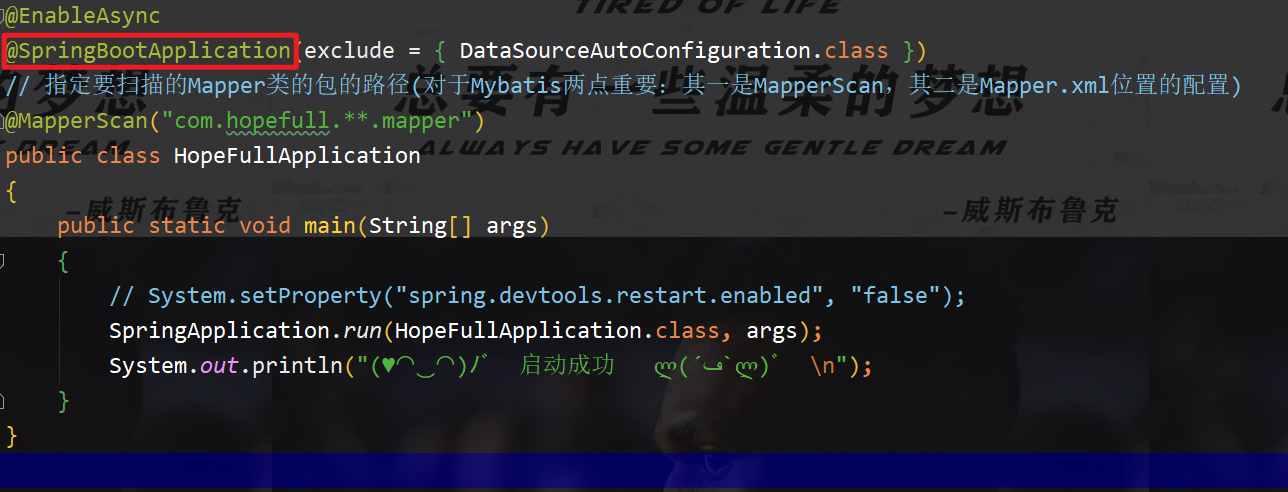
// @SpringBootApplication :标注这这个类是一个SpringBoot的应用   启动类下的所有资源被导入
@SpringBootApplication
public class DemoApplication {

    public static void main(String[] args) {
        // 将Springboot启动
        SpringApplication.run(DemoApplication.class, args);
    }

}
|
1
2
3
4
5
6
7
8
|
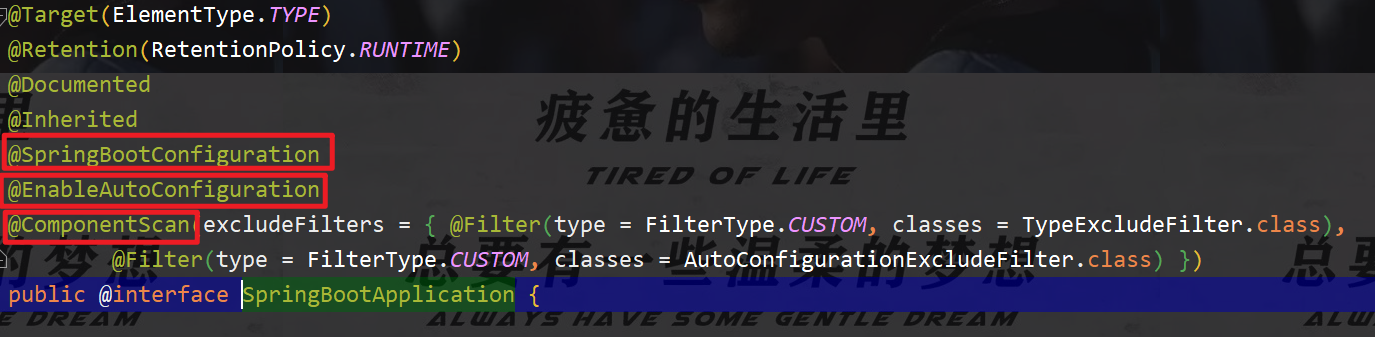
@SpringBootConfiguration 	: springboot的配置
	@Configuration	:spring的配置类
		@Component	:说明这也是一个spring的组件

@EnableAutoConfiguration	:自动配置
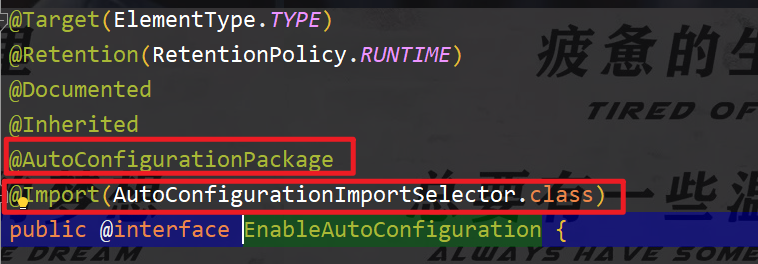
	@AutoConfigurationPackage	:自动配置包
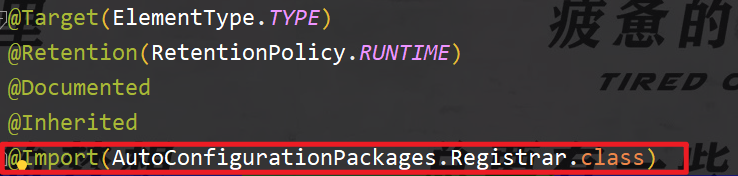
		@Import(AutoConfigurationPackages.Registrar.class)	:自动配置包注册
	@Import(AutoConfigurationImportSelector.class)	:自动配置导入选择
|
@SpringBootApplication 集成了所有注解,当它启动的时候,它所集成的资源都会被导入
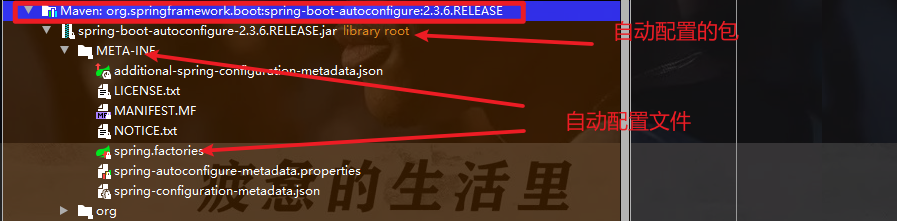
META-INF/spring.factories:自动配置的核心文件

1
2
|
Properties properties = PropertiesLoaderUtils.loadProperties(resource)
//所有资源加载到配置类中!
|
所以,自动配置真正实现是从classpath中搜寻所有的/META-INF/spring.factories配置文件,并将其中对应的org.springframework.boot.autoconfigure.包下的配置项,通过反射实例化为对应标注了@Configuration的JavaConfig形式的IOC容器配置类,然后将这些都汇总成为一个实例并加载到IOC容器中
结论:springboot所有的自动配置都是在启动的时候扫描并加载:`spring.factories`所有的的自动配置类都在这里,但是不
一定生效,要判断条件是否成立,只要导入了对应的start就有对应的启动器了,有了启动器,我们自动装配就会生效,然后
就配置成功!
- 1、springboot在启动的时候,从类路径下
/META-INF/spring.factories获取指定的值
- 2、将这些自动配置的类导入容器,自动配置就会生效,帮我进行自动配置
- 3、以前我们需要自动配置的东西,现在springboot帮我们做了
- 4、整个JavaEE的整体解决方案和自动配置都在springboot-autoconfigure的jar包中
- 5、它将所有的需要导入的组件一圈类名的方式返回,这些组件就会被添加到容器中
- 6、它会给容器中导入非常多的自动配置类(xxxAutoConfiguration),就是给容器中导入这个场景需要的所有组件,并配置好这些组件,即自动装配(Configuration);
- 7、有了自动配置类,免去了我们手动编写配置注入功能组件等工作;
springApplication.run方法分析
分析该方法主要分为两部分,一部分是SpringApplication的实例化,二是run方法的执行
SpringApplication
这个类主要做了一下四件事情
1、推断应用的类型是普通的项目还是web项目
2、查找并加载所有可用初始化器,设置到initializers属性中
3、找出所有的应用程序监听器,设置到listeners属性中
4、推断并设置main方法的定义类,找到运行的主类
配置文件
Springboot使用一个全局的配置文件,配置文件名称是固定的
-
application.properties
-
application.yml
注意:这里的空格是不能少的,少了即失效
yml基础语法
说明:语法要求严格!
1、空格不能省略
2、以缩进来控制层级关系,只要是左边对齐的一列数据都是同一个层级的
3、属性和值的大小写都是十分敏感的
字面量: 普通的值 [ 数字,布尔值,字符串]
字面量直接卸载后面就可以,字符串默认不用加上双引号或者单引号
注意:
- ““双引号,不会转义字符串里面的特殊字符,特殊字符会作为本身想表达的意思;
- 比如:name: “clover \n felix” 输出: clover 换行 felix
- ‘‘单引号,会转义特殊字符,特殊字符最终会变成和普通字符一样输出
- 比如:name:‘clover \n felix’ 输出:clover \n felix
注入配置文件
yaml注入配置文件
1、在springboot项目中的resource目录下新建一个文件application.yml
2、编写一个实体类Dog;
 1
 2
 3
 4
 5
 6
 7
 8
 9
10
|
@Component			//注册bean到容器中
public class Dog {

    @Value("wangcai")
    private String name;
    @Value("3")
    private int age;

	// 有参无参构造、get、set方法、toString()方法
}
|
3、思考我们原来是如何给bean注入属性值的!@Value,给狗狗类测试一下
1
2
3
4
5
6
7
|
@Component //注册bean
public class Dog {
	@Value("阿黄")
	private String name;
	@Value("18")
	private Integer age;
}
|
4、在springboot的测试类下注入狗狗类并输出一下
 1
 2
 3
 4
 5
 6
 7
 8
 9
10
|
@SpringBootTest
class DemoApplicationTests {
	@Autowired //将狗狗自动注入进来
	private Dog dog;

	@Test
	public void contextLoads() {
	System.out.println(dog); //打印看下狗狗对象
	}
}
|
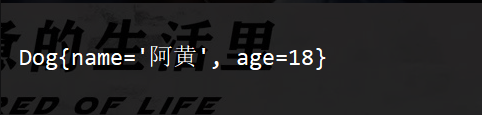
结果成功输出,@Value注入成功,这是我们原来的方法
5、在编写一个复杂一点的实体类:Person类
 1
 2
 3
 4
 5
 6
 7
 8
 9
10
11
|
Component 	//注册bean到容器中
public class Person {
		private String name;
		private Integer age;
		private Boolean happy;
		private Date birth;
		private Map<String,Object> maps;
		private List<Object> lists;
		private Dog dog;
		//有参无参构造、get、set方法、toString()方法
}
|
6、我们来使用yaml配置的方法进行注入,写的时候要注意区别和优势,编写一个yaml配置
 1
 2
 3
 4
 5
 6
 7
 8
 9
10
11
12
|
person:
  name: clover
  age: 3
  happy: false
  birth: 1996/08/24
  maps: {k1: v1,k2: v2}
  lists:
    - code
    - music
  dog:
    name: wangcai
    age: 3
|
7、把刚刚写好的Person对象所有的值,注入到我们的类中
 1
 2
 3
 4
 5
 6
 7
 8
 9
10
11
12
13
14
15
16
17
18
19
20
21
22
23
|
@Component

/*
    @ConfigurationProperties作用:
    将配置文件中配置的每一个属性的值,映射到这个组件中;
    告诉SpringBoot将本类中的所有属性和配置文件中相关的配置进行绑定
    参数 prefix = "person" :将配置文件中的person下面的所有属性一一对应

    只有这个组件是容器中的组件,才能使用容器提供的@ConfigurationProperties功能
*/

@ConfigurationProperties(prefix = "person")
public class Person {

    private String name;
    private int age;
    private boolean happy;
    private Date birth;
    private Map<String,Object> maps;
    private List<Object> lists;
    private Dog dog;

}
|
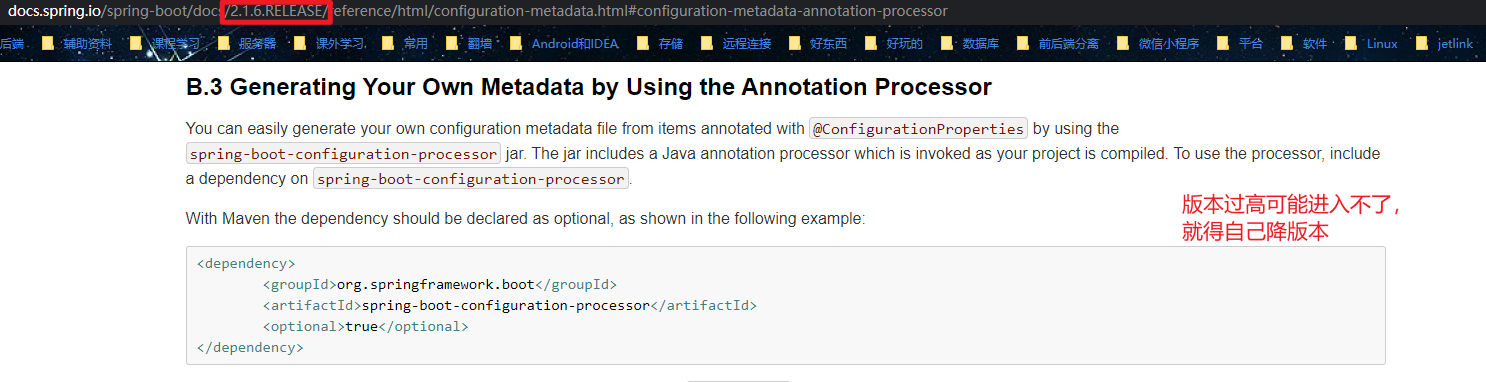
8、IDEA提示,SpringBoot配置注解处理器没有找到,让我们查看文档,我们查看文档,可以找到一个依赖
1
2
3
4
5
6
|
 <!-- 导入配置文件处理器,配置文件进行绑定就会有提示,需要重启 -->
<dependency>
	<groupId>org.springframework.boot</groupId>
	<artifactId>spring-boot-configuration-processor</artifactId>
	<optional>true</optional>
</dependency>
|
9、确认以上配置都OK之后,去测试类中测试一下
 1
 2
 3
 4
 5
 6
 7
 8
 9
10
11
|
@SpringBootTest
class Springboot02ConfigApplicationTests {
    @Autowired
    private Person person;		//将person自动注入进来

    @Test
    void contextLoads() {
        System.out.println(dog);
    }

}
|
结果:所有值全部注入成功
加载指定的配置文件
@PropertySource:加载指定的配置文件
@configurationProperties:默认从全局配置文件中获取值
注意:properties配置文件在写中文的时候,会有乱码 , 我们需要去IDEA中设置编码格式为UTF-8; settings-->FileEncodings 中配置;
对比小结
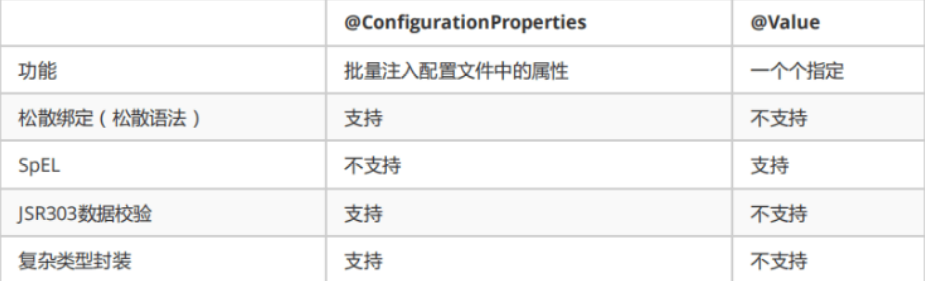
@Value这个使用起来并不友好!我们需要为每个属性单独注解赋值,比较麻烦;看个功能对比图
1、@ConfigurationProperties只需要写一次即可,@Value则需要每个字段都添加
2、松散绑定:这个什么意思呢?比如我写的yml中写的lastname,这个和lastName是一样的,- 后面跟着的字母默认是大写的。这就是松散绑定。可以进行一下测试。
3、JSR303数据校验,这个就是我们可以在字段时增加一层锅炉其验证,可以保证数据的合法性
4、复杂类型封装,yml中可以封装对象,使用value就不支持
结论:
配置yml和配置properties都可以获取到值,推荐使用yml
如果我们在某个业务中,只需要获取配置文件中的某个值,可以使用一下@Value
如果说我们专门编写了一个JavaBean来和配置文件进行一一映射,就直接使用configurationProperties。
自动配置原理
分析自动配置原理
1
2
3
4
|
在配置文件中能配置的东西,都存在一个固有的规律
比如:xxxxAutoConfiguration:都有一个默认值   xxxProperties  和  配置文件进行绑定,我们就可以使用自定义的配置了

xxxProperties中存在一些默认值,也就是xxxxAutoConfiguration的默认值,如果我们想要修改值,就必须让xxxProperties与配置文件绑定,然后就可以通过其中的属性修改默认值
|
以HttpEncodingAutoConfiguration(Http编码自动配置) 为例解释自动配置原理;
 1
 2
 3
 4
 5
 6
 7
 8
 9
10
11
12
13
14
15
16
17
18
19
20
21
22
23
24
25
26
27
28
29
30
31
32
33
34
35
36
37
38
39
40
41
42
43
44
|
//表示这是一个配置类,和以前编写的配置文件一样,也可以给容器中添加组件;
@Configuration

//启动指定类的ConfigurationProperties功能;
		//进入这个HttpProperties查看,将配置文件中对应的值和HttpProperties绑定起来;
		//并把HttpProperties加入到ioc容器中
@EnableConfigurationProperties({HttpProperties.class})

//Spring底层@Conditional注解
		//根据不同的条件判断,如果满足指定的条件,整个配置类里面的配置就会生效;
		//这里的意思就是判断当前应用是否是web应用,如果是,当前配置类生效
@ConditionalOnWebApplication(type = ConditionalOnWebApplication.Type.SERVLET)

//判断当前项目有没有这个类CharacterEncodingFilter;SpringMVC中进行乱码解决的过滤器;
@ConditionalOnClass({CharacterEncodingFilter.class})

//判断配置文件中是否存在某个配置:spring.http.encoding.enabled;
	//如果不存在,判断也是成立的
	//即使我们配置文件中不配置pring.http.encoding.enabled=true,也是默认生效的;
@ConditionalOnProperty(
prefix = "spring.http.encoding",
value = {"enabled"},
matchIfMissing = true
)
public class HttpEncodingAutoConfiguration {
		//他已经和SpringBoot的配置文件映射了
		private final Encoding properties;

		//只有一个有参构造器的情况下,参数的值就会从容器中拿
		public HttpEncodingAutoConfiguration(HttpProperties properties) {
			this.properties = properties.getEncoding();
		}
		//给容器中添加一个组件,这个组件的某些值需要从properties中获取
		@Bean
		@ConditionalOnMissingBean //判断容器没有这个组件?
		public CharacterEncodingFilter characterEncodingFilter() {
		CharacterEncodingFilter filter = new OrderedCharacterEncodingFilter();
		filter.setEncoding(this.properties.getCharset().name());
		filter.setForceRequestEncoding(this.properties.shouldForce(org.springframework.boot.autoconfigure.http.HttpProperties.Encoding.Type.REQUEST));
		filter.setForceResponseEncoding(this.properties.shouldForce(org.springframe work.boot.autoconfigure.http.HttpProperties.Encoding.Type.RESPONSE));
		return filter;
		} //。。。。。。。
}
|
一句话总结:根据当前不同的条件判断,决定这个配置类是否生效!
- 一旦这个配置类生效:这个配置类就会给容器中添加各种组件;
- 这些组件的属性是从对应的properties类中获取的,这些类里面的每一个属性又是和配置文件绑定的;
- 所有在配置文件中能配置的属性都是在xxxProperties类中封装着;
- 配置文件能配置什么就可以参照某个功能对应的这个属性类
1
2
3
4
5
|
//从配置文件中获取指定的值和bean的属性进行绑定
@ConfigurationProperties(prefix = "spring.http")
		public class HttpProperties {
		// .....
}
|
自动配置原理再理解
SpringBoot类启动的时候有一个@SpringBootApplication注解
该注解里面又包含了三个非常重要的注解
@SpringBootConfiguration:点进去以后可以看到里面的底层是Configuration注解,说白了就是支持JavaConfig的方式来进行配置(使用Configuration配置类等同于XML文件)@EnableAutoConfiguration:开启自动配置功能@ComponentScan:这个注解,默认是扫描当前类下的package。将@Controller/@Service/@Component/@Repository等注解加载到IOC容器中
重点EnableAutoConfiguration
我们知道SpringBoot可以帮我们减少很多的配置,也肯定听过“约定大于配置”这么一句话,那SpringBoot是怎么做的呢?其实靠的就是@EnableAutoConfiguration注解。
简单来说,这个注解可以帮助我们自动载入应用程序所需要的所有默认配置。
点进去查看发现有两个比较主要的注解
@AutoConfigurationPackage:自动配置包@Import:给IOC容器导入组件
AutoConfigurationPackage
这个注解称之为自动配置包,点进去查看后发现依赖的还是Import注解
在点进去看,就发现重要的代码
在默认的情况下就是将:主配置类(@SpringBootApplication)所在包及其子包里边的组件扫描到Spring容器中。
- 看完这句话,会不会觉得,这不就是ComponentScan的功能吗?这俩不就重复了吗?
我开始也有这个疑问,直到我看到文档的这句话:
it will be used when scanning for code @Entity classes.
It is generally recommended that you place EnableAutoConfiguration (if you’re
not using @SpringBootApplication) in a root package so that all sub-packages
and classes can be searched.
比如说,你用了Spring Data JPA,可能会在实体类上写@Entity注解。这个@Entity注解由@AutoConfigurationPackage扫描并加载,而我们平时开发用的@Controller/@Service/@Component/@Repository这些注解是由ComponentScan来扫描并加载的。
回到Import
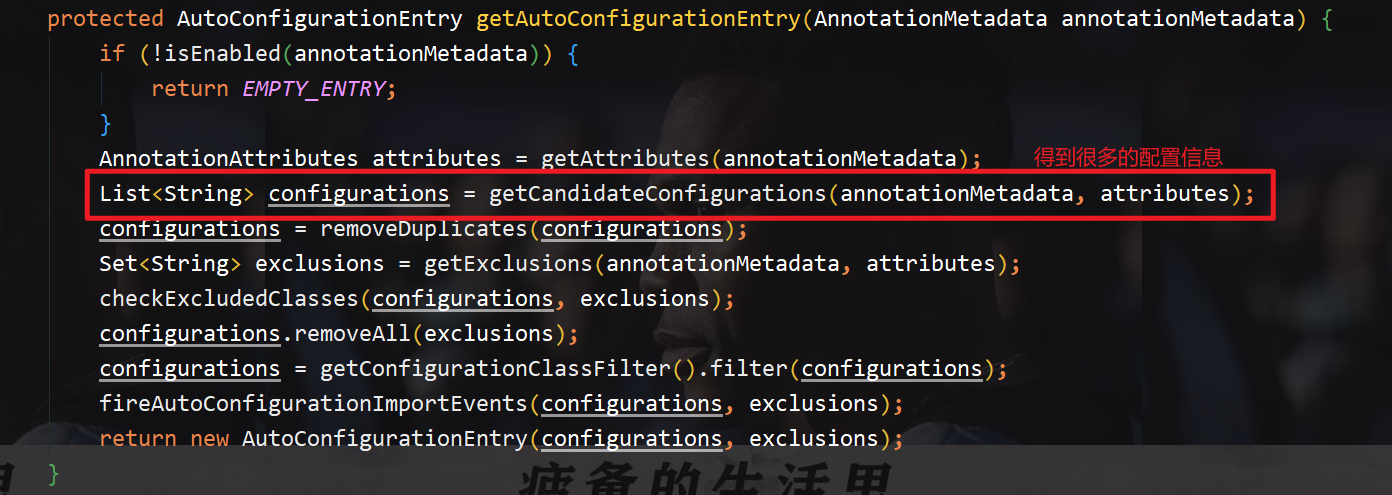
回到@Import(AutoConfigurationImportSelector.class)这句代码上,再点进去AutoConfigurationImportSelector.class看看具体的实现是什么:
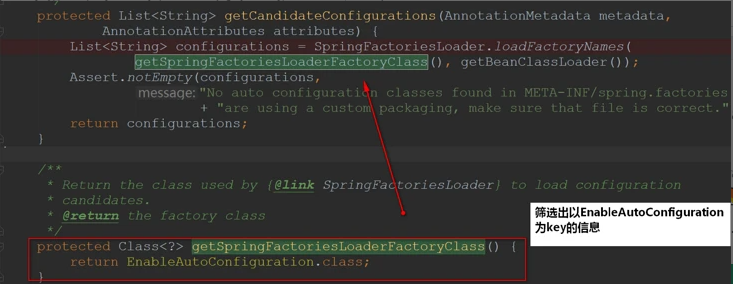
我们再进去看一下这些配置信息是从哪里来的(进去getCandidateConfigurations方法):
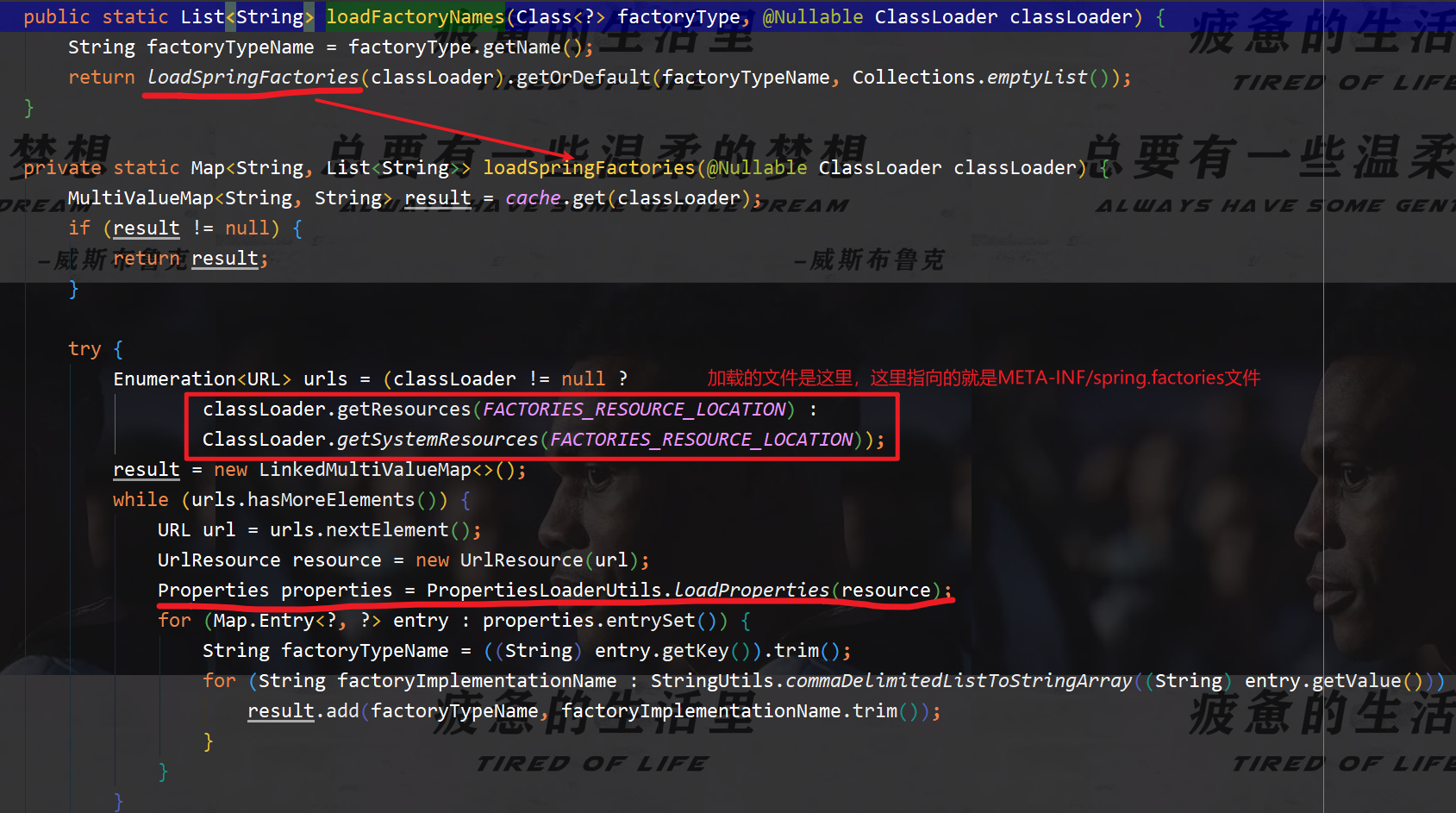
这里包装了一层,我们看到的只是通过SpringFactoriesLoader来加载,还没看到关键信息,继续进去:
梳理思路:
FACTORIES_RESOURCE_LOCATION的值是META-INF/spring.factories- Spring启动的时候会扫描所有jar路径下的
META-INF/spring.factories,将其文件包装成Properties对象
- 从Properties对象获取到key值为
EnableAutoConfiguration的数据,然后添加到容器中去
总结
@SpringBootApplication等同于下面三个注解:
@SpringBootConfiguration@EnableAutoConfiguration@ComponentScan
其中@EnableAutoConfiguration是关键(启用自动配置),内部实际上就去加载META-INF/spring.factories文件的信息,然后筛选出以EnableAutoConfiguration为key的数据,加载到IOC容器中,实现自动配置功能!
通过获取到的key值为EnableAutoConfiguration的数据,就会自动去加载META-INF/spring.factories文件的信息,然后通过xxxxAutoConfiguration中的条件来判断当前这个配置类是否生效,如果生效就会往容器中添加组件
- 这些组件中属性的值是从对应的Properties类中所获取的,这些属性又是和配置文件进行绑定的
- 所以我们需要配置什么就可以参照properties来配置,你也可以去手动的修改其默认值
静态资源映射规则
SpringBoot中,SpringMVC的web配置都在WebMvcAutoconfiguration这个配置类里面
WebMvcAutoconfiguration中有很多配置的方法
有一个方法addResourceHandlers添加资源处理
 1
 2
 3
 4
 5
 6
 7
 8
 9
10
11
12
13
14
15
16
17
18
19
20
21
22
23
24
|
@Override
		public void addResourceHandlers(ResourceHandlerRegistry registry) {
			if (!this.resourceProperties.isAddMappings()) {
				// 已禁用默认资源处理
				logger.debug("Default resource handling disabled");
				return;
			}
			// 缓存控制
			Duration cachePeriod = this.resourceProperties.getCache().getPeriod();
			CacheControl cacheControl = this.resourceProperties.getCache().getCachecontrol().toHttpCacheControl();
			// webjars 配置
			if (!registry.hasMappingForPattern("/webjars/**")) {
				customizeResourceHandlerRegistration(registry.addResourceHandler("/webjars/**")
						.addResourceLocations("classpath:/META-INF/resources/webjars/")
						.setCachePeriod(getSeconds(cachePeriod)).setCacheControl(cacheControl));
			}
			// 静态资源配置
			String staticPathPattern = this.mvcProperties.getStaticPathPattern();
			if (!registry.hasMappingForPattern(staticPathPattern)) {
				customizeResourceHandlerRegistration(registry.addResourceHandler(staticPathPattern)
						.addResourceLocations(getResourceLocations(this.resourceProperties.getStaticLocations()))
						.setCachePeriod(getSeconds(cachePeriod)).setCacheControl(cacheControl));
			}
		}
|
读源码:
- 比如/webjars/** ,都需要去classpath:/META-INF/resources/webjars/找对应的资源;
那什么是webjars呢?
Webjars本质就是以jar包的方式引入我们的静态资源 , 我们以前要导入一个静态资源文件,直接导入即可
使用SpringBoot需要使用Webjars,我们可以去搜索一下:
网站:https://www.webjars.org 【网站带看,并引入jQuery测试】
要使用jQuery,我们只要要引入jQuery对应版本的pom依赖即可!
1
2
3
4
5
|
<dependency>
	<groupId>org.webjars</groupId>
	<artifactId>jquery</artifactId>
	<version>3.4.1</version>
</dependency>
|
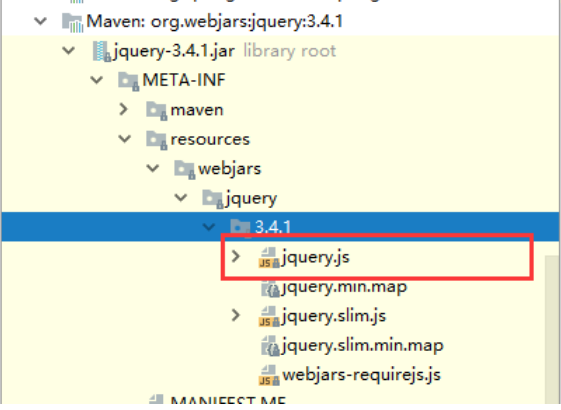
查看webjars目录结构,并访问jQuery.js文件
访问:只要是静态资源,SpringBoot就会去对应的路径寻找资源
第二种静态资源映射规则
那我们项目中要是使用自己的静态资源该怎么导入呢?我们看下一行代码;
我们去找staticPathPattern发现第二种映射规则 : /** , 访问当前的项目任意资源,它会去找 resourceProperties 这个类,我们可以点进去看一下分析:.
 1
 2
 3
 4
 5
 6
 7
 8
 9
10
11
12
13
|
// 进入方法
public String[] getStaticLocations() {
	return this.staticLocations;
}
// 找到对应的值
private String[] staticLocations = CLASSPATH_RESOURCE_LOCATIONS;
// 找到路径
private static final String[] CLASSPATH_RESOURCE_LOCATIONS = {
		"classpath:/META-INF/resources/",
		"classpath:/resources/",
		"classpath:/static/",
		"classpath:/public/"
};
|
ResourceProperties 可以设置和我们静态资源有关的参数;这里面指向了它会去寻找资源的文件夹,即 上面数组的内容。
所以有四个目录存放的静态资源可以被我们识别
1
2
3
4
|
"classpath:/META-INF/resources/",
"classpath:/resources/",
"classpath:/static/",
"classpath:/public/"
|
总结:
- 1、在SpringBoot,可以使用一下方式处理静态资源
- webjars
localhost:8080/webjars/
- public,static,resources
localhost:8080/
- 2、优先级:resources>static(默认)>public
- 3、只要自定义了目录,默认路径就会失效,再次访问原来默认对应的路径就会报错
/* 与 /** 的区别:
- /* :会匹配所有的url(
只匹配当前文件夹下文件,不匹配子文件夹下文件),包括*.jsp页面
- /** :会匹配所有的url(
匹配当前文件夹下文件和子文件夹下文件);路径型的和后缀型的url(包括/login,.jsp,.js,*.html等)
模板引擎
思想:
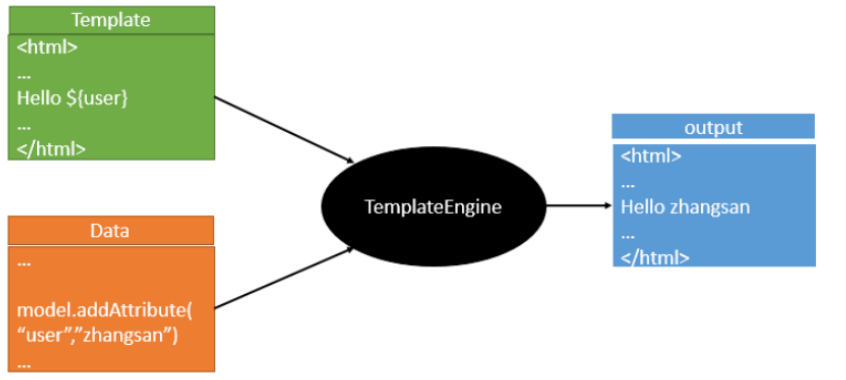
模板引擎的作用就是我们来写一个页面模板,比如有些值呢,是动态的,我们写一些表达式。而这些 值,从哪来呢,就是我们在后台封装一些数据。然后把这个模板和这个数据交给我们模板引擎,模板引 擎按照我们这个数据帮你把这表达式解析、填充到我们指定的位置,然后把这个数据最终生成一个我们 想要的内容给我们写出去,这就是我们这个模板引擎,不管是jsp还是其他模板引擎,都是这个思想。只 不过呢,就是说不同模板引擎之间,他们可能这个语法有点不一样。其他的我就不介绍了,我主要来介 绍一下SpringBoot给我们推荐的Thymeleaf模板引擎,这模板引擎呢,是一个高级语言的模板引擎,他 的这个语法更简单。而且呢,功能更强大。
引入Thymeleaf
Thymeleaf 官网:
Thymeleaf 在Github 的主页:
Spring官方文档: 找到我们对应的版本
找到对应的pom依赖:
1
2
3
4
5
|
<!--thymeleaf-->
<dependency>
	<groupId>org.springframework.boot</groupId>
	<artifactId>spring-boot-starter-thymeleaf</artifactId>
</dependency>
|
Maven会自动下载jar包,我们可以去看看下载的东西
Thymeleaf分析
前面呢,我们已经引入了Thymeleaf,那这个要怎么使用呢?
我们首先得按照SpringBoot的自动配置原理看一下我们这个Thymeleaf的自动配置规则,在按照那个规 则,我们进行使用。
我们去找一下Thymeleaf的自动配置类:ThymeleafProperties
 1
 2
 3
 4
 5
 6
 7
 8
 9
10
11
12
13
14
|
@ConfigurationProperties(
		prefix = "spring.thymeleaf"
)
public class ThymeleafProperties {
		private static final Charset DEFAULT_ENCODING;
		public static final String DEFAULT_PREFIX = "classpath:/templates/";
		public static final String DEFAULT_SUFFIX = ".html";
		private boolean checkTemplate = true;
		private boolean checkTemplateLocation = true;
		private String prefix = "classpath:/templates/";
		private String suffix = ".html";
		private String mode = "HTML";
		private Charset encoding;
}
|
我们可以在其中看到默认的前缀和后缀!
我们只需要把我们的html页面放在类路径下的templates下,thymeleaf就可以帮我们自动渲染了。
使用thymeleaf什么都不需要配置,只需要将他放在指定的文件夹下即可!
MVC自动配置原理
官网阅读
官方文档
 1
 2
 3
 4
 5
 6
 7
 8
 9
10
11
12
13
14
15
16
17
18
19
20
21
22
23
24
25
26
27
28
29
30
31
32
33
34
35
36
37
38
39
40
41
42
43
44
45
46
47
|
Spring MVC Auto-configuration
// Spring Boot为Spring MVC提供了自动配置,它可以很好地与大多数应用程序一起工作。
Spring Boot provides auto-configuration for Spring MVC that works well with most applications.

// 自动配置在Spring默认设置的基础上添加了以下功能:
The auto-configuration adds the following features on top of Spring's defaults:

// 包含视图解析器
Inclusion of ContentNegotiatingViewResolver and BeanNameViewResolver beans.

// 支持静态资源文件夹的路径,以及webjars
Support for serving static resources, including support for WebJars

// 自动注册了Converter:
// 转换器,这就是我们网页提交数据到后台自动封装成为对象的东西,比如把"1"字符串自动转换为 int类型
// Formatter:【格式化器,比如页面给我们了一个2019-8-10,它会给我们自动格式化为Date对象】
Automatic registration of Converter, GenericConverter, and Formatter beans.

// HttpMessageConverters
// SpringMVC用来转换Http请求和响应的的,比如我们要把一个User对象转换为JSON字符串,可以去看官网文档解释;
Support for HttpMessageConverters (covered later in this document).

// 定义错误代码生成规则的
Automatic registration of MessageCodesResolver (covered later in this document).

// 首页定制
Static index.html support.

// 图标定制
Custom Favicon support (covered later in this document).

// 初始化数据绑定器:帮我们把请求数据绑定到JavaBean中!
Automatic use of a ConfigurableWebBindingInitializer bean (covered later in this document).

/*
如果您希望保留Spring Boot MVC功能,并且希望添加其他MVC配置(拦截器、格式化程序、视图控制器和其他功能),
则可以添加自己的@configuration类,类型为webmvcconfiguer,但不添加@EnableWebMvc。如果希望提供
RequestMappingHandlerMapping、RequestMappingHandlerAdapter或
ExceptionHandlerExceptionResolver的自定义实例,则可以声明WebMVCregistrationAdapter实例来提供此类组件。
*/
If you want to keep Spring Boot MVC features and you want to add additional MVC configuration
(interceptors, formatters, view controllers, and other features), you can add your own@Configuration class
of type WebMvcConfigurer but without @EnableWebMvc.If you wish to provide custom instances of
RequestMappingHandlerMapping,RequestMappingHandlerAdapter, orExceptionHandlerExceptionResolver,
you can declare a WebMvcRegistrationsAdapter instance to provide such components.
// 如果您想完全控制Spring MVC,可以添加自己的@Configuration,并用@EnableWebMvc进行注释。
If you want to take complete control of Spring MVC, you can add your own @Configuration annotated with @EnableWebMvc.
|
ContentNegotiatingViewResolver 内容协商视图解析器
自动配置了ViewResolver,就是我们之前学习SpringMVC的视图解析器;
即根据方法的返回值取得视图对象(View),然后由视图对象决定如何渲染(转发,重定向)
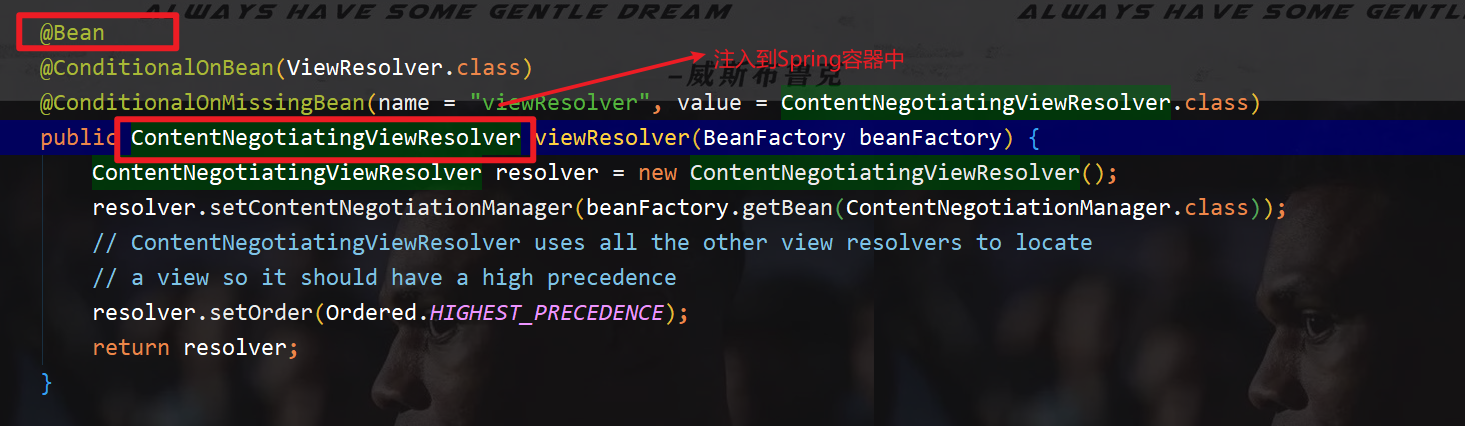
先查看一下源码:找到WebMvcAutoConfiguration,然后搜索ContentNegotiatingViewResolver。找到如下方法!
 1
 2
 3
 4
 5
 6
 7
 8
 9
10
11
12
13
14
|
@Bean
@ConditionalOnBean(ViewResolver.class)
@ConditionalOnMissingBean(name = "viewResolver", value =
ContentNegotiatingViewResolver.class)
public ContentNegotiatingViewResolver viewResolver(BeanFactory beanFactory)
{
	ContentNegotiatingViewResolver resolver = new ContentNegotiatingViewResolver();

	resolver.setContentNegotiationManager(beanFactory.getBean(ContentNegotiationManager.class));

	// ContentNegotiatingViewResolver使用所有其他视图解析器来定位视图,因此它应该具有较高的优先级
	resolver.setOrder(Ordered.HIGHEST_PRECEDENCE);
	return resolver;
}
|
可以点击这个类(ContentNegotiatingViewResolver)看看,找到对应的解析视图的代码
 1
 2
 3
 4
 5
 6
 7
 8
 9
10
11
12
13
14
15
16
17
|
@Nullable // 注解说明:@Nullable 即参数可为null
public View resolveViewName(String viewName, Locale locale) throws Exception
{
		RequestAttributes attrs = RequestContextHolder.getRequestAttributes();
		Assert.state(attrs instanceof ServletRequestAttributes, "No currentServletRequestAttributes");
		List<MediaType> requestedMediaTypes = this.getMediaTypes(((ServletRequestAttributes)attrs).getRequest());
		if (requestedMediaTypes != null) {
			// 获取候选的视图对象
			List<View> candidateViews = this.getCandidateViews(viewName, locale,requestedMediaTypes);
			// 选择一个最适合的视图对象,然后把这个对象返回
			View bestView = this.getBestView(candidateViews, requestedMediaTypes, attrs);
			if (bestView != null) {
					return bestView;
			}
		}
		// .....
}
|
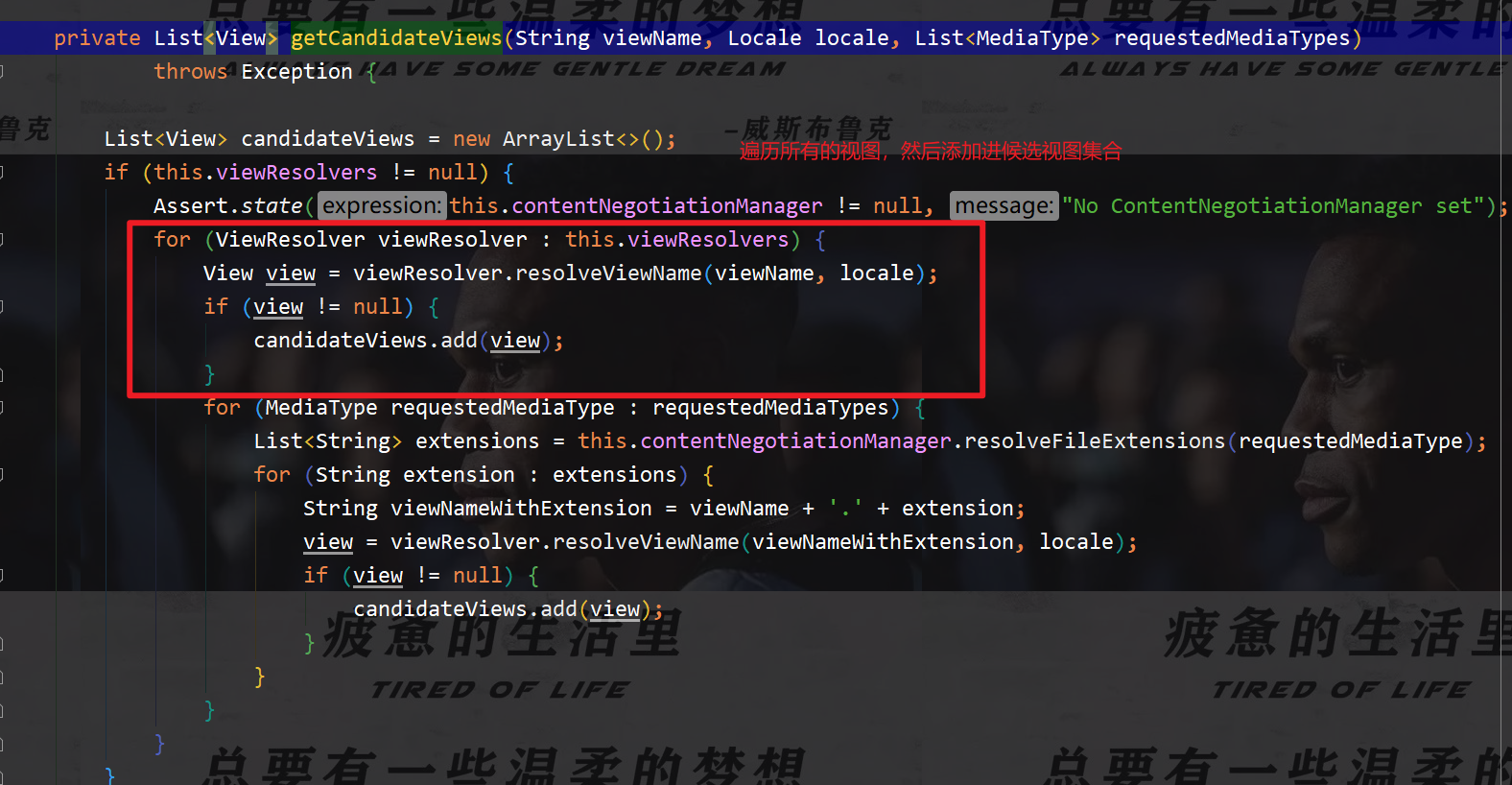
继续点击查看,是如何获取视图的呢?
getCandidateViews中看到他是把所有的视图解析器拿来,进行while循环,挨个解析!
1
|
Iterator var5 = this.viewResolvers.iterator();
|
所以得出结论:ContentNegotiatingViewResolver 这个视图解析器就是用来组合所有的视图解析器的
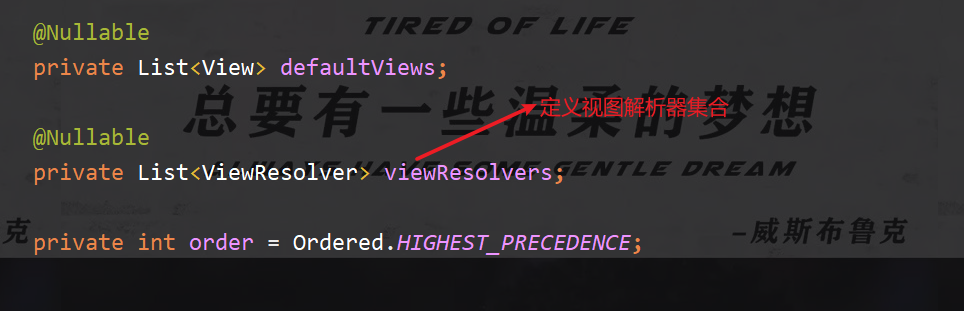
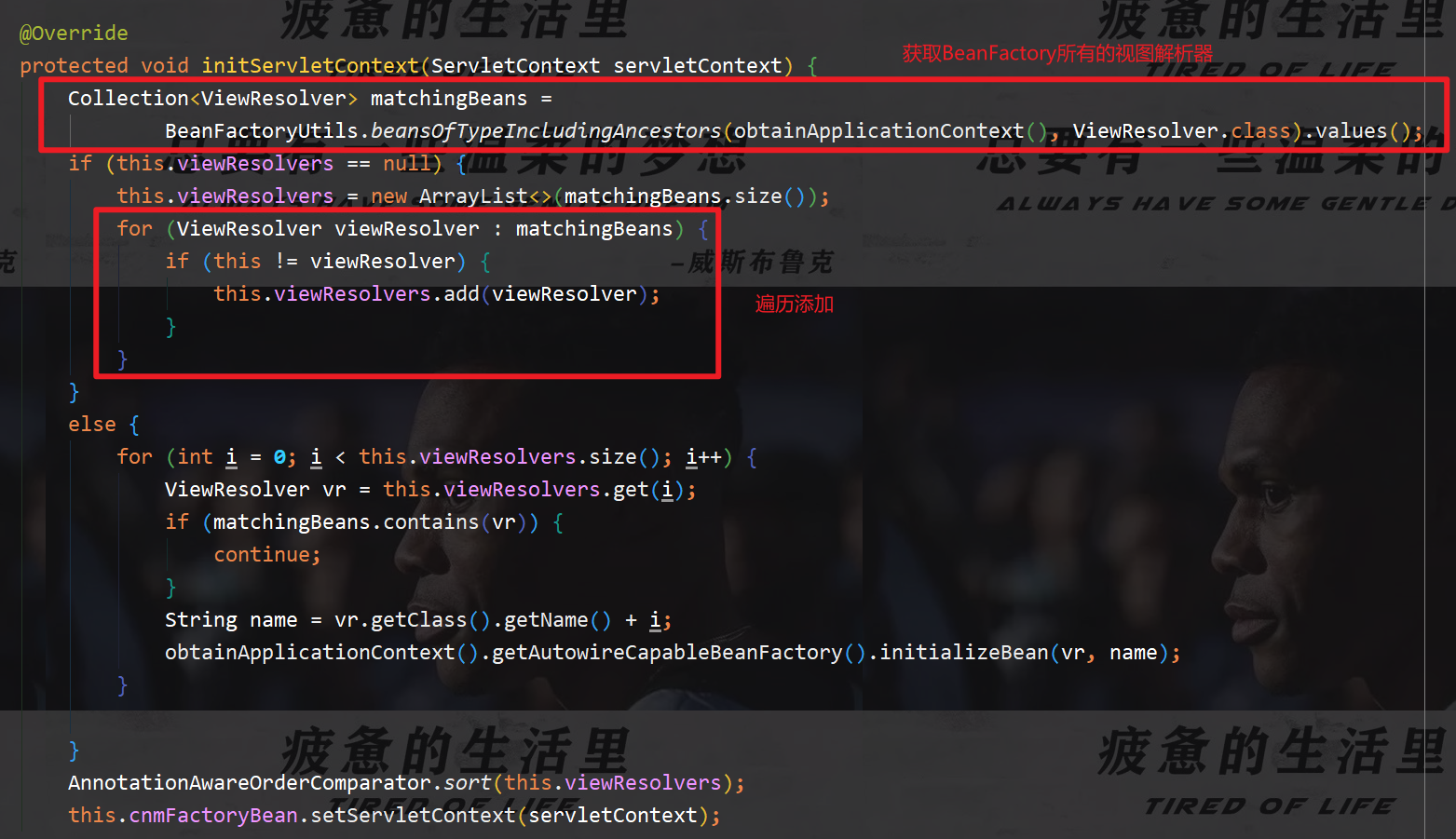
再去研究下他的组合逻辑,看到有个属性viewResolvers,看看它是在哪里进行赋值的!
 1
 2
 3
 4
 5
 6
 7
 8
 9
10
11
|
protected void initServletContext(ServletContext servletContext) {
	// 这里它是从beanFactory工具中获取容器中的所有视图解析器
	// ViewRescolver.class 把所有的视图解析器来组合的
	Collection<ViewResolver> matchingBeans = BeanFactoryUtils.beansOfTypeIncludingAncestors(this.obtainApplicationContext(), ViewResolver.class).values();

	ViewResolver viewResolver;
	if (this.viewResolvers == null) {
			this.viewResolvers = new ArrayList(matchingBeans.size());
	}
	// ...............
}
|
既然它是在容器中去找视图解析器,我们是否可以猜想,我们就可以去实现一个视图解析器了呢? 我们可以自己给容器中去添加一个视图解析器;这个类就会帮我们自动的将它组合进来;我们去实现一 下
1、在主程序中新建一个config的package,在里面写一个自己的解析器
 1
 2
 3
 4
 5
 6
 7
 8
 9
10
11
12
13
14
15
16
17
18
19
20
21
22
23
24
25
26
27
28
29
30
|
package com.clover.config;

import org.springframework.context.annotation.Bean;
import org.springframework.context.annotation.Configuration;
import org.springframework.web.servlet.View;
import org.springframework.web.servlet.ViewResolver;
import org.springframework.web.servlet.config.annotation.WebMvcConfigurer;

import java.util.Locale;

// 扩展SpringMVC
@Configuration
public class MyMvcConfig implements WebMvcConfigurer {

    // ViewResolver 实现了视图解析器接口的类,我们就可以把它看作视图解析器

    @Bean   // 放入到Bean中
    public ViewResolver getViewResolver(){
        return new MyViewResolver();
    }

    // 自定义了一个自己的视图解析器 MyViewResolver
    public static class MyViewResolver implements ViewResolver{

        @Override
        public View resolveViewName(String viewName, Locale locale) throws Exception {
            return null;
        }
    }
}
|
2、查看我们的自己写的解析视图器是否起作用
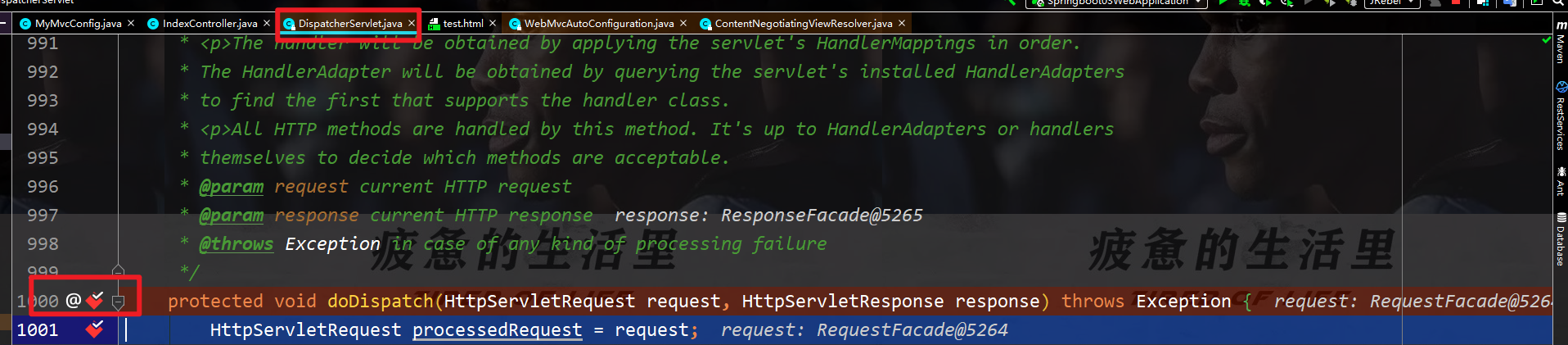
给DispatchServlet中的doDispatch方法加个断点进行调试一下,因为所有请求都会走到这个方法中
3、启动项目,查看Debug消息
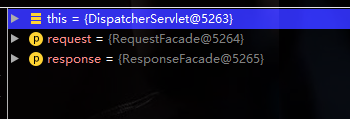
找到this
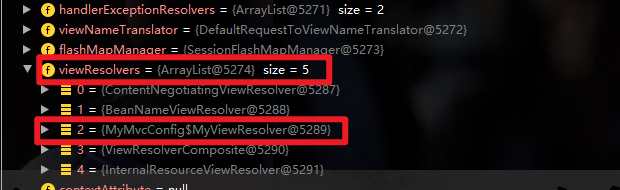
找到视图解析器,寻找我们自定义的视图解析器
结论:
如果,你想diy一些定制化的功能,只需要写个组件,然后将它交给SpringBoot,SpringBoot就会帮我们自动装配
测试确实也跳转过来了!所以说,我们要扩展SpringMVC,官方就推荐我们这么去使用,既保留SpringBoot 所有的自动配置,也能用我们扩展的配置!
分析原理:
1、WebMvcAutoConfiguration 是 SpringMVC的自动配置类,里面有一个类 WebMvcAutoConfigurationAdapter
2、这个类上有一个注解,在做其它自动配置是会导入@Import(EnableWebMvcConfiguration.class)
3、点进EnableWebMvcConfiguration这个类看一下,它继承了一个父类:DelegatingWebMvcConfiguration
有如下代码
 1
 2
 3
 4
 5
 6
 7
 8
 9
10
11
|
public class DelegatingWebMvcConfiguration extends
WebMvcConfigurationSupport {
	private final WebMvcConfigurerComposite configurers = newWebMvcConfigurerComposite();
	// 从容器中获取所有的webmvcConfigurer
	@Autowired(required = false)
	public void setConfigurers(List<WebMvcConfigurer> configurers) {
		if (!CollectionUtils.isEmpty(configurers)) {
			this.configurers.addWebMvcConfigurers(configurers);
		}
	}
}
|
4、可以在这个类中去寻找一个我们刚才设置的viewController当做参考,发现它调用了一个
1
2
3
|
protected void addViewControllers(ViewControllerRegistry registry) {
	this.configurers.addViewControllers(registry);
}
|
5、点进去查看
1
2
3
4
5
6
7
8
|
public void addViewControllers(ViewControllerRegistry registry) {
	Iterator var2 = this.delegates.iterator();
	while(var2.hasNext()) {
		// 将所有的WebMvcConfigurer相关配置来一起调用!包括我们自己配置的和Spring给我们配置的
		WebMvcConfigurer delegate = (WebMvcConfigurer)var2.next();
		delegate.addViewControllers(registry);
	}
}
|
结论:
所有的WebMvcConfiguration都会被调用,不止Spring自己的配置类,我们自己的类当然也会被调用
全面接管SpringMVC
当然,我们开发中不推荐使用全面接管SpringMVC
思考问题?为什么加了一个注解,自动配置就失效了!查看源码
1、发现这个注解导入了一个类,点进去查看
1
2
3
|
@Import({DelegatingWebMvcConfiguration.class})
public @interface EnableWebMvc {
}
|
2、它继承了一个父类WebMvcConfigurationSupport
1
2
3
4
|
public class DelegatingWebMvcConfiguration extends WebMvcConfigurationSupport
{
	// ......
}
|
3、查看WebMvc自动配置类
 1
 2
 3
 4
 5
 6
 7
 8
 9
10
11
|
@Configuration(proxyBeanMethods = false)
@ConditionalOnWebApplication(type = Type.SERVLET)
@ConditionalOnClass({ Servlet.class, DispatcherServlet.class,WebMvcConfigurer.class })

// 这个注解的意思就是:容器中没有这个组件的时候,这个自动配置类才生效
@ConditionalOnMissingBean(WebMvcConfigurationSupport.class)
@AutoConfigureOrder(Ordered.HIGHEST_PRECEDENCE + 10)
@AutoConfigureAfter({ DispatcherServletAutoConfiguration.class,
TaskExecutionAutoConfiguration.class,ValidationAutoConfiguration.class })
public class WebMvcAutoConfiguration {
}
|
总结一句话:@EnableWebMvc将WebMvcConfigurationSupport组件导入进来了;
而导入的WebMvcConfigurationSupport只是SpringMVC最基本的功能!
在SpringBoot中会有非常多的扩展配置,只要看见了这个,我们就应该多留心注意
test