1. setState
setState更新状态的2种写法
1.对象式setState: setState是一个由我们自己去调用的同步方法,但是调用完setState后,需要react帮我们根据参数去修改状态,并且重新渲染页面,这个是异步的,也就是react不会在调用setState后立马去改变状态和重新渲染。但是setState第二个参数————函数,是在react在调用setState后更新完组件并且重新渲染页面后被调用的,如果需要一更新完状态就查看状态的需求,就可以在这个函数中写输出语句
setState(stateChange, [callback])——对象式的setState
- stateChange为状态改变对象(该对象可以体现出状态的更改)
- callback是可选的回调函数, 它在状态更新完毕、界面也更新后(render调用后)才被调用
2.函数式setState:
setState(updater, [callback])——函数式的setState
1.updater为返回stateChange对象的函数。
2.updater可以接收到state和props。
4.callback是可选的回调函数, 它在状态更新、界面也更新后(render调用后)才被调用。
总结:
区别:函数式setState可以获取到此次更新前的state以及props
- 而对象式setState就需要自己this.state去获取state
1.对象式的setState是函数式的setState的简写方式(语法糖)
2.使用原则:
(1).如果新状态不依赖于原状态 ===> 使用对象方式

(2).如果新状态依赖于原状态 ===> 使用函数方式

(3).如果需要在setState()执行后获取最新的状态数据,
要在第二个callback函数中读取
App.js
 1
 2
 3
 4
 5
 6
 7
 8
 9
10
11
12
13
|
import React, { Component } from 'react'
import StateTest from './components/1_setState'

export default class App extends Component {
    render() {
        return (
            <div>
                {/* addend:给StateTest组件传递加数 */}
                <StateTest addend={1}/>
            </div>
        )
    }
}
|
1_setState.js
 1
 2
 3
 4
 5
 6
 7
 8
 9
10
11
12
13
14
15
16
17
18
19
20
21
22
23
24
25
26
27
28
29
30
31
32
33
34
35
36
37
38
39
|
import React, { Component } from 'react'

export default class StateTest extends Component {
    state = {count:0}

    getSum = () => {
        /**
         * 对象式setState:
         *      参数一:更新状态对象
         *      参数二:函数,该函数会在人为调用setState函数后,react接收到信号,去根据参数修改状态并重新渲染组件后被调用
         * 所以在该函数中输出的状态,为更新后的状态。由于react根据参数去修改状态并重新渲染页面是异步的,所以在setState下面输出的状态为还未更新成功的状态
         */
        // this.setState(
        //     {count:this.state.count+1},
        //     () => {console.log(this.state.count);} //初次输出1
        // )
        // console.log(this.state.count); //初次输出0


        /**
         * 函数式setState
         *      参数一:返回更新状态对象的函数,该函数可以接收到更新前的state以及可以接收到props
         *      参数二:函数(与对象式setState一样),该函数会在人为调用setState函数后,react接收到信号,去根据参数修改状态并重新渲染组件后被调用
         */
        this.setState(
            (state,props) => ({count:state.count+props.addend}),
            () => {console.log(this.state.count);} //初次输出1
        )
        console.log(this.state.count); //初次输出0
    }
    render() {
        return (
            <div>
                <h2>当前求和为:{this.state.count}</h2>
                <button onClick={this.getSum}>+1</button>
            </div>
        )
    }
}
|
2. lazyLoad
-
import About from ‘./About’
import Home from ‘./Home’
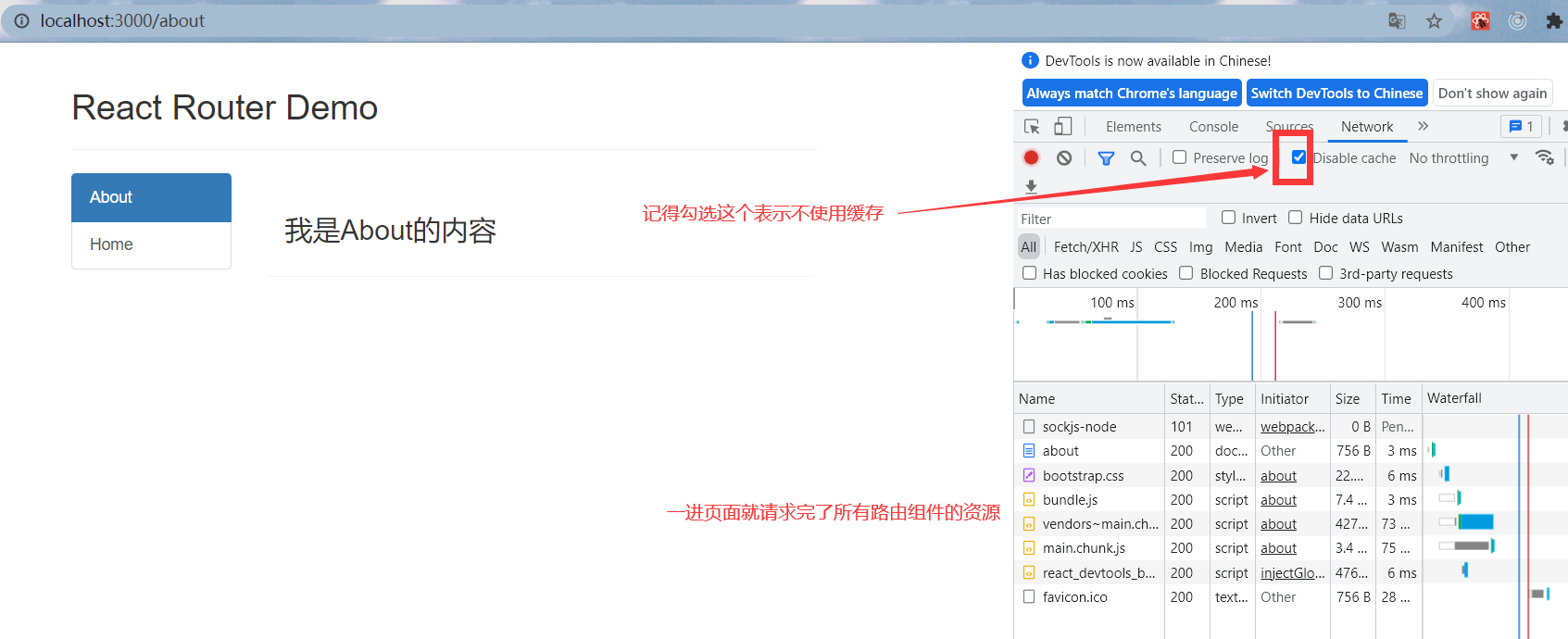
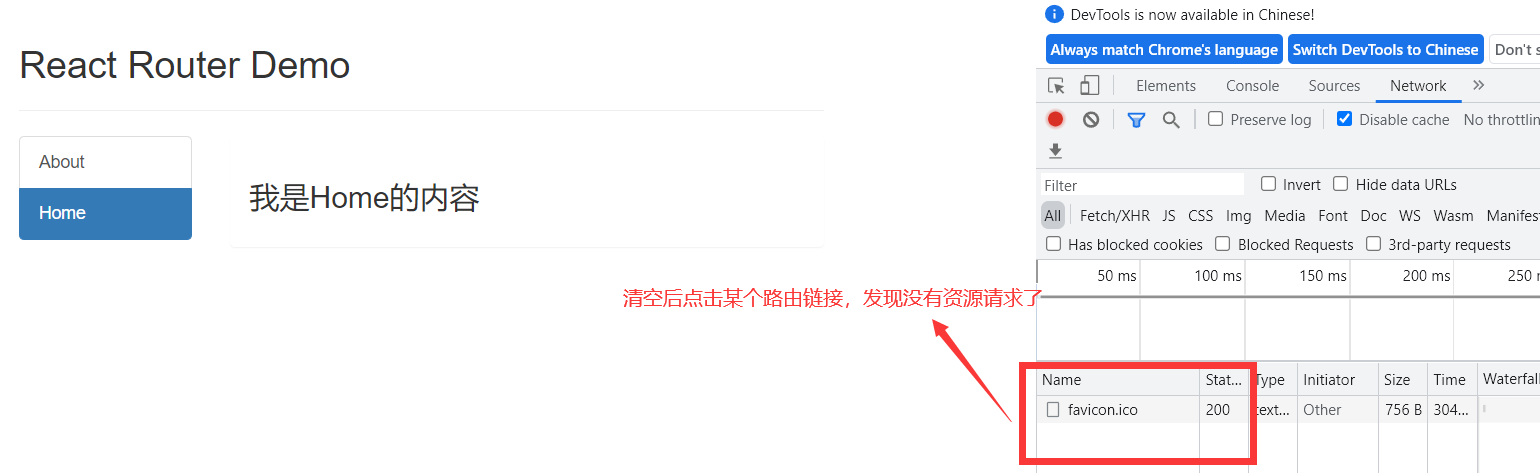
这样引入的路由组件都是直接加载组件,一访问网页,就会加载出所有的路由组件,当你再去点击某个路由组件时,这时已经没有资源请求了,因为在一进页面已经请求完了所有路由组件的资源

-
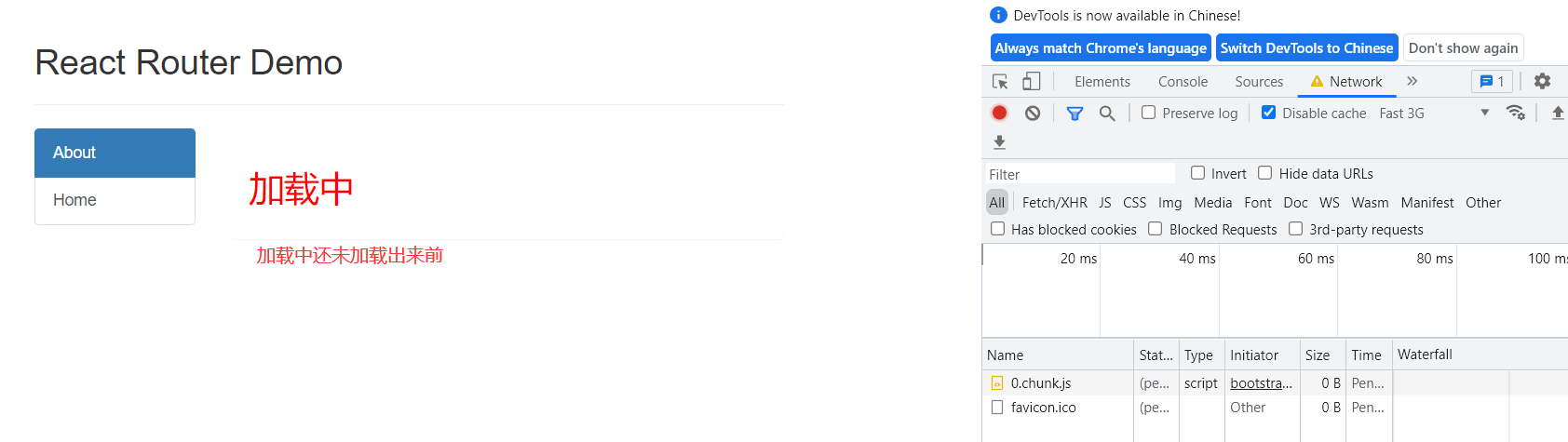
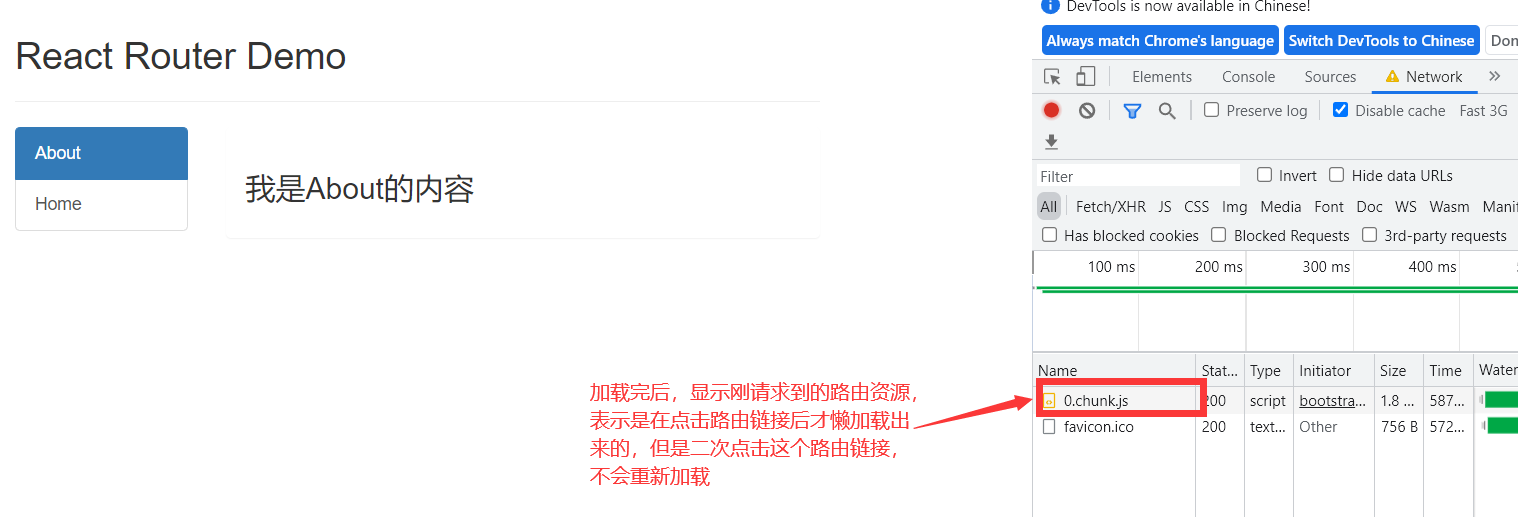
用懒加载引入的路由组件,是当点击某个路由组件跳转时,才去请求这个路由组件对应的资源
1.通过React的lazy函数配合import()函数动态加载路由组件 ===> 路由组件代码会被分开打包
2.通过指定在加载得到路由打包文件前显示一个自定义loading界面
About.js
1
2
3
4
5
6
7
8
9
|
import React, { Component } from 'react'

export default class About extends Component {
    render() {
        return (
            <h3>我是About的内容</h3>
        )
    }
}
|
Home.js
1
2
3
4
5
6
7
8
9
|
import React, { Component } from 'react'

export default class Home extends Component {
    render() {
        return (
            <h3>我是Home的内容</h3>
        )
    }
}
|
Loading.js (在加载得到路由打包文件前显示一个自定义loading界面)
 1
 2
 3
 4
 5
 6
 7
 8
 9
10
11
|
import React, { Component } from 'react'

export default class Loading extends Component {
    render() {
        return (
            <div>
                <h2 style={{color: "red"}}>加载中</h2>
            </div>
        )
    }
}
|
LazyLoadTest.js
 1
 2
 3
 4
 5
 6
 7
 8
 9
10
11
12
13
14
15
16
17
18
19
20
21
22
23
24
25
26
27
28
29
30
31
32
33
34
35
36
37
38
39
40
41
42
43
44
45
|
import React, { Component, lazy, Suspense} from 'react'
import {NavLink, Route} from 'react-router-dom'
// 引入懒加载暂时没加载出来时显示的组件
import Loading from './Loading'
// 这样引入的路由组件都是直接加载组件,一访问网页,就会加载出所有的路由组件,当你再去点击某个路由组件时,这时已经没有资源请求了,因为在一进页面已经请求完了所有路由组件的资源
// import About from './About'
// import Home from './Home'

//懒加载引入路由组件
//切记:这里lazy的函数参数体中的{}必须去掉:import('./Home'),不然会报错。如果加了{}就必须return:{return import('./Home')}
const Home = lazy(()=> {return import('./Home')} )
const About = lazy(()=> import('./About') )

export default class LazyLoadTest extends Component {
    render() {
        return (
            <div>
                <div className="row">
                    <div className="col-xs-offset-2 col-xs-8">
                        <div className="page-header"><h2>React Router Demo</h2></div>
                    </div>
                </div>
                <div className="row">
                    <div className="col-xs-2 col-xs-offset-2">
                        <div className="list-group">
                            <NavLink className="list-group-item" to="/about">About</NavLink>
                            <NavLink className="list-group-item" to="/home">Home</NavLink>
                        </div>
                    </div>
                    <div className="col-xs-6">
                        <div className="panel">
                            <div className="panel-body">
                                {/* Suspense中的fallback是为了防止网速过慢,导致懒加载时一下子加载不出来,fallback的属性值是当网速过慢时,懒加载没加载出来之前显示的页面,可以直接写一个VDOM,也可以定义一个组件,但是注意这个组件不能也为懒加载 */}
                                <Suspense fallback={<Loading/>}>
                                    <Route path='/about' component={About}/>
                                    <Route path='/home' component={Home}/>
                                </Suspense>
                            </div>
                        </div>
                    </div>
                </div>
            </div>
        )
    }
}
|
3. Hooks
1. React Hook/Hooks是什么?
1
2
|
(1). Hook是React 16.8.0版本增加的新特性/新语法
(2). 可以让你在函数组件中使用 state 以及其他的 React 特性
|
2. 三个常用的Hook
1
2
3
|
(1). State Hook: React.useState()
(2). Effect Hook: React.useEffect()
(3). Ref Hook: React.useRef()
|
3. State Hook
数组也可以结构赋值:
arr[1,2,3,4]
const[a,b]=arr
a就为1,b就为2
1
2
3
4
5
6
7
8
|
(1). State Hook让函数组件也可以有state状态, 并进行状态数据的读写操作
(2). 语法: const [xxx, setXxx] = React.useState(initValue)
(3). useState()说明:
        参数: 第一次初始化指定的值在内部作缓存(函数式组件中的函数一进页面自动调用一次,之后每修改一次状态,就会重新调用一次,虽然会重新调用const [xxx, setXxx] = React.useState(initValue)这句代码,但是不会让initValue覆盖掉当前state的值,也就是底层只会初始化一次state)
        返回值: 包含2个元素的数组, 第1个为内部当前状态值, 第2个为更新状态值的函数
(4). setXxx()2种写法:
        setXxx(newValue): 参数为非函数值, 直接指定新的状态值, 内部用其覆盖原来的状态值
        setXxx(value => newValue): 参数为函数, 接收原本的状态值, 返回新的状态值, 内部用其覆盖原来的状态值
|
StateHookTest.js
 1
 2
 3
 4
 5
 6
 7
 8
 9
10
11
12
13
14
15
16
17
18
19
20
21
22
23
24
25
26
27
28
29
30
31
32
33
34
35
36
|
import React from 'react'

// 类式组件操作state
// class StateHookTest extends React.Component {
//     state={count:0}

//     add = () => {
//         this.setState(state => ({count:state.count+1}))
//     }

//     render() {
//         return (
//             <div>
//                 <h2>当前求和为:{this.state.count}</h2>
//                 <button onClick={this.add}>点我+1</button>
//             </div>
//         )
//     }
// }

//函数式组件操作state
function StateHookTest (){

    const [count,setCount] = useState(0)

    function add(){
        setCount(count+1)
    }

    return (
        <div>
            <h2>当前求和为:{count}</h2>
            <button onClick={add}>点我+1</button>
        </div>
    )
}
|
4. Effect Hook
 1
 2
 3
 4
 5
 6
 7
 8
 9
10
11
12
13
14
15
16
17
18
19
20
|
(1). Effect Hook 可以让你在函数组件中执行副作用操作(用于模拟类组件中的生命周期钩子)
(2). React中的副作用操作:
        发ajax请求数据获取
        设置订阅 / 启动定时器
        手动更改真实DOM
(3). 语法和说明:
        useEffect(() => {
          // 在此可以执行任何带副作用操作
          return () => { // 在组件卸载前执行
            // 在此做一些收尾工作, 比如清除定时器/取消订阅等
          }
        }, [stateValue])
        1.useEffect的第二个参数次昂当于监测参数数组中的数据改变,如果数组参数中的数据改变了,就会重新调用参数1中的回调函数,该回调函数就相当于componentDidMount+componentDidUpdate钩子。
        2.如果指定的是[], 表示回调函数不为任何东西的改变所重新调用,所以回调函数只会在第一次render()后执行,相当于componentDidMount。
        3.useEffect函数第一个参数:回调函数的返回函数就相当于componentWillUnmount钩子

(4). 可以把 useEffect Hook 看做如下三个函数的组合
        componentDidMount()
        componentDidUpdate()
    	componentWillUnmount()
|
EffectHook.js
 1
 2
 3
 4
 5
 6
 7
 8
 9
10
11
12
13
14
15
16
17
18
19
20
21
22
23
24
25
26
27
28
29
30
31
32
33
34
35
36
37
38
39
40
41
42
43
44
45
46
47
48
49
50
51
52
53
54
55
56
57
58
59
60
61
62
63
64
65
66
67
68
69
70
71
72
73
74
75
76
77
78
79
80
81
|
import React, {useState, useEffect} from 'react'
import { unmountComponentAtNode } from 'react-dom'

// 类式组件操作state
// class EffectHook extends React.Component {
//     state={count:0}

//     // 挂载完毕后开启定时器,使count1秒中+1一次
//     componentDidMount(){
//         this.timer = setInterval(()=>{
//             this.setState(state => ({count:state.count+1}))
//         },1000)
//     }

//     // 将要卸载时,关闭定时器
//     componentWillUnmount(){
//         clearInterval(this.timer)
//     }

//     add = () => {
//         this.setState(state => ({count:state.count+1}))
//     }

//     unmount = () =>{
//         unmountComponentAtNode(document.getElementById("root"))
//     }

//     render() {
//         return (
//             <div>
//                 <h2>当前求和为:{this.state.count}</h2>
//                 <button onClick={this.add}>点我+1</button>
//                 <button onClick={this.unmount}>点我卸载组件</button>
//             </div>
//         )
//     }
// }

//函数式组件操作state
function EffectHook (){

    const [count,setCount] = useState(0)
    const [name,setName] = useState('张三')

    function add(){
        setCount(count+1)
    }

    function changeName(){
        setName('憨憨')
    }

    function unmount(){
        unmountComponentAtNode(document.getElementById("root"))
    }
    /**
     * useEffect:
     *      参数1:函数
     *      参数2:监听状态数组
     * 如果参数2指定了状态,那么当这些状态的值改变时,参数1的回调函数会重新被调用。相当于componentDidMount钩子+componentDidUpdate钩子
     * 如果参数2中没指定状态,只传一个空数组,表示不监听任何状态的改变,所以参数1的回调函数只在第一次进页面时被调用一次,相当于componentDidMount钩子
     * 参数1的返回函数相当于componentWillUnMount钩子
     */
    useEffect(() => {
        // 只在第一次进页面开启一个定时器
        let timer = setInterval(()=>{setCount(count => count+1)},1000)
        // 在页面将要卸载之前关闭定时器
        return ()=>{clearInterval(timer)}
    },[])

    return (
        <div>
            <h2>当前求和为:{count}---{name}</h2>
            <button onClick={add}>点我+1</button>
            <button onClick={changeName}>点我修改名字</button>
            <button onClick={unmount}>点我卸载组件</button>
        </div>
    )
}

export default EffectHook
|
5. Ref Hook
1
2
3
|
(1). Ref Hook可以在函数组件中存储/查找组件内的标签或任意其它数据
(2). 语法: const refContainer = useRef()
(3). 作用:保存标签对象,功能与React.createRef()一样
|
RefHook.js
  1
  2
  3
  4
  5
  6
  7
  8
  9
 10
 11
 12
 13
 14
 15
 16
 17
 18
 19
 20
 21
 22
 23
 24
 25
 26
 27
 28
 29
 30
 31
 32
 33
 34
 35
 36
 37
 38
 39
 40
 41
 42
 43
 44
 45
 46
 47
 48
 49
 50
 51
 52
 53
 54
 55
 56
 57
 58
 59
 60
 61
 62
 63
 64
 65
 66
 67
 68
 69
 70
 71
 72
 73
 74
 75
 76
 77
 78
 79
 80
 81
 82
 83
 84
 85
 86
 87
 88
 89
 90
 91
 92
 93
 94
 95
 96
 97
 98
 99
100
|
import React, {useState, useEffect, useRef} from 'react'
import { unmountComponentAtNode } from 'react-dom'

// 类式组件操作state
// class RefHook extends React.Component {
//     state={count:0}

//     // 创建一个ref容器
//     myRef = React.createRef()

//     // 挂载完毕后开启定时器,使count1秒中+1一次
//     componentDidMount(){
//         this.timer = setInterval(()=>{
//             this.setState(state => ({count:state.count+1}))
//         },1000)
//     }

//     // 将要卸载时,关闭定时器
//     componentWillUnmount(){
//         clearInterval(this.timer)
//     }

//     add = () => {
//         this.setState(state => ({count:state.count+1}))
//     }

//     // 展示myRef容器中的结点的value值
//     show = () =>{
//         alert(this.myRef.current.value)
//     }

//     unmount = () =>{
//         unmountComponentAtNode(document.getElementById("root"))
//     }

//     render() {
//         return (
//             <div>
//                 <h2>当前求和为:{this.state.count}</h2>
//                 <input type="text" ref={this.myRef}/>
//                 <button onClick={this.add}>点我+1</button>
//                 <button onClick={this.show}>点我提示输入框内容</button>
//                 <button onClick={this.unmount}>点我卸载组件</button>
//             </div>
//         )
//     }
// }

//函数式组件操作state
function RefHook (){

    const [count,setCount] = useState(0)
    const [name,setName] = useState('张三')
    // 创建一个ref容器
    const myRef = useRef()

    function add(){
        setCount(count+1)
    }

    function changeName(){
        setName('憨憨')
    }

    // 展示myRef容器中的结点的value值
    function show(){
        alert(myRef.current.value)
    }

    function unmount(){
        unmountComponentAtNode(document.getElementById("root"))
    }
    /**
     * useEffect:
     *      参数1:函数
     *      参数2:监听状态数组
     * 如果参数2指定了状态,那么当这些状态的值改变时,参数1的回调函数会重新被调用。相当于componentDidMount钩子+componentDidUpdate钩子
     * 如果参数2中没指定状态,只传一个空数组,表示不监听任何状态的改变,所以参数1的回调函数只在第一次进页面时被调用一次,相当于componentDidMount钩子
     * 参数1的返回函数相当于componentWillUnMount钩子
     */
    useEffect(() => {
        // 只在第一次进页面开启一个定时器
        let timer = setInterval(()=>{setCount(count => count+1)},1000)
        // 在页面将要卸载之前关闭定时器
        return ()=>{clearInterval(timer)}
    },[])

    return (
        <div>
            <h2>当前求和为:{count}---{name}</h2>
            <input type="text" ref={myRef}/>
            <button onClick={add}>点我+1</button>
            <button onClick={changeName}>点我修改名字</button>
            <button onClick={show}>点我提示输入框内容</button>
            <button onClick={unmount}>点我卸载组件</button>
        </div>
    )
}

export default RefHook
|
4. Fragment
使用
<Fragment><Fragment>
<></>
作用
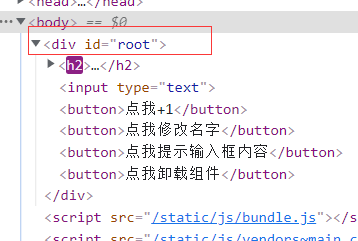
可以不用必须有一个真实的DOM根标签了
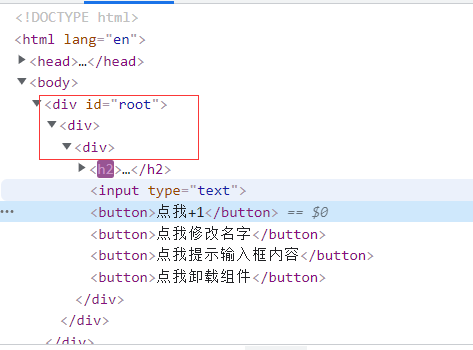
- 正常项目出来外层最少会有三级div,第一级:index.html中的,第二级:App.js中的,第三级:自身组件最外层必须套的一个div
- 为了避免出现这么多无用的div嵌套,可以使用或者<></>代替
- 使用浏览器会在解析时自动抛掉这个标签,并且这个标签只能接收一个参数,就是key,除了key之外不接收任何参数,如果Fragment标签内的东西全都是遍历得到,就需要指定key。
- 但是使用<></>则不能接受任何参数
所以如果Fragment中的内容是遍历出来的,就使用Fragment标签,如果不是遍历来的就可以使用<></>空标签
App.js
 1
 2
 3
 4
 5
 6
 7
 8
 9
10
11
12
|
import React, { Component, Fragment } from 'react'
import FragmentTest from './components/FragmentTest'

export default class App extends Component {
    render() {
        return (
            <Fragment>
                <FragmentTest/>
            </Fragment>
        )
    }
}
|
FragmentTest.js
  1
  2
  3
  4
  5
  6
  7
  8
  9
 10
 11
 12
 13
 14
 15
 16
 17
 18
 19
 20
 21
 22
 23
 24
 25
 26
 27
 28
 29
 30
 31
 32
 33
 34
 35
 36
 37
 38
 39
 40
 41
 42
 43
 44
 45
 46
 47
 48
 49
 50
 51
 52
 53
 54
 55
 56
 57
 58
 59
 60
 61
 62
 63
 64
 65
 66
 67
 68
 69
 70
 71
 72
 73
 74
 75
 76
 77
 78
 79
 80
 81
 82
 83
 84
 85
 86
 87
 88
 89
 90
 91
 92
 93
 94
 95
 96
 97
 98
 99
100
|
import React, {useState, useEffect, useRef, Fragment} from 'react'
import { unmountComponentAtNode } from 'react-dom'

// 类式组件操作state
// class FragmentTest extends React.Component {
//     state={count:0}

//     // 创建一个ref容器
//     myRef = React.createRef()

//     // 挂载完毕后开启定时器,使count1秒中+1一次
//     componentDidMount(){
//         this.timer = setInterval(()=>{
//             this.setState(state => ({count:state.count+1}))
//         },1000)
//     }

//     // 将要卸载时,关闭定时器
//     componentWillUnmount(){
//         clearInterval(this.timer)
//     }

//     add = () => {
//         this.setState(state => ({count:state.count+1}))
//     }

//     // 展示myRef容器中的结点的value值
//     show = () =>{
//         alert(this.myRef.current.value)
//     }

//     unmount = () =>{
//         unmountComponentAtNode(document.getElementById("root"))
//     }

//     render() {
//         return (
//             <div>
//                 <h2>当前求和为:{this.state.count}</h2>
//                 <input type="text" ref={this.myRef}/>
//                 <button onClick={this.add}>点我+1</button>
//                 <button onClick={this.show}>点我提示输入框内容</button>
//                 <button onClick={this.unmount}>点我卸载组件</button>
//             </div>
//         )
//     }
// }

//函数式组件操作state
function FragmentTest (){

    const [count,setCount] = useState(0)
    const [name,setName] = useState('张三')
    // 创建一个ref容器
    const myRef = useRef()

    function add(){
        setCount(count+1)
    }

    function changeName(){
        setName('憨憨')
    }

    // 展示myRef容器中的结点的value值
    function show(){
        alert(myRef.current.value)
    }

    function unmount(){
        unmountComponentAtNode(document.getElementById("root"))
    }
    /**
     * useEffect:
     *      参数1:函数
     *      参数2:监听状态数组
     * 如果参数2指定了状态,那么当这些状态的值改变时,参数1的回调函数会重新被调用。相当于componentDidMount钩子+componentDidUpdate钩子
     * 如果参数2中没指定状态,只传一个空数组,表示不监听任何状态的改变,所以参数1的回调函数只在第一次进页面时被调用一次,相当于componentDidMount钩子
     * 参数1的返回函数相当于componentWillUnMount钩子
     */
    useEffect(() => {
        // 只在第一次进页面开启一个定时器
        let timer = setInterval(()=>{setCount(count => count+1)},1000)
        // 在页面将要卸载之前关闭定时器
        return ()=>{clearInterval(timer)}
    },[])

    return (
        <Fragment>
            <h2>当前求和为:{count}---{name}</h2>
            <input type="text" ref={myRef}/>
            <button onClick={add}>点我+1</button>
            <button onClick={changeName}>点我修改名字</button>
            <button onClick={show}>点我提示输入框内容</button>
            <button onClick={unmount}>点我卸载组件</button>
        </Fragment>
    )
}

export default FragmentTest
|
5. Context
理解
一种组件间通信方式, 常用于**【祖组件】与【后代组件】**间通信
使用
 1
 2
 3
 4
 5
 6
 7
 8
 9
10
11
12
13
14
15
16
17
18
19
20
21
22
|
1) 祖组件中创建Context容器对象:
	const XxxContext = React.createContext()

2) 祖组件渲染子组时,外面包裹xxxContext.Provider, 通过value属性给后代组件传递数据:
	<xxxContext.Provider value={数据}>
		子组件
    </xxxContext.Provider>

3) 后代组件读取数据(需要声明接收祖组件传递的数据):

	//第一种方式:仅适用于类组件
	  static contextType = xxxContext  // 声明接收context
	  this.context // 读取context中的value数据

	//第二种方式: 函数组件与类组件都可以,在要使用祖组件传递的数据的地方声明接收
	  <xxxContext.Consumer>
	    {
	      value => ( // value就是context中的value数据
	        要显示的内容
	      )
	    }
	  </xxxContext.Consumer>
|
注意: 在应用开发中一般不用context, 一般都用它的封装react插件,即使用Provider标签传递数据给容器组件
Context.js
 1
 2
 3
 4
 5
 6
 7
 8
 9
10
11
12
13
14
15
16
17
18
19
20
21
22
23
24
25
26
27
28
29
30
31
32
33
34
35
36
37
38
39
40
41
42
43
44
45
46
47
48
49
50
51
52
53
54
55
56
57
58
59
60
61
62
63
64
65
66
67
68
69
70
71
|
import React, { Component} from 'react'
import './index.css'

// 创建一个Context容器,这里大写是因为到时候要把这个作为组件
const MyContext = React.createContext()

export default class A extends Component {

    state={name:'张三', age:18}

    render() {
        const{name,age}=this.state
        return (
            <div className="parent">
                <h2>我是父组件</h2>
                {/* 如果是单个数据,可以直接传 */}
                {/* <MyContext.Provider value={this.state.name}>
                    <B/>
                </MyContext.Provider> */}

                {/* 如果是多个数据,可以传一个对象,这里触发了对象的简写方式 */}
                <MyContext.Provider value={{name,age}}>
                    <B/>
                </MyContext.Provider>
            </div>
        )
    }
}

class B extends Component {
    render() {
        return (
            <div className="son">
                <h2>我是子组件</h2>
                <C/>
            </div>
        )
    }
}

// 类式组件C
// class C extends Component {
//     static contextType = MyContext
//     render() {
//         return (
//             <div className="grand">
//                 <h2>我是孙组件</h2>
//                 {/* this.context就是祖组件使用MyContext.Provider的属性value传递的数据 */}
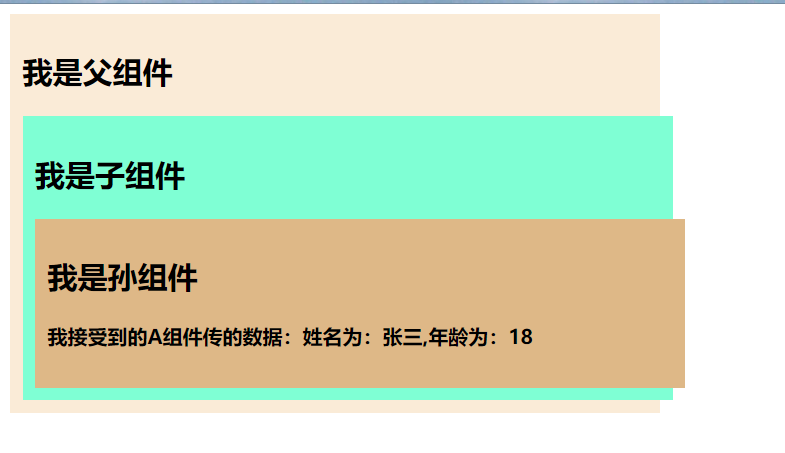
//                 <h4>我接受到的A组件传的数据:{`姓名为:${this.context.name},年龄为:${this.context.age}`}</h4>
//             </div>
//         )
//     }
// }

// 函数式组件C
function C (){
    return (
        <div className="grand">
            <h2>我是孙组件</h2>
            <h4>
                我接受到的A组件传的数据:
                <MyContext.Consumer>
                    {
                        // value就是祖组件使用MyContext.Provider的属性value传递的数据
                        value => `姓名为:${value.name},年龄为:${value.age}`
                    }
                </MyContext.Consumer>
            </h4>
        </div>
    )
}
|
Context.css
 1
 2
 3
 4
 5
 6
 7
 8
 9
10
11
12
13
14
15
|
.parent{
    width:500px;
    background-color: antiquewhite;
    padding: 10px;
}
.son{
    width:100%;
    background-color: aquamarine;
    padding: 10px;
}
.grand{
    width:100%;
    background-color: burlywood;
    padding: 10px;
}
|
6. 组件优化
Component的2个问题
-
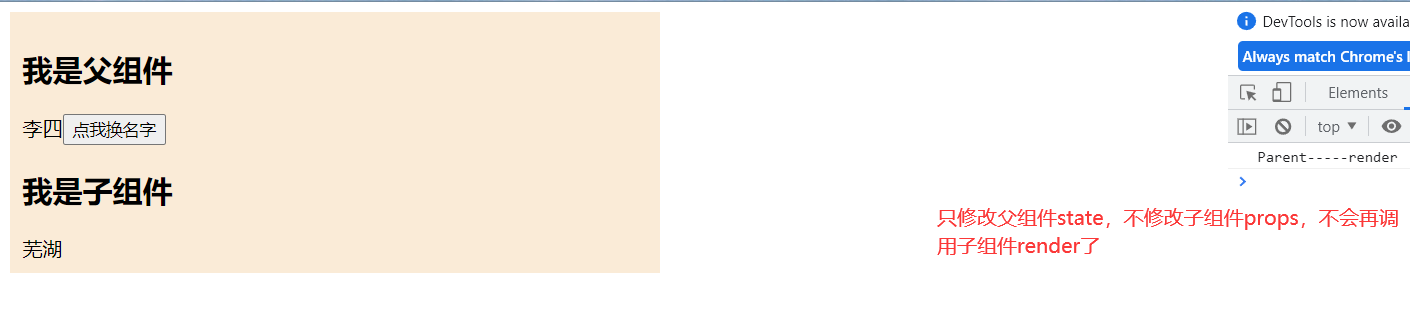
只要执行setState(),即使不改变状态数据, 组件也会重新render() ==> 效率低
-
只当前组件重新render(), 就会自动重新render子组件,纵使子组件没有用到父组件的任何数据 ==> 效率低
效率高的做法
只有当组件的state或props数据发生改变时才重新render()
原因
Component中的shouldComponentUpdate()总是返回true
解决
办法1:
重写shouldComponentUpdate()方法
比较新旧state或props数据, 如果有变化才返回true, 如果没有返回false
缺点是:如果state中有很多个状态,那么判断state是否修改需要判断多个状态,但是可以将state对象转为json字符串,判断字符串是否相等,就可以判断state中多个状态是否都进行了修改
PureComponent.js
 1
 2
 3
 4
 5
 6
 7
 8
 9
10
11
12
13
14
15
16
17
18
19
20
21
22
23
24
25
26
27
28
29
30
31
32
33
34
35
36
37
38
39
40
41
42
43
44
45
46
47
48
49
50
51
52
53
54
55
56
57
58
59
60
|
import React, { Component} from 'react'
import './index.css'

export default class A extends Component {

    state = {name:'张三'}

    /* 解决this.setState({})也能重新调用render的问题 */
    // 是否能更新阀门能接收两个参数:要更新的props和要更新的state
    shouldComponentUpdate (nextProps,nextState) {
        // 如果props和state都没更新,则不能执行更新,即重新调用render。(A组件没有被传递props,所以只判断state是否更新)
        return !(this.state.name == nextState.name)
    }

    change = () =>{
        // 能正常更新并重新调用render
        this.setState({name:"李四"})

        // 经处理后,没有改变state,则不能重新调用render
        // this.setState({})
    }

    render() {
        // 验证父组件render有没有被调用
        console.log("Parent-----render");
        const{name}=this.state
        return (
            <div className="parent">
                <h2>我是父组件</h2>
                <span>{name}</span>
                <button onClick={this.change}>点我换名字</button>
                {/* 如果子组件接收父组件传递的state,那么当父组件state改变时,会先调用父组件的render,再也会调用子组件的render。 */}
                {/* <B name={name}/> */}

                {/* 就算传递给子组件的name是固定的或者根本没传递数据给子组件,父组件的状态改变并导致render重新调用, 也会导致子组件的render被调用*/}
                <B name="芜湖"/>
            </div>
        )
    }
}

class B extends Component {

    /* 解决无论子组件没有接收父组件的数据,或者子组件接收了,但是传的参数是固定不变的,在这种情况下,父组件状态改变重新调用render也会导致子组件的render被重新调用的问题 */
    shouldComponentUpdate (nextProps,nextState) {
        // 如果props和state都没更新,则不能执行更新,即重新调用render。(B组件没有state,所以只判断props是否更新)
        return !(this.props.name == nextProps.name)
    }

    render() {
        // 验证子组件render有没有被调用
        console.log("Son-----render");
        return (
            <div>
                <h2>我是子组件</h2>
                <span>{this.props.name}</span>
            </div>
        )
    }
}
|
index.css
1
2
3
4
5
|
.parent{
    width:500px;
    background-color: antiquewhite;
    padding: 10px;
}
|
办法2:
使用PureComponent
PureComponent重写了shouldComponentUpdate(), 只有state或props数据有变化才返回true
注意:
只是进行state和props数据的浅比较, 如果只是数据对象内部数据变了, 返回false
不要直接修改state数据, 而是要产生新数据
项目中一般使用PureComponent来优化
PureComponent.js
 1
 2
 3
 4
 5
 6
 7
 8
 9
10
11
12
13
14
15
16
17
18
19
20
21
22
23
24
25
26
27
28
29
30
31
32
33
34
35
36
37
38
39
40
41
42
43
44
45
46
47
48
49
50
51
52
53
54
55
56
57
58
59
|
import React, { PureComponent} from 'react'
import './index.css'

export default class A extends PureComponent {

    state = {name:'张三', age:18, sex:"男"}

    change = () =>{

        /**
         * PureComponent判断状态是否改变时,是浅判断
         * 如果state对象的地址没变,只是改变其内部的属性值,那么认为state状态对象没有改变,所以会更新状态但是不会重新调用render,应避免这种写法
         * 如果是this.setState({name:"李四"})这样去更新状态,{name:"李四"}表示的是另一个对象,所以PureComponent监测到state对象的地址改变了,就会重新调用render
         */

        // 能正常更新,但是不会重新调用render
        // const obj = this.state
        // obj.name = "李四"
        // this.setState(obj)

        // 能正常更新并重新调用render
        this.setState({name:"李四"})

        // 什么都没改变,所以state状态对象没变,不会调用render
        // this.setState({})
    }

    render() {
        // 验证父组件render有没有被调用
        console.log("Parent-----render");
        const{name}=this.state
        return (
            <div className="parent">
                <h2>我是父组件</h2>
                <span>{name}</span>
                <button onClick={this.change}>点我换名字</button>
                {/* 如果子组件接收父组件传递的state,那么当父组件state改变时,会先调用父组件的render,再也会调用子组件的render。 */}
                {/* <B name={name}/> */}

                {/* 就算传递给子组件的name是固定的或者根本没传递数据给子组件,父组件的状态改变并导致render重新调用, 也会导致子组件的render被调用*/}
                <B name="芜湖"/>
            </div>
        )
    }
}

class B extends PureComponent {

    render() {
        // 验证子组件render有没有被调用
        console.log("Son-----render");
        return (
            <div>
                <h2>我是子组件</h2>
                <span>{this.props.name}</span>
            </div>
        )
    }
}
|
index.css
1
2
3
4
5
|
.parent{
    width:500px;
    background-color: antiquewhite;
    padding: 10px;
}
|
7. render props
如何向组件内部动态传入带内容的结构(标签)?
Vue中:
	使用slot技术, 也就是通过组件标签体传入结构  <A><B/></A>
React中:
	使用children props: 通过组件标签体传入结构
	使用render props: 通过组件标签属性传入结构,而且可以携带数据,一般用render函数属性
普通的父子传数据
ordinaryProps.js
 1
 2
 3
 4
 5
 6
 7
 8
 9
10
11
12
13
14
15
16
17
18
19
20
21
22
23
24
25
26
27
28
29
30
31
32
33
34
35
36
37
38
|
import React, { Component } from 'react'
import './index.css'

export default class ordinaryProps extends Component {
    render() {
        return (
            <div className="father">
                <h2>我是父组件</h2>
                <A/>
            </div>
        )
    }
}

class A extends Component {

    state = {name:"张三"}

    render() {
        return (
            <div className="son">
                <h2>我是子组件</h2>
                <B name={this.state.name}/>
            </div>
        )
    }
}

class B extends Component {
    render() {
        return (
            <div className="grand">
                <h2>我是孙组件</h2>
                <span>我接受到A组件的姓名为:{this.props.name}</span>
            </div>
        )
    }
}
|
index.css
 1
 2
 3
 4
 5
 6
 7
 8
 9
10
11
12
|
.father{
    width:500px;
    background-color: antiquewhite;
}
.son{
    width:100%;
    background-color: aquamarine;
}
.grand{
    width:100%;
    background-color: cadetblue;
}
|
children props
<A>
  <B>xxxx</B>
</A>
{this.props.children}
问题: 如果B组件需要A组件内的数据, ==> 做不到
ChildrenProps.js
 1
 2
 3
 4
 5
 6
 7
 8
 9
10
11
12
13
14
15
16
17
18
19
20
21
22
23
24
25
26
27
28
29
30
31
32
33
34
35
36
37
38
39
40
41
42
43
|
import React, { Component } from 'react'
import './index.css'

export default class ChildrenProps extends Component {
    render() {
        return (
            <div className="father">
                <h2>我是父组件</h2>
                {/* 写在组件标签体的内容,都放在组件的this.props.children中 */}
                <A>
                    <B/>
                </A>
            </div>
        )
    }
}

class A extends Component {

    state = {name:"张三"}

    render() {
        return (
            <div className="son">
                <h2>我是子组件</h2>
                {/* 存放着B组件 */}
                {this.props.children}
            </div>
        )
    }
}

class B extends Component {
    render() {
        return (
            <div className="grand">
                <h2>我是孙组件</h2>
                {/* 此时B组件接收不到A组件中的数据 */}
                <span>我接受到A组件的姓名为:{this.props.name}</span>
            </div>
        )
    }
}
|
index.css
 1
 2
 3
 4
 5
 6
 7
 8
 9
10
11
12
|
.father{
    width:500px;
    background-color: antiquewhite;
}
.son{
    width:100%;
    background-color: aquamarine;
}
.grand{
    width:100%;
    background-color: cadetblue;
}
|
render props
<A render={(data) => <B data={data}/>}></A>
A组件: {this.props.render(内部state数据)}
B组件: 读取A组件传入的数据显示 {this.props.data}
**好处是:**可以在A组件中一直预留一个位置,如果想显示谁,就相应的改变一下传递给A组件的render函数的返回值就行了,非常灵活的在A组件预留的位置中,即 {this.props.render(内部state数据)} 这里,想显示谁就显示谁,类似插槽
<A render={(data) => }>
renderProps.js
 1
 2
 3
 4
 5
 6
 7
 8
 9
10
11
12
13
14
15
16
17
18
19
20
21
22
23
24
25
26
27
28
29
30
31
32
33
34
35
36
37
38
39
40
41
|
import React, { Component } from 'react'
import './index.css'

export default class renderProps extends Component {
    render() {
        return (
            <div className="father">
                <h2>我是父组件</h2>
                {/* 使用renderProps,传递一个render函数给A组件,调用的返回值即为B组件。A组件可以在调用传递的render函数时,传递数据进去,该数据作为传给B组件的props,这样B组件就可以接收到A组件的数据了 */}
                <A render={(name)=><B name={name}/>} />
            </div>
        )
    }
}

class A extends Component {

    state = {name:"张三"}

    render() {
        return (
            <div className="son">
                <h2>我是子组件</h2>
                {/* 调用render函数,返回B组件,传递的参数作为props传递给B组件 */}
                {this.props.render(this.state.name)}
            </div>
        )
    }
}

class B extends Component {
    render() {
        return (
            <div className="grand">
                <h2>我是孙组件</h2>
                {/* 此时B组件就可以接收到A组件传递的name数据 */}
                <span>我接受到A组件的姓名为:{this.props.name}</span>
            </div>
        )
    }
}
|
index.css
 1
 2
 3
 4
 5
 6
 7
 8
 9
10
11
12
|
.father{
    width:500px;
    background-color: antiquewhite;
}
.son{
    width:100%;
    background-color: aquamarine;
}
.grand{
    width:100%;
    background-color: cadetblue;
}
|
8. 错误边界
理解:
错误边界(Error boundary):用来捕获后代组件错误,渲染出备用页面,所以在显示容易出错的后代组件,先进行判断后代组件是否出错,如果出错就显示备用页面
特点:
只能捕获后代组件生命周期产生的错误,不能捕获自己组件产生的错误和其他组件在合成事件、定时器中产生的错误
使用方式:
getDerivedStateFromError配合componentDidCatch
 1
 2
 3
 4
 5
 6
 7
 8
 9
10
11
12
13
14
|
// 生命周期函数,一旦后台组件报错,就会触发
static getDerivedStateFromError(error) {
    console.log(error);
    // 在render之前触发
    // 返回新的state
    return {
        hasError: true,
    };
}

componentDidCatch(error, info) {
    // 统计页面的错误。发送请求发送到后台去
    console.log(error, info);
}
|
例子:
ErrorBoundary.js
 1
 2
 3
 4
 5
 6
 7
 8
 9
10
11
12
13
14
15
16
17
18
19
20
21
22
23
24
25
26
27
28
29
30
31
32
33
34
35
36
37
38
39
40
41
42
43
44
45
46
47
48
49
50
51
52
53
|
import React, { Component } from 'react'
import './index.css'

export default class ErrorBoundary extends Component {

    state = {hasError:false}

    // 生命周期函数,一旦后台组件报错,就会触发
    static getDerivedStateFromError(error){
        // 在render之前触发,能接收错误原因
        console.log(error);
        // 返回新的state
        return {hasError:true}
    }

    // 只要有后代组件出错,就会调用这个钩子,作用是:统计错误次数,反馈给服务器,通知编码人员解决
    componentDidCatch(error,info){
        console.log(error);
        console.log(info);
    }

    render() {
        return (
            <div className="father">
                <h2>我是父组件</h2>
                {/* 当后代组件有错误时(A组件,即A组件的后代组件),显示备用页面,即不影响当前祖先组件的显示 */}
                {this.state.hasError?<h2>网络不好,请耐心等待.....</h2>:<A/>}
            </div>
        )
    }
}

class A extends Component {

    // per是正确的数据:数组
    // state = {per:[{id:1,name:"张三",age:18},{id:2,name:"李四",age:19},{id:3,name:"王五",age:17}]}
    // per是错误的数据:字符串,如果不对这个错误进行处理,会造成父组件也显示不了,整个页面都报错
    state = {per:"张三"}

    render() {
        const {per} = this.state
        return (
            <div className="son">
                <h2>我是子组件</h2>
                <ul>
                    {
                        per.map(item => <li key={item.id}>{item.name}-----{item.age}</li>)
                    }
                </ul>
            </div>
        )
    }
}
|
index.css
1
2
3
4
5
6
7
8
|
.father{
    width:500px;
    background-color: antiquewhite;
}
.son{
    width:100%;
    background-color: aquamarine;
}
|
9. 组件通信方式总结
组件间的关系:
- 父子组件
- 兄弟组件(非嵌套组件)
- 祖孙组件(跨级组件)
几种通信方式:
	1.props:
		(1).children props
		(2).render props
	2.消息订阅-发布:
		pubs-sub、event等等
	3.集中式管理:
		redux、dva等等
	4.conText:
		生产者-消费者模式
比较好的搭配方式:
	父子组件:props
	兄弟组件:消息订阅-发布、集中式管理
	祖孙组件(跨级组件):消息订阅-发布、集中式管理、conText(开发用的少,封装插件用的多)