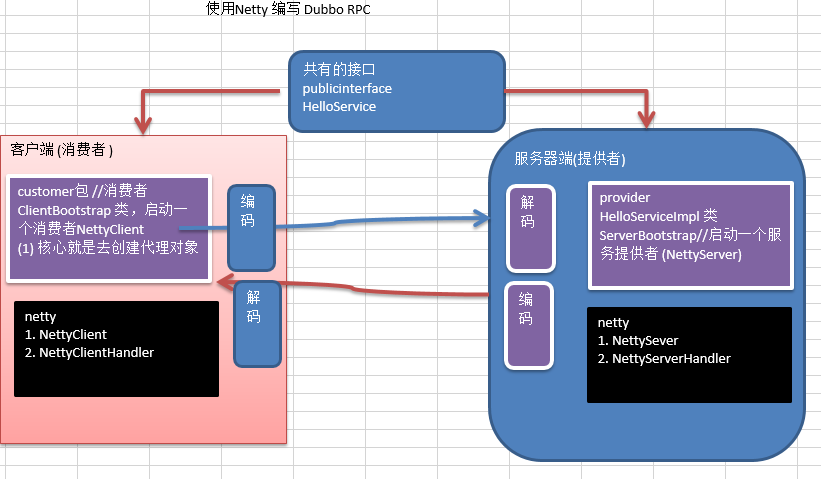
1、Netty的介绍
1、Netty是由JBOSS提供的一个Java开源框架,现为Github上的独立项目
2、Netty是一个异步的、基于事件驱动的网络应用框架,用以快速开发高性能、高可靠性的网络IO程序
- 基于事件驱动:比如一个网页中有一个按钮,当你点击时会触发一个事件,这个事件就会去调用一个函数
3、Netty主要针对在TCP协议下,面向Clients端的高并发应用,或者Peer-to-Peer场景下的大量数据持续传输的应用。
4、Netty本质是一个NIO框架,适用于服务器通讯相关的多种应用场景
5、要透彻理解Netty,需要先学习NIO,这样才能阅读Netty源码

2、BIO
2.1、I/O模型基本说明
-
I/O模型简单理解:就是用什么样的通道进行数据的发送和接收,很大程度上决定了程序通信的性能
-
Java共支持3种网络编程模型I/O模型:BIO、NIO、AIO
-
Java BIO:同步并阻塞(传统阻塞型),服务器实现模式为一个连接对应一个线程,即客户端有连接请求时服务端就需要启动一个线程进行处理,如果这个连接不做任何事情会造成不必要的线程开销
-
Java NIO:同步非阻塞,服务器实现模式为一个线程处理多个请求(连接),即客户端发送的连接请求都会注册到多路复用器上,多路复用器轮询到连接有I/O请求就进行处理
5.Java AIO(NIO.2):异步非阻塞,AIO引入异步通道的概念,采用了Proactor模式,简化了程序编写,有效的请求才启动线程,它的特点是先由操作系统完成后才通知服务端程序启动线程去处理,一般适用于连接数较多且连接时间较长的应用
2.2、I/O模型适用场景
- BIO方式适用于连接数目比较小且固定的架构,这种方式对服务器资源要求比较高,并发局限于应用中,JDK1.4以前唯一选择,但是程序简单易理解。
- NIO方式适用于连接数目多且连接比较短(轻操作)的架构,比如聊天服务器,弹幕系统,服务器间通讯等。编程比较复杂,JDK1.4开始支持。
- AIO方式适用于连接数目多且连接比较长(重操作)的架构,比如相册服务器,充分调用操作系统参与并发操作,编程比较复杂,JDK7开始支持。
2.3、BIO基本介绍
- Java BIO就是传统的java io编程,其相关的类和接口在java.io
- BIO(blocking I/O):同步阻塞,服务器实现模式为一个连接对应一个线程,即客户端有连接请求时服务端就需要启动一个线程进行处理,如果这个连接不做任何事情会造成不必要的线程开销,可以通过线程池机制改善(实现多个客户连接服务器)
2.4、BIO工作机制
- 服务器端启动一个ServerSocket
- 客户端启动Socket对服务器进行通信,默认情况下服务器端需要对每个客户建立一个线程与之通信
- 客户端发出请求后,先咨询服务器是否有线程响应,如果没有则等待,或者被拒绝
- 如果有响应,客户端线程会等待请求结束后,再继续执行
2.5、BIO应用实例
实例说明
- 使用BIO模型编写一个服务器端,监听6666端口,当有客户端连接时,就启动一个线程与之通讯
- 要求使用线程池机制改善,可以连接多个客户端
- 服务器端可以接受客户端发送的数据(
telnet方式即可)
 1
 2
 3
 4
 5
 6
 7
 8
 9
10
11
12
13
14
15
16
17
18
19
20
21
22
23
24
25
26
27
28
29
30
31
32
33
34
35
36
37
38
39
40
41
42
43
44
45
46
47
48
49
50
51
52
53
54
55
56
57
58
59
60
61
62
63
64
65
66
67
68
69
70
71
72
73
74
75
76
77
78
79
80
|
package com.clover.bio;

import java.io.IOException;
import java.io.InputStream;
import java.net.ServerSocket;
import java.net.Socket;
import java.util.concurrent.ExecutorService;
import java.util.concurrent.Executors;

public class BIOServer {
    public static void main(String[] args) throws IOException {
        // 线程池机制

        //思路
        //1.创建一个线程池
        //2.如果有客户端连接,就创建一个线程,与之通信(单独写一个方法)

        ExecutorService newCachedThreadPool = Executors.newCachedThreadPool();

        // 创建ServerSocket
        ServerSocket serverSocket = new ServerSocket(6666);

        System.out.println("服务器启动了");

        while(true){
            // 监听,等待客户端连接
            System.out.println("线程信息 id =" + Thread.currentThread().getId() + "名字=" + Thread.currentThread().getName());
            System.out.println("等待连接.........");
            final Socket socket = serverSocket.accept();
            System.out.println("连接到一个客户端");

            // 连接到一个客户端就创建一个线程,与之通信(单独写一个方法)
            newCachedThreadPool.execute(new Runnable() {
                // 我们可以重写这个方法
                @Override
                public void run() {
                    // 可以和客户端通讯
                    handler(socket);
                }
            });
        }
    }

    // 编写一个handler方法和客户端通讯
    public static void handler(Socket socket){

        try {
            System.out.println("线程信息 id =" + Thread.currentThread().getId() + "名字=" + Thread.currentThread().getName());
            byte[] bytes = new byte[1024];

            // 通过socket获取输入流
            InputStream inputStream = socket.getInputStream();

            // 循环读取客户端发送的数据
            while(true){
                System.out.println("线程信息 id =" + Thread.currentThread().getId() + "名字=" + Thread.currentThread().getName());

                System.out.println("read.........");
                int read = inputStream.read(bytes);
                if(read != -1){
                    // 不等于-1说明还未读完,还可以继续读取
                    // 输出客户端发送的数据
                    System.out.println(new java.lang.String(bytes,0,read));
                }else{
                    break;
                }
            }
        } catch (Exception e) {
            e.printStackTrace();
        } finally {
            System.out.println("关闭和client的连接");
            try {
                socket.close();
            } catch (Exception e) {
                e.printStackTrace();
            }
        }
    }

}
|
还可以测试每一次客户端连接后对应的线程是否与它通讯的线程是否一样
这个代码中的accept和read函数会产生阻塞情况
连接过后
有连接的就会卡在read处,但是当你发送数据后又会阻塞再read处,这就会使性能很低
2.6、Java BIO问题分析
- 每个请求都需要创建独立的线程,与对应的客户端进行数据Read,业务处理,数据Write
- 当并发数较大时,需要创建大量线程来处理连接,系统资源占用比较大
- 连接建立后,如果当前线程暂时没有数据可读,则线程就会阻塞再Read操作上,造成线程资源浪费
3、NIO
3.1、Java NIO基本介绍
- Java NIO全称Java non-blocking IO,是指JDK提供的新API。从JDK1.4开始,Java提供了一系列改进的输入/输出的新特性,被称为NIO(即New IO),是同步非阻塞的。
- NIO相关类都被放在Java.nio包及子包下,并且对原java.io包中的很多类进行改写。
- NIO有三大核心部分:Channel(通道),Buffer(缓冲区),Selector(选择器)
- NIO是面向缓冲区,或者面向块编程的。数据读取到一个它稍后处理的缓冲区,需要时可在缓冲区中前后移动,这就增加了处理过程中的灵活性,使用它可以提供非阻塞式的高伸缩性网络。
- Java NIO的非阻塞模式,使一个线程从某通道发送请求或者读取数据,但是它仅能得到目前可用的数据,如果目前没有数据可用时,就什么都不会获取,而不是保持线程阻塞,所以直至数据变的可以读取之前,该线程可以继续做其它的事情。非阻塞写也是如此,一个线程请求写入一些数据到某通道,但不需要等待它完全写入,这个线程同时可以去做别的事情
- 通俗理解:NIO是可以做到用一个线程来处理多个操作的。假设有10000个请求过来,根据实际情况,可以分配50或者100个线程来处理。不像之前的阻塞IO那样,非得分配10000个。
- HTTP2.0使用了多路复用技术,做到同一个连接并发处理多个请求,而且并发请求的数量比HTTP1.1大了好几个数量级。
3.2、NIO和BIO的比较
- BIO是以流的方式处理数据,而NIO以块的方式处理数据,块I/O的效率比流I/O高很多
- BIO是阻塞的,NIO则是非阻塞的
- BIO基于字节流和字符流进行操作,而NIO基于Channel(通道) 和 Buffer(缓冲区) 进行操作,
数据总是从通道读取到缓冲区中,或者从缓冲区写入到通道中。Selector(选择器)用于监听多个通道的事件(比如;连接请求,数据到达等),因此使用单个线程就可以监听多个客户端通道
3.3、NIO三大核心原理示意图
Selector、Channel和Buffer的关系图说明
- 每个Channel都会对应一个Buffer
- 每个Selector都对应一个线程,一个线程对应多个Channel(连接)
- 该图反应了有三个Channel注册到了该Selector(使用程序解释)
- 程序切换到哪个Channel是由事件决定的,Event就是一个重要的概念
- Selector会根据不同的事件,在各个通道上切换
- Buffer就是一个内存块,底层是有一个数组
- 数据的读取写入是通过Buffer,这个和BIO有本质的区别,BIO中要么是输入流,或者是输出流,不能双向,但是NIO的Buffer是可以读也可以写,需要flip方法切换
- Channel是双向的,可以返回底层操作系统的情况,比如Linux,底层的操作系统通道就是双向的
3.4、缓冲区(Buffer)
3.4.1、基本介绍
缓冲区(Buffer):缓冲区本质上是一个可以读写数据的内存块,可以理解成是一个容器对象(含数组),该对象提供了一组方法,可以更轻松地使用内存块,缓冲区对象内置了一些机制,能够跟踪和记录缓冲区的状态变化情况。Channel提供从文件、网络读取数据的渠道,但是读取或写入的数据都必须经由Buffer。如图:(后面举例说明)
3.4.2、Buffer类及其子类
- 在NIO中,Buffer是一个顶层父类,它是一个抽象类,类的层级关系图
- Buffer类定义了所有的缓冲区都具有的四个属性来提供关于其所包含的数据元素的信息
- Capacity:容量,即可以容纳的最大数据量;在缓冲区创建的时候被设定并且不能改变
- Limit:表示缓冲区的当前终点,不能对缓冲区超过极限的位置进行读写操作。且极限是可以修改的
- Position:位置,下一个要被读或写的元素的索引,每次读写缓冲区数据时都会改变值,为下次读写做准备
- Mark:标记
- Buffer类相关方法
3.4.3、ByteBuffer
从前面可以看出对于Java中的基本数据类型(boolean除外),都有一个Buffer类型与之相对应,最常用的自然是ByteBuffer类(二进制数据),该类的主要方法如下
3.5、通道(Channel)
3.5.1、基本介绍
- NIO的通道类似于流,但是有些区别如下
- 通道可以同时进行读写,而流只能读或者写
- 通道可以实现异步读写数据
- 通道可以从缓冲区读数据,也可以写数据到缓冲区中
- BIO中的Stream是单向的,例如FileInputStream对象只能进行读取数据的操作,而NIO中的通道(Channel)是双向的,可以读操作,也可以写操作
- Channel在NIO中是一个接口
public interface Channel extends Closeable{}
- 常用的Channel类有:FileChannel、DatagramChannel、ServerSocketChannel和SocketChannel
- 这里需要注意ServerSocketChannel和SocketChannel两个类
- 当有一个连接产生的时候,我们Server中的
ServerSocketChannel会产生一个与该客户端对应的通道,通道类型为SocketChannel,而其真实的实现类型为SockerChannelImpl,然后再通过该通道与服务器进行通讯
- FileChannel用于文件的数据读写,DatagramChannel用于UDP的数据读写,ServerSocketChannel和SocketChannel用于TCP的数据读写
3.5.2、FileChannel类
FileChannel主要用来对本地文件进行IO操作,常见的方法有
public int read (ByteBuffer dst) ,从通道读取数据并放入缓冲区中public int write(ByteBuffer src) ,把缓冲区的数据写到通道中public long transferFrom(ReadableByteChannel src,long position,long count) , 从目标通道中复制数据到当前通道public long transferTo(long position,long count,WriteableByteChannel target) , 把数据从当前通道复制给目标通道
3.5.3、应用实例1-本地文件写数据
实例要求:
- 使用前面学习后的ByteBuffer(缓冲)和FileChannel(通道),将"hello,韋"写入到file01.txt中
- 文件不存在就创建 (一个汉字3个字节)
 1
 2
 3
 4
 5
 6
 7
 8
 9
10
11
12
13
14
15
16
17
18
19
20
21
22
23
24
25
26
27
28
29
30
31
|
package com.clover.nio;

import java.io.FileOutputStream;
import java.nio.ByteBuffer;
import java.nio.channels.FileChannel;

public class NIOFileChannel01 {
  public static void main(String[] args) throws Exception{
      String str = "hello,韋";
      //创建一个输出流->然后获取内置channel
      FileOutputStream fileOutputStream = new FileOutputStream("H:\\file01.txt");

      //通过FileOutputStream获取对应的FileChannel
      //这个FileChannel真实类型为FileChannelImpl
      FileChannel fileChannel = fileOutputStream.getChannel();

      //创建一个缓冲区 ByteBuffer
      ByteBuffer byteBuffer = ByteBuffer.allocate(1024);

      //将数据放入缓冲区中
      byteBuffer.put(str.getBytes());

      //数据写入完毕后要将buffer反转
      byteBuffer.flip();

      // 将缓冲区数据写入fileChannel
      fileChannel.write(byteBuffer);
      //因为fileChannel中封装了Java的输出流,最终写入文件中也是通过流写入,所以最后需要关闭
      fileOutputStream.close();
  }
}
|
3.5.4、应用实例2-本地文件读写数据
实例要求:
- 使用前面学习后的ByteBuffer(缓冲)和FileChannel(通道),将file01.txt中的数据读入到程序,并显示再控制台屏幕
- 假定文件已存在
 1
 2
 3
 4
 5
 6
 7
 8
 9
10
11
12
13
14
15
16
17
18
19
20
21
22
23
24
25
26
27
28
|
package com.clover.nio;

import java.io.File;
import java.io.FileInputStream;
import java.nio.ByteBuffer;
import java.nio.channels.FileChannel;

public class NIOFileChannel02 {
  public static void main(String[] args) throws Exception {
      //创建一个文件的输入流->然后获取内置channel
      File file = new File("H:\\file01.txt");
      FileInputStream fileInputStream = new FileInputStream(file);

      //通过fileInputStream获取对应的channel
      FileChannel fileChannel = fileInputStream.getChannel();

      //创建一个缓冲区
      ByteBuffer byteBuffer = ByteBuffer.allocate((int) file.length());

      //将通道中的数据向缓冲区中写入
      fileChannel.read(byteBuffer);

      //将byteBuffer的字节数据转成String
      System.out.println(new String(byteBuffer.array()));

      fileInputStream.close();
  }
}
|
3.5.5、应用实例3-使用一个Buffer完成文件读取、写入
实例要求:
- 使用FIleChannel(通道)和方法read,write,完成文件的拷贝
- 拷贝一个文本文件 1.txt,放在项目下即可
 1
 2
 3
 4
 5
 6
 7
 8
 9
10
11
12
13
14
15
16
17
18
19
20
21
22
23
24
25
26
27
28
29
30
31
32
33
34
35
36
37
38
39
40
41
42
43
|
package com.clover.nio;

import java.io.File;
import java.io.FileInputStream;
import java.io.FileOutputStream;
import java.nio.ByteBuffer;
import java.nio.channels.FileChannel;

public class NIOFileChannel03 {
  public static void main(String[] args) throws Exception {
      // 创建一个文件
      File file = new File("H:\\1.txt");
      FileInputStream fileInputStream = new FileInputStream(file);
      // 通过文件输入流获取channel
      FileChannel fileInputStreamChannel = fileInputStream.getChannel();

      // 创建一个输出流,读取数据
      FileOutputStream fileOutputStream = new FileOutputStream("H:\\2.txt");
      // 获取对应的channel
      FileChannel fileOutputStreamChannel = fileOutputStream.getChannel();

      // 创建一个缓冲区
      ByteBuffer byteBuffer = ByteBuffer.allocate((int) file.length());

      while (true){
          // 这里有一个重要操作,一定不能忘记
          byteBuffer.clear(); // 清空buffer
          // 将通道数据写入缓冲区
          int read = fileInputStreamChannel.read(byteBuffer);
          if (read == -1){
              break;
          }
          // buffer写入完数据后要反转为后面从buffer读取数据做准备
          byteBuffer.flip();
          // 将缓冲区数据读取到通道中
          fileOutputStreamChannel.write(byteBuffer);
      }

      // 关闭相关的流
      fileInputStream.close();
      fileOutputStream.close();
  }
}
|
3.5.6、应用实例4-拷贝文件transferFrom方法
实例要求:
- 使用FileChannel(通道)和方法 transferFrom,完成文件的拷贝
- 拷贝一张图片
 1
 2
 3
 4
 5
 6
 7
 8
 9
10
11
12
13
14
15
16
17
18
19
20
21
22
23
24
25
26
|
package com.clover.nio;

import java.io.FileInputStream;
import java.io.FileOutputStream;
import java.nio.channels.FileChannel;

public class NIOFileChannel04 {
  public static void main(String[] args) throws Exception {
      // 创建相关的流
      FileInputStream fileInputStream = new FileInputStream("H:\\1.jpg");
      FileOutputStream fileOutputStream = new FileOutputStream("H:\\2.jpg");

      // 获取相关流所对应的通道
      FileChannel fileInputStreamChannel = fileInputStream.getChannel();
      FileChannel fileOutputStreamChannel = fileOutputStream.getChannel();

      // 将文件从目标通道拷贝到当前通道
      fileOutputStreamChannel.transferFrom(fileInputStreamChannel,0,fileInputStreamChannel.size());

      // 关闭相关的通道和流
      fileInputStreamChannel.close();
      fileOutputStreamChannel.close();
      fileInputStream.close();
      fileOutputStream.close();
  }
}
|
3.5.7、关于Buffer和Channel的注意事项和细节
- ByteBuffer支持类型化的put和get,put放入的是什么数据类型,get就应该使用响应的数据类型来取出,否则可能有BufferUnderflowException异常
 1
 2
 3
 4
 5
 6
 7
 8
 9
10
11
12
13
14
15
16
17
18
19
20
21
22
23
24
|
package com.clover.nio;

import java.nio.ByteBuffer;

public class NIOByteBufferPutGet {
  public static void main(String[] args) {
      // 创建一个Buffer
      ByteBuffer buffer = ByteBuffer.allocate(64);

      //类型化方式放入数据
      buffer.putInt(824);
      buffer.putLong(8);
      buffer.putChar('韋');
      buffer.putShort((short) 4);

      // 取出数据
      buffer.flip();

      System.out.println(buffer.getInt());
      System.out.println(buffer.getLong());
      System.out.println(buffer.getChar());
      System.out.println(buffer.getShort());
  }
}
|
- 可以将一个普通的Buffer转成只读Buffer
 1
 2
 3
 4
 5
 6
 7
 8
 9
10
11
12
13
14
15
16
17
18
19
20
21
22
23
24
25
26
27
|
package com.clover.nio;

import java.nio.ByteBuffer;

public class ReadOnlyBuffer {
  public static void main(String[] args) {
      // 创建一个Buffer
      ByteBuffer buffer = ByteBuffer.allocate(64);
      for (int i= 0; i < 64; i++){
          buffer.put((byte) i);
      }

      //读取
      buffer.flip();

      // 得到一个只读的Buffer
      ByteBuffer readOnlyBuffer = buffer.asReadOnlyBuffer();
      System.out.println(readOnlyBuffer.getClass());

      while (readOnlyBuffer.hasRemaining()){
          // 这个方法会让我们的position自动加1
          System.out.println(readOnlyBuffer.get());
      }

      readOnlyBuffer.put((byte) 824); // 用只读的Buffer进行写入操作会抛出ReadOnlyBufferException
  }
}
|
- NIO还提供了MappedByteBuffer,可以让文件直接在内存(堆外的内存)中进行修改,而如何同步到文件由NIO来完成
 1
 2
 3
 4
 5
 6
 7
 8
 9
10
11
12
13
14
15
16
17
18
19
20
21
22
23
24
25
26
27
28
29
30
31
32
33
34
|
package com.clover.nio;

import java.io.RandomAccessFile;
import java.nio.MappedByteBuffer;
import java.nio.channels.FileChannel;

/*
 * 说明
 * 1.MappedByteBuffer 可以让文件直接在内存(堆外内存)中修改,操作系统不需要拷贝一次
 */

public class MappedByteBufferTest {
  public static void main(String[] args) throws Exception {
      RandomAccessFile randomAccessFile = new RandomAccessFile("H:\\1.txt", "rw");
      //获取对应的通道
      FileChannel channel = randomAccessFile.getChannel();

      /*
       * 参数1:FileChannel.MapMode.READ_WRITE 使用的读写模式
       * 参数2:0 :可以直接修改的起始位置
       * 参数3:5 :是映射到内存的大小(不是索引位置),即将 1.txt的多少个字节映射到内存
       * 可以直接修改的范围就是0-5
       * MappedByteBuffer 实际类型 DirectByteBuffer
       */
      MappedByteBuffer mappedByteBuffer = channel.map(FileChannel.MapMode.READ_WRITE, 0, 5);

      mappedByteBuffer.put(0, (byte) 'H');
      mappedByteBuffer.put(3, (byte) '8');
      mappedByteBuffer.put(5, (byte) '8');  //这个地方的5并不是代表索引,而是代表可以修改字节数的大小,超过5会抛出异常IndexOutOfBoundsException

      randomAccessFile.close() ;

  }
}
|
- 前面我们讲的读写操作,都是通过一个Buffer完成的,NIO还支持通过多个Buffer(即Buffer数组)完成读写操作,即Scattering和Gatering
 1
 2
 3
 4
 5
 6
 7
 8
 9
10
11
12
13
14
15
16
17
18
19
20
21
22
23
24
25
26
27
28
29
30
31
32
33
34
35
36
37
38
39
40
41
42
43
44
45
46
47
48
49
50
51
52
53
54
55
56
57
58
59
60
61
62
63
64
65
|
package com.clover.nio;

import java.net.InetSocketAddress;
import java.nio.ByteBuffer;
import java.nio.channels.ServerSocketChannel;
import java.nio.channels.SocketChannel;
import java.util.Arrays;

/*
 * Scattering:将数据写入到buffer时,可以采用buffer数组,依次写入  [分散]
 * Gathering:从buffer读取数据时,可以采用buffer数组,依次读取
 */
public class ScatteringAndGatheringTest {
  public static void main(String[] args) throws Exception {
      // 使用ServerSocketChannel 和 SocketChannel  这就需要网络了
      ServerSocketChannel serverSocketChannel = ServerSocketChannel.open();
      InetSocketAddress inetSocketAddress = new InetSocketAddress(7000);

      // 绑定端口到socket,并启动
      serverSocketChannel.socket().bind(inetSocketAddress);

      // 创建buffer数组
      ByteBuffer[] byteBuffers = new ByteBuffer[2];
      byteBuffers[0] = ByteBuffer.allocate(5);
      byteBuffers[1] = ByteBuffer.allocate(3);

      // 等待客户端连接(telnet)
      SocketChannel socketChannel = serverSocketChannel.accept();

      int messageLength = 8;   // 假设我们从客户端最多接受8个字节

      // 循环读取
      while (true){
          // 统计读取了多少个字节
          int byteRead = 0;
          while (byteRead < messageLength){
              long l = socketChannel.read(byteBuffers);
              byteRead += l;// 累计读取的字节数
              System.out.println("byteRead =" + byteRead);
              // 使用流打印,查看当前buffer的position和limit
              Arrays.asList(byteBuffers).stream().map(buffer -> "position=" + buffer.position() + ",limit=" + buffer.limit()).forEach(System.out::println);
          }

          // 将所有的buffer进行一个反转flip
          Arrays.asList(byteBuffers).forEach(buffer -> buffer.flip());

          // 将数据读取出来显示在控制台
          long byteWrite = 0;// 查看显示在控制台字节大小
          while (byteWrite < messageLength){
              long w = socketChannel.write(byteBuffers);
              byteWrite += w;
          }

          // 将所有的buffer进行clear
          Arrays.asList(byteBuffers).forEach(buffer -> {
              // 如果数据是全部读取完毕,接着再次往buffer写数据,这时position是上次读取位置,limit是最大可读取位置,全部读取完成position=limit
              // 那么直接往里面写数据会报错,因为position必须小于limit,而我们也想从0开始存储,并且需要让最大存储限制limit应该是容量capacity
              // 那我们就需要手动修改position和limit的值。让position=0,而limit=capacity,buffer提供了这个方法clear()
              buffer.clear();
          });

          System.out.println("byteRead=" + byteRead + ",byteWrite=" + byteWrite + ",messageLength=" + messageLength);
      }
  }
}
|
3.6、Selector(选择器)
3.6.1、基本介绍
- Java的NIO,用非阻塞的IO方式。可以用一个线程,处理多个的客户端连接,就会使用到Selector(选择器)
- Selector能够检测到多个注册的通道上是否有事件发生(注意:多个Channel以事件的方式可以注册到同一个Selector),如果有事件发生,便获取事件然后针对每个事件进行相应的处理。这样就可以只用一个单线程去管理多个通道,也就是管理多个连接和请求。
- 只有在通道真正有读写事件发生时,才会进行读写,就大大的减少了系统开销,并且不必为每个连接都创建一个线程,不用去维护多个线程
- 避免了多线程之间的上下文切换导致的开销
3.6.2、Selector示意图和特点说明
特点再说明:
- Netty的IO线程NioEventLoop聚合了Selector(选择器,也叫多路复用器),可以同时并发处理成百上千个客户端的连接
- 当线程从某客户端Socket通道进行读写数据时,若没有数据可读写时,该线程可以进行其它任务。
- 线程通常将非阻塞IO的空闲时间用于在其它通道上执行IO操作,所以单独的线程可以管理多个输入和输出通道
- 由于读写操作都是非阻塞的,这就可以充分提升IO线程的运行效率,避免由于频繁IO阻塞导致的线程挂起
- 一个IO线程可以并发处理N个客户端连接和读写操作,这从根本上解决了传统同步阻塞IO,一个连接一个线程模型,架构的性能、弹性伸缩能力和可靠性都得到了极大的提升。
3.6.3、Selector类相关的方法
Selector类是一个抽象类,常用方法和说明如下:
1
2
3
4
5
|
public abstract class Selector implements Closeable{
		public static Selector open(); // 得到一个选择器对象
		public int select(long timeout); // 监控所有注册的通道,当其中有IO操作可以进行时,将对应的SelectionKey加入到内部集合中并返回,参数用来设置超时时间
		public Set<SelectionKey> selectedKeys(); // 从内部集合中得到所有的SelectionKey
}
|
注意事项
1. NIO中的ServerSocketChannel功能类似ServerSocket,SocketChannel功能类似Socket
2. Selector相关方法说明
	   selector.select(); //阻塞
	   selector.select(1000); // 阻塞1000毫秒,在1000毫秒后返回
	   selector.wakeup(); // 唤醒selector
	   selector.selectNow(); // 不阻塞,立马返还
3.7、NIO非阻塞网络编程原理分析图
NIO非阻塞网络编程相关的(Selector、SelectionKey、ServerSocketChannel和SocketChannel)关系梳理图
对上图说明:
- 当客户端连接时,会通过
ServerSocketChannel得到SocketChannel
- Selector进行监听,使用
select方法,可以使用阻塞的也可以使用非阻塞的,返回有事件发生的通道的个数
- 将
SocketChannel注册到Selector上,使用register(Selector sel,int ops),一个selector上可以注册多个SocketChannel
- 注册后返回一个
SelectionKey,会和该Selector关联该key被Selector管理起来,做成一个集合的形式
- 进一步得到各个SelectionKey(有事件发生)
- 再通过SelectionKey反向获取
SocketChannel,通过channel()方法
- 可以通过得到的
channel,完成业务处理
3.8、NIO非阻塞网络编程快速入门
案例要求:
- 编写一个NIO入门案例,实现服务器端和客户端之间的数据简单通讯(非阻塞)
- 目的:理解NIO非阻塞网络编程机制
服务器端:
 1
 2
 3
 4
 5
 6
 7
 8
 9
10
11
12
13
14
15
16
17
18
19
20
21
22
23
24
25
26
27
28
29
30
31
32
33
34
35
36
37
38
39
40
41
42
43
44
45
46
47
48
49
50
51
52
53
54
55
56
57
58
59
60
61
62
63
64
65
66
67
68
69
70
71
72
73
74
75
76
77
78
79
80
81
82
83
|
package com.clover.nio;

import java.net.InetSocketAddress;
import java.nio.ByteBuffer;
import java.nio.channels.*;
import java.util.Iterator;
import java.util.Set;

public class NIOServer {
  public static void main(String[] args) throws Exception{
      // 创建ServerSocketChannel -> ServerSocket
      ServerSocketChannel serverSocketChannel = ServerSocketChannel.open();

      // 得到一个Selector对象
      Selector selector = Selector.open();

      // 绑定一个端口6666,在服务器端监听
      serverSocketChannel.socket().bind(new InetSocketAddress(6666));

      // 设置为非阻塞
      serverSocketChannel.configureBlocking(false);

      // 把 serverSocketChannel 注册到 selector 关心事件为OP_ACCEPT
      serverSocketChannel.register(selector, SelectionKey.OP_ACCEPT);

      // 循环等待客户端连接
      while (true){
          // 这里我们等待1秒,如果没有事件发生,就返回
          if (selector.select(1000) == 0){
              // 没有事件发生
              System.out.println("服务器等待了1秒,无连接");
              continue;
          }

          // 如果返回的 >0,就获取到相关的selectionKey集合
          // 1.如果返回的 >0,表示已经获取到关注的事件
          // 2.selector.selectedKeys() 返回关注事件的集合
          // 3.通过 selectionKeys 反向获取通道
          Set<SelectionKey> selectionKeys = selector.selectedKeys();

          // 遍历<SelectionKey> ,使用迭代器遍历
          Iterator<SelectionKey> keyIterator = selectionKeys.iterator();

          while (keyIterator.hasNext()){
              // 获取到SelectionKey
              SelectionKey key = keyIterator.next();

              //根据key对应的通道发生的事件做相应的处理
              if (key.isAcceptable()){
                  // 如果是 OP_ACCEPT,有新的客户端连接
                  // 给该客户端生成一个SocketChannel
                  // 这里使用 accept 为什么不会产生阻塞? 因为你原本的判断就已经判定了它时处于哪一个事件,自然不会在去等待
                  SocketChannel socketChannel = serverSocketChannel.accept();
                  System.out.println("客户端连接成功  生成了一个 socketChannel " + socketChannel.hashCode());
                  socketChannel.configureBlocking(false);
                  // 将 socketChannel 注册到selector,关注事件为 OP_READ,同时给该 socketChannel 关联一个Buffer
                  /*
                   * 这里需要注意:
                   *    如果你在将 socketChannel 注册到selector时,给其关联一个buffer分配空间过大时,在
                   *    后面使用输出语句进行输出时,没有字节填充时,后面会默认输出乱码
                   */
                  socketChannel.register(selector,SelectionKey.OP_READ, ByteBuffer.allocate(9));
              }

              if (key.isReadable()){
                  // 发生 OP_READ 事件
                  // 通过key反向获取到对应的channel
                  SocketChannel channel = (SocketChannel)key.channel();

                  // 获取到该Channel关联的Buffer
                  ByteBuffer buffer = (ByteBuffer)key.attachment();

                  // 将通道中的数据读取到Buffer
                  channel.read(buffer);
                  System.out.println("从客户端发送的数据" + new String(buffer.array()));
              }

              // 手动从集合中移除当前的 SelectionKey ,防止重复操作
              keyIterator.remove();
          }
      }
  }
}
|
客户端:
 1
 2
 3
 4
 5
 6
 7
 8
 9
10
11
12
13
14
15
16
17
18
19
20
21
22
23
24
25
26
27
28
29
30
31
32
|
package com.clover.nio;

import jdk.nashorn.internal.ir.CallNode;

import java.net.InetSocketAddress;
import java.nio.ByteBuffer;
import java.nio.channels.SocketChannel;

public class NIOClient {
  public static void main(String[] args) throws Exception{
      // 得到一个网络通道
      SocketChannel socketChannel = SocketChannel.open();
      // 设置非阻塞
      socketChannel.configureBlocking(false);
      // 提供服务器端的ip 和 端口
      InetSocketAddress inetSocketAddress = new InetSocketAddress("127.0.0.1", 6666);
      // 连接服务器
      if (!socketChannel.connect(inetSocketAddress)){
          while (!socketChannel.finishConnect()){
                System.out.println("因为连接需要事件,客户端不会阻塞,可以做其它工作");
          }
      }

      // 如果连接成功,就发送数据‘
      String str = "hello,韋";
      // 使用这种方式就不需要再去指定字节大小了,也不再浪费空间大小
      ByteBuffer buffer = ByteBuffer.wrap(str.getBytes());
      // 发送数据,将Buffer数据写入channel
      socketChannel.write(buffer);
      System.in.read();// 使代码停止在此
  }
}
|
总结:
1.服务器端创建serverSocketChannel,并设置监听端口和非阻塞
2.得到一个selector对象,并把serverSocketChannel注册到selector上,并设置关心事件为OP_ACCEPT
3.当客户端有连接产生时,先获取到关注的事件,在通过selector.selectedKeys() 返回关注事件的
集合(即注册到selector上key的集合),并使用迭代器进行遍历
4.获取selectionKeys集合种的key来判断是什么事件,如果是连接事件,则用accept函数得到socketChannel,并将该
channel注册到selector上,同时设为非阻塞,并从集合种移除当前key,防止重复操作
5.如果监听到有事件发生,如果是读事件,则通过key获取到对应的channel,该channel与注册到selector上的channel是
一样的,读取完数据之后也要进行移除操作,防止重复操作
疑问
为什么进行第一次连接时,服务器端对应的serverSocketChannel注册到selector上得到一个key,而第二个新客户端连接时,与第一次的key一致,不是每次执行完都移除了嘛?
解答:
因为当有连接事件产生时,监听器会监听到是什么事件,然后通过selector.selectedKeys()返回关注事件的集合(即注册
到selector上key的集合),进行完连接事件后就会使用remove函数对当前key进行移除,因为使用的hasnext()方法,防止进
行重复操作,因为当前的移除操作执行完毕后,当前该次循环也就结束了,当再次执行连接事件时,又会调用
selector.selectedKeys()函数获取key的集合,所以serverSocketChannel对应的key是一致的
3.9、SelectionKey
- SelectionKey,表示Selector和网络通道的注册关系,共四种:
- int OP_ACCEPT:有新的网络连接可以accept,值为16
- int OP_CONNECT:代表连接已经建立,值为8
- int OP_READ:代表读写操作,值为1
- int OP_WRITE:代表写操作,值为4
- 源码中
- public static final int OP_READ = 1 « 0;
- public static final int OP_WRITE = 1 « 2;
- public static final int OP_CONNECT = 1 « 3;
- public static final int OP_ACCEPT = 1 « 4;
- SelectionKey相关方法
1
2
3
4
5
6
7
8
9
|
public abstract class SelectionKey {
		public abstract Selector selector();// 得到与之关联的Selector对象
		public abstract SelectableChannel channel();//得到与之关联的通道
		public final Object attachment();//得到与之关联的共享数据
		public abstract SelectionKey interestOps(int ops);//设置或改变监听事件,比如:原本是监听连接事件,你可以将其改为监听读事件,这个根据需求来定
		public final boolean isAcceptable();//是否可以accept
		public final boolean isReadable();//是否可以读
		public final boolean isWriteable();//是否可以写
}
|
3.10、ServerSocketChannel
- ServerSocketChannel在服务器端监听新的客户端Socket连接,产生一个SocketChannel
- 相关方法
1
2
3
4
5
6
7
|
public abstract class ServerSocketChannel extends AbstractSelectableChannel implements NetworkChannel{
		public static ServerSocketChannel open();//得到一个ServerSocketChannel通道
		public final ServerSocketChannel bind(SocketAddress local);//设置服务器端端口号
		public final SelectableChannel configureBlocking(boolean block);//设置阻塞或非阻塞模式,取值false表示采用非阻塞模式
		public abstract SocketChannel accept();//接受一个连接,返回代表这个连接的通道对象
		public final SelectionKey register(Selector sel, int ops);//注册一个选择器并设置监听事件
}
|
3.11、SocketChannel
- SocketChannel,网络IO通道,具体负责进行读写操作。NIO把缓冲区的数据写入通道,或者把通道里的数据读到缓冲区
- 相关方法
 1
 2
 3
 4
 5
 6
 7
 8
 9
10
|
public abstract class SocketChannel extends AbstractSelectableChannel implements ByteChannel, ScatteringByteChannel, GatheringByteChannel, NetworkChannel {
		public static SocketChannel open();//得到一个Socket Channel通道
		public fianl SelectableChannel configureBlocking(boolean block);// 设置阻塞或非阻塞模式,取值false表示采用非阻塞模式
		public abstract boolean connect(SocketAddress remote);//连接服务器
		public abstract boolean finishConnect();//如果上面的方法连接失败,接下来就要通过该方法完成连接操作
		public int write(ByteBuffer src);//往通道里面写数据
		public int read(ByteBuffer dst);//从通道里面读取数据
		public final SelectionKey register(Selector sel,int ops,Object att);//注册一个选择器并设置监听事件,最后一个参数可以设置共享数据
		public final void close();//关闭通道
}
|
3.12、NIO网络编程应用实例-群聊系统
实例要求:
- 编写一个搞NIO群聊系统,实现服务器端和客户端之间的数据简单通讯(非阻塞)
- 实现多人群聊
- 服务器端:可以监测用户上线、离线,并实现消息转发功能
- 客户端:通过Channel可以无阻塞发送消息给其它所有用户,同时可以接受到其它用户发送的消息(由服务器转发得到)
- 目的:进一步理解NIO非阻塞网络编程
- 示意图
服务器端:
  1
  2
  3
  4
  5
  6
  7
  8
  9
 10
 11
 12
 13
 14
 15
 16
 17
 18
 19
 20
 21
 22
 23
 24
 25
 26
 27
 28
 29
 30
 31
 32
 33
 34
 35
 36
 37
 38
 39
 40
 41
 42
 43
 44
 45
 46
 47
 48
 49
 50
 51
 52
 53
 54
 55
 56
 57
 58
 59
 60
 61
 62
 63
 64
 65
 66
 67
 68
 69
 70
 71
 72
 73
 74
 75
 76
 77
 78
 79
 80
 81
 82
 83
 84
 85
 86
 87
 88
 89
 90
 91
 92
 93
 94
 95
 96
 97
 98
 99
100
101
102
103
104
105
106
107
108
109
110
111
112
113
114
115
116
117
118
119
120
121
122
123
124
125
126
127
128
129
130
131
132
133
134
135
136
137
138
139
|
package com.clover.nio.groupchat;

import java.io.IOException;
import java.net.InetSocketAddress;
import java.nio.ByteBuffer;
import java.nio.channels.*;
import java.util.Iterator;

public class GroupChatServer {
    // 定义属性
    private Selector selector;
    private ServerSocketChannel listenChannel;
    private static final int PORT=6667;

    // 构造器
    // 初始化工作
    public GroupChatServer(){
        try {
            // 得到选择器
            selector = Selector.open();
            // 得到ServerSocketChannel
            listenChannel = ServerSocketChannel.open();
            // 绑定端口
            listenChannel.socket().bind(new InetSocketAddress(PORT));
            // 设置非阻塞模式
            listenChannel.configureBlocking(false);
            // 将该listenChannel 注册到Selector
            listenChannel.register(selector, SelectionKey.OP_ACCEPT);
        } catch (IOException e){
            e.printStackTrace();
        }
    }

    // 监听
    public void listen(){
        try {
            // 循环处理
            while(true){
                int count = selector.select();
                if(count > 0){ // 有事件处理
                    // 遍历得到selectionKey集合
                    Iterator<SelectionKey> iterator = selector.selectedKeys().iterator();
                    while (iterator.hasNext()){
                        // 取出selectionKey
                        SelectionKey key = iterator.next();

                        //根据key对应的通道发生的事件做相应的处理
                        if(key.isAcceptable()){
                            SocketChannel sc = listenChannel.accept();
                            sc.configureBlocking(false);
                            // 将该sc注册到Selector
                            sc.register(selector,SelectionKey.OP_READ);
                            // 输出提示
                            System.out.println(sc.getRemoteAddress() + "上线");
                        }

                        if (key.isReadable()){// 通道发送read事件,即通道是可读状态
                            // 处理读事件(专门写方法)
                            readData(key);
                        }

                        // 手动从集合中移除当前的 SelectionKey ,防止重复操作
                        iterator.remove();
                    }
                }  else {
                    System.out.println("等待......");
                }
            }

        } catch (Exception e){
            e.printStackTrace();
        } finally{

        }
    }

    // 读取客户端数据 通过对应的key获取到对应的通道
    public void readData(SelectionKey key){
        // 定义channel属性
        SocketChannel channel = null;
        try {
            // 得到channel
            channel = (SocketChannel) key.channel();
            // 创建Buffer
            ByteBuffer buffer = ByteBuffer.allocate(1024);//33
            int count = channel.read(buffer);
            // 根据count的值做处理
            if(count > 0){
                // 把缓冲区的数据转成字符串
                String msg = new String(buffer.array());
                // 输出该消息
                System.out.println("from 客户端:" + msg);

                // 向其它的客户端转发消息(去掉自己),专门写一个方法来处理
                sendInfoToOtherClients(msg,channel);
            }
        } catch (IOException e){
            try {
                System.out.println(channel.getRemoteAddress() + " 离线了....");
                // 取消注册
                key.cancel();
                // 关闭通道
                channel.close();
            } catch (IOException e1){
                e1.printStackTrace();
            }

        }
    }

    // 转发消息给其它客户端(通道)
    public void sendInfoToOtherClients(String msg,SocketChannel self) throws IOException{
        System.out.println("服务器转发消息中..........");
        // 遍历 所有注册到Selector 上的 SocketChannel,并排除自身
        for (SelectionKey key:selector.keys()){
            // 通过key得到对应的 SocketChannel
            Channel targetChannel = key.channel();

            // 排除自己
            if (targetChannel instanceof SocketChannel && targetChannel != self){
                // 转型
                SocketChannel dest = (SocketChannel)targetChannel;
                // 将msg存储到buffer
                ByteBuffer buffer = ByteBuffer.wrap(msg.getBytes());
                // 将buffer的数据写入通道
                dest.write(buffer);
            }
        }
    }


    public static void main(String[] args) {
        // 创建服务器对象
        GroupChatServer groupChatServer = new GroupChatServer();

        groupChatServer.listen();
    }
}
|
客户端:
 1
 2
 3
 4
 5
 6
 7
 8
 9
10
11
12
13
14
15
16
17
18
19
20
21
22
23
24
25
26
27
28
29
30
31
32
33
34
35
36
37
38
39
40
41
42
43
44
45
46
47
48
49
50
51
52
53
54
55
56
57
58
59
60
61
62
63
64
65
66
67
68
69
70
71
72
73
74
75
76
77
78
79
80
81
82
83
84
85
86
87
88
89
90
91
92
93
94
95
96
97
98
99
|
package com.clover.nio.groupchat;

import java.io.IOException;
import java.net.InetSocketAddress;
import java.nio.ByteBuffer;
import java.nio.channels.SelectionKey;
import java.nio.channels.Selector;
import java.nio.channels.SocketChannel;
import java.util.Iterator;
import java.util.Scanner;

public class GroupChatClient {
    // 定义相关的属性
    private final String HOST = "127.0.0.1"; // 服务器的IP
    private final int PORT = 6667;
    private Selector selector;
    private SocketChannel socketChannel;
    private String username;

    // 构造器,完成初始化工作
    public GroupChatClient() throws IOException {
        selector = Selector.open();
        // 连接服务器
        socketChannel = SocketChannel.open(new InetSocketAddress(HOST,PORT));
        // 设置非阻塞
        socketChannel.configureBlocking(false);
        // 将channel注册到selector
        socketChannel.register(selector, SelectionKey.OP_READ);
        // 得到username
        username = socketChannel.getLocalAddress().toString();

        System.out.println(username + " is ok.....");
    }

    // 向服务器发送消息
    public void sendInfo(String info){
        info = username + "说:" + info;

        try{
            socketChannel.write(ByteBuffer.wrap(info.getBytes()));
        } catch (IOException e){
            e.printStackTrace();
        }
    }

    // 读取从服务器端回复的消息
    public void readInfo(){
        try {
            int readChannels = selector.select();
            if (readChannels > 0){
                Iterator<SelectionKey> iterator = selector.selectedKeys().iterator();
                while (iterator.hasNext()){
                    SelectionKey key = iterator.next();
                    if(key.isReadable()){
                        SocketChannel channel = (SocketChannel)key.channel();
                        ByteBuffer buffer = ByteBuffer.allocate(1024);
                        channel.read(buffer);
                        // 将读取到的数据转化为字符串
                        String msg = new String(buffer.array());
                        // 输出消息并去掉头尾空格
                        System.out.println(msg.trim());
                    }
                    // 手动从集合中移除当前的 SelectionKey ,防止重复操作
                    iterator.remove();
                }
            } else {
//                System.out.println("没有可以用的通道....");
            }
        } catch (IOException e){
            e.printStackTrace();
        }
    }

    public static void main(String[] args) throws Exception{
        // 启动我们的客户端
        GroupChatClient chatClient = new GroupChatClient();

        // 启动一个线程,每隔3秒,读取从服务器端发送的数据
        new Thread(){
            public void run(){
                while (true){
                    chatClient.readInfo();
                    try {
                        Thread.currentThread().sleep(3000);
                    }catch (InterruptedException e){
                        e.printStackTrace();
                    }
                }
            }
        }.start();

        // 发送数据给服务器端
        Scanner scanner = new Scanner(System.in);
        while (scanner.hasNextLine()){
            String s = scanner.nextLine();
            chatClient.sendInfo(s);
        }
    }
}
|
注意:这里面得到一个通道时,记得设置为非阻塞模式;其次,这个里面的离线部分没理解清楚,参考B站一位评论
3.13、NIO与零拷贝
3.13.1、零拷贝基本介绍
- 零拷贝是网络编程的关键,很多性能优化都离不开。
- 在Java程序中,常用的零拷贝有mmap(内存映射)和sendFile。那么,他们在OS里面,到底是怎么样的一个设计?我们分析mmap和sendFile这两个零拷贝
- 另外我们看下NIO中如何使用零拷贝
3.13.2、传统IO
3.13.3、mmap优化
- mmap通过内存映射,将文件映射到内核缓冲区,同时,用户空间可以共享内核空间的数据。这样,在进行网络传输时,就可以减少内核空间到用户控件的拷贝次数
- mmap示意图
3.13.4、sendFile优化
-
Linux2.1版本提供了sendFile函数,其基本原理如下:数据根本不经过用户态,直接从内核缓冲区进入到Socket Buffer,同时,由于和用户态完全无关,就减少了一次上下文切换
-
示意图和小结
提示:零拷贝从操作系统角度看是没有CPU拷贝
-
Linux在2.4版本中,做了一些修改,避免了从内核缓冲区拷贝到Socket buffer的操作,直接拷贝到协议栈,从而再一次减少了数据拷贝,具体如下图
注意:这里其实有一次CPU拷贝kernel buffer -> socket buffer,但是,拷贝的信息很少,比如length,offset,消耗低,可以忽略不计
3.13.5、零拷贝的再次理解
- 我们说零拷贝是从操作系统的角度来说的。因为内核缓冲器之间,没有数据是重复的(只有kernel buffer 有一份数据)
- 零拷贝不仅仅带来更少的数据复制,还能带来其它的性能又是,例如更少的上下文切换,更少的CPU缓存伪共享以及无CPU校验和计算
3.13.6、mmap和sendFile的区别
- mmap适合小数据量读写,sendFile适合大文件传输
- mmap需要4次上下文切换,3次数据拷贝;sendFile需要3次上下文切换,最少2次数据拷贝
- sendFile可以利用DMA方式,减少CPU拷贝,mmap则不能(必须从内核拷贝到Socket缓冲区)
3.14、零拷贝实例
案例要求:
- 使用传统的IO方法传递一个大文件
- 使用NIO零拷贝方式传递(transferTo)一个大文件
- 看看两种传递方式耗时时间分别是多少
3.14.1、传统IO方式
服务器端:
 1
 2
 3
 4
 5
 6
 7
 8
 9
10
11
12
13
14
15
16
17
18
19
20
21
22
23
24
25
26
27
28
29
30
31
|
package com.clover.nio.zerocopy;

import java.io.DataInputStream;
import java.net.ServerSocket;
import java.net.Socket;

public class OldIOServer {

    public static void main(String[] args) throws Exception {
        ServerSocket serverSocket = new ServerSocket(7001);

        while (true) {
            Socket socket = serverSocket.accept();
            DataInputStream dataInputStream = new DataInputStream(socket.getInputStream());

            try {
                byte[] byteArray = new byte[4096];

                while (true) {
                    int readCount = dataInputStream.read(byteArray, 0, byteArray.length);

                    if (-1 == readCount) {
                        break;
                    }
                }
            } catch (Exception ex) {
                ex.printStackTrace();
            }
        }
    }
}
|
客户端:
 1
 2
 3
 4
 5
 6
 7
 8
 9
10
11
12
13
14
15
16
17
18
19
20
21
22
23
24
25
26
27
28
29
30
31
32
33
34
35
|
package com.clover.nio.zerocopy;

import java.io.DataOutputStream;
import java.io.FileInputStream;
import java.io.InputStream;
import java.net.Socket;

public class OldIOClient {

    public static void main(String[] args) throws Exception {
        Socket socket = new Socket("localhost", 7001);

        String fileName = "protoc-3.6.1-win32.zip";
        InputStream inputStream = new FileInputStream(fileName);

        DataOutputStream dataOutputStream = new DataOutputStream(socket.getOutputStream());

        byte[] buffer = new byte[4096];
        long readCount;
        long total = 0;

        long startTime = System.currentTimeMillis();

        while ((readCount = inputStream.read(buffer)) >= 0) {
            total += readCount;
            dataOutputStream.write(buffer);
        }

        System.out.println("发送总字节数: " + total + ", 耗时: " + (System.currentTimeMillis() - startTime));

        dataOutputStream.close();
        socket.close();
        inputStream.close();
    }
}
|
结果图:
3.14.2、transferTo
服务器端:
 1
 2
 3
 4
 5
 6
 7
 8
 9
10
11
12
13
14
15
16
17
18
19
20
21
22
23
24
25
26
27
28
29
30
31
32
33
34
35
36
|
package com.clover.nio.zerocopy;

import java.net.InetSocketAddress;
import java.net.ServerSocket;
import java.nio.ByteBuffer;
import java.nio.channels.ServerSocketChannel;
import java.nio.channels.SocketChannel;

public class NewIOServer {
  public static void main(String[] args) throws Exception{
    ServerSocketChannel serverSocketChannel = ServerSocketChannel.open();
    InetSocketAddress inetSocketAddress = new InetSocketAddress(7001);
    ServerSocket serverSocket = serverSocketChannel.socket();
    serverSocket.bind(inetSocketAddress);

    //创建Buffer
    ByteBuffer buffer = ByteBuffer.allocate(4096);

    while (true){
      SocketChannel socketChannel = serverSocketChannel.accept();

      int readCount = 0;

      while (-1 != readCount){
        try {
          readCount = socketChannel.read(buffer);
        } catch (Exception e){
          e.printStackTrace();
        }

        // 将buffer倒带,因为这个buffer这次使用后下次还需使用
        buffer.rewind();// 使 position = 0 mark=-1 作废
      }
    }
  }
}
|
客户端:
 1
 2
 3
 4
 5
 6
 7
 8
 9
10
11
12
13
14
15
16
17
18
19
20
21
22
23
24
25
26
27
28
29
|
package com.clover.nio.zerocopy;

import java.io.FileInputStream;
import java.net.InetSocketAddress;
import java.nio.channels.FileChannel;
import java.nio.channels.SocketChannel;

public class NewIOClient {
  public static void main(String[] args) throws Exception{
      SocketChannel socketChannel = SocketChannel.open();
      socketChannel.connect(new InetSocketAddress("localhost",7001));
      String filename = "protoc-3.6.1-win32.zip";

      // 得到一个文件channel
      FileChannel fileChannel = new FileInputStream(filename).getChannel();

      // 准备发送
      long startTime = System.currentTimeMillis();

      // 在Linux下,一个transferTo 方法就可以完成传输
      // 在windows下,一次调用transferTo只能发送8M文件,就需要分段传输文件,而且要注意传输位置
      long transferCount = fileChannel.transferTo(0, fileChannel.size(), socketChannel);

      System.out.println("发送的总的字节数 =" + transferCount + " 耗时:"+(System.currentTimeMillis()-startTime));

      // 关闭通道
      fileChannel.close();
  }
}
|
结果图:
3.15、Java AIO基本介绍
- JDK7引入了Asynchronous I/O,即AIO。在进行I/O编程中,常用到两种模式:Reactor和Proactor。Java 的NIO就是Reactor,当有时间触发时,服务器端得到通知,进行相应的处理
- AIO即NIO2.0,叫做异步不阻塞的IO。即AIO引入异步通道的概念,采用了Proactor模式,简化了程序编写,有效的请求才启动线程,它的特点是先由操作系统完成后才通知服务端程序启动线程区处理,一般适用于连接数较多且连接时间较长的应用
- 目前AIO还没有广泛应用,Netty也是基于NIO,而不是AIO,因此我们就不详解AIO了,有兴趣的同学可以参考Java新一代网络编程模型AIO原理及Linux系统AIO介绍
3.16、BIO、NIO、AIO对比表
举例说明
- 同步阻塞:到理发店理发,就一直等理发师,知道轮到自己理发
- 同步非阻塞:到理发店理发,发现前面有其它人理发,给理发师说下,先干其它事情,一会过来看是否轮到自己
- 异步非阻塞:给理发师打电话,让理发师上门服务,自己干其它事情,理发师自己来家给你理发
4、Netty概述
4.1、原生NIO存在的问题
- NIO的类库和API复杂,使用麻烦:需要熟练掌握Selector、ServerSocketChannel、SocketChannel、ByteBuffer等
- 需要具备其它的额外技能:要熟悉Java多线程编程,因为NIO编程涉及到Reactor模式,你必须对多线程和网络编程非常熟悉,才能编写出高质量的NIO程序
- 开发工作量和难度都非常大:例如客户端面临断连重连、网络闪断、半包读写、失败缓存、网络拥塞和异常流的处理等等
- JDK NIO的BUG:例如臭名昭著的 Epoll Bug,它会导致Selector空轮询,最终导致CPU100%。直到JDK 1.7 版本该问题仍旧存在,没有被根本解决
4.2、Netty官网说明
Netty官网
Netty is an asynchronous event-driven network application framework
for rapid development of maintainable high performance protocol servers & clients.
4.3、Netty的优点
Netty对JDK自带的NIO的API进行了封装,解决了上述问题
- 设计优雅:适用于各种传输类型的统一API阻塞和非阻塞Socket;基于灵活且可扩展的事件模型,可以清晰的分离关注点;高度可定制的线程模型,单线程,一个或多个线程池
- 使用方便:详细记录的Javadoc,用户指南和实例;没有其它依赖项,JDK 5(Netty 3.x)或6 (Netty 4.x)就足够了
- 高性能、吞吐量更高:延迟耕地;减少资源消耗;最小化不必要的内存复制
- 安全:完整的SSL/TLS和StartTLS支持
- 社区活跃、不断更新、版本迭代周期端,发现的Bug可以被及时修复,同时,更多的性功能会被加入
4.4、版本说明
- netty版本分别为netty3.x、netty4.x和netty5.x
- 因为netty5出现重大Bug,已经被官网废弃了,目前推荐使用的是Netty4.x的稳定版本
- 目前在官网可下载的版本netty3.x、netty4.0.x和netty4.1.x
- Netty下载地址
5、Netty高性能框架设计
5.1、线程模型基本介绍
- 不同的线程模式,对程序的性能有很大影响,为了搞清楚Netty线程模式,我们来系统的讲解下各个线程模式,最后看看Netty线程模型有什么优越性
- 目前存在的线程模型有:传统阻塞I/O服务模型、Reactor模式
- 根据Reactor的数量和处理资源池线程数量的不同,有三种典型的实现
- 单Reactor 单线程
- 单Reactor 多线程
- 主从Reactor 多线程
- Netty线程模式(Netty主要基于主从Reactor多线程模型做了一定的改进,其中主从Reactor多线程模型有多个Reactor)
5.2、传统阻塞I/O服务模型
5.2.1、工作原理图
黄色的框表示对象,蓝色的框表示线程,白色的框表示方法(API)
5.2.2、模型特点
- 采用阻塞IO模式获取输入的数据
- 每个连接都需要独立的线程完成数据的输入,业务处理,数据返回
5.2.3、问题分析
- 当并发数很大,就会创建大量的线程,占用很大系统资源
- 连接创建后,如果当前线程暂时没有数可读,该线程会阻塞在read操作,造成线程资源浪费
5.3、Reactor模式
5.3.1、针对传统阻塞I/O服务模型的2个缺点,解决方案
-
基于I/O复用模型:多个连接公用一个阻塞对象,应用程序只需在一个阻塞对象等待,无需阻塞等待所有连接。当某个连接有新的数据可以处理时,操作系统通知应用程序,线程从阻塞状态返回,开始进行业务处理
Reactor 对应的叫法:1、反应器模式 2、分发者模式(Dispatcher) 3、通知者模式(notifier)
-
基于线程池复用线程资源:不必再为每个连接创建线程,将连接完成后的业务处理任务分配给线程进行处理,一个线程可以处理多个连接的业务
I/O复用结合线程池,就是Reactor模式基本设计思想,如图:
1. Reactor模式,通过一个或多个输入同时传递给服务处理器的模式(基于事件驱动)
2. 服务器端程序处理传入的多个请求,并将他们同步分派到相应的处理线程,因此Reactor模式也叫Dispatcher模式
3. Reactor模式使用IO复用监听,收到事件后,分发给某个线程(进程),这点就是网络服务器高并发处理关键
5.3.2、Reactor模式中核心组成:
- Reactor:Reactor在一个单独的线程中运行,负责监听和分发事件,分发给适当的处理程序来对IO事件做出反应。它就像公司的电话接线员,它接听来自客户的电话并将线路转移到适当的联系人
- Handlers:处理程序执行I/O事件要完成的实际事件,类似于客户想要与之交谈的公司中的实际官员。Reactor通过调度适当的处理程序来响应I/O事件,处理程序执行非阻塞操作
5.3.3、Reactor模式分类:
根据Reactor的数量和处理资源池线程数量的不同,有三种典型的实现
- 单Reactor 单线程
- 单Reactor 多线程
- 主从Reactor 多线程
5.4、单Reactor 单线程
前面所写的NIO群聊系统就是一个单Reactor 单线程模式
5.4.1、方案说明
- Select是前面I/O复用模型介绍的标准网络编程API,可以实现应用程序通过一个阻塞对象监听多路连接请求
- Reactor对象通过Select监听客户端请求事件,收到事件后通过Dispatch进行分发
- 如果是建立连接请求事件,则由Acceptor通过Accept处理连接请求,然后创建一个Handler对象处理连接完成后的后续业务处理
- 如果不是建立连接事件,则Reactor会分发调用对应的Handler来响应
- Handler会完成Read->业务处理->Send的完整业务流程
结合实例;服务器端用一个线程通过多路复用搞定所有的IO操作(包括连接、读、写等),编码简单,清晰明了,但是如果客户端连接数量较多,将无法支撑,前面的NIO群聊系统就属于这种类型
5.4.2、方案优缺点分析
- 优点:模型简单,没有多线程、进行通信、竞争的问题,全部都在一个线程中完成
- 缺点:性能问题,只有一个线程,无法完全发挥多核CPU的性能。Handler在处理某个连接上的业务时,整个进程无法处理其它连接事件,很容易导致性能瓶颈
- 缺点:可靠性问题,线程意外终止,过着进入死循环,会导致整个系统通信模块不可以,不能接收和处理外部消息,造成节点故障
- 使用场景:客户端的数量有限,业务处理非常快速,比如Redis在业务处理的时间复杂度O(1)的情况
5.5、单Reactor 多线程
工作原理示意图:
5.5.1、方案说明:
- Reactor对象通过select监控客户端请求事件,收到事件后,通过Dispatch进行分发
- 如果是建立连接请求,则由Acceptor通过Accept处理连接请求,然后创建一个Handler对象处理完成连接后的各种事件
- 如果不是连接请求,则由Reactor分发调用连接对应的Handler来处理
- Handler只负责响应事件,不做具体的业务处理,通过read读取数据后,会分发给后面的worker线程池的某个线程处理业务
- worker线程池会分配独立的线程完成真正的业务,并将结果返回给handler
- handler收到响应后,通过send将结果返回给client
5.5.2、方案优缺点分析:
- 优点:可以充分的利用多核CPU的处理能力
- 缺点:多线程数据共享和访问比较复杂,Reactor处理所有事件的监听和响应,在单线程运行,在高并发场景容易出现性能瓶颈
5.6、主从Reactor 多线程
工作原理示意图:
5.6.1、方案说明:
- Reactor主线程MainReactor对象通过select监听事件,收到事件后,通过Acceptor处理连接事件
- 当Acceptor处理连接事件后,MainReactor将连接分配给SubReactor
- SubReactor将连接加入到连接队列进行监听,并创建handler进行各种事件处理
- 当有新的事件发生时,SubReactor就会调用对应的handler处理
- handler通过read读取数据,分发给后面的worker线程池处理
- worker线程池分配独立worker线程进行业务处理,并返回结果
- handler收到响应结果后,再通过send将结果返回给client
- Reactor主线程可以对应多个Reactor子线程,即MainReactor可以关联多个SubReactor
5.6.2、方案优缺点说明
1.优点:父线程与子线程的数据交互简单职责明确,父线程只需要接收新连接,子线程完成后续的业务处理
2.优点:父线程与子线程的数据交互简单,Reactor主线程只需要把新连接传给子线程,子线程无需返回数据
3.缺点:编程复杂度较高
5.7、Reactor模式小结
1. 单Reactor 单线程,前台接待员和服务员是同一个人,全程为顾客服务
2. 单Reactor 多线程,1个前台接待员,多个服务员,接待员只负责接待
3. 主从Reactor 多线程,一个礼仪,多个前台接待员,多个服务生,礼仪负责将顾客领进门,然后交给接待员接待,服务员负责服务
Reactor模式具有以下优点:
- 响应快,不必为单个同步事件所阻塞,因为它有多个
SubReactor,这个阻塞了,它也可以通过下一个SubReactor来进行处理,虽然Reactor本身依然是同步的
- 可以最大程度的避免复杂的多线程及同步问题,并且避免了多线程/进程的切换开销
- 扩展性好,可以方便的通过增加Reactor实例个数来充分利用CPU资源
- 复用性好,Reactor模型本身与具体事件处理逻辑无关,具有很高的复用性??????
5.8、Netty模型
5.8.1、工作原理示意图1-简单版
- BossGroup线程维护Selector,只关注Accept
- 当接收到Accept事件后,获取对应的
SockerChannel,进一步封装成NIOSocketChannel并注册到WorkerGroup线程(事件循环),并进行维护
- 当WorkerGroup线程监听到注册到selector中的通道发生自己感兴趣的事件后,就进行处理(由handler处理),注意:handler已经加入到通道中了
5.8.2、工作原理示意图2-进阶版
这里就很像我们之前的主从Reactor,BossGroup中有多个MainReactor
5.8.3、工作原理示意图3-详细版
- Netty抽象出两组线程池BossGroup:专门负责接收客户端的连接,WorkGroup:专门负责网络的读写
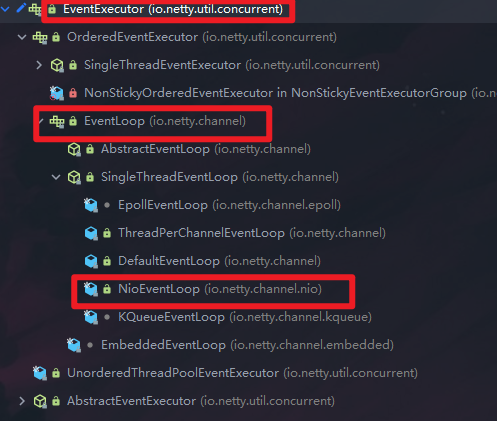
- BossGroup和WorkGroup类型都是
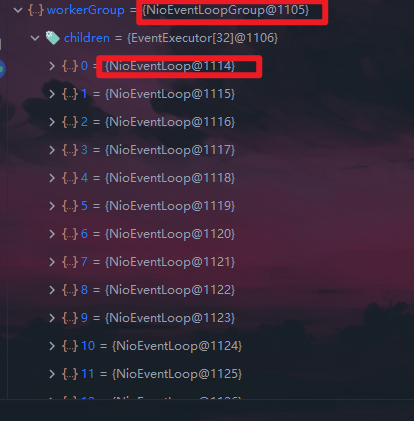
NioEventLoopGroup
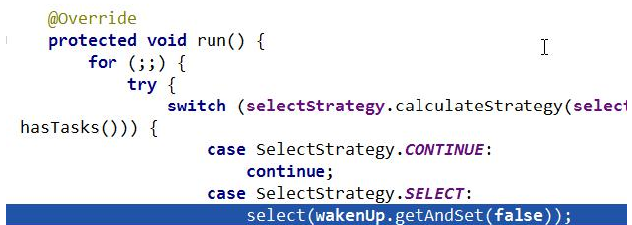
- NioEventLoopGroup相当于一个事件循环组,这个组中含有多个事件循环,每一个事件循环是NioEventLoop
- NioEventLoop表示一个不断循环执行处理任务的线程,每个NioEventLoop都有一个
Selector,用于监听绑定在其上的socket的网络通讯
- NioEventLoopGroup可以有多个线程,即可以含有多个NioEventLoop
- 每个Boss NioEventLoop循环执行的步骤有3步
- 轮询accept事件
- 处理accept事件,与client建立连接,生成
NioSocketChannel,并将其注册到某个WorkerNioEventLoop上的Selector
- 处理任务队列的任务,即runAllTasks
- 每个WorkerNioEventLoop循环执行的步骤
- 轮询read,write事件
- 处理I/O事件,即read、write事件,在对应的
NioSocketChannel上处理
- 处理任务队列的任务,即runAllTasks
- 每个WorkerNioEventLoop处理业务时,会使用
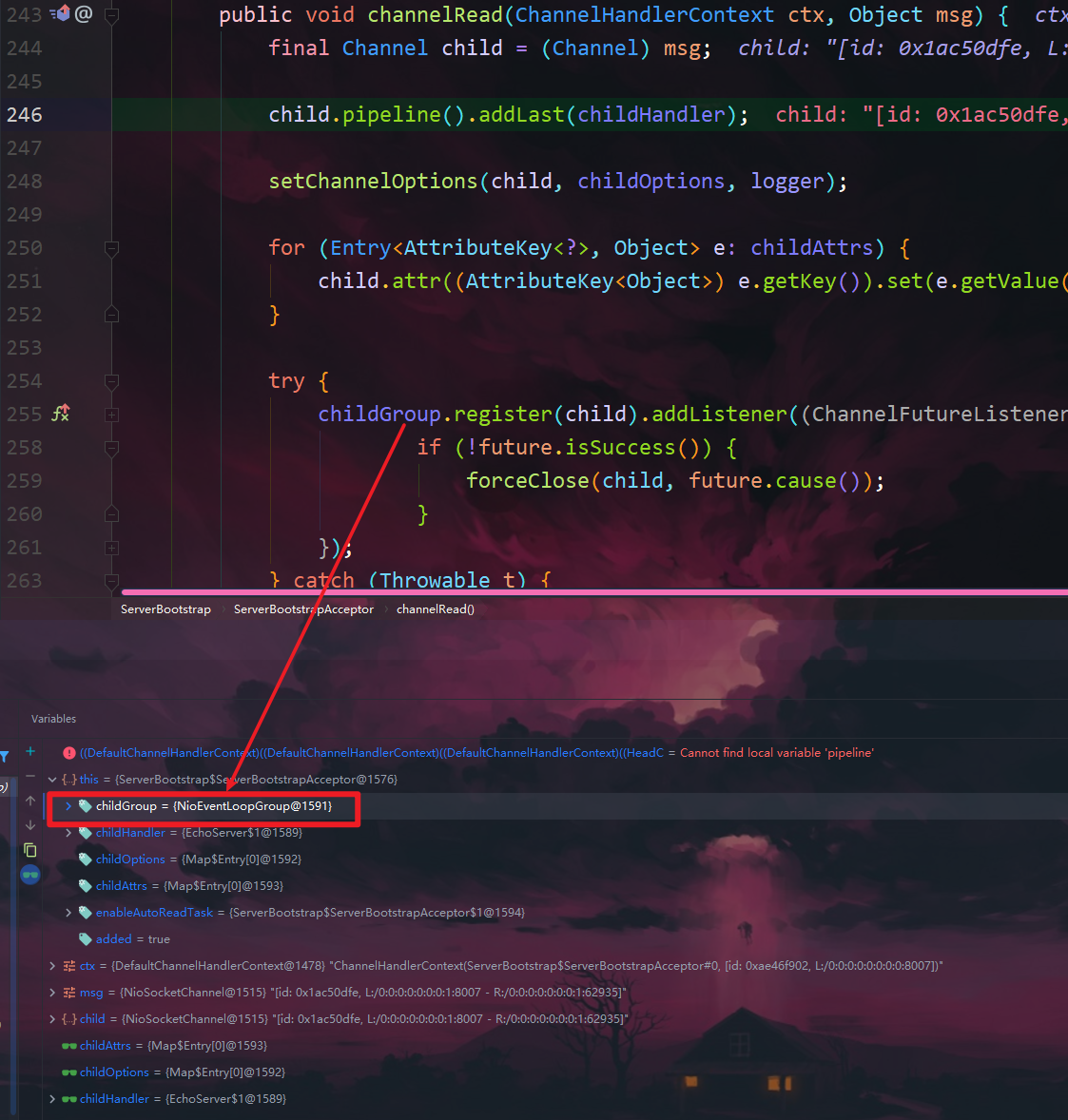
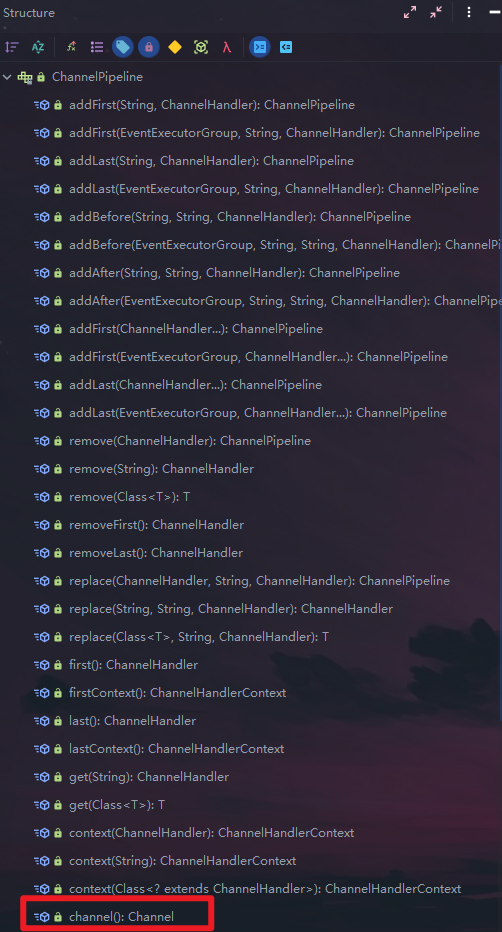
pipeline(管道),pipeline中包含了channel,即通过pipeline可以获取到对应通道,管道中维护了很多的处理器
5.8.4、Netty快速入门实例-TCP服务
- 实例要求:使用IDEA创建Netty项目
- Netty服务器在6668端口监听,客户端能发送消息给服务器"hello,服务器"
- 服务器可以回复消息给客户端"hello,客户器"
- 目的:对Netty线程模型有一个初步认识
- 说明:创建Maven项目,并引入Netty包
Bootstrap执行流程
ChannelFuture 在Netty中的所有的I/O操作都是异步执行的,这就意味着任何一个I/O操作会立刻返
回,不保证在调用结束的时候操作会执行完成。因此,会返回一个ChannelFuture的实例,通过这个实
例可以获取当前I/O操作的状态。
当我们要关闭 channel 时,可以调用 `channel.close()` 方法进行关闭。但是该方法也是一个异步方法。
真正的关闭操作并不是在调用该方法的线程中执行的,而是在 NIO 线程中执行真正的关闭操作
服务器端:
 1
 2
 3
 4
 5
 6
 7
 8
 9
10
11
12
13
14
15
16
17
18
19
20
21
22
23
24
25
26
27
28
29
30
31
32
33
34
35
36
37
38
39
40
41
42
43
44
45
46
47
48
49
50
51
52
53
54
55
56
57
58
59
60
61
62
63
|
package com.clover.netty.simple;

import io.netty.bootstrap.ServerBootstrap;
import io.netty.channel.ChannelFuture;
import io.netty.channel.ChannelInitializer;
import io.netty.channel.ChannelOption;
import io.netty.channel.EventLoopGroup;
import io.netty.channel.nio.NioEventLoopGroup;
import io.netty.channel.socket.SocketChannel;
import io.netty.channel.socket.nio.NioServerSocketChannel;

public class NettyServer {
  public static void main(String[] args) throws Exception{
      /*
       * 说明
       * 1.创建两个线程组 bossGroup 和 workerGroup
       * 2.bossGroup 只是处理连接请求,真正的和客户端业务处理,会交给 workerGroup 完成
       * 3.两个线程组都是无线循环
       */
      EventLoopGroup bossGroup = new NioEventLoopGroup();
      EventLoopGroup workerGroup = new NioEventLoopGroup();

      try {
          // 创建服务器的启动对象,配置参数
          ServerBootstrap bootstrap = new ServerBootstrap();

          // 使用链式编程来进行设置
          bootstrap.group(bossGroup,workerGroup)// 设置两个线程组
                  .channel(NioServerSocketChannel.class)// 使用NioSocketChannel作为服务器的通道实现类型
                  .option(ChannelOption.SO_BACKLOG,128)// 设置线程队列等待连接个数
                  .childOption(ChannelOption.SO_KEEPALIVE,true)// 设置保持活动连接状态
                  .childHandler(new ChannelInitializer<SocketChannel>() { // 创建一个通道初始化对象(匿名对象)
                      // 向workerGroup中EventLoop所关联的通道对应的pipeline设置处理器
                      @Override
                      protected void initChannel(SocketChannel ch) throws Exception {
                          ch.pipeline().addLast(new NettyServerHandler());
                      }
                  });// 给我们的workerGroup的 EventLoop对应的管道设置处理器

          System.out.println("服务器 is ready");

          /*
           * ChannelFuture 在Netty中的所有的I/O操作都是异步执行的,这就意味着任何一个I/O操作会立刻返回,不保证
		   * 在调用结束的时候操作会执行完成。因此,会返回一个ChannelFuture的实例,通过这个实例可以获取当前I/O操
		   * 作的状态。
           */

          // 绑定一个端口,并且同步,生成了一个ChannelFuture 对象
          // 启动服务器(并绑定端口)
          // 为什么使用同步?因为Netty是基于异步操作的,如果不使用同步,可能服务器还未启动就执行下面的语句了,就会产生异常
          ChannelFuture cf = bootstrap.bind(6668).sync();

          // 对关闭通道进行监听(只有当你有一个关闭通道这样的事件发生时,才会去进行处理)
          // 这里为什么也需要使用同步?因为不适用同步,他就会跳过这个语句直接执行finally中的语句关闭线程组了
		  // closeFuture().sync() 不是用于关闭 Channel ,而是允许你阻塞直到 Channel 关闭,然后执行一些额外的操作
		  // 它有一个监听的作用,当通道关闭的时候,它会返回一个 ChannelFuture,这个里面包含了IO操作的状态
          cf.channel().closeFuture().sync();
      } finally{
          bossGroup.shutdownGracefully();
          workerGroup.shutdownGracefully();
      }
  }
}
|
服务器端Handler
 1
 2
 3
 4
 5
 6
 7
 8
 9
10
11
12
13
14
15
16
17
18
19
20
21
22
23
24
25
26
27
28
29
30
31
32
33
34
35
36
37
38
39
40
41
42
43
44
|
package com.clover.netty.simple;

import io.netty.buffer.ByteBuf;
import io.netty.buffer.Unpooled;
import io.netty.channel.ChannelHandlerContext;
import io.netty.channel.ChannelInboundHandlerAdapter;
import io.netty.util.CharsetUtil;

/*
 * 说明
 * 1.我们自定义一个Handler需要继承netty规定好的某个HandlerAdapter(规范)
 * 2.这时我们自定义一个Handler,才能称之为一个handler
 */
public class NettyServerHandler extends ChannelInboundHandlerAdapter {
    /*
     * 读取数据(这里我们可以读取客户端发送的数据)
     * 1.ChannelHandlerContext ctx:上下文对象,含有管道pipeline(业务逻辑处理),通道channel(数据读写处理),地址
     * 2.Object msg:就是客户端发送的数据,默认时Object类型
     */
    @Override
    public void channelRead(ChannelHandlerContext ctx, Object msg) throws Exception {
        System.out.println("server ctx =" + ctx);
        // 将msg转化成一个ByteBuf
        // ByteBuf时Netty提供的,不是NIO的ByteBuffer
        ByteBuf buf = (ByteBuf) msg;
        System.out.println("客户端发送的消息是:" + buf.toString(CharsetUtil.UTF_8));
        System.out.println("客户端地址:" + ctx.channel().remoteAddress());
    }

    // 数据读取完毕返回给客户端的消息
    @Override
    public void channelReadComplete(ChannelHandlerContext ctx) throws Exception {
        // writeAndFlush 是 write方法 + flush方法
        // 将数据写入到缓冲区,并刷新
        // 一般讲,我们对这个发送的数据需要进行编码
        ctx.writeAndFlush(Unpooled.copiedBuffer("hello,客户端",CharsetUtil.UTF_8));
    }

    // 当出现异常时,一般是需要关闭通道
    @Override
    public void exceptionCaught(ChannelHandlerContext ctx, Throwable cause) throws Exception {
        ctx.channel().close();
    }
}
|
客户端
 1
 2
 3
 4
 5
 6
 7
 8
 9
10
11
12
13
14
15
16
17
18
19
20
21
22
23
24
25
26
27
28
29
30
31
32
33
34
35
36
37
38
39
40
41
42
|
package com.clover.netty.simple;

import io.netty.bootstrap.Bootstrap;
import io.netty.channel.ChannelFuture;
import io.netty.channel.ChannelInitializer;
import io.netty.channel.EventLoopGroup;
import io.netty.channel.nio.NioEventLoopGroup;
import io.netty.channel.socket.SocketChannel;
import io.netty.channel.socket.nio.NioSocketChannel;

public class NettyClient {
  public static void main(String[] args) throws Exception{
      // 客户端需要一个事件循环组
      EventLoopGroup group = new NioEventLoopGroup();

      try {
          // 创建一个客户端启动对象
          // 注意客户端使用的不是ServerBootstrap,而是Bootstrap
          Bootstrap bootstrap = new Bootstrap();

          // 设置相关参数,链式编程
          bootstrap.group(group) // 设置线程组
                  .channel(NioSocketChannel.class) // 设置客户端通道的实现类型(将来使用反射处理)
                  .handler(new ChannelInitializer<SocketChannel>() {
                      @Override
                      protected void initChannel(SocketChannel ch) throws Exception {
                          ch.pipeline().addLast(new NettyClientHandler());// 加入自己的处理器
                      }
                  });
          System.out.println("客户端 is ok");

          // 启动客户端去连接服务器端
          // 关于 ChannelFuture 后面要分析,涉及到Netty的异步模型
          ChannelFuture channelFuture = bootstrap.connect("127.0.0.1", 6668).sync();

          // 给关闭通道进行监听(sync是让其为阻塞到通道关闭后做额外的操作)
          channelFuture.channel().closeFuture().sync();
      }finally{
          group.shutdownGracefully();
      }
  }
}
|
客户端Handler
 1
 2
 3
 4
 5
 6
 7
 8
 9
10
11
12
13
14
15
16
17
18
19
20
21
22
23
24
25
26
27
28
29
30
|
package com.clover.netty.simple;

import io.netty.buffer.ByteBuf;
import io.netty.buffer.Unpooled;
import io.netty.channel.ChannelHandlerContext;
import io.netty.channel.ChannelInboundHandlerAdapter;
import io.netty.util.CharsetUtil;

public class NettyClientHandler extends ChannelInboundHandlerAdapter {
    // 当通道就绪时,就会触发该方法
    @Override
    public void channelActive(ChannelHandlerContext ctx) throws Exception {
        System.out.println("client " + ctx);
        ctx.writeAndFlush(Unpooled.copiedBuffer("hello,Server", CharsetUtil.UTF_8));
    }

    // 当通道有读取事件时,会触发
    @Override
    public void channelRead(ChannelHandlerContext ctx, Object msg) throws Exception {
        ByteBuf buf = (ByteBuf) msg;
        System.out.println("输出服务器回复的消息:" + buf.toString(CharsetUtil.UTF_8));
        System.out.println("服务器端的地址:" + ctx.channel().remoteAddress());
    }

    @Override
    public void exceptionCaught(ChannelHandlerContext ctx, Throwable cause) throws Exception {
        cause.printStackTrace();
        ctx.close();
    }
}
|
5.8.5、任务队列中的Task有3种典型使用场景
- 用户程序自定义的普通任务(使用线程睡眠来解释)
 1
 2
 3
 4
 5
 6
 7
 8
 9
10
11
12
13
14
15
16
17
|
@Override
public void channelRead(ChannelHandlerContext ctx, Object msg) throws Exception {
// 比如这里我们有一个非常耗费时间的业务->异步执行-> 提交到该channel对应的NIOEventLoop的taskQueue中
ctx.channel()
	.eventLoop()
	.execute(new Runnable() {
		  @Override
		  public void run() {
			try {
			  Thread.sleep(10 * 1000);
			  ctx.writeAndFlush(Unpooled.copiedBuffer("hello,客户端2",CharsetUtil.UTF_8));
			} catch (Exception e) {
				System.out.println("发生异常" + e.getMessage());
			}
		  }
		});
}
|
- 用户自定义定时任务
 1
 2
 3
 4
 5
 6
 7
 8
 9
10
11
12
13
14
15
16
|
// 解决方案2:用户自定义定时任务
        /*
         * 使用scheduled,先执行taskQueue,执行完毕后再执行scheduled。并且scheduled里的延迟时间是从taskQueue执行第一个任务的时候开始计算的
         * 如果你写了Thread.sleep(),那么就会按照该设置的延时加上schedule中设置的时间总和
         */
        ctx.channel().eventLoop().schedule(new Runnable() {
            @Override
            public void run() {
                try {
                    Thread.sleep(5 * 1000);
                    ctx.writeAndFlush(Unpooled.copiedBuffer("hello,客户端3",CharsetUtil.UTF_8));
                } catch (Exception e) {
                    System.out.println("发生异常" + e.getMessage());
                }
            }
        },15, TimeUnit.SECONDS);
|
-
非当前Reactor线程调用Channel的各种方法
 例如在推送系统的业务线程里面,根据用户的表示,找到对应的Channel引用,然后调用Write类方法
 向该用户推送消息,就会进入到这种场景。最终的Write会提交到任务队列中后被异步消费
方案再说明:
- Netty抽象出两组线程池,BossGroup专门负责接收客户端连接,WorkerGroup专门负责网络读写操作。
- NioEventLoop表示一个不断循环执行处理任务的线程,每个NioEventLoop都有一个selector,用于监听绑定在其上的socket网络通道。
- NioEventLoop内部采用串行化设计,从消息的读取->解码->处理->编码->发送,始终由IO线程NioEventLoop负责
- NioEventLoopGroup下包含多个NioEventLoop
- 每个NioEventLoop中包含一个Selector,一个taskQueue
- 每个NioEventLoop的Selector上可以注册监听多个NioSocketChannel
- 每个NioSocketChannel只会绑定在唯一的NioEventLoop上
- 每个NioSocketChannel都会绑定有一个自己的ChannelPipeline
5.9、异步模型
5.9.1、基本介绍
- 异步的概念和同步相对。当一个异步过程调用发出后,调用者不能立刻得到结果。实际处理这个调用的组件在完成后,通过状态、通知和回调来通知调用者
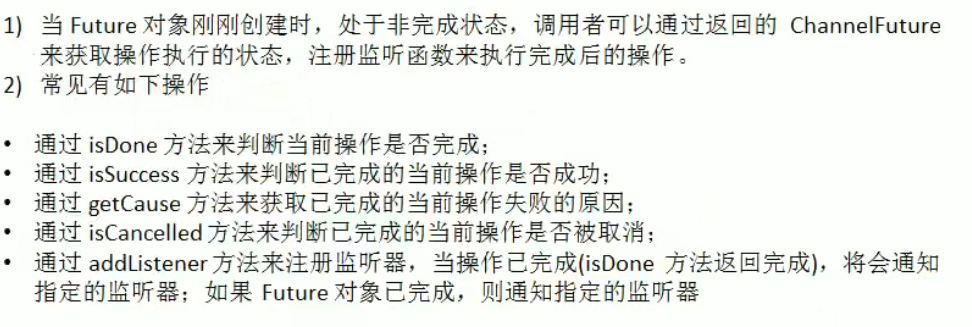
- Netty中的IO操作是异步的,包括Bind、Write、Connect等操作会简单的返回一个ChannelFuture
- 调用者并不能立刻获得结果,而是通过Future-Listener机制,用户可以方便的主动获取或者通过通知机制获得IO操作结果
- Netty的异步模型是建立在future和callback之上的,callback就是回调。重点说Future,它的核心思想是:假设一个方法fun,计算过程可能非常耗时,等待fun返回显然不合适。那么可以在调用fun 的时候,立马返回一个Future,后续可以通过Future去监控方法fun的处理过程(即:Future-Listener机制)
5.9.2、Future说明
- 表示异步的执行结果,可以通过它提供的方法来检测执行是否完成
- ChannelFuture是一个接口:public interface ChannelFuture ,我们可以添加监听器,当监听的事件发生时,就会通知到监听器
- 案例说明
5.9.3、工作原理示意图
说明:
- 在使用Netty进行编程时,拦截操作和转换出入站数据只需要提供 callback 或利用 future 即可。这使得链式操作简单、高效,并有利于编写可重用的、通用的代码。
- Netty框架的目标就是让你的业务逻辑从网络基础应用编码中分离出来、解脱出来
5.9.4、Future-Listener机制
举例说明:
演示:绑定端口是异步操作,当绑定操作处理完,将会调用相应的监听器处理逻辑
 1
 2
 3
 4
 5
 6
 7
 8
 9
10
|
cf.addListener(new ChannelFutureListener() {
  @Override
  public void operationComplete(ChannelFuture future) throws Exception {
	  if(future.isSuccess()){
		  System.out.println("监听端口 6668成功");
	  } else {
		  System.out.println("监听端口 6668失败");
	  }
  }
});
|
小结:相比传统阻塞I/O,执行I/O操作后线程会被阻塞住,直到操作完成;异步处理的好处是不会造成
线程阻塞,线程在I/O操作期间可以执行别的程序,在高并发情况下会更稳定和更高的吞吐量
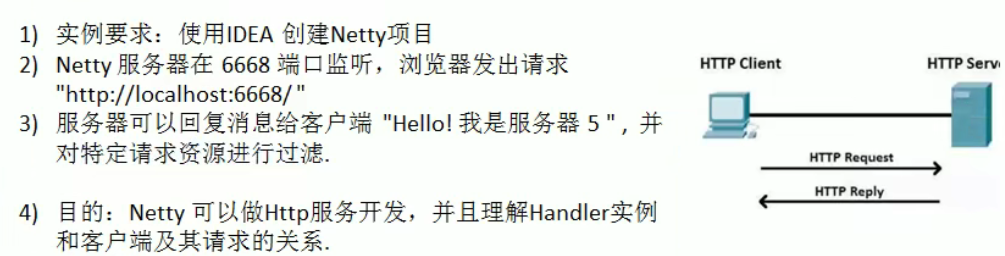
5.10、快速入门实例-HTTP服务
服务器端
 1
 2
 3
 4
 5
 6
 7
 8
 9
10
11
12
13
14
15
16
17
18
19
20
21
22
23
24
25
26
27
28
29
30
31
|
package com.clover.netty.http;

import io.netty.bootstrap.ServerBootstrap;
import io.netty.channel.ChannelFuture;
import io.netty.channel.EventLoopGroup;
import io.netty.channel.nio.NioEventLoopGroup;
import io.netty.channel.socket.nio.NioServerSocketChannel;

public class TestServer {
  public static void main(String[] args) throws Exception{

      EventLoopGroup bossGroup = new NioEventLoopGroup();
      EventLoopGroup workerGroup = new NioEventLoopGroup();

      try {
          ServerBootstrap serverBootstrap = new ServerBootstrap();

          serverBootstrap.group(bossGroup,workerGroup)
                  .channel(NioServerSocketChannel.class)
                  .childHandler(new TestServerInitializer());

          // 注意:谷歌浏览器使用6668端口可能无法访问,可能存在安全验证,换一个端口就好
          ChannelFuture channelFuture = serverBootstrap.bind(15989).sync();

          channelFuture.channel().closeFuture().sync();
      }finally{
          bossGroup.shutdownGracefully();
          workerGroup.shutdownGracefully();
      }
  }
}
|
向管道加入处理器
 1
 2
 3
 4
 5
 6
 7
 8
 9
10
11
12
13
14
15
16
17
18
19
20
21
22
23
24
25
|
package com.clover.netty.http;

import io.netty.channel.ChannelInitializer;
import io.netty.channel.ChannelPipeline;
import io.netty.channel.socket.SocketChannel;
import io.netty.handler.codec.http.HttpServerCodec;

public class TestServerInitializer extends ChannelInitializer<SocketChannel> {
    @Override
    protected void initChannel(SocketChannel ch) throws Exception {
        // 向管道加入处理器
        // 得到管道
        ChannelPipeline pipeline = ch.pipeline();

        // 加入一个netty提供的httpServerCodec(编解码器)
        /*
         * HttpServerCodec说明
         * 1.HttpServerCodec 是netty提供处理Http的 编-解码器
         */
        pipeline.addLast("MyHttpServerCodec",new HttpServerCodec());

        // 2.增加一个自定的handler
        pipeline.addLast("MyTestHttpServerHandler",new TestHttpServerHandler());
    }
}
|
自定义handler
 1
 2
 3
 4
 5
 6
 7
 8
 9
10
11
12
13
14
15
16
17
18
19
20
21
22
23
24
25
26
27
28
29
30
31
32
33
34
35
36
37
38
39
40
41
42
43
44
45
46
47
48
49
50
51
52
53
54
55
56
|
package com.clover.netty.http;

import io.netty.buffer.ByteBuf;
import io.netty.buffer.Unpooled;
import io.netty.channel.ChannelHandlerContext;
import io.netty.channel.SimpleChannelInboundHandler;
import io.netty.handler.codec.http.*;
import io.netty.util.CharsetUtil;

import java.net.URI;
import java.nio.charset.Charset;

/*
 * 说明
 * 1.SimpleChannelInboundHandler 是 ChannelInboundHandlerAdapter的子类
 * 2.HttpObject 客户端和服务器端相互通讯的数据被封装成HttpObject
 */
public class TestHttpServerHandler extends SimpleChannelInboundHandler<HttpObject> {

    // channelRead0读取客户端数据
    @Override
    protected void channelRead0(ChannelHandlerContext ctx, HttpObject msg) throws Exception {
        // 判断msg 是不是 httprequest请求
        if( msg instanceof HttpRequest){

            System.out.println("pipeline hascode =" + ctx.pipeline().hashCode()+ " TestHttpServerHandler hascode =" +this.hashCode());

            System.out.println("msg 类型=" + msg.getClass());
            System.out.println("客户端地址" + ctx.channel().remoteAddress());

            // 将msg转化为HttpRequest
            HttpRequest httpRequest = (HttpRequest) msg;
            //获取uri,过滤指定资源
            URI uri = new URI(httpRequest.uri());
            if("/favicon.ico".equals(uri.getPath())){
                System.out.println("请求了 favicon.ico,不做响应");
                return;
            }

            // 回复信息给浏览器,需要满足http协议
            ByteBuf content = Unpooled.copiedBuffer("hello,我是服务器", CharsetUtil.UTF_8);

            // 构造一个http的响应,即httpResponse
            FullHttpResponse response = new DefaultFullHttpResponse(HttpVersion.HTTP_1_1, HttpResponseStatus.OK, content);

            /*
             * 注意:如果中文乱码,则需要在 CONTENT_TYPE 中,修改为text/plain;charset=utf-8,或者直接将CharsetUtil.UTF_8改为UTF_16
             */
            response.headers().set(HttpHeaderNames.CONTENT_TYPE,"text/plain;charset=utf-8");
            response.headers().set(HttpHeaderNames.CONTENT_LENGTH,content.readableBytes());

            // 将构建好的response返回
            ctx.writeAndFlush(response);
        }
    }
}
|
http不是一个长连接,用完即断掉
当你有多个浏览器连接服务器时,每个连接对应的pipeline和handler都是唯一的、不一样的,不是公用一个pipeline和handler
浏览器刷新时也会产生一个新的pipeline和handler,这是因为http协议原因所导致的,与TCP协议还是有区别的
6、核心模块组件
6.1、Bootstrap、ServerBootstrap
- Bootstrap 意思是引导,一个 Netty 应用通常由一个 Bootstrap 开始,主要作用是配置整个 Netty 程序,串联各个组件,Netty中
Bootstrap 类是客户端程序的启动引导类,ServerBootstrap是服务端启动引导类
- 常见的方法有
- public ServerBootstrap group(EventLoopGroup parentGroup, EventLoopGroup childGroup),该方法用于服务器端,用来设置两个 EventLoop
- public B group(EventLoopGroup group) ,该方法用于客户端,用来设置一个 EventLoop
- public B channel(Class<> channelClass),该方法用来设置一个服务器端的通道实现
- public <> B option(ChannelOption<> option, T value),用来给 ServerChannel 添加配置
- public <> ServerBootstrap childOption(ChannelOption<> childOption, T value),用来给接收到的通道添加配置
- public ServerBootstrap childHandler(ChannelHandler childHandler),该方法用来设置业务处理类(自定义的 handler)
- public ChannelFuture bind(int inetPort) ,该方法用于服务器端,用来设置占用的端口号
- public ChannelFuture connect(String inetHost, int inetPort) ,该方法用于客户端,用来连接服务器端
6.2、Future、ChannelFuture
- Netty 中所有的 IO 操作都是异步的,不能立刻得知消息是否被正确处理。但是可以过一会等它执行完成或者直接注册一个监听,具体的实现就是通过
Future 和 ChannelFutures,他们可以注册一个监听,当操作执行成功或失败时监听会自动触发注册的监听事件
- 常见的方法有
- Channel channel(),返回当前正在进行 IO 操作的通道
- ChannelFuture sync(),等待同步操作执行完毕
6.3、Channel
- Netty 网络通信的组件,能够用于执行网络 I/O 操作
- 通过Channel 可获得当前网络连接的通道的状态
- 通过Channel 可获得 网络连接的配置参数 (例如接收缓冲区大小)
- Channel 提供异步的网络 I/O 操作(如建立连接,读写,绑定端口),异步调用意味着任何 I/O 调用都将立即返回,并且不保证在调用结束时所请求的 I/O 操作已完成
- 调用立即返回一个 ChannelFuture 实例,通过注册监听器到 ChannelFuture 上,可以 监控I/O 操作成功、失败或取消时回调通知调用方
- 支持关联 I/O 操作与对应的处理程序
- 不同协议、不同的阻塞类型的连接都有不同的 Channel 类型与之对应,常用的 Channel 类型:
- NioSocketChannel,异步的客户端 TCP Socket 连接。
- NioServerSocketChannel,异步的服务器端 TCP Socket 连接。
- NioDatagram Channel,异步的 UDP 连接。
- NioSctpChannel,异步的客户端 Sctp 连接。
- NioSctpServerChannel,异步的 Sctp 服务器端连接,这些通道涵盖了 UDP 和 TCP 网络 IO 以及文件 IO。
6.4、Selector
- Netty 基于 Selector 对象实现 I/O 多路复用,通过 Selector 一个线程可以监听多个连接的 Channel 事件
- 当向一个 Selector 中注册 Channel 后,Selector 内部的机制就可以自动不断地查询(Select) 这些注册的 Channel 是否有已就绪的 I/O 事件(例如可读,可写,网络连接完成等),这样程序就可以很简单地使用一个线程高效地管理多个 Channel
6.5、ChannelHandler 及其实现类
-
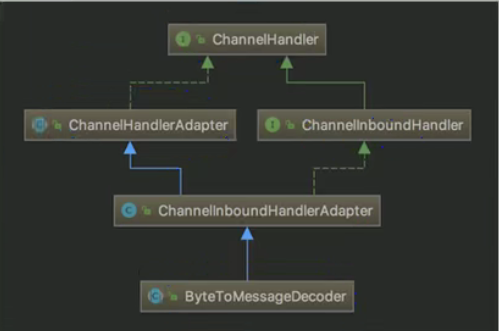
ChannelHandler 是一个接口,处理 I/O 事件或拦截 I/O 操作,并将其转发到其 ChannelPipeline(业务处理链)中的下一个处理程序
-
ChannelHandler 本身并没有提供很多方法,因为这个接口有许多的方法需要实现,方便使用期间,可以继承它的子类
-
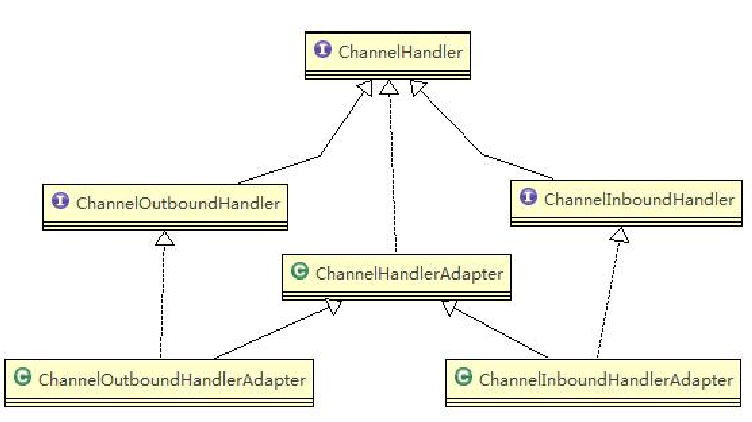
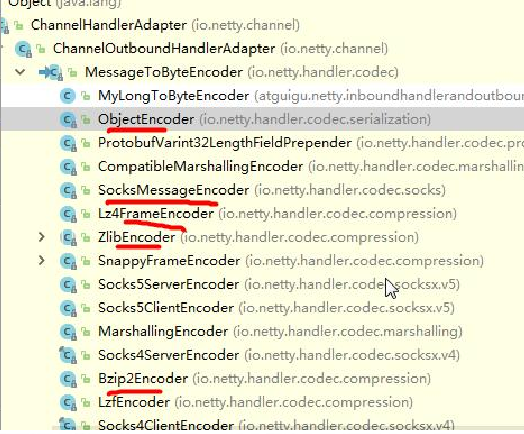
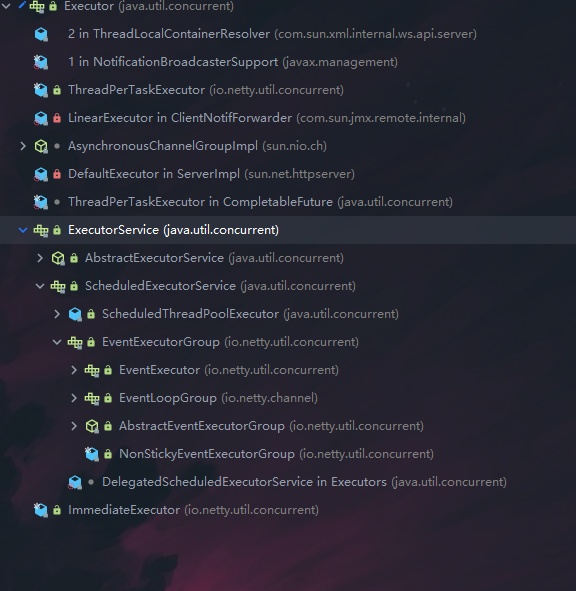
ChannelHandler 及其实现类一览图
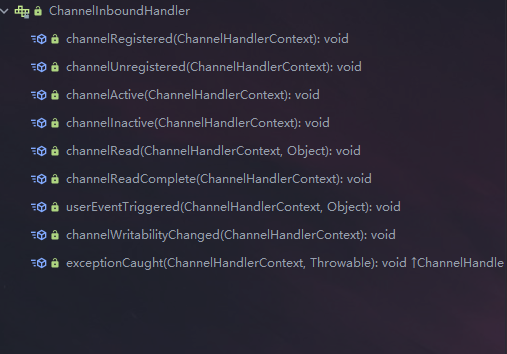
- ChannelInboundHandler 用于处理入站 I/O 事件
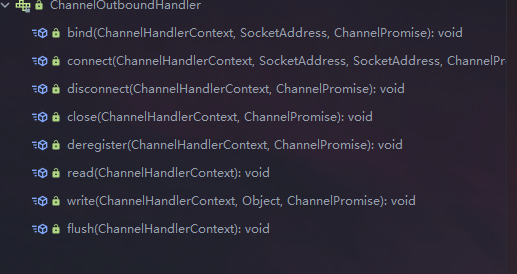
- ChannelOutboundHandler 用于处理出站 I/O 操作
适配器
- ChannelInboundHandlerAdapter 用于处理入站 I/O 事件
- ChannelOutboundHandlerAdapter 用于处理出站 I/O 操作
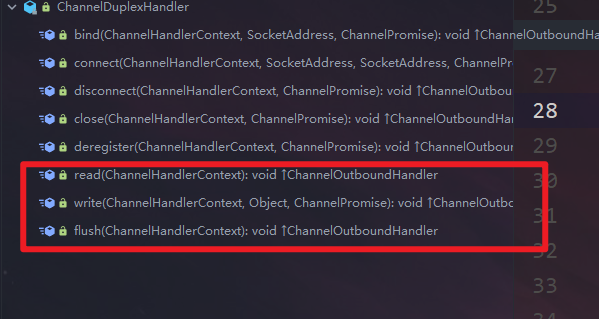
- ChannelDuplexHandler 用于处理入站和出站事件
-
我们经常需要自定义一个 Handler 类去继承 ChannelInboundHandlerAdapter,然后通过重写相应方法实现业务逻辑,我们接下来看看一般都需要重写哪些方
 1
 2
 3
 4
 5
 6
 7
 8
 9
10
11
12
13
14
15
16
17
18
19
20
21
22
23
24
25
26
27
28
29
30
31
32
33
34
35
36
37
38
|
public class Channel InboundHandlerAdapter extends Channel HandlerAdapter
implements Channel InboundHandler {
    public Channel InboundHandlerAdapter() { }
    public void channelRegistered(ChannelHandlerContext ctx) throws Exception {
        ctx.fireChannelRegistered();
    }
    public void channelUnregistered(ChannelHandlerContext ctx) throws Exception {
        ctx.fireChannelUnregistered();
    }
    //通道就绪事件
    public void channelActive(ChannelHandlerContext ctx) throws Exception {
        ctx.fireChannelActive();
    }
    public void channelInactive(ChannelHandlerContext ctx) throws Exception {
        ctx.fireChannelInactive();
    }
    //通道读取数据事件
    public void channelRead(ChannelHandlerContext ctx, Object msg) throws Exception {
        ctx.fireChannelRead(msg);
	}
	//数据读取完毕事件
	public void channelReadComplete(ChannelHandlerContext ctx, Object msg) throws Exception {
        ctx.fireChannelRead(msg);
	}
	//数据读取完毕事件
	public void channelReadComplete(ChannelHandlerContext ctx, Object msg) throws Exception {
        ctx.fireChannelRead(msg);
	}
	public void userEventTriggered(ChannelHandlerContext ctx, Object evt) throws Exception {
        ctx.fireUserEventTriggered(evt);
	}
	public void channelWritabilityChanged(ChannelHandlerContext ctx) throws Exception {
        ctx.fireChannelWritabilityChanged(msg);
	}
	//通道发生异常事件
	public void exceptionCaught(ChannelHandlerContext ctx, Throwable cause) throws Exception {
        ctx.fireExceptionCaught(msg);
	}
|
6.6、Pipeline和ChannelPipeline
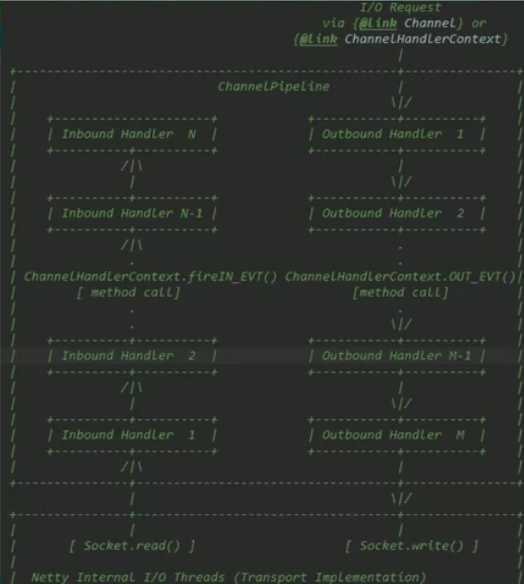
ChannelPipeline 是一个重点:
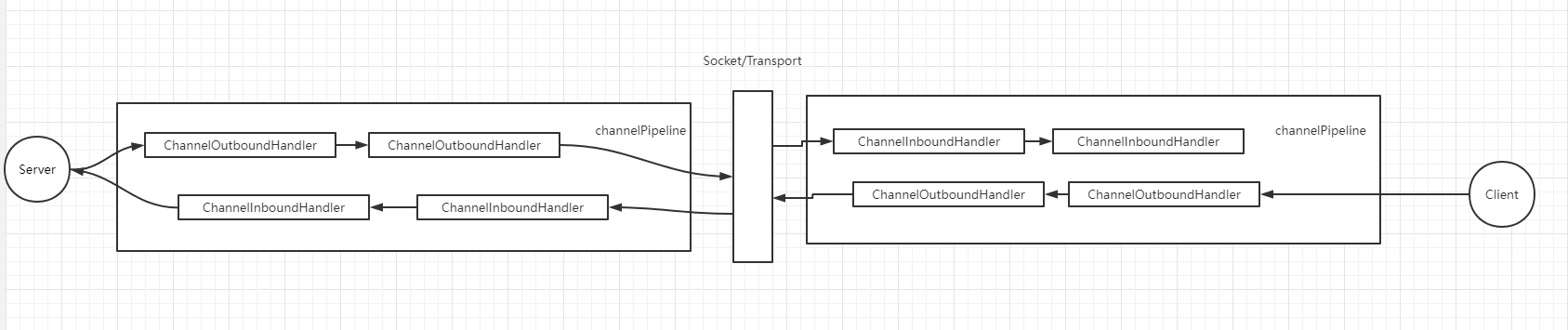
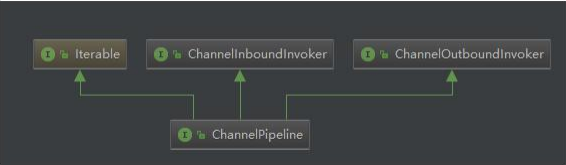
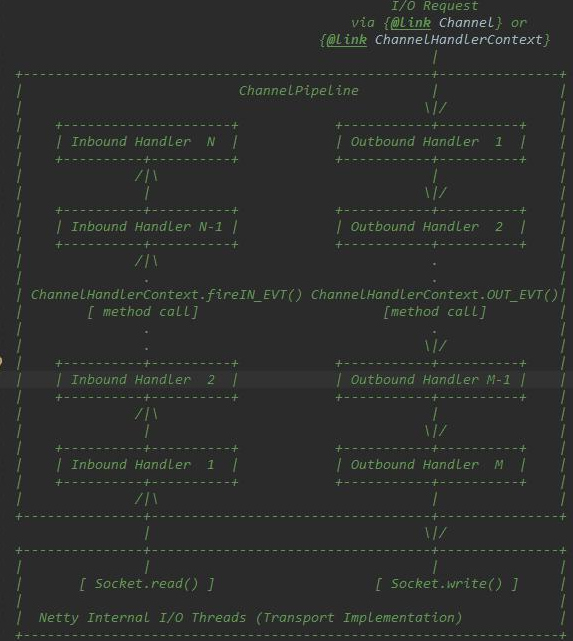
- ChannelPipeline 是一个 Handler 的集合,它负责处理和拦截 inbound 或者 outbound 的事件和操作,相当于一个贯穿 Netty 的链。(也可以这样理解:ChannelPipeline 是保存 ChannelHandler 的 List,用于处理或拦截 Channel 的入站事件和出站操作)
- ChannelPipeline 实现了一种高级形式的拦截过滤器模式,使用户可以完全控制事件的处理方式,以及 Channel 中各个的 ChannelHandler 如何相互交互
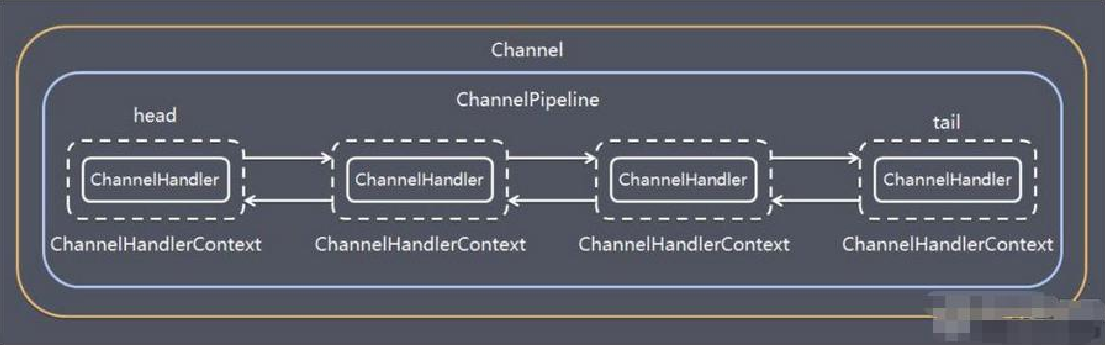
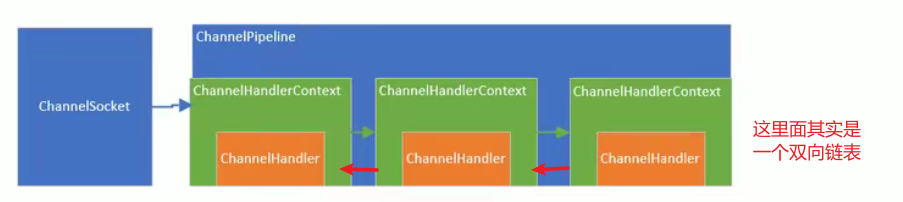
- 在 Netty 中每个 Channel 都有且仅有一个 ChannelPipeline 与之对应,它们的组成关系如下
- 一个 Channel 包含了一个 ChannelPipeline,而 ChannelPipeline 中又维护了一个由 ChannelHandlerContext 组成的双向链表,并且每个 ChannelHandlerContext 中又关联着一个 ChannelHandler
- 入站事件和出站事件在一个双向链表中,
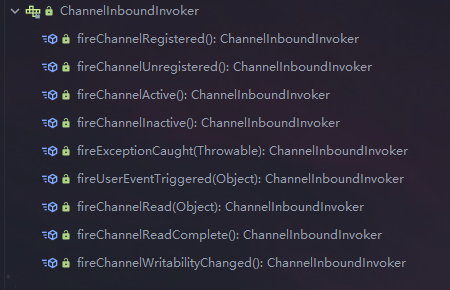
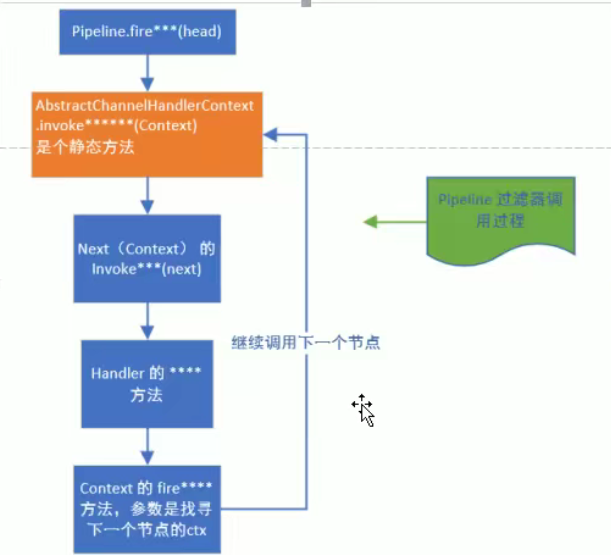
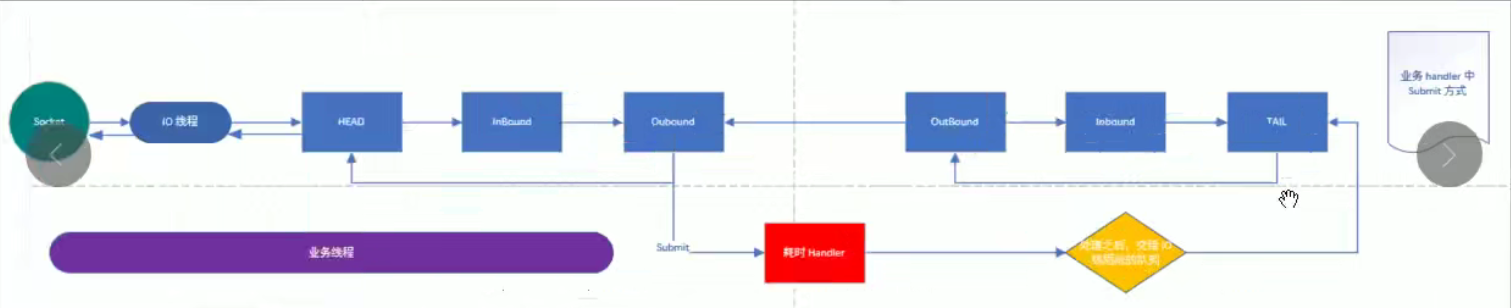
入站事件会从链表 head 往后传递到最后一个入站的 handler,出站事件会从链表 tail 往前传递到最前一个出站的 handler,两种类型的 handler 互不干扰
- 常用方法
- Channel Pipeline addFirst(ChannelHandler… handlers),把一个业务处理类(handler)添加到链中的第一个位置
- Channel Pipeline addLast(ChannelHandler… handlers),把一个业务处理类(handler)添加到链中的最后一个位置
6.7、ChannelHandlerContext
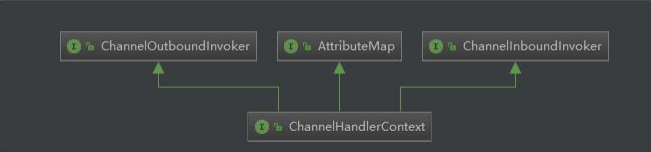
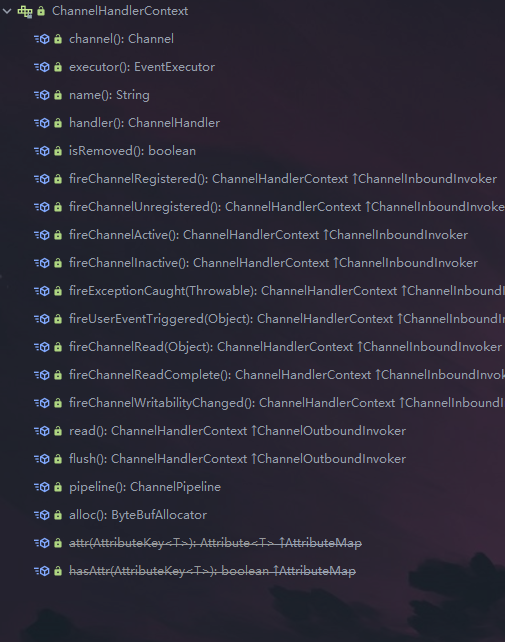
- 保存 Channel 相关的所有上下文信息,同时关联一个 ChannelHandler 对象
- 即 ChannelHandlerContext 中包含一个具体的事件处理器 ChannelHandler , 同时ChannelHandlerContext 中也绑定了对应的 pipeline 和 Channel 的信息,方便对 ChannelHandler进行调用
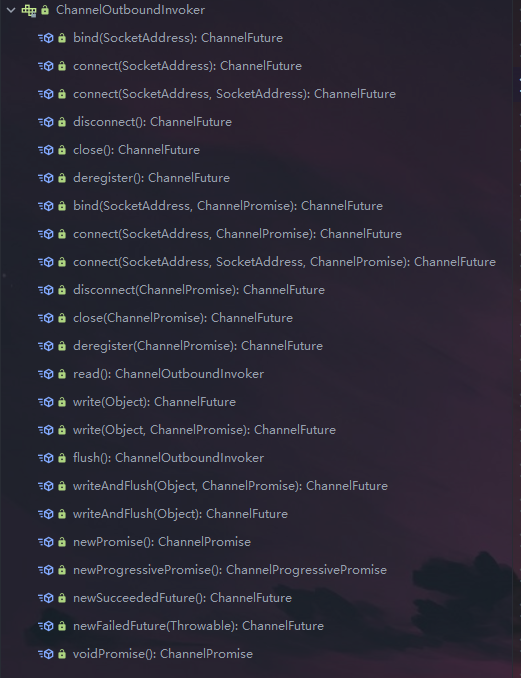
- 常用方法
- ChannelFuture close(),关闭通道
- ChannelOutboundInvoker flush(),刷新
- ChannelFuture writeAndFlush(Object msg) , 将数据写到 ChannelPipeline 中当前ChannelHandler 的下一个 ChannelHandler 开始处理 (出站)
6.8、ChannelOption
- Netty 在创建 Channel 实例后,一般都需要设置 ChannelOption 参数
- ChannelOption 参数如下:
- ChannelOption.SO_BACKLOG
- 对应TCP/IP协议 listen 函数中的 backlog 参数,用来初始化服务器可连接队列大小。服务端处理客户端连接请求是顺序处理的,所以同一时间只能处理一个客户端连接。多个客户端来的时候,服务端将不能处理的客户端连接请求放在队列中等待处理,backlog参数指定了队列的大小
- ChannelOption.SO_KEEPALIVE
6.9、EventLoopGroup 和其实现类 NioEventLoopGroup
- EventLoopGroup 是一组 EventLoop 的抽象,Netty为了更好的利用多核 CPU 资源,一般会有多个 EventLoop 同时工作,每个 EventLoop 维护着一个Selector实例
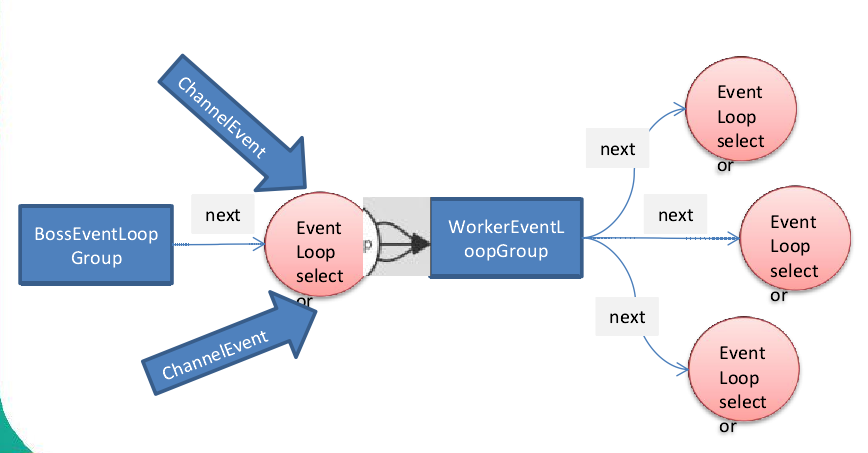
- EventLoopGroup 提供 next 接口,可以从组里面按照一定规则获取其中一个 EventLoop来处理任务。在 Netty 服务器端编程中,我们一般都需要提供两个 EventLoopGroup,例如:BossEventLoopGroup 和 WorkerEventLoopGroup
- 通常一个服务端口即一个 ServerSocketChannel 对应一个 Selector 和一个 EventLoop 线程。BossEventLoopGroup 负责接收客户端的连接并将 SocketChannel 交给 WorkerEventLoopGroup 来进行 IO 处理,如下图所示
- BossEventLoopGroup 通常是一个单线程的 EventLoop,EventLoop 维护着一个注册了ServerSocketChannel 的 Selector 实例,BossEventLoop 不断轮询Selector 将连接事件分离出来
- 通常是OP_ACCEPT 事件,然后将接收到的 SocketChannel 交给 WorkerEventLoopGroup
- WorkerEventLoopGroup 会由 next 选择其中一个 EventLoop来将这个SocketChannel 注册到其维护的 Selector 并对其后续的 IO 事件进行处理
- 常用方法
- public NioEventLoopGroup(),构造方法
- public Future<> shutdownGracefully(),断开连接,关闭线程
6.10、Unpooled类
- Netty 提供一个专门用来
操作缓冲区(即Netty的数据容器)的工具类
- 常用方法如下所示
1
2
|
//通过给定的数据和字符编码返回一个 ByteBuf 对象(类似于 NIO 中的 ByteBuffer 但有区别)
public static ByteBuf copiedBuffer(CharSequence string, Charset charset)
|
- 举例说明Unpooled 获取 Netty的数据容器ByteBuf 的基本使用
(案例说明)
实例代码一
 1
 2
 3
 4
 5
 6
 7
 8
 9
10
11
12
13
14
15
16
17
18
19
20
21
22
23
24
25
26
27
28
29
30
31
32
33
34
35
36
37
38
|
package com.clover.netty.buf;

import io.netty.buffer.ByteBuf;
import io.netty.buffer.Unpooled;

public class NettyByteBuf01 {
  public static void main(String[] args) {
      // 先创建一个ByteBuf
      /*
       * 说明
       * 1.创建对象,该对象包含一个数组array,是一个byte[10]类型的数组
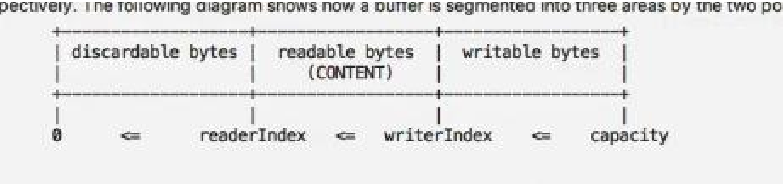
       * 2.在netty的buffer中,不需要使用flip反转
       *    底层维护了 readerIndex 和 writerIndex
       * 3.通过 readerIndex 和 writerIndex 和 capacity ,将buffer分成三个区域
       * 0---readerIndex,已经读取的区域
       * readerIndex --- writerIndex,可以读取的区域
       * writerIndex --- 0,可写的区域
       */
      ByteBuf buf = Unpooled.buffer(10);

      for (int i = 0; i < 10; i++){
          buf.writeByte(i);
      }

      System.out.println("capacity=" + buf.capacity());

    // 输出
    //      for (int i = 0; i < buf.capacity(); i++){
    //          // 这种方法是通过下标获取对应的值,不会使readerIndex改变值
    //          System.out.println(buf.getByte(i));
    //      }

      // 改变readerIndex的输出方式
      for (int i = 0;i < buf.capacity(); i++) {
          System.out.println(buf.readByte());
      }
  }
}
|
实例代码二
 1
 2
 3
 4
 5
 6
 7
 8
 9
10
11
12
13
14
15
16
17
18
19
20
21
22
23
24
25
26
27
28
29
30
31
32
33
34
35
36
37
38
39
40
41
42
43
44
45
46
47
48
|
package com.clover.netty.buf;

import io.netty.buffer.ByteBuf;
import io.netty.buffer.Unpooled;
import io.netty.util.CharsetUtil;

import java.nio.charset.Charset;

public class NettyByteBuf02 {
  public static void main(String[] args) {
      //创建ByteBuf
      /*
       * 说明
       * 第一个参数代表写入内容,第二个代表内容的字符集编码
       */
      ByteBuf buf = Unpooled.copiedBuffer("hello,world!", Charset.forName("utf-8"));

      // 使用相关的方法
      if (buf.hasArray()){
          // 获取buf的数组
          byte[] content = buf.array();

          System.out.println(new String(content,CharsetUtil.UTF_8));
          System.out.println("bytebuf=" + buf);

          // 获取数组位移偏移量
          System.out.println(buf.arrayOffset());// 0
          System.out.println(buf.readerIndex());// 0
          System.out.println(buf.writerIndex());// 12
          System.out.println(buf.capacity());// 36

          //System.out.println(buf.readByte());// 104 这是h代表的ASCII码
          System.out.println(buf.getByte(0));// 104 这是h代表的ASCII码

          int len = buf.readableBytes();// 获取可读字节数
          System.out.println("len=" + len);// 如果在前面没有使用readbyte读取数据,则不会对可读字节产生影响,如果使用就会有影响

          // 使用for循环取出各个字节
          for (int i = 0; i < len; i++) {
              System.out.println((char) buf.getByte(i));
          }

          // 按照某个范围读取
          System.out.println(buf.getCharSequence(0,4,Charset.forName("utf-8")));
          System.out.println(buf.getCharSequence(4,6,Charset.forName("utf-8")));
      }
  }
}
|
6.11、群聊系统升级
- 编写一个 Netty 群聊系统,实现服务器端和客户端之间的数据简单通讯(非阻塞)
- 实现多人群聊
- 服务器端:可以监测用户上线,离线,并实现消息转发功能
- 客户端:通过channel 可以无阻塞发送消息给其它所有用户,同时可以接受其它用户发送的消息(由服务器转发得到)
- 目的:进一步理解Netty非阻塞网络编程机制
服务器端:
 1
 2
 3
 4
 5
 6
 7
 8
 9
10
11
12
13
14
15
16
17
18
19
20
21
22
23
24
25
26
27
28
29
30
31
32
33
34
35
36
37
38
39
40
41
42
43
44
45
46
47
48
49
50
51
52
53
54
55
56
57
58
59
60
|
package com.clover.netty.groupchat;

import io.netty.bootstrap.ServerBootstrap;
import io.netty.channel.*;
import io.netty.channel.nio.NioEventLoopGroup;
import io.netty.channel.socket.SocketChannel;
import io.netty.channel.socket.nio.NioServerSocketChannel;
import io.netty.handler.codec.string.StringDecoder;
import io.netty.handler.codec.string.StringEncoder;

public class GroupChatServer {
    // 监听端口
    private int port;

    public GroupChatServer(int port){
        this.port = port;
    }

    public void run() throws Exception{

        EventLoopGroup bossGroup = new NioEventLoopGroup(1);
        EventLoopGroup workerGroup = new NioEventLoopGroup();

        try{
            ServerBootstrap bootstrap = new ServerBootstrap();

            bootstrap.group(bossGroup,workerGroup)
                    .channel(NioServerSocketChannel.class)
                    .option(ChannelOption.SO_BACKLOG,128)
                    .childOption(ChannelOption.SO_KEEPALIVE,true)
                    .childHandler(new ChannelInitializer<SocketChannel>() {
                        @Override
                        protected void initChannel(SocketChannel ch) throws Exception {
                            // 获取到pipeline
                            ChannelPipeline pipeline = ch.pipeline();
                            // 向pipeline中加入解码器
                            pipeline.addLast("decoder",new StringDecoder());
                            // 向pipeline中加入编码器
                            pipeline.addLast("encoder",new StringEncoder());
                            // 加入自己的业务处理handler
                            pipeline.addLast(new GroupChatServerHandler());
                        }
                    });

            System.out.println("netty 服务器启动");
            ChannelFuture channelFuture = bootstrap.bind(port).sync();

            // 监听关闭事件
            channelFuture.channel().closeFuture().sync();
        }finally{
            bossGroup.shutdownGracefully();
            workerGroup.shutdownGracefully();
        }

    }

  public static void main(String[] args) throws Exception {
        new GroupChatServer(7000).run();
  }
}
|
服务器端handler:
 1
 2
 3
 4
 5
 6
 7
 8
 9
10
11
12
13
14
15
16
17
18
19
20
21
22
23
24
25
26
27
28
29
30
31
32
33
34
35
36
37
38
39
40
41
42
43
44
45
46
47
48
49
50
51
52
53
54
55
56
57
58
59
60
61
62
63
64
65
66
67
68
69
70
71
72
73
74
75
76
77
78
|
package com.clover.netty.groupchat;

import io.netty.channel.Channel;
import io.netty.channel.ChannelHandlerContext;
import io.netty.channel.SimpleChannelInboundHandler;
import io.netty.channel.group.ChannelGroup;
import io.netty.channel.group.DefaultChannelGroup;
import io.netty.util.concurrent.GlobalEventExecutor;

import java.text.SimpleDateFormat;
import java.util.Date;

public class GroupChatServerHandler extends SimpleChannelInboundHandler<String> {
    // 定义一个channel组,管理所有的channel
    // GlobalEventExecutor.INSTANCE 是全局的事件执行器,是一个单例
    private static ChannelGroup channelGroup= new DefaultChannelGroup(GlobalEventExecutor.INSTANCE);
    SimpleDateFormat sdf = new SimpleDateFormat("yyyy-MM-dd HH:mm:ss");// 输出接收消息时的时间

    // handlerAdded表示连接建立,一旦连接,第一个被执行
    // 将当前channel加入到channelGroup
    @Override
    public void handlerAdded(ChannelHandlerContext ctx) throws Exception {
        Channel channel = ctx.channel();
        /*
         * 将该客户端加入聊天的信息推送给其它在线的客户端
         * 该方法会将channelGroup中所有的channel遍历一遍,并发送消息,我们不需要自己遍历
         */
        channelGroup.writeAndFlush("[客户端]" + channel.remoteAddress() + " 加入聊天" + sdf.format(new Date()) + "\n");
        channelGroup.add(channel);
    }

    // 表示断开连接了,将xxx客户离开信息推送给当前在线的客户
    // 只要触发了handlerRemoved函数就会自动在channelGroup中移除自己,不需要自己手动去清除
    @Override
    public void handlerRemoved(ChannelHandlerContext ctx) throws Exception {
        Channel channel = ctx.channel();
        channelGroup.writeAndFlush("[客户端]" + channel.remoteAddress() + "离开了\n");
        System.out.println("channelGroup size =" + channelGroup.size());
    }

    // 表示channel处于活动状态,可以提示xx上线
    @Override
    public void channelActive(ChannelHandlerContext ctx) throws Exception {
        System.out.println(ctx.channel().remoteAddress()+ "上线了~");
    }

    // 表示channel处于非活动状态,可以提示xx离线
    @Override
    public void channelInactive(ChannelHandlerContext ctx) throws Exception {
        System.out.println(ctx.channel().remoteAddress()+ "离线了~");
    }

    // 读取数据
    @Override
    protected void channelRead0(ChannelHandlerContext ctx, String msg) throws Exception {
        // 获取到当前的channel
        Channel channel = ctx.channel();
        // 这个时候我们需要遍历channelGroup,根据不同的情况回送不同的消息,主要是为了剔除自己
        channelGroup.forEach( ch ->{
            // 不是当前的channel,就直接转发消息
            if (channel !=ch){
                // 将当前channel通道的信息转发给ch,即channelGroup中遍历出来的某一个channel
                ch.writeAndFlush("[客户]" + channel.remoteAddress() + "发送了消息:" + msg + "\n");
            } else {
                ch.writeAndFlush("[自己]发送了消息" + msg + "\n");
            }
        });
    }

    @Override
    public void exceptionCaught(ChannelHandlerContext ctx, Throwable cause) throws Exception {
        // 关闭通道
        ctx.channel().close();
    }
}

说明:
先执行 handlerAdd 再执行 handlerActive
|
客户端:
 1
 2
 3
 4
 5
 6
 7
 8
 9
10
11
12
13
14
15
16
17
18
19
20
21
22
23
24
25
26
27
28
29
30
31
32
33
34
35
36
37
38
39
40
41
42
43
44
45
46
47
48
49
50
51
52
53
54
55
56
57
58
59
60
61
62
63
64
65
66
|
package com.clover.netty.groupchat;

import io.netty.bootstrap.Bootstrap;
import io.netty.channel.*;
import io.netty.channel.nio.NioEventLoopGroup;
import io.netty.channel.socket.SocketChannel;
import io.netty.channel.socket.nio.NioSocketChannel;
import io.netty.handler.codec.string.StringDecoder;
import io.netty.handler.codec.string.StringEncoder;

import java.util.Scanner;

public class GroupChatClient {
    // 属性
    private final String host;
    private final int port;

    public GroupChatClient(String host, int port) {
        this.host = host;
        this.port = port;
    }

    public void run() throws Exception{
        EventLoopGroup group = new NioEventLoopGroup();

        try {
            Bootstrap bootstrap = new Bootstrap();

            bootstrap.group(group)
                    .channel(NioSocketChannel.class)
                    .handler(new ChannelInitializer<SocketChannel>() {
                        @Override
                        protected void initChannel(SocketChannel ch) throws Exception {
                            // 得到pipeline
                            ChannelPipeline pipeline = ch.pipeline();
                            // 加入相关的handler
                            // 向pipeline中加入解码器
                            pipeline.addLast("decoder",new StringDecoder());
                            // 向pipeline中加入编码器
                            pipeline.addLast("encoder",new StringEncoder());
                            // 加入自定义的handler
                            pipeline.addLast(new GroupChatClientHandler());
                        }
                    });

            ChannelFuture channelFuture = bootstrap.connect(host, port).sync();
            // 得到channel
            Channel channel = channelFuture.channel();
            System.out.println("-----------" + channel.localAddress() + "-------------");

            // 需要输入信息,因此我需要一个扫描器
            Scanner scanner = new Scanner(System.in);
            while(scanner.hasNextLine()){
                String msg = scanner.nextLine();
                // 通过channel发送信息到服务器端
                channel.writeAndFlush(msg + "\r\n");
            }
        } finally{
            group.shutdownGracefully();
        }
    }

  public static void main(String[] args) throws Exception{
        new GroupChatClient("127.0.0.1",7000).run();
  }
}
|
客户端handler:
 1
 2
 3
 4
 5
 6
 7
 8
 9
10
11
12
13
|
package com.clover.netty.groupchat;

import io.netty.channel.ChannelHandlerContext;
import io.netty.channel.SimpleChannelInboundHandler;


public class GroupChatClientHandler extends SimpleChannelInboundHandler<String> {

    @Override
    protected void channelRead0(ChannelHandlerContext ctx, String msg) throws Exception {
        System.out.println(msg.trim());
    }
}
|
6.12、Netty心跳检测机制案例
实例要求:
- 编写一个 Netty心跳检测机制案例, 当服务器超过3秒没有读时,就提示读空闲
- 当服务器超过5秒没有写操作时,就提示写空闲
- 实现当服务器超过7秒没有读或者写操作时,就提示读写空闲
 1
 2
 3
 4
 5
 6
 7
 8
 9
10
11
12
13
14
15
16
17
18
19
20
21
22
23
24
25
26
27
28
29
30
31
32
33
34
35
36
37
38
39
40
41
42
43
44
45
46
47
48
49
50
51
52
53
54
55
56
57
58
|
package com.clover.netty.heartbeat;

import io.netty.bootstrap.ServerBootstrap;
import io.netty.channel.ChannelFuture;
import io.netty.channel.ChannelInitializer;
import io.netty.channel.ChannelPipeline;
import io.netty.channel.nio.NioEventLoopGroup;
import io.netty.channel.socket.SocketChannel;
import io.netty.channel.socket.nio.NioServerSocketChannel;
import io.netty.channel.socket.nio.NioSocketChannel;
import io.netty.handler.logging.LogLevel;
import io.netty.handler.logging.LoggingHandler;
import io.netty.handler.timeout.IdleStateHandler;

import java.util.concurrent.TimeUnit;

public class MyServer {
  public static void main(String[] args) throws Exception{
      // 创建两个线程组
      NioEventLoopGroup bossGroup = new NioEventLoopGroup(1);
      NioEventLoopGroup workerGroup = new NioEventLoopGroup();

      try {

          ServerBootstrap serverBootstrap = new ServerBootstrap();

          serverBootstrap.group(bossGroup,workerGroup)
                  .channel(NioServerSocketChannel.class)
                  .handler(new LoggingHandler(LogLevel.INFO)) // 在我们的bossGroup中增加一个日志处理器
                  .childHandler(new ChannelInitializer<SocketChannel>() {
                      @Override
                      protected void initChannel(SocketChannel ch) throws Exception {
                          ChannelPipeline pipeline = ch.pipeline();
                          // 加入一个netty提供的处理器 IdleStateHandler
                          /*
                           * 说明
                           * 1.IdleStateHandler 是netty提供的处理空闲状态的处理器
                           * 2.long readerIdleTime : 表示多长时间没有读,就会发送一个心跳检测包检测是否连接
                           * 3.long writerIdleTime : 表示多长时间没有写,就会发送一个心跳检测包检测是否连接
                           * 4.long allIdleTime : 表示多长时间没有读写,就会发送一个心跳检测包检测是否连接
                           * 5.当IdleStateHandler触发后,就会传递给换到的下一个handler去处理,通过调用(触发)下一个handler的userEventTriggered
                           *   在该方法中去处理IdleStateHandler(读空闲,写空闲,读写空闲)
                           * 6.如果是0表示不检测,所以如果全是0,则相当于没添加这个 IdleStateHandler,连接是个普通的短连接。
                           */
                          pipeline.addLast(new IdleStateHandler(3,5,7, TimeUnit.SECONDS));
                          // 加入一个对空闲检测进一步处理的handler(自定义)
                          pipeline.addLast(new MyServerHandler());
                      }
                  });
          ChannelFuture channelFuture = serverBootstrap.bind(7000).sync();
          channelFuture.channel().closeFuture().sync();

      } finally{
          bossGroup.shutdownGracefully();
          workerGroup.shutdownGracefully();
      }
  }
}
|
 1
 2
 3
 4
 5
 6
 7
 8
 9
10
11
12
13
14
15
16
17
18
19
20
21
22
23
24
25
26
27
28
29
30
31
32
33
34
35
36
37
38
|
package com.clover.netty.heartbeat;

import io.netty.channel.ChannelHandlerContext;
import io.netty.channel.ChannelInboundHandlerAdapter;
import io.netty.handler.timeout.IdleStateEvent;

public class MyServerHandler extends ChannelInboundHandlerAdapter {
    /*
     * @param ctx 上下文
     * @param evt 事件
     * @throws Exception
     */
    @Override
    public void userEventTriggered(ChannelHandlerContext ctx, Object evt) throws Exception {
        if (evt instanceof IdleStateEvent){
            // 将evt向下转型 IdleStateEvent
            IdleStateEvent event = (IdleStateEvent) evt;
            String eventType = null;
            switch (event.state()){
                case READER_IDLE:
                    eventType = "读空闲";
                    break;
                case WRITER_IDLE:
                    eventType = "写空闲";
                    break;
                case ALL_IDLE:
                    eventType = "读写空闲";
                    break;
            }

            System.out.println(ctx.channel().remoteAddress() + "---超时事件---" + eventType);
            System.out.println("服务器开始做相应的处理");

            // 如果发生空闲,我们关闭通道,结果显示就只会显示一次空闲后就不在显示了
            ctx.channel().close();
        }
    }
}
|
6.13、Netty 通过WebSocket编程实现服务器和客户端长连接
实例要求:
- Http协议是无状态的, 浏览器和服务器间的请求响应一次,下一次会重新创建连接
- 要求:实现基于webSocket的长连接的全双工的交互
- 改变Http协议多次请求的约束,实现长连接了, 服务器可以发送消息给浏览器
- 客户端浏览器和服务器端会相互感知,比如服务器关闭了,浏览器会感知,同样浏览器关闭了,服务器会感知
- 运行界面如下
服务器端:
 1
 2
 3
 4
 5
 6
 7
 8
 9
10
11
12
13
14
15
16
17
18
19
20
21
22
23
24
25
26
27
28
29
30
31
32
33
34
35
36
37
38
39
40
41
42
43
44
45
46
47
48
49
50
51
52
53
54
55
56
57
58
59
60
61
62
63
64
65
66
67
68
69
70
71
|
package com.clover.netty.websocket;

import io.netty.bootstrap.ServerBootstrap;
import io.netty.channel.ChannelFuture;
import io.netty.channel.ChannelInitializer;
import io.netty.channel.ChannelPipeline;
import io.netty.channel.EventLoopGroup;
import io.netty.channel.nio.NioEventLoopGroup;
import io.netty.channel.socket.SocketChannel;
import io.netty.channel.socket.nio.NioServerSocketChannel;
import io.netty.handler.codec.http.HttpObjectAggregator;
import io.netty.handler.codec.http.HttpServerCodec;
import io.netty.handler.codec.http.websocketx.WebSocketServerProtocolHandler;
import io.netty.handler.logging.LogLevel;
import io.netty.handler.logging.LoggingHandler;
import io.netty.handler.stream.ChunkedWriteHandler;

public class MyServer {
  public static void main(String[] args) throws Exception{
      // 创建两个线程组
      EventLoopGroup bossGroup = new NioEventLoopGroup(1);
      EventLoopGroup workerGroup = new NioEventLoopGroup();

      try{

          ServerBootstrap serverBootstrap = new ServerBootstrap();

          serverBootstrap.group(bossGroup,workerGroup)
                  .channel(NioServerSocketChannel.class)
                  .handler(new LoggingHandler(LogLevel.INFO))
                  .childHandler(new ChannelInitializer<SocketChannel>() {
                      @Override
                      protected void initChannel(SocketChannel ch) throws Exception {
                          ChannelPipeline pipeline = ch.pipeline();

                          // 因为基于http协议,使用http的编码和解码器
                          pipeline.addLast(new HttpServerCodec());
                          // 是以块方式写,添加ChunkedWriteHandler处理器
                          pipeline.addLast(new ChunkedWriteHandler());

                          /*
                           * 说明
                           * 1.http数据在传输过程中是分段,HttpObjectAggregator,作用就是可将多个段聚合
                           * 2.这就是为什么,当浏览器发送大量数据时,就会发出多次http请求
                           */
                          pipeline.addLast(new HttpObjectAggregator(8192));
                          /*
                           * 说明
                           * 1.对应的websocket,它的数据是以 帧(frame) 形式传递
                           * 2.可以看到WebSocketFrame 下面有六个子类
                           * 3.浏览器请求时 ws://localhost:7000/xxx 表示请求的qurl
                           * 4.WebSocketServerProtocolHandler 核心功能是将http协议升级为ws协议,即保持长连接
                           * 5.是通过一个 状态码 101
                           */
                          pipeline.addLast(new WebSocketServerProtocolHandler("/hello"));

                          // 自定义的handler,处理业务逻辑
                          pipeline.addLast(new MyTextWebSocketFrameHandler());
                      }
                  });

          ChannelFuture channelFuture = serverBootstrap.bind(7000).sync();

          channelFuture.channel().closeFuture().sync();

      } finally{
          bossGroup.shutdownGracefully();
          workerGroup.shutdownGracefully();
      }
  }
}
|
对应的handler:
 1
 2
 3
 4
 5
 6
 7
 8
 9
10
11
12
13
14
15
16
17
18
19
20
21
22
23
24
25
26
27
28
29
30
31
32
33
34
35
36
37
|
package com.clover.netty.websocket;

import io.netty.channel.ChannelHandlerContext;
import io.netty.channel.SimpleChannelInboundHandler;
import io.netty.handler.codec.http.websocketx.TextWebSocketFrame;

import java.time.LocalDateTime;

// 这里 TextWebSocketFrame 类型,表示一个文本帧(frame)
public class MyTextWebSocketFrameHandler extends SimpleChannelInboundHandler<TextWebSocketFrame> {
    @Override
    protected void channelRead0(ChannelHandlerContext ctx, TextWebSocketFrame msg) throws Exception {
        System.out.println("服务器收到消息:" + msg.text());

        // 回复浏览器消息
        ctx.channel().writeAndFlush(new TextWebSocketFrame("服务器时间:" + LocalDateTime.now() + " " + msg.text()));
    }

    // 当web客户端连接后,就会触发这个方法
    @Override
    public void handlerAdded(ChannelHandlerContext ctx) throws Exception {
        // id 表示唯一的值,LongText 这个值是唯一的,ShortText 这个值不是唯一的
        System.out.println("handlerAdded 被调用了" + ctx.channel().id().asLongText());
        System.out.println("handlerAdded 被调用了" + ctx.channel().id().asShortText());
    }

    @Override
    public void handlerRemoved(ChannelHandlerContext ctx) throws Exception {
        System.out.println("handlerRemoved 被调用了" + ctx.channel().id().asLongText());
    }

    @Override
    public void exceptionCaught(ChannelHandlerContext ctx, Throwable cause) throws Exception {
        System.out.println("异常发生" + cause.getMessage());
        ctx.close();// 关闭连接
    }
}
|
客户端:
 1
 2
 3
 4
 5
 6
 7
 8
 9
10
11
12
13
14
15
16
17
18
19
20
21
22
23
24
25
26
27
28
29
30
31
32
33
34
35
36
37
38
39
40
41
42
43
44
45
46
47
48
49
50
51
52
53
54
55
|
<!DOCTYPE html>
<html lang="en">
<head>
    <meta charset="UTF-8">
    <title>Title</title>
</head>
<body>
<script>
    var socket;
    // 判断当前浏览器是否支持websocket
    if (window.WebSocket){
        socket = new WebSocket("ws://localhost:7000/hello");
        socket.onmessage = function (ev) {
            var rt = document.getElementById("responseText");
            rt.value = rt.value + "\n" + ev.data;
        };

        // 相当于连接开启(感知到连接开启)
        socket.onopen = function (ev) {
            var rt = document.getElementById("responseText");
            rt.value = "连接开启了...";
        };

        // 相当于连接关闭(感知到连接关闭)
        socket.onclose = function (ev) {
            var rt = document.getElementById("responseText");
            rt.value = rt.value + "\n" + "连接关闭了...";
        };
    } else {
        alert("当前浏览器不支持webSocket");
    }

    // 发送消息到服务器
    function send(message) {
        // 先判断websocket是否创建好
        if (!window.socket){
            return ;
        }
        if (socket.readyState == WebSocket.OPEN){
            // 通过socket发送消息
            socket.send(message);
        } else {
            alert("连接未开启...");
        }
    }
</script>
    <form onsubmit="return false">
        <textarea name="message" style="height: 300px;width: 300px"></textarea>
        <input type="button" value="发送消息" onclick="send(this.form.message.value)"/>
        <textarea id="responseText" style="height: 300px;width: 300px"></textarea>
        <input type="button" value="清空内容" onclick="document.getElementById('responseText').value=''"/>
    </form>

</body>
</html>
|
7、Google Protobuf
7.1、编码和解码的基本介绍
- 编写网络应用程序时,因为数据在网络种传输的都是二进制字节码数据,在发送数据时就需要编码,接收数据时就需要解码
- codec(编解码器)的组成部分有两个:decoder(解码器)和encoder(编码器)。encoder负责把业务数据转换成字节码数据,decoder负责把字节码数据转换成业务数据
7.2、Netty 本身的编码解码的机制和问题分析
-
Netty 自身提供了一些 codec(编解码器)
-
Netty 提供的编码器
StringEncoder,对字符串数据进行编码ObjectEncoder,对 Java 对象进行编码
-
Netty 提供的解码器
StringDecoder, 对字符串数据进行解码ObjectDecoder,对 Java 对象进行解码
-
Netty 本身自带的 ObjectDecoder 和 ObjectEncoder 可以用来实现 POJO 对象或各种业务对象的编码和解码,底层使用的仍是 Java 序列化技术 , 而Java 序列化技术本身效率就不高,存在如下问题
- 无法跨语言
- 序列化后的体积太大,是二进制编码的 5 倍多
- 序列化性能太低
=> 引出新的解决方案[Google的Protobuf]
7.3、Protobuf
7.3.1、Protobuf基本介绍和使用示意图
-
Protobuf 是 Google 发布的开源项目,全称 Google Protocol Buffers,是一种轻便高效的结构化数据存储格式,可以用于结构化数据串行化,或者说序列化。它很适合做数据存储或 RPC(远程过程调用 remote procedure call)数据交换格式。
目前很多公司 http+json -> tcp+protobuf
-
参考文档:语言指南
-
Protobuf 是以 message 的方式来管理数据的
-
支持跨平台、跨语言,即客户端和服务器端可以是不同的语言编写的 (支持目前绝大多数语言,例如 C++、C#、Java、python 等)
-
高性能,高可靠性
-
使用 protobuf 编译器能自动生成代码,Protobuf 是将类的定义使用.proto文件进行描述。说明,在idea 中编写 .proto 文件时,会自动提示是否下载 .ptotot 编写插件. 可以让语法高亮
-
然后通过 protoc.exe 编译器根据.proto 自动生成.java 文件
-
protobuf 使用示意图
7.4、Protobuf快速入门实例1
编写程序,使用Protobuf完成如下功能
- 客户端可以发送一个Student PoJo 对象到服务器 (通过 Protobuf 编码)
- 服务端能接收Student PoJo 对象,并显示信息(通过 Protobuf 解码)
ProtoBuf:
1
2
3
4
5
6
7
8
|
syntax = "proto3";// 版本
option java_outer_classname = "StudentPOJO";// 生成的外部类名,同时也是文件名
// protobuf使用message管理数据
message Student{
  // 会在StudentPOJO外部类中生成一个内部类Student,它是真正发送的POJO对象
  int32 id =1; // Student类中有一个属性 名字为 id ,类型为int32(protobuf类型),1表示属性序号,不是值
  string name =2;
}
|
ProtoBuf生成的xxx.java:
  1
  2
  3
  4
  5
  6
  7
  8
  9
 10
 11
 12
 13
 14
 15
 16
 17
 18
 19
 20
 21
 22
 23
 24
 25
 26
 27
 28
 29
 30
 31
 32
 33
 34
 35
 36
 37
 38
 39
 40
 41
 42
 43
 44
 45
 46
 47
 48
 49
 50
 51
 52
 53
 54
 55
 56
 57
 58
 59
 60
 61
 62
 63
 64
 65
 66
 67
 68
 69
 70
 71
 72
 73
 74
 75
 76
 77
 78
 79
 80
 81
 82
 83
 84
 85
 86
 87
 88
 89
 90
 91
 92
 93
 94
 95
 96
 97
 98
 99
100
101
102
103
104
105
106
107
108
109
110
111
112
113
114
115
116
117
118
119
120
121
122
123
124
125
126
127
128
129
130
131
132
133
134
135
136
137
138
139
140
141
142
143
144
145
146
147
148
149
150
151
152
153
154
155
156
157
158
159
160
161
162
163
164
165
166
167
168
169
170
171
172
173
174
175
176
177
178
179
180
181
182
183
184
185
186
187
188
189
190
191
192
193
194
195
196
197
198
199
200
201
202
203
204
205
206
207
208
209
210
211
212
213
214
215
216
217
218
219
220
221
222
223
224
225
226
227
228
229
230
231
232
233
234
235
236
237
238
239
240
241
242
243
244
245
246
247
248
249
250
251
252
253
254
255
256
257
258
259
260
261
262
263
264
265
266
267
268
269
270
271
272
273
274
275
276
277
278
279
280
281
282
283
284
285
286
287
288
289
290
291
292
293
294
295
296
297
298
299
300
301
302
303
304
305
306
307
308
309
310
311
312
313
314
315
316
317
318
319
320
321
322
323
324
325
326
327
328
329
330
331
332
333
334
335
336
337
338
339
340
341
342
343
344
345
346
347
348
349
350
351
352
353
354
355
356
357
358
359
360
361
362
363
364
365
366
367
368
369
370
371
372
373
374
375
376
377
378
379
380
381
382
383
384
385
386
387
388
389
390
391
392
393
394
395
396
397
398
399
400
401
402
403
404
405
406
407
408
409
410
411
412
413
414
415
416
417
418
419
420
421
422
423
424
425
426
427
428
429
430
431
432
433
434
435
436
437
438
439
440
441
442
443
444
445
446
447
448
449
450
451
452
453
454
455
456
457
458
459
460
461
462
463
464
465
466
467
468
469
470
471
472
473
474
475
476
477
478
479
480
481
482
483
484
485
486
487
488
489
490
491
492
493
494
495
496
497
498
499
500
501
502
503
504
505
506
507
508
509
510
511
512
513
514
515
516
517
518
519
520
521
522
523
524
525
526
527
528
529
530
531
532
533
534
535
536
537
538
539
540
541
542
543
544
545
546
547
548
549
550
551
552
553
554
555
556
557
558
559
560
561
562
563
564
565
566
567
568
569
570
571
572
573
574
575
576
577
578
579
580
581
582
583
584
585
586
587
588
589
590
591
592
593
594
595
596
597
598
599
600
601
602
603
604
605
606
607
608
609
610
611
612
613
614
615
616
617
618
619
620
621
622
623
624
625
626
627
628
629
630
631
632
633
634
635
636
637
638
639
640
641
642
643
644
645
646
647
648
649
650
651
652
653
654
655
656
657
658
659
660
661
662
663
664
665
666
667
668
669
670
671
672
673
674
675
676
677
678
679
680
681
682
683
684
685
686
687
688
689
690
691
692
693
694
695
696
697
698
699
700
701
702
703
704
705
706
707
708
709
710
711
712
|
package com.clover.netty.codec;
// Generated by the protocol buffer compiler.  DO NOT EDIT!
// source: Student.proto

public final class StudentPOJO {
  private StudentPOJO() {}
  public static void registerAllExtensions(
      com.google.protobuf.ExtensionRegistryLite registry) {
  }

  public static void registerAllExtensions(
      com.google.protobuf.ExtensionRegistry registry) {
    registerAllExtensions(
        (com.google.protobuf.ExtensionRegistryLite) registry);
  }
  public interface StudentOrBuilder extends
      // @@protoc_insertion_point(interface_extends:Student)
      com.google.protobuf.MessageOrBuilder {

    /**
     * <pre>
     * 会在StudentPOJO外部类中生成一个内部类Student,它是真正发送的POJO对象
     * </pre>
     *
     * <code>int32 id = 1;</code>
     * @return The id.
     */
    int getId();

    /**
     * <code>string name = 2;</code>
     * @return The name.
     */
    java.lang.String getName();
    /**
     * <code>string name = 2;</code>
     * @return The bytes for name.
     */
    com.google.protobuf.ByteString
        getNameBytes();
  }
  /**
   * <pre>
   * protobuf使用message管理数据
   * </pre>
   *
   * Protobuf type {@code Student}
   */
  public static final class Student extends
      com.google.protobuf.GeneratedMessageV3 implements
      // @@protoc_insertion_point(message_implements:Student)
      StudentOrBuilder {
  private static final long serialVersionUID = 0L;
    // Use Student.newBuilder() to construct.
    private Student(com.google.protobuf.GeneratedMessageV3.Builder<?> builder) {
      super(builder);
    }
    private Student() {
      name_ = "";
    }

    @java.lang.Override
    @SuppressWarnings({"unused"})
    protected java.lang.Object newInstance(
        UnusedPrivateParameter unused) {
      return new Student();
    }

    @java.lang.Override
    public final com.google.protobuf.UnknownFieldSet
    getUnknownFields() {
      return this.unknownFields;
    }
    private Student(
        com.google.protobuf.CodedInputStream input,
        com.google.protobuf.ExtensionRegistryLite extensionRegistry)
        throws com.google.protobuf.InvalidProtocolBufferException {
      this();
      if (extensionRegistry == null) {
        throw new java.lang.NullPointerException();
      }
      com.google.protobuf.UnknownFieldSet.Builder unknownFields =
          com.google.protobuf.UnknownFieldSet.newBuilder();
      try {
        boolean done = false;
        while (!done) {
          int tag = input.readTag();
          switch (tag) {
            case 0:
              done = true;
              break;
            case 8: {

              id_ = input.readInt32();
              break;
            }
            case 18: {
              java.lang.String s = input.readStringRequireUtf8();

              name_ = s;
              break;
            }
            default: {
              if (!parseUnknownField(
                  input, unknownFields, extensionRegistry, tag)) {
                done = true;
              }
              break;
            }
          }
        }
      } catch (com.google.protobuf.InvalidProtocolBufferException e) {
        throw e.setUnfinishedMessage(this);
      } catch (java.io.IOException e) {
        throw new com.google.protobuf.InvalidProtocolBufferException(
            e).setUnfinishedMessage(this);
      } finally {
        this.unknownFields = unknownFields.build();
        makeExtensionsImmutable();
      }
    }
    public static final com.google.protobuf.Descriptors.Descriptor
        getDescriptor() {
      return StudentPOJO.internal_static_Student_descriptor;
    }

    @java.lang.Override
    protected com.google.protobuf.GeneratedMessageV3.FieldAccessorTable
        internalGetFieldAccessorTable() {
      return StudentPOJO.internal_static_Student_fieldAccessorTable
          .ensureFieldAccessorsInitialized(
              StudentPOJO.Student.class, StudentPOJO.Student.Builder.class);
    }

    public static final int ID_FIELD_NUMBER = 1;
    private int id_;
    /**
     * <pre>
     * 会在StudentPOJO外部类中生成一个内部类Student,它时真正发送的POJO对象
     * </pre>
     *
     * <code>int32 id = 1;</code>
     * @return The id.
     */
    @java.lang.Override
    public int getId() {
      return id_;
    }

    public static final int NAME_FIELD_NUMBER = 2;
    private volatile java.lang.Object name_;
    /**
     * <code>string name = 2;</code>
     * @return The name.
     */
    @java.lang.Override
    public java.lang.String getName() {
      java.lang.Object ref = name_;
      if (ref instanceof java.lang.String) {
        return (java.lang.String) ref;
      } else {
        com.google.protobuf.ByteString bs =
            (com.google.protobuf.ByteString) ref;
        java.lang.String s = bs.toStringUtf8();
        name_ = s;
        return s;
      }
    }
    /**
     * <code>string name = 2;</code>
     * @return The bytes for name.
     */
    @java.lang.Override
    public com.google.protobuf.ByteString
        getNameBytes() {
      java.lang.Object ref = name_;
      if (ref instanceof java.lang.String) {
        com.google.protobuf.ByteString b =
            com.google.protobuf.ByteString.copyFromUtf8(
                (java.lang.String) ref);
        name_ = b;
        return b;
      } else {
        return (com.google.protobuf.ByteString) ref;
      }
    }

    private byte memoizedIsInitialized = -1;
    @java.lang.Override
    public final boolean isInitialized() {
      byte isInitialized = memoizedIsInitialized;
      if (isInitialized == 1) return true;
      if (isInitialized == 0) return false;

      memoizedIsInitialized = 1;
      return true;
    }

    @java.lang.Override
    public void writeTo(com.google.protobuf.CodedOutputStream output)
                        throws java.io.IOException {
      if (id_ != 0) {
        output.writeInt32(1, id_);
      }
      if (!getNameBytes().isEmpty()) {
        com.google.protobuf.GeneratedMessageV3.writeString(output, 2, name_);
      }
      unknownFields.writeTo(output);
    }

    @java.lang.Override
    public int getSerializedSize() {
      int size = memoizedSize;
      if (size != -1) return size;

      size = 0;
      if (id_ != 0) {
        size += com.google.protobuf.CodedOutputStream
          .computeInt32Size(1, id_);
      }
      if (!getNameBytes().isEmpty()) {
        size += com.google.protobuf.GeneratedMessageV3.computeStringSize(2, name_);
      }
      size += unknownFields.getSerializedSize();
      memoizedSize = size;
      return size;
    }

    @java.lang.Override
    public boolean equals(final java.lang.Object obj) {
      if (obj == this) {
       return true;
      }
      if (!(obj instanceof StudentPOJO.Student)) {
        return super.equals(obj);
      }
      StudentPOJO.Student other = (StudentPOJO.Student) obj;

      if (getId()
          != other.getId()) return false;
      if (!getName()
          .equals(other.getName())) return false;
      if (!unknownFields.equals(other.unknownFields)) return false;
      return true;
    }

    @java.lang.Override
    public int hashCode() {
      if (memoizedHashCode != 0) {
        return memoizedHashCode;
      }
      int hash = 41;
      hash = (19 * hash) + getDescriptor().hashCode();
      hash = (37 * hash) + ID_FIELD_NUMBER;
      hash = (53 * hash) + getId();
      hash = (37 * hash) + NAME_FIELD_NUMBER;
      hash = (53 * hash) + getName().hashCode();
      hash = (29 * hash) + unknownFields.hashCode();
      memoizedHashCode = hash;
      return hash;
    }

    public static StudentPOJO.Student parseFrom(
        java.nio.ByteBuffer data)
        throws com.google.protobuf.InvalidProtocolBufferException {
      return PARSER.parseFrom(data);
    }
    public static StudentPOJO.Student parseFrom(
        java.nio.ByteBuffer data,
        com.google.protobuf.ExtensionRegistryLite extensionRegistry)
        throws com.google.protobuf.InvalidProtocolBufferException {
      return PARSER.parseFrom(data, extensionRegistry);
    }
    public static StudentPOJO.Student parseFrom(
        com.google.protobuf.ByteString data)
        throws com.google.protobuf.InvalidProtocolBufferException {
      return PARSER.parseFrom(data);
    }
    public static StudentPOJO.Student parseFrom(
        com.google.protobuf.ByteString data,
        com.google.protobuf.ExtensionRegistryLite extensionRegistry)
        throws com.google.protobuf.InvalidProtocolBufferException {
      return PARSER.parseFrom(data, extensionRegistry);
    }
    public static StudentPOJO.Student parseFrom(byte[] data)
        throws com.google.protobuf.InvalidProtocolBufferException {
      return PARSER.parseFrom(data);
    }
    public static StudentPOJO.Student parseFrom(
        byte[] data,
        com.google.protobuf.ExtensionRegistryLite extensionRegistry)
        throws com.google.protobuf.InvalidProtocolBufferException {
      return PARSER.parseFrom(data, extensionRegistry);
    }
    public static StudentPOJO.Student parseFrom(java.io.InputStream input)
        throws java.io.IOException {
      return com.google.protobuf.GeneratedMessageV3
          .parseWithIOException(PARSER, input);
    }
    public static StudentPOJO.Student parseFrom(
        java.io.InputStream input,
        com.google.protobuf.ExtensionRegistryLite extensionRegistry)
        throws java.io.IOException {
      return com.google.protobuf.GeneratedMessageV3
          .parseWithIOException(PARSER, input, extensionRegistry);
    }
    public static StudentPOJO.Student parseDelimitedFrom(java.io.InputStream input)
        throws java.io.IOException {
      return com.google.protobuf.GeneratedMessageV3
          .parseDelimitedWithIOException(PARSER, input);
    }
    public static StudentPOJO.Student parseDelimitedFrom(
        java.io.InputStream input,
        com.google.protobuf.ExtensionRegistryLite extensionRegistry)
        throws java.io.IOException {
      return com.google.protobuf.GeneratedMessageV3
          .parseDelimitedWithIOException(PARSER, input, extensionRegistry);
    }
    public static StudentPOJO.Student parseFrom(
        com.google.protobuf.CodedInputStream input)
        throws java.io.IOException {
      return com.google.protobuf.GeneratedMessageV3
          .parseWithIOException(PARSER, input);
    }
    public static StudentPOJO.Student parseFrom(
        com.google.protobuf.CodedInputStream input,
        com.google.protobuf.ExtensionRegistryLite extensionRegistry)
        throws java.io.IOException {
      return com.google.protobuf.GeneratedMessageV3
          .parseWithIOException(PARSER, input, extensionRegistry);
    }

    @java.lang.Override
    public Builder newBuilderForType() { return newBuilder(); }
    public static Builder newBuilder() {
      return DEFAULT_INSTANCE.toBuilder();
    }
    public static Builder newBuilder(StudentPOJO.Student prototype) {
      return DEFAULT_INSTANCE.toBuilder().mergeFrom(prototype);
    }
    @java.lang.Override
    public Builder toBuilder() {
      return this == DEFAULT_INSTANCE
          ? new Builder() : new Builder().mergeFrom(this);
    }

    @java.lang.Override
    protected Builder newBuilderForType(
        com.google.protobuf.GeneratedMessageV3.BuilderParent parent) {
      Builder builder = new Builder(parent);
      return builder;
    }
    /**
     * <pre>
     * protobuf使用message管理数据
     * </pre>
     *
     * Protobuf type {@code Student}
     */
    public static final class Builder extends
        com.google.protobuf.GeneratedMessageV3.Builder<Builder> implements
        // @@protoc_insertion_point(builder_implements:Student)
        StudentPOJO.StudentOrBuilder {
      public static final com.google.protobuf.Descriptors.Descriptor
          getDescriptor() {
        return StudentPOJO.internal_static_Student_descriptor;
      }

      @java.lang.Override
      protected com.google.protobuf.GeneratedMessageV3.FieldAccessorTable
          internalGetFieldAccessorTable() {
        return StudentPOJO.internal_static_Student_fieldAccessorTable
            .ensureFieldAccessorsInitialized(
                StudentPOJO.Student.class, StudentPOJO.Student.Builder.class);
      }

      // Construct using StudentPOJO.Student.newBuilder()
      private Builder() {
        maybeForceBuilderInitialization();
      }

      private Builder(
          com.google.protobuf.GeneratedMessageV3.BuilderParent parent) {
        super(parent);
        maybeForceBuilderInitialization();
      }
      private void maybeForceBuilderInitialization() {
        if (com.google.protobuf.GeneratedMessageV3
                .alwaysUseFieldBuilders) {
        }
      }
      @java.lang.Override
      public Builder clear() {
        super.clear();
        id_ = 0;

        name_ = "";

        return this;
      }

      @java.lang.Override
      public com.google.protobuf.Descriptors.Descriptor
          getDescriptorForType() {
        return StudentPOJO.internal_static_Student_descriptor;
      }

      @java.lang.Override
      public StudentPOJO.Student getDefaultInstanceForType() {
        return StudentPOJO.Student.getDefaultInstance();
      }

      @java.lang.Override
      public StudentPOJO.Student build() {
        StudentPOJO.Student result = buildPartial();
        if (!result.isInitialized()) {
          throw newUninitializedMessageException(result);
        }
        return result;
      }

      @java.lang.Override
      public StudentPOJO.Student buildPartial() {
        StudentPOJO.Student result = new StudentPOJO.Student(this);
        result.id_ = id_;
        result.name_ = name_;
        onBuilt();
        return result;
      }

      @java.lang.Override
      public Builder clone() {
        return super.clone();
      }
      @java.lang.Override
      public Builder setField(
          com.google.protobuf.Descriptors.FieldDescriptor field,
          java.lang.Object value) {
        return super.setField(field, value);
      }
      @java.lang.Override
      public Builder clearField(
          com.google.protobuf.Descriptors.FieldDescriptor field) {
        return super.clearField(field);
      }
      @java.lang.Override
      public Builder clearOneof(
          com.google.protobuf.Descriptors.OneofDescriptor oneof) {
        return super.clearOneof(oneof);
      }
      @java.lang.Override
      public Builder setRepeatedField(
          com.google.protobuf.Descriptors.FieldDescriptor field,
          int index, java.lang.Object value) {
        return super.setRepeatedField(field, index, value);
      }
      @java.lang.Override
      public Builder addRepeatedField(
          com.google.protobuf.Descriptors.FieldDescriptor field,
          java.lang.Object value) {
        return super.addRepeatedField(field, value);
      }
      @java.lang.Override
      public Builder mergeFrom(com.google.protobuf.Message other) {
        if (other instanceof StudentPOJO.Student) {
          return mergeFrom((StudentPOJO.Student)other);
        } else {
          super.mergeFrom(other);
          return this;
        }
      }

      public Builder mergeFrom(StudentPOJO.Student other) {
        if (other == StudentPOJO.Student.getDefaultInstance()) return this;
        if (other.getId() != 0) {
          setId(other.getId());
        }
        if (!other.getName().isEmpty()) {
          name_ = other.name_;
          onChanged();
        }
        this.mergeUnknownFields(other.unknownFields);
        onChanged();
        return this;
      }

      @java.lang.Override
      public final boolean isInitialized() {
        return true;
      }

      @java.lang.Override
      public Builder mergeFrom(
          com.google.protobuf.CodedInputStream input,
          com.google.protobuf.ExtensionRegistryLite extensionRegistry)
          throws java.io.IOException {
        StudentPOJO.Student parsedMessage = null;
        try {
          parsedMessage = PARSER.parsePartialFrom(input, extensionRegistry);
        } catch (com.google.protobuf.InvalidProtocolBufferException e) {
          parsedMessage = (StudentPOJO.Student) e.getUnfinishedMessage();
          throw e.unwrapIOException();
        } finally {
          if (parsedMessage != null) {
            mergeFrom(parsedMessage);
          }
        }
        return this;
      }

      private int id_ ;
      /**
       * <pre>
       * 会在StudentPOJO外部类中生成一个内部类Student,它时真正发送的POJO对象
       * </pre>
       *
       * <code>int32 id = 1;</code>
       * @return The id.
       */
      @java.lang.Override
      public int getId() {
        return id_;
      }
      /**
       * <pre>
       * 会在StudentPOJO外部类中生成一个内部类Student,它时真正发送的POJO对象
       * </pre>
       *
       * <code>int32 id = 1;</code>
       * @param value The id to set.
       * @return This builder for chaining.
       */
      public Builder setId(int value) {

        id_ = value;
        onChanged();
        return this;
      }
      /**
       * <pre>
       * 会在StudentPOJO外部类中生成一个内部类Student,它时真正发送的POJO对象
       * </pre>
       *
       * <code>int32 id = 1;</code>
       * @return This builder for chaining.
       */
      public Builder clearId() {

        id_ = 0;
        onChanged();
        return this;
      }

      private java.lang.Object name_ = "";
      /**
       * <code>string name = 2;</code>
       * @return The name.
       */
      public java.lang.String getName() {
        java.lang.Object ref = name_;
        if (!(ref instanceof java.lang.String)) {
          com.google.protobuf.ByteString bs =
              (com.google.protobuf.ByteString) ref;
          java.lang.String s = bs.toStringUtf8();
          name_ = s;
          return s;
        } else {
          return (java.lang.String) ref;
        }
      }
      /**
       * <code>string name = 2;</code>
       * @return The bytes for name.
       */
      public com.google.protobuf.ByteString
          getNameBytes() {
        java.lang.Object ref = name_;
        if (ref instanceof String) {
          com.google.protobuf.ByteString b =
              com.google.protobuf.ByteString.copyFromUtf8(
                  (java.lang.String) ref);
          name_ = b;
          return b;
        } else {
          return (com.google.protobuf.ByteString) ref;
        }
      }
      /**
       * <code>string name = 2;</code>
       * @param value The name to set.
       * @return This builder for chaining.
       */
      public Builder setName(
          java.lang.String value) {
        if (value == null) {
    throw new NullPointerException();
  }

        name_ = value;
        onChanged();
        return this;
      }
      /**
       * <code>string name = 2;</code>
       * @return This builder for chaining.
       */
      public Builder clearName() {

        name_ = getDefaultInstance().getName();
        onChanged();
        return this;
      }
      /**
       * <code>string name = 2;</code>
       * @param value The bytes for name to set.
       * @return This builder for chaining.
       */
      public Builder setNameBytes(
          com.google.protobuf.ByteString value) {
        if (value == null) {
    throw new NullPointerException();
  }
  checkByteStringIsUtf8(value);

        name_ = value;
        onChanged();
        return this;
      }
      @java.lang.Override
      public final Builder setUnknownFields(
          final com.google.protobuf.UnknownFieldSet unknownFields) {
        return super.setUnknownFields(unknownFields);
      }

      @java.lang.Override
      public final Builder mergeUnknownFields(
          final com.google.protobuf.UnknownFieldSet unknownFields) {
        return super.mergeUnknownFields(unknownFields);
      }


      // @@protoc_insertion_point(builder_scope:Student)
    }

    // @@protoc_insertion_point(class_scope:Student)
    private static final StudentPOJO.Student DEFAULT_INSTANCE;
    static {
      DEFAULT_INSTANCE = new StudentPOJO.Student();
    }

    public static StudentPOJO.Student getDefaultInstance() {
      return DEFAULT_INSTANCE;
    }

    private static final com.google.protobuf.Parser<Student>
        PARSER = new com.google.protobuf.AbstractParser<Student>() {
      @java.lang.Override
      public Student parsePartialFrom(
          com.google.protobuf.CodedInputStream input,
          com.google.protobuf.ExtensionRegistryLite extensionRegistry)
          throws com.google.protobuf.InvalidProtocolBufferException {
        return new Student(input, extensionRegistry);
      }
    };

    public static com.google.protobuf.Parser<Student> parser() {
      return PARSER;
    }

    @java.lang.Override
    public com.google.protobuf.Parser<Student> getParserForType() {
      return PARSER;
    }

    @java.lang.Override
    public StudentPOJO.Student getDefaultInstanceForType() {
      return DEFAULT_INSTANCE;
    }

  }

  private static final com.google.protobuf.Descriptors.Descriptor
    internal_static_Student_descriptor;
  private static final
    com.google.protobuf.GeneratedMessageV3.FieldAccessorTable
      internal_static_Student_fieldAccessorTable;

  public static com.google.protobuf.Descriptors.FileDescriptor
      getDescriptor() {
    return descriptor;
  }
  private static  com.google.protobuf.Descriptors.FileDescriptor
      descriptor;
  static {
    java.lang.String[] descriptorData = {
      "\n\rStudent.proto\"#\n\007Student\022\n\n\002id\030\001 \001(\005\022\014" +
      "\n\004name\030\002 \001(\tB\rB\013StudentPOJOb\006proto3"
    };
    descriptor = com.google.protobuf.Descriptors.FileDescriptor
      .internalBuildGeneratedFileFrom(descriptorData,
        new com.google.protobuf.Descriptors.FileDescriptor[] {
        });
    internal_static_Student_descriptor =
      getDescriptor().getMessageTypes().get(0);
    internal_static_Student_fieldAccessorTable = new
      com.google.protobuf.GeneratedMessageV3.FieldAccessorTable(
        internal_static_Student_descriptor,
        new java.lang.String[] { "Id", "Name", });
  }

  // @@protoc_insertion_point(outer_class_scope)
}
|
服务器端:
 1
 2
 3
 4
 5
 6
 7
 8
 9
10
11
12
13
14
15
16
17
18
19
20
21
22
23
24
25
26
27
28
29
30
31
32
33
34
35
36
37
38
39
40
41
42
43
44
45
46
47
48
49
50
51
52
53
54
55
56
57
58
59
60
61
62
63
64
65
66
67
68
69
70
71
72
73
74
75
76
77
|
package com.clover.netty.codec;

import io.netty.bootstrap.ServerBootstrap;
import io.netty.channel.*;
import io.netty.channel.nio.NioEventLoopGroup;
import io.netty.channel.socket.SocketChannel;
import io.netty.channel.socket.nio.NioServerSocketChannel;
import io.netty.handler.codec.protobuf.ProtobufDecoder;

public class NettyServer {
  public static void main(String[] args) throws Exception{
      /*
       * 说明
       * 1.创建两个线程组 bossGroup 和 workerGroup
       * 2.bossGroup 只是处理连接请求,真正的和客户端业务处理,会交给 workerGroup 完成
       * 3.两个线程组都是无线循环
       */
      EventLoopGroup bossGroup = new NioEventLoopGroup();
      EventLoopGroup workerGroup = new NioEventLoopGroup();

      try {
          // 创建服务器的启动对象,配置参数
          ServerBootstrap bootstrap = new ServerBootstrap();

          // 使用链式编程来进行设置
          bootstrap
              .group(bossGroup, workerGroup) // 设置两个线程组
              .channel(NioServerSocketChannel.class) // 使用NioServerSocketChannel作为服务器的通道实现类型
              .option(ChannelOption.SO_BACKLOG, 128) // 设置线程队列等待连接个数
              .childOption(ChannelOption.SO_KEEPALIVE, true) // 设置保持活动连接状态
              .childHandler(
                  new ChannelInitializer<SocketChannel>() { // 创建一个通道初始化对象(匿名对象)
                    // 向workerGroup中EventLoop所关联的通道对应的pipeline设置处理器
                    @Override
                    protected void initChannel(SocketChannel ch) throws Exception {
                        // 在pipeline中加入ProtoBufDecoder
                        // 指定对哪种对象进行解码
                        ch.pipeline().addLast("decoder",new ProtobufDecoder(StudentPOJO.Student.getDefaultInstance()));

                        ch.pipeline().addLast(new NettyServerHandler());
                        // 可以使用一个集合管理SocketChannel,在推送消息时,可以将业务加到各个Channel对应的NIOEventLoop的taskQueue 或者 scheduleTaskQueue
                        System.out.println("客户SocketChannel hashcode=" + ch.hashCode());
                    }
                  }); // 给我们的workerGroup的 EventLoop对应的管道设置处理器

          System.out.println("服务器 is ready");

          /*
           * ChannelFuture 在Netty中的所有的I/O操作都是异步执行的,这就意味着任何一个I/O操作会立刻返回,不保证在调用结束的时候操作会执行完成。因此,会返回一个ChannelFuture的实例,通过这个实例可以获取当前I/O操作的状态。
           */

          // 绑定一个端口,并且同步,生成了一个ChannelFuture 对象
          // 启动服务器(并绑定端口)
          // 为什么使用同步?因为Netty是基于异步操作的,如果不使用同步,可能服务器还未启动就执行下面的语句了,就会产生异常
          ChannelFuture cf = bootstrap.bind(6668).sync();

          // 给cf注册监听器,监控我们关心的事件
          cf.addListener(new ChannelFutureListener() {
              @Override
              public void operationComplete(ChannelFuture future) throws Exception {
                  if(future.isSuccess()){
                      System.out.println("监听端口 6668成功");
                  } else {
                      System.out.println("监听端口 6668失败");
                  }
              }
          });

          // 对关闭通道进行监听(只有当你有一个关闭通道这样的事件发生时,才会去进行处理)
          // 这里为什么也需要使用同步?因为不适用同步,他就会跳过这个语句直接执行finally中的语句关闭线程组了
          cf.channel().closeFuture().sync();
      } finally{
          bossGroup.shutdownGracefully();
          workerGroup.shutdownGracefully();
      }
  }
}
|
服务器端handler:
 1
 2
 3
 4
 5
 6
 7
 8
 9
10
11
12
13
14
15
16
17
18
19
20
21
22
23
24
25
26
27
28
29
30
31
32
33
34
35
36
37
38
39
40
41
42
43
|
package com.clover.netty.codec;

import io.netty.buffer.Unpooled;
import io.netty.channel.ChannelHandlerContext;
import io.netty.channel.ChannelInboundHandlerAdapter;
import io.netty.util.CharsetUtil;

import java.util.concurrent.TimeUnit;

/*
 * 说明
 * 1.我们自定义一个Handler需要继承netty规定好的某个HandlerAdapter(规范)
 * 2.这时我们自定义一个Handler,才能称之为一个handler
 */
public class NettyServerHandler extends ChannelInboundHandlerAdapter {
    /*
     * 读取数据(这里我们可以读取客户端发送的数据)
     * 1.ChannelHandlerContext ctx:上下文对象,含有管道pipeline(业务逻辑处理),通道channel(数据读写处理),地址
     * 2.Object msg:就是客户端发送的数据,默认是Object类型
     */
    @Override
    public void channelRead(ChannelHandlerContext ctx, Object msg) throws Exception {
        // 读取客户端发送的StudentPOJO.Student
        StudentPOJO.Student student = (StudentPOJO.Student) msg;

    	System.out.println("客户端发送的数据 id =" + student.getId() + "名字=" + student.getName());
    }

    // 数据读取完毕返回给客户端的消息
    @Override
    public void channelReadComplete(ChannelHandlerContext ctx) throws Exception {
        // writeAndFlush 是 write方法 + flush方法
        // 将数据写入到缓冲区,并刷新
        // 一般讲,我们对这个发送的数据需要进行编码
        ctx.writeAndFlush(Unpooled.copiedBuffer("hello,客户端1",CharsetUtil.UTF_8));
    }

    // 当出现异常时,一般是需要关闭通道
    @Override
    public void exceptionCaught(ChannelHandlerContext ctx, Throwable cause) throws Exception {
        ctx.channel().close();
    }
}
|
客户端:
 1
 2
 3
 4
 5
 6
 7
 8
 9
10
11
12
13
14
15
16
17
18
19
20
21
22
23
24
25
26
27
28
29
30
31
32
33
34
35
36
37
38
39
40
41
42
43
44
45
46
|
package com.clover.netty.codec;

import io.netty.bootstrap.Bootstrap;
import io.netty.channel.ChannelFuture;
import io.netty.channel.ChannelInitializer;
import io.netty.channel.EventLoopGroup;
import io.netty.channel.nio.NioEventLoopGroup;
import io.netty.channel.socket.SocketChannel;
import io.netty.channel.socket.nio.NioSocketChannel;
import io.netty.handler.codec.protobuf.ProtobufEncoder;

public class NettyClient {
  public static void main(String[] args) throws Exception{
      // 客户端需要一个事件循环组
      EventLoopGroup group = new NioEventLoopGroup();

      try {
          // 创建一个客户端启动对象
          // 注意客户端使用的不是ServerBootstrap,而是Bootstrap
          Bootstrap bootstrap = new Bootstrap();

          // 设置相关参数,链式编程
          bootstrap.group(group) // 设置线程组
                  .channel(NioSocketChannel.class) // 设置客户端通道的实现类型(将来使用反射处理)
                  .handler(new ChannelInitializer<SocketChannel>() {
                      @Override
                      protected void initChannel(SocketChannel ch) throws Exception {
                          // 在pipeline中加入我们的编码器ProtoBufEncoder
                          ch.pipeline().addLast("encoder",new ProtobufEncoder());

                          ch.pipeline().addLast(new NettyClientHandler());// 加入自己的处理器
                      }
                  });
          System.out.println("客户端 is ok");

          // 启动客户端去连接服务器端
          // 关于 ChannelFuture 后面要分析,涉及到Netty的异步模型
          ChannelFuture channelFuture = bootstrap.connect("127.0.0.1", 6668).sync();

          // 给关闭通道进行监听(sync是让其为非阻塞??????)
          channelFuture.channel().closeFuture().sync();
      }finally{
          group.shutdownGracefully();
      }
  }
}
|
客户端handler:
 1
 2
 3
 4
 5
 6
 7
 8
 9
10
11
12
13
14
15
16
17
18
19
20
21
22
23
24
25
26
27
28
29
30
31
|
package com.clover.netty.codec;

import io.netty.buffer.ByteBuf;
import io.netty.channel.ChannelHandlerContext;
import io.netty.channel.ChannelInboundHandlerAdapter;
import io.netty.util.CharsetUtil;

public class NettyClientHandler extends ChannelInboundHandlerAdapter {
    // 当通道就绪时,就会触发该方法
    @Override
    public void channelActive(ChannelHandlerContext ctx) throws Exception {
        // 发送一个Student对象到服务器
        StudentPOJO.Student student = StudentPOJO.Student.newBuilder().setId(4).setName("林冲").build();

        ctx.writeAndFlush(student);
    }

    // 当通道有读取事件时,会触发
    @Override
    public void channelRead(ChannelHandlerContext ctx, Object msg) throws Exception {
        ByteBuf buf = (ByteBuf) msg;
        System.out.println("输出服务器回复的消息:" + buf.toString(CharsetUtil.UTF_8));
        System.out.println("服务器端的地址:" + ctx.channel().remoteAddress());
    }

    @Override
    public void exceptionCaught(ChannelHandlerContext ctx, Throwable cause) throws Exception {
        cause.printStackTrace();
        ctx.close();
    }
}
|
7.5、Protobuf快速入门实例2
编写程序,使用Protobuf完成如下功能
- 客户端可以随机发送Student PoJo/ Worker PoJo 对象到服务器 (通过 Protobuf 编码)
- 服务端能接收Student PoJo/ Worker PoJo 对象(需要判断是哪种类型),并显示信息(通过 Protobuf 解码)
ProtoBuf:
 1
 2
 3
 4
 5
 6
 7
 8
 9
10
11
12
13
14
15
16
17
18
19
20
21
22
23
24
25
26
27
28
29
30
31
32
|
syntax = "proto3";
option optimize_for = SPEED;  // 加快解析
option java_package = "com.clover.netty.codec2";// 指定生成到哪个包下
option java_outer_classname = "MyDataInfo"; // 指定外部类名称

// protobuf 可以使用message管理其它的message
message MyMessage{
  // 定义一个枚举类型
  enum DateType {
    StudentType = 0;// 在proto3中,要求enmu下属性的编号从0开始
    WorkerType = 1;
  }

  // 用data_type来标识传的是哪一个枚举类型
  DateType data_type = 1;

  // 表示每次枚举类型最多只能出现Student、Worker中的一个,节省空间
  oneof dataBody {
    Student student = 2;
    Worker worker = 3;
  }
}

message Student{
  int32 id = 1;// Student类的属性
  string name =2;// Student类的属性
}

message Worker{
  string name = 1;
  int32 age = 2;
}
|
ProtoBuf生成的xxx.java:
   1
   2
   3
   4
   5
   6
   7
   8
   9
  10
  11
  12
  13
  14
  15
  16
  17
  18
  19
  20
  21
  22
  23
  24
  25
  26
  27
  28
  29
  30
  31
  32
  33
  34
  35
  36
  37
  38
  39
  40
  41
  42
  43
  44
  45
  46
  47
  48
  49
  50
  51
  52
  53
  54
  55
  56
  57
  58
  59
  60
  61
  62
  63
  64
  65
  66
  67
  68
  69
  70
  71
  72
  73
  74
  75
  76
  77
  78
  79
  80
  81
  82
  83
  84
  85
  86
  87
  88
  89
  90
  91
  92
  93
  94
  95
  96
  97
  98
  99
 100
 101
 102
 103
 104
 105
 106
 107
 108
 109
 110
 111
 112
 113
 114
 115
 116
 117
 118
 119
 120
 121
 122
 123
 124
 125
 126
 127
 128
 129
 130
 131
 132
 133
 134
 135
 136
 137
 138
 139
 140
 141
 142
 143
 144
 145
 146
 147
 148
 149
 150
 151
 152
 153
 154
 155
 156
 157
 158
 159
 160
 161
 162
 163
 164
 165
 166
 167
 168
 169
 170
 171
 172
 173
 174
 175
 176
 177
 178
 179
 180
 181
 182
 183
 184
 185
 186
 187
 188
 189
 190
 191
 192
 193
 194
 195
 196
 197
 198
 199
 200
 201
 202
 203
 204
 205
 206
 207
 208
 209
 210
 211
 212
 213
 214
 215
 216
 217
 218
 219
 220
 221
 222
 223
 224
 225
 226
 227
 228
 229
 230
 231
 232
 233
 234
 235
 236
 237
 238
 239
 240
 241
 242
 243
 244
 245
 246
 247
 248
 249
 250
 251
 252
 253
 254
 255
 256
 257
 258
 259
 260
 261
 262
 263
 264
 265
 266
 267
 268
 269
 270
 271
 272
 273
 274
 275
 276
 277
 278
 279
 280
 281
 282
 283
 284
 285
 286
 287
 288
 289
 290
 291
 292
 293
 294
 295
 296
 297
 298
 299
 300
 301
 302
 303
 304
 305
 306
 307
 308
 309
 310
 311
 312
 313
 314
 315
 316
 317
 318
 319
 320
 321
 322
 323
 324
 325
 326
 327
 328
 329
 330
 331
 332
 333
 334
 335
 336
 337
 338
 339
 340
 341
 342
 343
 344
 345
 346
 347
 348
 349
 350
 351
 352
 353
 354
 355
 356
 357
 358
 359
 360
 361
 362
 363
 364
 365
 366
 367
 368
 369
 370
 371
 372
 373
 374
 375
 376
 377
 378
 379
 380
 381
 382
 383
 384
 385
 386
 387
 388
 389
 390
 391
 392
 393
 394
 395
 396
 397
 398
 399
 400
 401
 402
 403
 404
 405
 406
 407
 408
 409
 410
 411
 412
 413
 414
 415
 416
 417
 418
 419
 420
 421
 422
 423
 424
 425
 426
 427
 428
 429
 430
 431
 432
 433
 434
 435
 436
 437
 438
 439
 440
 441
 442
 443
 444
 445
 446
 447
 448
 449
 450
 451
 452
 453
 454
 455
 456
 457
 458
 459
 460
 461
 462
 463
 464
 465
 466
 467
 468
 469
 470
 471
 472
 473
 474
 475
 476
 477
 478
 479
 480
 481
 482
 483
 484
 485
 486
 487
 488
 489
 490
 491
 492
 493
 494
 495
 496
 497
 498
 499
 500
 501
 502
 503
 504
 505
 506
 507
 508
 509
 510
 511
 512
 513
 514
 515
 516
 517
 518
 519
 520
 521
 522
 523
 524
 525
 526
 527
 528
 529
 530
 531
 532
 533
 534
 535
 536
 537
 538
 539
 540
 541
 542
 543
 544
 545
 546
 547
 548
 549
 550
 551
 552
 553
 554
 555
 556
 557
 558
 559
 560
 561
 562
 563
 564
 565
 566
 567
 568
 569
 570
 571
 572
 573
 574
 575
 576
 577
 578
 579
 580
 581
 582
 583
 584
 585
 586
 587
 588
 589
 590
 591
 592
 593
 594
 595
 596
 597
 598
 599
 600
 601
 602
 603
 604
 605
 606
 607
 608
 609
 610
 611
 612
 613
 614
 615
 616
 617
 618
 619
 620
 621
 622
 623
 624
 625
 626
 627
 628
 629
 630
 631
 632
 633
 634
 635
 636
 637
 638
 639
 640
 641
 642
 643
 644
 645
 646
 647
 648
 649
 650
 651
 652
 653
 654
 655
 656
 657
 658
 659
 660
 661
 662
 663
 664
 665
 666
 667
 668
 669
 670
 671
 672
 673
 674
 675
 676
 677
 678
 679
 680
 681
 682
 683
 684
 685
 686
 687
 688
 689
 690
 691
 692
 693
 694
 695
 696
 697
 698
 699
 700
 701
 702
 703
 704
 705
 706
 707
 708
 709
 710
 711
 712
 713
 714
 715
 716
 717
 718
 719
 720
 721
 722
 723
 724
 725
 726
 727
 728
 729
 730
 731
 732
 733
 734
 735
 736
 737
 738
 739
 740
 741
 742
 743
 744
 745
 746
 747
 748
 749
 750
 751
 752
 753
 754
 755
 756
 757
 758
 759
 760
 761
 762
 763
 764
 765
 766
 767
 768
 769
 770
 771
 772
 773
 774
 775
 776
 777
 778
 779
 780
 781
 782
 783
 784
 785
 786
 787
 788
 789
 790
 791
 792
 793
 794
 795
 796
 797
 798
 799
 800
 801
 802
 803
 804
 805
 806
 807
 808
 809
 810
 811
 812
 813
 814
 815
 816
 817
 818
 819
 820
 821
 822
 823
 824
 825
 826
 827
 828
 829
 830
 831
 832
 833
 834
 835
 836
 837
 838
 839
 840
 841
 842
 843
 844
 845
 846
 847
 848
 849
 850
 851
 852
 853
 854
 855
 856
 857
 858
 859
 860
 861
 862
 863
 864
 865
 866
 867
 868
 869
 870
 871
 872
 873
 874
 875
 876
 877
 878
 879
 880
 881
 882
 883
 884
 885
 886
 887
 888
 889
 890
 891
 892
 893
 894
 895
 896
 897
 898
 899
 900
 901
 902
 903
 904
 905
 906
 907
 908
 909
 910
 911
 912
 913
 914
 915
 916
 917
 918
 919
 920
 921
 922
 923
 924
 925
 926
 927
 928
 929
 930
 931
 932
 933
 934
 935
 936
 937
 938
 939
 940
 941
 942
 943
 944
 945
 946
 947
 948
 949
 950
 951
 952
 953
 954
 955
 956
 957
 958
 959
 960
 961
 962
 963
 964
 965
 966
 967
 968
 969
 970
 971
 972
 973
 974
 975
 976
 977
 978
 979
 980
 981
 982
 983
 984
 985
 986
 987
 988
 989
 990
 991
 992
 993
 994
 995
 996
 997
 998
 999
1000
1001
1002
1003
1004
1005
1006
1007
1008
1009
1010
1011
1012
1013
1014
1015
1016
1017
1018
1019
1020
1021
1022
1023
1024
1025
1026
1027
1028
1029
1030
1031
1032
1033
1034
1035
1036
1037
1038
1039
1040
1041
1042
1043
1044
1045
1046
1047
1048
1049
1050
1051
1052
1053
1054
1055
1056
1057
1058
1059
1060
1061
1062
1063
1064
1065
1066
1067
1068
1069
1070
1071
1072
1073
1074
1075
1076
1077
1078
1079
1080
1081
1082
1083
1084
1085
1086
1087
1088
1089
1090
1091
1092
1093
1094
1095
1096
1097
1098
1099
1100
1101
1102
1103
1104
1105
1106
1107
1108
1109
1110
1111
1112
1113
1114
1115
1116
1117
1118
1119
1120
1121
1122
1123
1124
1125
1126
1127
1128
1129
1130
1131
1132
1133
1134
1135
1136
1137
1138
1139
1140
1141
1142
1143
1144
1145
1146
1147
1148
1149
1150
1151
1152
1153
1154
1155
1156
1157
1158
1159
1160
1161
1162
1163
1164
1165
1166
1167
1168
1169
1170
1171
1172
1173
1174
1175
1176
1177
1178
1179
1180
1181
1182
1183
1184
1185
1186
1187
1188
1189
1190
1191
1192
1193
1194
1195
1196
1197
1198
1199
1200
1201
1202
1203
1204
1205
1206
1207
1208
1209
1210
1211
1212
1213
1214
1215
1216
1217
1218
1219
1220
1221
1222
1223
1224
1225
1226
1227
1228
1229
1230
1231
1232
1233
1234
1235
1236
1237
1238
1239
1240
1241
1242
1243
1244
1245
1246
1247
1248
1249
1250
1251
1252
1253
1254
1255
1256
1257
1258
1259
1260
1261
1262
1263
1264
1265
1266
1267
1268
1269
1270
1271
1272
1273
1274
1275
1276
1277
1278
1279
1280
1281
1282
1283
1284
1285
1286
1287
1288
1289
1290
1291
1292
1293
1294
1295
1296
1297
1298
1299
1300
1301
1302
1303
1304
1305
1306
1307
1308
1309
1310
1311
1312
1313
1314
1315
1316
1317
1318
1319
1320
1321
1322
1323
1324
1325
1326
1327
1328
1329
1330
1331
1332
1333
1334
1335
1336
1337
1338
1339
1340
1341
1342
1343
1344
1345
1346
1347
1348
1349
1350
1351
1352
1353
1354
1355
1356
1357
1358
1359
1360
1361
1362
1363
1364
1365
1366
1367
1368
1369
1370
1371
1372
1373
1374
1375
1376
1377
1378
1379
1380
1381
1382
1383
1384
1385
1386
1387
1388
1389
1390
1391
1392
1393
1394
1395
1396
1397
1398
1399
1400
1401
1402
1403
1404
1405
1406
1407
1408
1409
1410
1411
1412
1413
1414
1415
1416
1417
1418
1419
1420
1421
1422
1423
1424
1425
1426
1427
1428
1429
1430
1431
1432
1433
1434
1435
1436
1437
1438
1439
1440
1441
1442
1443
1444
1445
1446
1447
1448
1449
1450
1451
1452
1453
1454
1455
1456
1457
1458
1459
1460
1461
1462
1463
1464
1465
1466
1467
1468
1469
1470
1471
1472
1473
1474
1475
1476
1477
1478
1479
1480
1481
1482
1483
1484
1485
1486
1487
1488
1489
1490
1491
1492
1493
1494
1495
1496
1497
1498
1499
1500
1501
1502
1503
1504
1505
1506
1507
1508
1509
1510
1511
1512
1513
1514
1515
1516
1517
1518
1519
1520
1521
1522
1523
1524
1525
1526
1527
1528
1529
1530
1531
1532
1533
1534
1535
1536
1537
1538
1539
1540
1541
1542
1543
1544
1545
1546
1547
1548
1549
1550
1551
1552
1553
1554
1555
1556
1557
1558
1559
1560
1561
1562
1563
1564
1565
1566
1567
1568
1569
1570
1571
1572
1573
1574
1575
1576
1577
1578
1579
1580
1581
1582
1583
1584
1585
1586
1587
1588
1589
1590
1591
1592
1593
1594
1595
1596
1597
1598
1599
1600
1601
1602
1603
1604
1605
1606
1607
1608
1609
1610
1611
1612
1613
1614
1615
1616
1617
1618
1619
1620
1621
1622
1623
1624
1625
1626
1627
1628
1629
1630
1631
1632
1633
1634
1635
1636
1637
1638
1639
1640
1641
1642
1643
1644
1645
1646
1647
1648
1649
1650
1651
1652
1653
1654
1655
1656
1657
1658
1659
1660
1661
1662
1663
1664
1665
1666
1667
1668
1669
1670
1671
1672
1673
1674
1675
1676
1677
1678
1679
1680
1681
1682
1683
1684
1685
1686
1687
1688
1689
1690
1691
1692
1693
1694
1695
1696
1697
1698
1699
1700
1701
1702
1703
1704
1705
1706
1707
1708
1709
1710
1711
1712
1713
1714
1715
1716
1717
1718
1719
1720
1721
1722
1723
1724
1725
1726
1727
1728
1729
1730
1731
1732
1733
1734
1735
1736
1737
1738
1739
1740
1741
1742
1743
1744
1745
1746
1747
1748
1749
1750
1751
1752
1753
1754
1755
1756
1757
1758
1759
1760
1761
1762
1763
1764
1765
1766
1767
1768
1769
1770
1771
1772
1773
1774
1775
1776
1777
1778
1779
1780
1781
1782
1783
1784
1785
1786
1787
1788
1789
1790
1791
1792
1793
1794
1795
1796
1797
1798
1799
1800
1801
1802
1803
1804
1805
1806
1807
1808
1809
1810
1811
1812
1813
1814
1815
1816
1817
1818
1819
1820
1821
1822
1823
1824
1825
1826
1827
1828
1829
1830
1831
1832
1833
1834
1835
1836
1837
1838
1839
1840
1841
1842
1843
1844
1845
1846
1847
1848
1849
1850
1851
1852
1853
1854
1855
1856
1857
1858
1859
1860
1861
1862
1863
1864
1865
1866
1867
1868
1869
1870
1871
1872
1873
1874
1875
1876
1877
1878
1879
1880
1881
1882
1883
1884
1885
1886
1887
1888
1889
1890
1891
1892
1893
1894
1895
1896
1897
1898
1899
1900
1901
1902
1903
1904
1905
1906
1907
1908
1909
1910
1911
1912
1913
1914
1915
1916
1917
1918
1919
1920
1921
1922
1923
1924
1925
1926
1927
1928
1929
1930
1931
1932
1933
1934
1935
1936
1937
1938
1939
1940
1941
1942
1943
1944
1945
1946
1947
1948
1949
1950
1951
1952
1953
1954
1955
1956
1957
1958
1959
1960
1961
1962
1963
1964
1965
1966
1967
1968
1969
1970
1971
1972
1973
1974
1975
1976
1977
1978
1979
1980
1981
1982
1983
1984
1985
1986
1987
1988
1989
1990
1991
1992
1993
1994
1995
1996
1997
1998
1999
2000
2001
2002
2003
2004
2005
2006
2007
2008
2009
2010
2011
2012
2013
2014
2015
2016
2017
2018
2019
2020
2021
2022
2023
2024
2025
2026
2027
2028
2029
2030
2031
2032
2033
2034
2035
2036
2037
2038
2039
2040
2041
2042
2043
2044
2045
2046
2047
2048
2049
2050
2051
2052
2053
2054
2055
2056
2057
2058
2059
2060
2061
2062
2063
2064
2065
2066
2067
2068
2069
2070
2071
2072
2073
2074
2075
2076
2077
2078
2079
2080
2081
2082
2083
2084
2085
2086
2087
2088
2089
2090
2091
2092
2093
2094
2095
2096
2097
2098
2099
2100
2101
2102
2103
2104
2105
2106
2107
2108
2109
2110
2111
2112
2113
2114
2115
2116
2117
2118
2119
2120
2121
2122
2123
2124
2125
2126
2127
2128
2129
2130
2131
2132
2133
2134
2135
2136
2137
2138
2139
2140
2141
2142
2143
2144
2145
2146
2147
2148
2149
2150
2151
2152
2153
2154
2155
2156
2157
2158
2159
2160
2161
2162
2163
2164
2165
2166
2167
2168
2169
2170
2171
2172
2173
2174
2175
2176
2177
2178
2179
2180
2181
2182
2183
2184
2185
2186
2187
2188
2189
2190
2191
2192
2193
2194
2195
2196
2197
2198
2199
2200
2201
2202
2203
2204
2205
2206
2207
2208
2209
2210
2211
2212
2213
2214
2215
2216
2217
2218
2219
2220
2221
2222
2223
2224
2225
2226
2227
2228
2229
2230
2231
2232
2233
2234
2235
2236
2237
2238
2239
2240
2241
2242
2243
2244
2245
2246
2247
2248
2249
2250
2251
2252
2253
2254
2255
2256
2257
2258
2259
2260
2261
2262
2263
2264
2265
2266
2267
2268
2269
2270
2271
2272
2273
2274
2275
2276
2277
2278
2279
2280
2281
2282
2283
2284
2285
2286
2287
2288
2289
2290
2291
2292
2293
2294
2295
2296
2297
2298
2299
2300
2301
2302
2303
2304
2305
2306
2307
2308
2309
2310
2311
2312
2313
2314
2315
2316
2317
2318
2319
2320
2321
2322
2323
2324
2325
2326
2327
2328
2329
2330
2331
2332
2333
2334
2335
2336
2337
2338
2339
2340
2341
2342
2343
2344
2345
2346
2347
2348
2349
2350
2351
2352
2353
2354
2355
2356
2357
2358
2359
2360
2361
2362
2363
2364
2365
2366
2367
2368
2369
2370
2371
2372
2373
2374
2375
2376
2377
2378
2379
2380
2381
2382
2383
2384
2385
2386
2387
2388
2389
2390
2391
2392
2393
2394
2395
2396
2397
2398
2399
2400
2401
2402
2403
2404
2405
2406
2407
2408
2409
2410
2411
2412
2413
2414
2415
2416
2417
2418
2419
2420
2421
2422
2423
2424
2425
2426
2427
2428
2429
2430
2431
2432
2433
2434
2435
2436
2437
2438
2439
2440
2441
2442
2443
2444
2445
2446
2447
2448
2449
2450
2451
2452
2453
2454
2455
2456
2457
2458
2459
2460
2461
2462
2463
2464
2465
2466
2467
2468
2469
2470
2471
2472
2473
2474
2475
2476
2477
2478
2479
2480
2481
2482
2483
2484
2485
2486
2487
2488
2489
2490
2491
2492
2493
2494
2495
2496
2497
2498
2499
2500
2501
2502
2503
2504
2505
2506
2507
2508
2509
2510
2511
2512
2513
2514
2515
2516
2517
2518
2519
2520
2521
2522
2523
2524
2525
2526
2527
2528
2529
2530
2531
2532
2533
2534
2535
2536
2537
2538
2539
2540
2541
2542
2543
2544
2545
2546
2547
2548
2549
2550
2551
2552
2553
2554
2555
2556
2557
2558
2559
2560
2561
2562
2563
2564
2565
2566
2567
2568
2569
2570
2571
2572
2573
2574
2575
2576
2577
2578
2579
2580
2581
2582
2583
2584
2585
2586
2587
2588
2589
2590
2591
2592
2593
2594
2595
2596
2597
2598
2599
2600
2601
2602
2603
2604
2605
2606
2607
2608
2609
2610
2611
2612
2613
2614
2615
2616
2617
2618
2619
2620
2621
2622
2623
2624
2625
|
// Generated by the protocol buffer compiler. DO NOT EDIT!
// source: Student.proto
package com.clover.netty.codec2;
public final class MyDataInfo {
private MyDataInfo() {}
public static void registerAllExtensions(
com.google.protobuf.ExtensionRegistryLite registry) {
}
public static void registerAllExtensions(
com.google.protobuf.ExtensionRegistry registry) {
registerAllExtensions(
(com.google.protobuf.ExtensionRegistryLite) registry);
}
public interface MyMessageOrBuilder extends
// @@protoc_insertion_point(interface_extends:MyMessage)
com.google.protobuf.MessageOrBuilder {
/**
* <pre>
* 用data_type来标识传的是哪一个枚举类型
* </pre>
*
* <code>.MyMessage.DateType data_type = 1;</code>
* @return The enum numeric value on the wire for dataType.
*/
int getDataTypeValue();
/**
* <pre>
* 用data_type来标识传的是哪一个枚举类型
* </pre>
*
* <code>.MyMessage.DateType data_type = 1;</code>
* @return The dataType.
*/
com.clover.netty.codec2.MyDataInfo.MyMessage.DateType getDataType();
/**
* <code>.Student student = 2;</code>
* @return Whether the student field is set.
*/
boolean hasStudent();
/**
* <code>.Student student = 2;</code>
* @return The student.
*/
com.clover.netty.codec2.MyDataInfo.Student getStudent();
/**
* <code>.Student student = 2;</code>
*/
com.clover.netty.codec2.MyDataInfo.StudentOrBuilder getStudentOrBuilder();
/**
* <code>.Worker worker = 3;</code>
* @return Whether the worker field is set.
*/
boolean hasWorker();
/**
* <code>.Worker worker = 3;</code>
* @return The worker.
*/
com.clover.netty.codec2.MyDataInfo.Worker getWorker();
/**
* <code>.Worker worker = 3;</code>
*/
com.clover.netty.codec2.MyDataInfo.WorkerOrBuilder getWorkerOrBuilder();
public com.clover.netty.codec2.MyDataInfo.MyMessage.DataBodyCase getDataBodyCase();
}
/**
* <pre>
* protobuf 可以使用message管理其它的message
* </pre>
*
* Protobuf type {@code MyMessage}
*/
public static final class MyMessage extends
com.google.protobuf.GeneratedMessageV3 implements
// @@protoc_insertion_point(message_implements:MyMessage)
MyMessageOrBuilder {
private static final long serialVersionUID = 0L;
// Use MyMessage.newBuilder() to construct.
private MyMessage(com.google.protobuf.GeneratedMessageV3.Builder<?> builder) {
super(builder);
}
private MyMessage() {
dataType_ = 0;
}
@java.lang.Override
@SuppressWarnings({"unused"})
protected java.lang.Object newInstance(
UnusedPrivateParameter unused) {
return new MyMessage();
}
@java.lang.Override
public final com.google.protobuf.UnknownFieldSet
getUnknownFields() {
return this.unknownFields;
}
private MyMessage(
com.google.protobuf.CodedInputStream input,
com.google.protobuf.ExtensionRegistryLite extensionRegistry)
throws com.google.protobuf.InvalidProtocolBufferException {
this();
if (extensionRegistry == null) {
throw new java.lang.NullPointerException();
}
com.google.protobuf.UnknownFieldSet.Builder unknownFields =
com.google.protobuf.UnknownFieldSet.newBuilder();
try {
boolean done = false;
while (!done) {
int tag = input.readTag();
switch (tag) {
case 0:
done = true;
break;
case 8: {
int rawValue = input.readEnum();
dataType_ = rawValue;
break;
}
case 18: {
com.clover.netty.codec2.MyDataInfo.Student.Builder subBuilder = null;
if (dataBodyCase_ == 2) {
subBuilder = ((com.clover.netty.codec2.MyDataInfo.Student) dataBody_).toBuilder();
}
dataBody_ =
input.readMessage(com.clover.netty.codec2.MyDataInfo.Student.parser(), extensionRegistry);
if (subBuilder != null) {
subBuilder.mergeFrom((com.clover.netty.codec2.MyDataInfo.Student) dataBody_);
dataBody_ = subBuilder.buildPartial();
}
dataBodyCase_ = 2;
break;
}
case 26: {
com.clover.netty.codec2.MyDataInfo.Worker.Builder subBuilder = null;
if (dataBodyCase_ == 3) {
subBuilder = ((com.clover.netty.codec2.MyDataInfo.Worker) dataBody_).toBuilder();
}
dataBody_ =
input.readMessage(com.clover.netty.codec2.MyDataInfo.Worker.parser(), extensionRegistry);
if (subBuilder != null) {
subBuilder.mergeFrom((com.clover.netty.codec2.MyDataInfo.Worker) dataBody_);
dataBody_ = subBuilder.buildPartial();
}
dataBodyCase_ = 3;
break;
}
default: {
if (!parseUnknownField(
input, unknownFields, extensionRegistry, tag)) {
done = true;
}
break;
}
}
}
} catch (com.google.protobuf.InvalidProtocolBufferException e) {
throw e.setUnfinishedMessage(this);
} catch (java.io.IOException e) {
throw new com.google.protobuf.InvalidProtocolBufferException(
e).setUnfinishedMessage(this);
} finally {
this.unknownFields = unknownFields.build();
makeExtensionsImmutable();
}
}
public static final com.google.protobuf.Descriptors.Descriptor
getDescriptor() {
return com.clover.netty.codec2.MyDataInfo.internal_static_MyMessage_descriptor;
}
@java.lang.Override
protected com.google.protobuf.GeneratedMessageV3.FieldAccessorTable
internalGetFieldAccessorTable() {
return com.clover.netty.codec2.MyDataInfo.internal_static_MyMessage_fieldAccessorTable
.ensureFieldAccessorsInitialized(
com.clover.netty.codec2.MyDataInfo.MyMessage.class, com.clover.netty.codec2.MyDataInfo.MyMessage.Builder.class);
}
/**
* <pre>
* 定义一个枚举类型
* </pre>
*
* Protobuf enum {@code MyMessage.DateType}
*/
public enum DateType
implements com.google.protobuf.ProtocolMessageEnum {
/**
* <pre>
* 在proto3中,要求enmu下属性的编号从0开始
* </pre>
*
* <code>StudentType = 0;</code>
*/
StudentType(0),
/**
* <code>WorkerType = 1;</code>
*/
WorkerType(1),
UNRECOGNIZED(-1),
;
/**
* <pre>
* 在proto3中,要求enmu下属性的编号从0开始
* </pre>
*
* <code>StudentType = 0;</code>
*/
public static final int StudentType_VALUE = 0;
/**
* <code>WorkerType = 1;</code>
*/
public static final int WorkerType_VALUE = 1;
public final int getNumber() {
if (this == UNRECOGNIZED) {
throw new java.lang.IllegalArgumentException(
"Can't get the number of an unknown enum value.");
}
return value;
}
/**
* @param value The numeric wire value of the corresponding enum entry.
* @return The enum associated with the given numeric wire value.
* @deprecated Use {@link #forNumber(int)} instead.
*/
@java.lang.Deprecated
public static DateType valueOf(int value) {
return forNumber(value);
}
/**
* @param value The numeric wire value of the corresponding enum entry.
* @return The enum associated with the given numeric wire value.
*/
public static DateType forNumber(int value) {
switch (value) {
case 0: return StudentType;
case 1: return WorkerType;
default: return null;
}
}
public static com.google.protobuf.Internal.EnumLiteMap<DateType>
internalGetValueMap() {
return internalValueMap;
}
private static final com.google.protobuf.Internal.EnumLiteMap<
DateType> internalValueMap =
new com.google.protobuf.Internal.EnumLiteMap<DateType>() {
public DateType findValueByNumber(int number) {
return DateType.forNumber(number);
}
};
public final com.google.protobuf.Descriptors.EnumValueDescriptor
getValueDescriptor() {
if (this == UNRECOGNIZED) {
throw new java.lang.IllegalStateException(
"Can't get the descriptor of an unrecognized enum value.");
}
return getDescriptor().getValues().get(ordinal());
}
public final com.google.protobuf.Descriptors.EnumDescriptor
getDescriptorForType() {
return getDescriptor();
}
public static final com.google.protobuf.Descriptors.EnumDescriptor
getDescriptor() {
return com.clover.netty.codec2.MyDataInfo.MyMessage.getDescriptor().getEnumTypes().get(0);
}
private static final DateType[] VALUES = values();
public static DateType valueOf(
com.google.protobuf.Descriptors.EnumValueDescriptor desc) {
if (desc.getType() != getDescriptor()) {
throw new java.lang.IllegalArgumentException(
"EnumValueDescriptor is not for this type.");
}
if (desc.getIndex() == -1) {
return UNRECOGNIZED;
}
return VALUES[desc.getIndex()];
}
private final int value;
private DateType(int value) {
this.value = value;
}
// @@protoc_insertion_point(enum_scope:MyMessage.DateType)
}
private int dataBodyCase_ = 0;
private java.lang.Object dataBody_;
public enum DataBodyCase
implements com.google.protobuf.Internal.EnumLite,
com.google.protobuf.AbstractMessage.InternalOneOfEnum {
STUDENT(2),
WORKER(3),
DATABODY_NOT_SET(0);
private final int value;
private DataBodyCase(int value) {
this.value = value;
}
/**
* @param value The number of the enum to look for.
* @return The enum associated with the given number.
* @deprecated Use {@link #forNumber(int)} instead.
*/
@java.lang.Deprecated
public static DataBodyCase valueOf(int value) {
return forNumber(value);
}
public static DataBodyCase forNumber(int value) {
switch (value) {
case 2: return STUDENT;
case 3: return WORKER;
case 0: return DATABODY_NOT_SET;
default: return null;
}
}
public int getNumber() {
return this.value;
}
};
public DataBodyCase
getDataBodyCase() {
return DataBodyCase.forNumber(
dataBodyCase_);
}
public static final int DATA_TYPE_FIELD_NUMBER = 1;
private int dataType_;
/**
* <pre>
* 用data_type来标识传的是哪一个枚举类型
* </pre>
*
* <code>.MyMessage.DateType data_type = 1;</code>
* @return The enum numeric value on the wire for dataType.
*/
@java.lang.Override public int getDataTypeValue() {
return dataType_;
}
/**
* <pre>
* 用data_type来标识传的是哪一个枚举类型
* </pre>
*
* <code>.MyMessage.DateType data_type = 1;</code>
* @return The dataType.
*/
@java.lang.Override public com.clover.netty.codec2.MyDataInfo.MyMessage.DateType getDataType() {
@SuppressWarnings("deprecation")
com.clover.netty.codec2.MyDataInfo.MyMessage.DateType result = com.clover.netty.codec2.MyDataInfo.MyMessage.DateType.valueOf(dataType_);
return result == null ? com.clover.netty.codec2.MyDataInfo.MyMessage.DateType.UNRECOGNIZED : result;
}
public static final int STUDENT_FIELD_NUMBER = 2;
/**
* <code>.Student student = 2;</code>
* @return Whether the student field is set.
*/
@java.lang.Override
public boolean hasStudent() {
return dataBodyCase_ == 2;
}
/**
* <code>.Student student = 2;</code>
* @return The student.
*/
@java.lang.Override
public com.clover.netty.codec2.MyDataInfo.Student getStudent() {
if (dataBodyCase_ == 2) {
return (com.clover.netty.codec2.MyDataInfo.Student) dataBody_;
}
return com.clover.netty.codec2.MyDataInfo.Student.getDefaultInstance();
}
/**
* <code>.Student student = 2;</code>
*/
@java.lang.Override
public com.clover.netty.codec2.MyDataInfo.StudentOrBuilder getStudentOrBuilder() {
if (dataBodyCase_ == 2) {
return (com.clover.netty.codec2.MyDataInfo.Student) dataBody_;
}
return com.clover.netty.codec2.MyDataInfo.Student.getDefaultInstance();
}
public static final int WORKER_FIELD_NUMBER = 3;
/**
* <code>.Worker worker = 3;</code>
* @return Whether the worker field is set.
*/
@java.lang.Override
public boolean hasWorker() {
return dataBodyCase_ == 3;
}
/**
* <code>.Worker worker = 3;</code>
* @return The worker.
*/
@java.lang.Override
public com.clover.netty.codec2.MyDataInfo.Worker getWorker() {
if (dataBodyCase_ == 3) {
return (com.clover.netty.codec2.MyDataInfo.Worker) dataBody_;
}
return com.clover.netty.codec2.MyDataInfo.Worker.getDefaultInstance();
}
/**
* <code>.Worker worker = 3;</code>
*/
@java.lang.Override
public com.clover.netty.codec2.MyDataInfo.WorkerOrBuilder getWorkerOrBuilder() {
if (dataBodyCase_ == 3) {
return (com.clover.netty.codec2.MyDataInfo.Worker) dataBody_;
}
return com.clover.netty.codec2.MyDataInfo.Worker.getDefaultInstance();
}
private byte memoizedIsInitialized = -1;
@java.lang.Override
public final boolean isInitialized() {
byte isInitialized = memoizedIsInitialized;
if (isInitialized == 1) return true;
if (isInitialized == 0) return false;
memoizedIsInitialized = 1;
return true;
}
@java.lang.Override
public void writeTo(com.google.protobuf.CodedOutputStream output)
throws java.io.IOException {
if (dataType_ != com.clover.netty.codec2.MyDataInfo.MyMessage.DateType.StudentType.getNumber()) {
output.writeEnum(1, dataType_);
}
if (dataBodyCase_ == 2) {
output.writeMessage(2, (com.clover.netty.codec2.MyDataInfo.Student) dataBody_);
}
if (dataBodyCase_ == 3) {
output.writeMessage(3, (com.clover.netty.codec2.MyDataInfo.Worker) dataBody_);
}
unknownFields.writeTo(output);
}
@java.lang.Override
public int getSerializedSize() {
int size = memoizedSize;
if (size != -1) return size;
size = 0;
if (dataType_ != com.clover.netty.codec2.MyDataInfo.MyMessage.DateType.StudentType.getNumber()) {
size += com.google.protobuf.CodedOutputStream
.computeEnumSize(1, dataType_);
}
if (dataBodyCase_ == 2) {
size += com.google.protobuf.CodedOutputStream
.computeMessageSize(2, (com.clover.netty.codec2.MyDataInfo.Student) dataBody_);
}
if (dataBodyCase_ == 3) {
size += com.google.protobuf.CodedOutputStream
.computeMessageSize(3, (com.clover.netty.codec2.MyDataInfo.Worker) dataBody_);
}
size += unknownFields.getSerializedSize();
memoizedSize = size;
return size;
}
@java.lang.Override
public boolean equals(final java.lang.Object obj) {
if (obj == this) {
return true;
}
if (!(obj instanceof com.clover.netty.codec2.MyDataInfo.MyMessage)) {
return super.equals(obj);
}
com.clover.netty.codec2.MyDataInfo.MyMessage other = (com.clover.netty.codec2.MyDataInfo.MyMessage) obj;
if (dataType_ != other.dataType_) return false;
if (!getDataBodyCase().equals(other.getDataBodyCase())) return false;
switch (dataBodyCase_) {
case 2:
if (!getStudent()
.equals(other.getStudent())) return false;
break;
case 3:
if (!getWorker()
.equals(other.getWorker())) return false;
break;
case 0:
default:
}
if (!unknownFields.equals(other.unknownFields)) return false;
return true;
}
@java.lang.Override
public int hashCode() {
if (memoizedHashCode != 0) {
return memoizedHashCode;
}
int hash = 41;
hash = (19 * hash) + getDescriptor().hashCode();
hash = (37 * hash) + DATA_TYPE_FIELD_NUMBER;
hash = (53 * hash) + dataType_;
switch (dataBodyCase_) {
case 2:
hash = (37 * hash) + STUDENT_FIELD_NUMBER;
hash = (53 * hash) + getStudent().hashCode();
break;
case 3:
hash = (37 * hash) + WORKER_FIELD_NUMBER;
hash = (53 * hash) + getWorker().hashCode();
break;
case 0:
default:
}
hash = (29 * hash) + unknownFields.hashCode();
memoizedHashCode = hash;
return hash;
}
public static com.clover.netty.codec2.MyDataInfo.MyMessage parseFrom(
java.nio.ByteBuffer data)
throws com.google.protobuf.InvalidProtocolBufferException {
return PARSER.parseFrom(data);
}
public static com.clover.netty.codec2.MyDataInfo.MyMessage parseFrom(
java.nio.ByteBuffer data,
com.google.protobuf.ExtensionRegistryLite extensionRegistry)
throws com.google.protobuf.InvalidProtocolBufferException {
return PARSER.parseFrom(data, extensionRegistry);
}
public static com.clover.netty.codec2.MyDataInfo.MyMessage parseFrom(
com.google.protobuf.ByteString data)
throws com.google.protobuf.InvalidProtocolBufferException {
return PARSER.parseFrom(data);
}
public static com.clover.netty.codec2.MyDataInfo.MyMessage parseFrom(
com.google.protobuf.ByteString data,
com.google.protobuf.ExtensionRegistryLite extensionRegistry)
throws com.google.protobuf.InvalidProtocolBufferException {
return PARSER.parseFrom(data, extensionRegistry);
}
public static com.clover.netty.codec2.MyDataInfo.MyMessage parseFrom(byte[] data)
throws com.google.protobuf.InvalidProtocolBufferException {
return PARSER.parseFrom(data);
}
public static com.clover.netty.codec2.MyDataInfo.MyMessage parseFrom(
byte[] data,
com.google.protobuf.ExtensionRegistryLite extensionRegistry)
throws com.google.protobuf.InvalidProtocolBufferException {
return PARSER.parseFrom(data, extensionRegistry);
}
public static com.clover.netty.codec2.MyDataInfo.MyMessage parseFrom(java.io.InputStream input)
throws java.io.IOException {
return com.google.protobuf.GeneratedMessageV3
.parseWithIOException(PARSER, input);
}
public static com.clover.netty.codec2.MyDataInfo.MyMessage parseFrom(
java.io.InputStream input,
com.google.protobuf.ExtensionRegistryLite extensionRegistry)
throws java.io.IOException {
return com.google.protobuf.GeneratedMessageV3
.parseWithIOException(PARSER, input, extensionRegistry);
}
public static com.clover.netty.codec2.MyDataInfo.MyMessage parseDelimitedFrom(java.io.InputStream input)
throws java.io.IOException {
return com.google.protobuf.GeneratedMessageV3
.parseDelimitedWithIOException(PARSER, input);
}
public static com.clover.netty.codec2.MyDataInfo.MyMessage parseDelimitedFrom(
java.io.InputStream input,
com.google.protobuf.ExtensionRegistryLite extensionRegistry)
throws java.io.IOException {
return com.google.protobuf.GeneratedMessageV3
.parseDelimitedWithIOException(PARSER, input, extensionRegistry);
}
public static com.clover.netty.codec2.MyDataInfo.MyMessage parseFrom(
com.google.protobuf.CodedInputStream input)
throws java.io.IOException {
return com.google.protobuf.GeneratedMessageV3
.parseWithIOException(PARSER, input);
}
public static com.clover.netty.codec2.MyDataInfo.MyMessage parseFrom(
com.google.protobuf.CodedInputStream input,
com.google.protobuf.ExtensionRegistryLite extensionRegistry)
throws java.io.IOException {
return com.google.protobuf.GeneratedMessageV3
.parseWithIOException(PARSER, input, extensionRegistry);
}
@java.lang.Override
public Builder newBuilderForType() { return newBuilder(); }
public static Builder newBuilder() {
return DEFAULT_INSTANCE.toBuilder();
}
public static Builder newBuilder(com.clover.netty.codec2.MyDataInfo.MyMessage prototype) {
return DEFAULT_INSTANCE.toBuilder().mergeFrom(prototype);
}
@java.lang.Override
public Builder toBuilder() {
return this == DEFAULT_INSTANCE
? new Builder() : new Builder().mergeFrom(this);
}
@java.lang.Override
protected Builder newBuilderForType(
com.google.protobuf.GeneratedMessageV3.BuilderParent parent) {
Builder builder = new Builder(parent);
return builder;
}
/**
* <pre>
* protobuf 可以使用message管理其它的message
* </pre>
*
* Protobuf type {@code MyMessage}
*/
public static final class Builder extends
com.google.protobuf.GeneratedMessageV3.Builder<Builder> implements
// @@protoc_insertion_point(builder_implements:MyMessage)
com.clover.netty.codec2.MyDataInfo.MyMessageOrBuilder {
public static final com.google.protobuf.Descriptors.Descriptor
getDescriptor() {
return com.clover.netty.codec2.MyDataInfo.internal_static_MyMessage_descriptor;
}
@java.lang.Override
protected com.google.protobuf.GeneratedMessageV3.FieldAccessorTable
internalGetFieldAccessorTable() {
return com.clover.netty.codec2.MyDataInfo.internal_static_MyMessage_fieldAccessorTable
.ensureFieldAccessorsInitialized(
com.clover.netty.codec2.MyDataInfo.MyMessage.class, com.clover.netty.codec2.MyDataInfo.MyMessage.Builder.class);
}
// Construct using com.clover.netty.codec2.MyDataInfo.MyMessage.newBuilder()
private Builder() {
maybeForceBuilderInitialization();
}
private Builder(
com.google.protobuf.GeneratedMessageV3.BuilderParent parent) {
super(parent);
maybeForceBuilderInitialization();
}
private void maybeForceBuilderInitialization() {
if (com.google.protobuf.GeneratedMessageV3
.alwaysUseFieldBuilders) {
}
}
@java.lang.Override
public Builder clear() {
super.clear();
dataType_ = 0;
dataBodyCase_ = 0;
dataBody_ = null;
return this;
}
@java.lang.Override
public com.google.protobuf.Descriptors.Descriptor
getDescriptorForType() {
return com.clover.netty.codec2.MyDataInfo.internal_static_MyMessage_descriptor;
}
@java.lang.Override
public com.clover.netty.codec2.MyDataInfo.MyMessage getDefaultInstanceForType() {
return com.clover.netty.codec2.MyDataInfo.MyMessage.getDefaultInstance();
}
@java.lang.Override
public com.clover.netty.codec2.MyDataInfo.MyMessage build() {
com.clover.netty.codec2.MyDataInfo.MyMessage result = buildPartial();
if (!result.isInitialized()) {
throw newUninitializedMessageException(result);
}
return result;
}
@java.lang.Override
public com.clover.netty.codec2.MyDataInfo.MyMessage buildPartial() {
com.clover.netty.codec2.MyDataInfo.MyMessage result = new com.clover.netty.codec2.MyDataInfo.MyMessage(this);
result.dataType_ = dataType_;
if (dataBodyCase_ == 2) {
if (studentBuilder_ == null) {
result.dataBody_ = dataBody_;
} else {
result.dataBody_ = studentBuilder_.build();
}
}
if (dataBodyCase_ == 3) {
if (workerBuilder_ == null) {
result.dataBody_ = dataBody_;
} else {
result.dataBody_ = workerBuilder_.build();
}
}
result.dataBodyCase_ = dataBodyCase_;
onBuilt();
return result;
}
@java.lang.Override
public Builder clone() {
return super.clone();
}
@java.lang.Override
public Builder setField(
com.google.protobuf.Descriptors.FieldDescriptor field,
java.lang.Object value) {
return super.setField(field, value);
}
@java.lang.Override
public Builder clearField(
com.google.protobuf.Descriptors.FieldDescriptor field) {
return super.clearField(field);
}
@java.lang.Override
public Builder clearOneof(
com.google.protobuf.Descriptors.OneofDescriptor oneof) {
return super.clearOneof(oneof);
}
@java.lang.Override
public Builder setRepeatedField(
com.google.protobuf.Descriptors.FieldDescriptor field,
int index, java.lang.Object value) {
return super.setRepeatedField(field, index, value);
}
@java.lang.Override
public Builder addRepeatedField(
com.google.protobuf.Descriptors.FieldDescriptor field,
java.lang.Object value) {
return super.addRepeatedField(field, value);
}
@java.lang.Override
public Builder mergeFrom(com.google.protobuf.Message other) {
if (other instanceof com.clover.netty.codec2.MyDataInfo.MyMessage) {
return mergeFrom((com.clover.netty.codec2.MyDataInfo.MyMessage)other);
} else {
super.mergeFrom(other);
return this;
}
}
public Builder mergeFrom(com.clover.netty.codec2.MyDataInfo.MyMessage other) {
if (other == com.clover.netty.codec2.MyDataInfo.MyMessage.getDefaultInstance()) return this;
if (other.dataType_ != 0) {
setDataTypeValue(other.getDataTypeValue());
}
switch (other.getDataBodyCase()) {
case STUDENT: {
mergeStudent(other.getStudent());
break;
}
case WORKER: {
mergeWorker(other.getWorker());
break;
}
case DATABODY_NOT_SET: {
break;
}
}
this.mergeUnknownFields(other.unknownFields);
onChanged();
return this;
}
@java.lang.Override
public final boolean isInitialized() {
return true;
}
@java.lang.Override
public Builder mergeFrom(
com.google.protobuf.CodedInputStream input,
com.google.protobuf.ExtensionRegistryLite extensionRegistry)
throws java.io.IOException {
com.clover.netty.codec2.MyDataInfo.MyMessage parsedMessage = null;
try {
parsedMessage = PARSER.parsePartialFrom(input, extensionRegistry);
} catch (com.google.protobuf.InvalidProtocolBufferException e) {
parsedMessage = (com.clover.netty.codec2.MyDataInfo.MyMessage) e.getUnfinishedMessage();
throw e.unwrapIOException();
} finally {
if (parsedMessage != null) {
mergeFrom(parsedMessage);
}
}
return this;
}
private int dataBodyCase_ = 0;
private java.lang.Object dataBody_;
public DataBodyCase
getDataBodyCase() {
return DataBodyCase.forNumber(
dataBodyCase_);
}
public Builder clearDataBody() {
dataBodyCase_ = 0;
dataBody_ = null;
onChanged();
return this;
}
private int dataType_ = 0;
/**
* <pre>
* 用data_type来标识传的是哪一个枚举类型
* </pre>
*
* <code>.MyMessage.DateType data_type = 1;</code>
* @return The enum numeric value on the wire for dataType.
*/
@java.lang.Override public int getDataTypeValue() {
return dataType_;
}
/**
* <pre>
* 用data_type来标识传的是哪一个枚举类型
* </pre>
*
* <code>.MyMessage.DateType data_type = 1;</code>
* @param value The enum numeric value on the wire for dataType to set.
* @return This builder for chaining.
*/
public Builder setDataTypeValue(int value) {
dataType_ = value;
onChanged();
return this;
}
/**
* <pre>
* 用data_type来标识传的是哪一个枚举类型
* </pre>
*
* <code>.MyMessage.DateType data_type = 1;</code>
* @return The dataType.
*/
@java.lang.Override
public com.clover.netty.codec2.MyDataInfo.MyMessage.DateType getDataType() {
@SuppressWarnings("deprecation")
com.clover.netty.codec2.MyDataInfo.MyMessage.DateType result = com.clover.netty.codec2.MyDataInfo.MyMessage.DateType.valueOf(dataType_);
return result == null ? com.clover.netty.codec2.MyDataInfo.MyMessage.DateType.UNRECOGNIZED : result;
}
/**
* <pre>
* 用data_type来标识传的是哪一个枚举类型
* </pre>
*
* <code>.MyMessage.DateType data_type = 1;</code>
* @param value The dataType to set.
* @return This builder for chaining.
*/
public Builder setDataType(com.clover.netty.codec2.MyDataInfo.MyMessage.DateType value) {
if (value == null) {
throw new NullPointerException();
}
dataType_ = value.getNumber();
onChanged();
return this;
}
/**
* <pre>
* 用data_type来标识传的是哪一个枚举类型
* </pre>
*
* <code>.MyMessage.DateType data_type = 1;</code>
* @return This builder for chaining.
*/
public Builder clearDataType() {
dataType_ = 0;
onChanged();
return this;
}
private com.google.protobuf.SingleFieldBuilderV3<
com.clover.netty.codec2.MyDataInfo.Student, com.clover.netty.codec2.MyDataInfo.Student.Builder, com.clover.netty.codec2.MyDataInfo.StudentOrBuilder> studentBuilder_;
/**
* <code>.Student student = 2;</code>
* @return Whether the student field is set.
*/
@java.lang.Override
public boolean hasStudent() {
return dataBodyCase_ == 2;
}
/**
* <code>.Student student = 2;</code>
* @return The student.
*/
@java.lang.Override
public com.clover.netty.codec2.MyDataInfo.Student getStudent() {
if (studentBuilder_ == null) {
if (dataBodyCase_ == 2) {
return (com.clover.netty.codec2.MyDataInfo.Student) dataBody_;
}
return com.clover.netty.codec2.MyDataInfo.Student.getDefaultInstance();
} else {
if (dataBodyCase_ == 2) {
return studentBuilder_.getMessage();
}
return com.clover.netty.codec2.MyDataInfo.Student.getDefaultInstance();
}
}
/**
* <code>.Student student = 2;</code>
*/
public Builder setStudent(com.clover.netty.codec2.MyDataInfo.Student value) {
if (studentBuilder_ == null) {
if (value == null) {
throw new NullPointerException();
}
dataBody_ = value;
onChanged();
} else {
studentBuilder_.setMessage(value);
}
dataBodyCase_ = 2;
return this;
}
/**
* <code>.Student student = 2;</code>
*/
public Builder setStudent(
com.clover.netty.codec2.MyDataInfo.Student.Builder builderForValue) {
if (studentBuilder_ == null) {
dataBody_ = builderForValue.build();
onChanged();
} else {
studentBuilder_.setMessage(builderForValue.build());
}
dataBodyCase_ = 2;
return this;
}
/**
* <code>.Student student = 2;</code>
*/
public Builder mergeStudent(com.clover.netty.codec2.MyDataInfo.Student value) {
if (studentBuilder_ == null) {
if (dataBodyCase_ == 2 &&
dataBody_ != com.clover.netty.codec2.MyDataInfo.Student.getDefaultInstance()) {
dataBody_ = com.clover.netty.codec2.MyDataInfo.Student.newBuilder((com.clover.netty.codec2.MyDataInfo.Student) dataBody_)
.mergeFrom(value).buildPartial();
} else {
dataBody_ = value;
}
onChanged();
} else {
if (dataBodyCase_ == 2) {
studentBuilder_.mergeFrom(value);
}
studentBuilder_.setMessage(value);
}
dataBodyCase_ = 2;
return this;
}
/**
* <code>.Student student = 2;</code>
*/
public Builder clearStudent() {
if (studentBuilder_ == null) {
if (dataBodyCase_ == 2) {
dataBodyCase_ = 0;
dataBody_ = null;
onChanged();
}
} else {
if (dataBodyCase_ == 2) {
dataBodyCase_ = 0;
dataBody_ = null;
}
studentBuilder_.clear();
}
return this;
}
/**
* <code>.Student student = 2;</code>
*/
public com.clover.netty.codec2.MyDataInfo.Student.Builder getStudentBuilder() {
return getStudentFieldBuilder().getBuilder();
}
/**
* <code>.Student student = 2;</code>
*/
@java.lang.Override
public com.clover.netty.codec2.MyDataInfo.StudentOrBuilder getStudentOrBuilder() {
if ((dataBodyCase_ == 2) && (studentBuilder_ != null)) {
return studentBuilder_.getMessageOrBuilder();
} else {
if (dataBodyCase_ == 2) {
return (com.clover.netty.codec2.MyDataInfo.Student) dataBody_;
}
return com.clover.netty.codec2.MyDataInfo.Student.getDefaultInstance();
}
}
/**
* <code>.Student student = 2;</code>
*/
private com.google.protobuf.SingleFieldBuilderV3<
com.clover.netty.codec2.MyDataInfo.Student, com.clover.netty.codec2.MyDataInfo.Student.Builder, com.clover.netty.codec2.MyDataInfo.StudentOrBuilder>
getStudentFieldBuilder() {
if (studentBuilder_ == null) {
if (!(dataBodyCase_ == 2)) {
dataBody_ = com.clover.netty.codec2.MyDataInfo.Student.getDefaultInstance();
}
studentBuilder_ = new com.google.protobuf.SingleFieldBuilderV3<
com.clover.netty.codec2.MyDataInfo.Student, com.clover.netty.codec2.MyDataInfo.Student.Builder, com.clover.netty.codec2.MyDataInfo.StudentOrBuilder>(
(com.clover.netty.codec2.MyDataInfo.Student) dataBody_,
getParentForChildren(),
isClean());
dataBody_ = null;
}
dataBodyCase_ = 2;
onChanged();;
return studentBuilder_;
}
private com.google.protobuf.SingleFieldBuilderV3<
com.clover.netty.codec2.MyDataInfo.Worker, com.clover.netty.codec2.MyDataInfo.Worker.Builder, com.clover.netty.codec2.MyDataInfo.WorkerOrBuilder> workerBuilder_;
/**
* <code>.Worker worker = 3;</code>
* @return Whether the worker field is set.
*/
@java.lang.Override
public boolean hasWorker() {
return dataBodyCase_ == 3;
}
/**
* <code>.Worker worker = 3;</code>
* @return The worker.
*/
@java.lang.Override
public com.clover.netty.codec2.MyDataInfo.Worker getWorker() {
if (workerBuilder_ == null) {
if (dataBodyCase_ == 3) {
return (com.clover.netty.codec2.MyDataInfo.Worker) dataBody_;
}
return com.clover.netty.codec2.MyDataInfo.Worker.getDefaultInstance();
} else {
if (dataBodyCase_ == 3) {
return workerBuilder_.getMessage();
}
return com.clover.netty.codec2.MyDataInfo.Worker.getDefaultInstance();
}
}
/**
* <code>.Worker worker = 3;</code>
*/
public Builder setWorker(com.clover.netty.codec2.MyDataInfo.Worker value) {
if (workerBuilder_ == null) {
if (value == null) {
throw new NullPointerException();
}
dataBody_ = value;
onChanged();
} else {
workerBuilder_.setMessage(value);
}
dataBodyCase_ = 3;
return this;
}
/**
* <code>.Worker worker = 3;</code>
*/
public Builder setWorker(
com.clover.netty.codec2.MyDataInfo.Worker.Builder builderForValue) {
if (workerBuilder_ == null) {
dataBody_ = builderForValue.build();
onChanged();
} else {
workerBuilder_.setMessage(builderForValue.build());
}
dataBodyCase_ = 3;
return this;
}
/**
* <code>.Worker worker = 3;</code>
*/
public Builder mergeWorker(com.clover.netty.codec2.MyDataInfo.Worker value) {
if (workerBuilder_ == null) {
if (dataBodyCase_ == 3 &&
dataBody_ != com.clover.netty.codec2.MyDataInfo.Worker.getDefaultInstance()) {
dataBody_ = com.clover.netty.codec2.MyDataInfo.Worker.newBuilder((com.clover.netty.codec2.MyDataInfo.Worker) dataBody_)
.mergeFrom(value).buildPartial();
} else {
dataBody_ = value;
}
onChanged();
} else {
if (dataBodyCase_ == 3) {
workerBuilder_.mergeFrom(value);
}
workerBuilder_.setMessage(value);
}
dataBodyCase_ = 3;
return this;
}
/**
* <code>.Worker worker = 3;</code>
*/
public Builder clearWorker() {
if (workerBuilder_ == null) {
if (dataBodyCase_ == 3) {
dataBodyCase_ = 0;
dataBody_ = null;
onChanged();
}
} else {
if (dataBodyCase_ == 3) {
dataBodyCase_ = 0;
dataBody_ = null;
}
workerBuilder_.clear();
}
return this;
}
/**
* <code>.Worker worker = 3;</code>
*/
public com.clover.netty.codec2.MyDataInfo.Worker.Builder getWorkerBuilder() {
return getWorkerFieldBuilder().getBuilder();
}
/**
* <code>.Worker worker = 3;</code>
*/
@java.lang.Override
public com.clover.netty.codec2.MyDataInfo.WorkerOrBuilder getWorkerOrBuilder() {
if ((dataBodyCase_ == 3) && (workerBuilder_ != null)) {
return workerBuilder_.getMessageOrBuilder();
} else {
if (dataBodyCase_ == 3) {
return (com.clover.netty.codec2.MyDataInfo.Worker) dataBody_;
}
return com.clover.netty.codec2.MyDataInfo.Worker.getDefaultInstance();
}
}
/**
* <code>.Worker worker = 3;</code>
*/
private com.google.protobuf.SingleFieldBuilderV3<
com.clover.netty.codec2.MyDataInfo.Worker, com.clover.netty.codec2.MyDataInfo.Worker.Builder, com.clover.netty.codec2.MyDataInfo.WorkerOrBuilder>
getWorkerFieldBuilder() {
if (workerBuilder_ == null) {
if (!(dataBodyCase_ == 3)) {
dataBody_ = com.clover.netty.codec2.MyDataInfo.Worker.getDefaultInstance();
}
workerBuilder_ = new com.google.protobuf.SingleFieldBuilderV3<
com.clover.netty.codec2.MyDataInfo.Worker, com.clover.netty.codec2.MyDataInfo.Worker.Builder, com.clover.netty.codec2.MyDataInfo.WorkerOrBuilder>(
(com.clover.netty.codec2.MyDataInfo.Worker) dataBody_,
getParentForChildren(),
isClean());
dataBody_ = null;
}
dataBodyCase_ = 3;
onChanged();;
return workerBuilder_;
}
@java.lang.Override
public final Builder setUnknownFields(
final com.google.protobuf.UnknownFieldSet unknownFields) {
return super.setUnknownFields(unknownFields);
}
@java.lang.Override
public final Builder mergeUnknownFields(
final com.google.protobuf.UnknownFieldSet unknownFields) {
return super.mergeUnknownFields(unknownFields);
}
// @@protoc_insertion_point(builder_scope:MyMessage)
}
// @@protoc_insertion_point(class_scope:MyMessage)
private static final com.clover.netty.codec2.MyDataInfo.MyMessage DEFAULT_INSTANCE;
static {
DEFAULT_INSTANCE = new com.clover.netty.codec2.MyDataInfo.MyMessage();
}
public static com.clover.netty.codec2.MyDataInfo.MyMessage getDefaultInstance() {
return DEFAULT_INSTANCE;
}
private static final com.google.protobuf.Parser<MyMessage>
PARSER = new com.google.protobuf.AbstractParser<MyMessage>() {
@java.lang.Override
public MyMessage parsePartialFrom(
com.google.protobuf.CodedInputStream input,
com.google.protobuf.ExtensionRegistryLite extensionRegistry)
throws com.google.protobuf.InvalidProtocolBufferException {
return new MyMessage(input, extensionRegistry);
}
};
public static com.google.protobuf.Parser<MyMessage> parser() {
return PARSER;
}
@java.lang.Override
public com.google.protobuf.Parser<MyMessage> getParserForType() {
return PARSER;
}
@java.lang.Override
public com.clover.netty.codec2.MyDataInfo.MyMessage getDefaultInstanceForType() {
return DEFAULT_INSTANCE;
}
}
public interface StudentOrBuilder extends
// @@protoc_insertion_point(interface_extends:Student)
com.google.protobuf.MessageOrBuilder {
/**
* <pre>
* Student类的属性
* </pre>
*
* <code>int32 id = 1;</code>
* @return The id.
*/
int getId();
/**
* <pre>
* Student类的属性
* </pre>
*
* <code>string name = 2;</code>
* @return The name.
*/
java.lang.String getName();
/**
* <pre>
* Student类的属性
* </pre>
*
* <code>string name = 2;</code>
* @return The bytes for name.
*/
com.google.protobuf.ByteString
getNameBytes();
}
/**
* Protobuf type {@code Student}
*/
public static final class Student extends
com.google.protobuf.GeneratedMessageV3 implements
// @@protoc_insertion_point(message_implements:Student)
StudentOrBuilder {
private static final long serialVersionUID = 0L;
// Use Student.newBuilder() to construct.
private Student(com.google.protobuf.GeneratedMessageV3.Builder<?> builder) {
super(builder);
}
private Student() {
name_ = "";
}
@java.lang.Override
@SuppressWarnings({"unused"})
protected java.lang.Object newInstance(
UnusedPrivateParameter unused) {
return new Student();
}
@java.lang.Override
public final com.google.protobuf.UnknownFieldSet
getUnknownFields() {
return this.unknownFields;
}
private Student(
com.google.protobuf.CodedInputStream input,
com.google.protobuf.ExtensionRegistryLite extensionRegistry)
throws com.google.protobuf.InvalidProtocolBufferException {
this();
if (extensionRegistry == null) {
throw new java.lang.NullPointerException();
}
com.google.protobuf.UnknownFieldSet.Builder unknownFields =
com.google.protobuf.UnknownFieldSet.newBuilder();
try {
boolean done = false;
while (!done) {
int tag = input.readTag();
switch (tag) {
case 0:
done = true;
break;
case 8: {
id_ = input.readInt32();
break;
}
case 18: {
java.lang.String s = input.readStringRequireUtf8();
name_ = s;
break;
}
default: {
if (!parseUnknownField(
input, unknownFields, extensionRegistry, tag)) {
done = true;
}
break;
}
}
}
} catch (com.google.protobuf.InvalidProtocolBufferException e) {
throw e.setUnfinishedMessage(this);
} catch (java.io.IOException e) {
throw new com.google.protobuf.InvalidProtocolBufferException(
e).setUnfinishedMessage(this);
} finally {
this.unknownFields = unknownFields.build();
makeExtensionsImmutable();
}
}
public static final com.google.protobuf.Descriptors.Descriptor
getDescriptor() {
return com.clover.netty.codec2.MyDataInfo.internal_static_Student_descriptor;
}
@java.lang.Override
protected com.google.protobuf.GeneratedMessageV3.FieldAccessorTable
internalGetFieldAccessorTable() {
return com.clover.netty.codec2.MyDataInfo.internal_static_Student_fieldAccessorTable
.ensureFieldAccessorsInitialized(
com.clover.netty.codec2.MyDataInfo.Student.class, com.clover.netty.codec2.MyDataInfo.Student.Builder.class);
}
public static final int ID_FIELD_NUMBER = 1;
private int id_;
/**
* <pre>
* Student类的属性
* </pre>
*
* <code>int32 id = 1;</code>
* @return The id.
*/
@java.lang.Override
public int getId() {
return id_;
}
public static final int NAME_FIELD_NUMBER = 2;
private volatile java.lang.Object name_;
/**
* <pre>
* Student类的属性
* </pre>
*
* <code>string name = 2;</code>
* @return The name.
*/
@java.lang.Override
public java.lang.String getName() {
java.lang.Object ref = name_;
if (ref instanceof java.lang.String) {
return (java.lang.String) ref;
} else {
com.google.protobuf.ByteString bs =
(com.google.protobuf.ByteString) ref;
java.lang.String s = bs.toStringUtf8();
name_ = s;
return s;
}
}
/**
* <pre>
* Student类的属性
* </pre>
*
* <code>string name = 2;</code>
* @return The bytes for name.
*/
@java.lang.Override
public com.google.protobuf.ByteString
getNameBytes() {
java.lang.Object ref = name_;
if (ref instanceof java.lang.String) {
com.google.protobuf.ByteString b =
com.google.protobuf.ByteString.copyFromUtf8(
(java.lang.String) ref);
name_ = b;
return b;
} else {
return (com.google.protobuf.ByteString) ref;
}
}
private byte memoizedIsInitialized = -1;
@java.lang.Override
public final boolean isInitialized() {
byte isInitialized = memoizedIsInitialized;
if (isInitialized == 1) return true;
if (isInitialized == 0) return false;
memoizedIsInitialized = 1;
return true;
}
@java.lang.Override
public void writeTo(com.google.protobuf.CodedOutputStream output)
throws java.io.IOException {
if (id_ != 0) {
output.writeInt32(1, id_);
}
if (!getNameBytes().isEmpty()) {
com.google.protobuf.GeneratedMessageV3.writeString(output, 2, name_);
}
unknownFields.writeTo(output);
}
@java.lang.Override
public int getSerializedSize() {
int size = memoizedSize;
if (size != -1) return size;
size = 0;
if (id_ != 0) {
size += com.google.protobuf.CodedOutputStream
.computeInt32Size(1, id_);
}
if (!getNameBytes().isEmpty()) {
size += com.google.protobuf.GeneratedMessageV3.computeStringSize(2, name_);
}
size += unknownFields.getSerializedSize();
memoizedSize = size;
return size;
}
@java.lang.Override
public boolean equals(final java.lang.Object obj) {
if (obj == this) {
return true;
}
if (!(obj instanceof com.clover.netty.codec2.MyDataInfo.Student)) {
return super.equals(obj);
}
com.clover.netty.codec2.MyDataInfo.Student other = (com.clover.netty.codec2.MyDataInfo.Student) obj;
if (getId()
!= other.getId()) return false;
if (!getName()
.equals(other.getName())) return false;
if (!unknownFields.equals(other.unknownFields)) return false;
return true;
}
@java.lang.Override
public int hashCode() {
if (memoizedHashCode != 0) {
return memoizedHashCode;
}
int hash = 41;
hash = (19 * hash) + getDescriptor().hashCode();
hash = (37 * hash) + ID_FIELD_NUMBER;
hash = (53 * hash) + getId();
hash = (37 * hash) + NAME_FIELD_NUMBER;
hash = (53 * hash) + getName().hashCode();
hash = (29 * hash) + unknownFields.hashCode();
memoizedHashCode = hash;
return hash;
}
public static com.clover.netty.codec2.MyDataInfo.Student parseFrom(
java.nio.ByteBuffer data)
throws com.google.protobuf.InvalidProtocolBufferException {
return PARSER.parseFrom(data);
}
public static com.clover.netty.codec2.MyDataInfo.Student parseFrom(
java.nio.ByteBuffer data,
com.google.protobuf.ExtensionRegistryLite extensionRegistry)
throws com.google.protobuf.InvalidProtocolBufferException {
return PARSER.parseFrom(data, extensionRegistry);
}
public static com.clover.netty.codec2.MyDataInfo.Student parseFrom(
com.google.protobuf.ByteString data)
throws com.google.protobuf.InvalidProtocolBufferException {
return PARSER.parseFrom(data);
}
public static com.clover.netty.codec2.MyDataInfo.Student parseFrom(
com.google.protobuf.ByteString data,
com.google.protobuf.ExtensionRegistryLite extensionRegistry)
throws com.google.protobuf.InvalidProtocolBufferException {
return PARSER.parseFrom(data, extensionRegistry);
}
public static com.clover.netty.codec2.MyDataInfo.Student parseFrom(byte[] data)
throws com.google.protobuf.InvalidProtocolBufferException {
return PARSER.parseFrom(data);
}
public static com.clover.netty.codec2.MyDataInfo.Student parseFrom(
byte[] data,
com.google.protobuf.ExtensionRegistryLite extensionRegistry)
throws com.google.protobuf.InvalidProtocolBufferException {
return PARSER.parseFrom(data, extensionRegistry);
}
public static com.clover.netty.codec2.MyDataInfo.Student parseFrom(java.io.InputStream input)
throws java.io.IOException {
return com.google.protobuf.GeneratedMessageV3
.parseWithIOException(PARSER, input);
}
public static com.clover.netty.codec2.MyDataInfo.Student parseFrom(
java.io.InputStream input,
com.google.protobuf.ExtensionRegistryLite extensionRegistry)
throws java.io.IOException {
return com.google.protobuf.GeneratedMessageV3
.parseWithIOException(PARSER, input, extensionRegistry);
}
public static com.clover.netty.codec2.MyDataInfo.Student parseDelimitedFrom(java.io.InputStream input)
throws java.io.IOException {
return com.google.protobuf.GeneratedMessageV3
.parseDelimitedWithIOException(PARSER, input);
}
public static com.clover.netty.codec2.MyDataInfo.Student parseDelimitedFrom(
java.io.InputStream input,
com.google.protobuf.ExtensionRegistryLite extensionRegistry)
throws java.io.IOException {
return com.google.protobuf.GeneratedMessageV3
.parseDelimitedWithIOException(PARSER, input, extensionRegistry);
}
public static com.clover.netty.codec2.MyDataInfo.Student parseFrom(
com.google.protobuf.CodedInputStream input)
throws java.io.IOException {
return com.google.protobuf.GeneratedMessageV3
.parseWithIOException(PARSER, input);
}
public static com.clover.netty.codec2.MyDataInfo.Student parseFrom(
com.google.protobuf.CodedInputStream input,
com.google.protobuf.ExtensionRegistryLite extensionRegistry)
throws java.io.IOException {
return com.google.protobuf.GeneratedMessageV3
.parseWithIOException(PARSER, input, extensionRegistry);
}
@java.lang.Override
public Builder newBuilderForType() { return newBuilder(); }
public static Builder newBuilder() {
return DEFAULT_INSTANCE.toBuilder();
}
public static Builder newBuilder(com.clover.netty.codec2.MyDataInfo.Student prototype) {
return DEFAULT_INSTANCE.toBuilder().mergeFrom(prototype);
}
@java.lang.Override
public Builder toBuilder() {
return this == DEFAULT_INSTANCE
? new Builder() : new Builder().mergeFrom(this);
}
@java.lang.Override
protected Builder newBuilderForType(
com.google.protobuf.GeneratedMessageV3.BuilderParent parent) {
Builder builder = new Builder(parent);
return builder;
}
/**
* Protobuf type {@code Student}
*/
public static final class Builder extends
com.google.protobuf.GeneratedMessageV3.Builder<Builder> implements
// @@protoc_insertion_point(builder_implements:Student)
com.clover.netty.codec2.MyDataInfo.StudentOrBuilder {
public static final com.google.protobuf.Descriptors.Descriptor
getDescriptor() {
return com.clover.netty.codec2.MyDataInfo.internal_static_Student_descriptor;
}
@java.lang.Override
protected com.google.protobuf.GeneratedMessageV3.FieldAccessorTable
internalGetFieldAccessorTable() {
return com.clover.netty.codec2.MyDataInfo.internal_static_Student_fieldAccessorTable
.ensureFieldAccessorsInitialized(
com.clover.netty.codec2.MyDataInfo.Student.class, com.clover.netty.codec2.MyDataInfo.Student.Builder.class);
}
// Construct using com.clover.netty.codec2.MyDataInfo.Student.newBuilder()
private Builder() {
maybeForceBuilderInitialization();
}
private Builder(
com.google.protobuf.GeneratedMessageV3.BuilderParent parent) {
super(parent);
maybeForceBuilderInitialization();
}
private void maybeForceBuilderInitialization() {
if (com.google.protobuf.GeneratedMessageV3
.alwaysUseFieldBuilders) {
}
}
@java.lang.Override
public Builder clear() {
super.clear();
id_ = 0;
name_ = "";
return this;
}
@java.lang.Override
public com.google.protobuf.Descriptors.Descriptor
getDescriptorForType() {
return com.clover.netty.codec2.MyDataInfo.internal_static_Student_descriptor;
}
@java.lang.Override
public com.clover.netty.codec2.MyDataInfo.Student getDefaultInstanceForType() {
return com.clover.netty.codec2.MyDataInfo.Student.getDefaultInstance();
}
@java.lang.Override
public com.clover.netty.codec2.MyDataInfo.Student build() {
com.clover.netty.codec2.MyDataInfo.Student result = buildPartial();
if (!result.isInitialized()) {
throw newUninitializedMessageException(result);
}
return result;
}
@java.lang.Override
public com.clover.netty.codec2.MyDataInfo.Student buildPartial() {
com.clover.netty.codec2.MyDataInfo.Student result = new com.clover.netty.codec2.MyDataInfo.Student(this);
result.id_ = id_;
result.name_ = name_;
onBuilt();
return result;
}
@java.lang.Override
public Builder clone() {
return super.clone();
}
@java.lang.Override
public Builder setField(
com.google.protobuf.Descriptors.FieldDescriptor field,
java.lang.Object value) {
return super.setField(field, value);
}
@java.lang.Override
public Builder clearField(
com.google.protobuf.Descriptors.FieldDescriptor field) {
return super.clearField(field);
}
@java.lang.Override
public Builder clearOneof(
com.google.protobuf.Descriptors.OneofDescriptor oneof) {
return super.clearOneof(oneof);
}
@java.lang.Override
public Builder setRepeatedField(
com.google.protobuf.Descriptors.FieldDescriptor field,
int index, java.lang.Object value) {
return super.setRepeatedField(field, index, value);
}
@java.lang.Override
public Builder addRepeatedField(
com.google.protobuf.Descriptors.FieldDescriptor field,
java.lang.Object value) {
return super.addRepeatedField(field, value);
}
@java.lang.Override
public Builder mergeFrom(com.google.protobuf.Message other) {
if (other instanceof com.clover.netty.codec2.MyDataInfo.Student) {
return mergeFrom((com.clover.netty.codec2.MyDataInfo.Student)other);
} else {
super.mergeFrom(other);
return this;
}
}
public Builder mergeFrom(com.clover.netty.codec2.MyDataInfo.Student other) {
if (other == com.clover.netty.codec2.MyDataInfo.Student.getDefaultInstance()) return this;
if (other.getId() != 0) {
setId(other.getId());
}
if (!other.getName().isEmpty()) {
name_ = other.name_;
onChanged();
}
this.mergeUnknownFields(other.unknownFields);
onChanged();
return this;
}
@java.lang.Override
public final boolean isInitialized() {
return true;
}
@java.lang.Override
public Builder mergeFrom(
com.google.protobuf.CodedInputStream input,
com.google.protobuf.ExtensionRegistryLite extensionRegistry)
throws java.io.IOException {
com.clover.netty.codec2.MyDataInfo.Student parsedMessage = null;
try {
parsedMessage = PARSER.parsePartialFrom(input, extensionRegistry);
} catch (com.google.protobuf.InvalidProtocolBufferException e) {
parsedMessage = (com.clover.netty.codec2.MyDataInfo.Student) e.getUnfinishedMessage();
throw e.unwrapIOException();
} finally {
if (parsedMessage != null) {
mergeFrom(parsedMessage);
}
}
return this;
}
private int id_ ;
/**
* <pre>
* Student类的属性
* </pre>
*
* <code>int32 id = 1;</code>
* @return The id.
*/
@java.lang.Override
public int getId() {
return id_;
}
/**
* <pre>
* Student类的属性
* </pre>
*
* <code>int32 id = 1;</code>
* @param value The id to set.
* @return This builder for chaining.
*/
public Builder setId(int value) {
id_ = value;
onChanged();
return this;
}
/**
* <pre>
* Student类的属性
* </pre>
*
* <code>int32 id = 1;</code>
* @return This builder for chaining.
*/
public Builder clearId() {
id_ = 0;
onChanged();
return this;
}
private java.lang.Object name_ = "";
/**
* <pre>
* Student类的属性
* </pre>
*
* <code>string name = 2;</code>
* @return The name.
*/
public java.lang.String getName() {
java.lang.Object ref = name_;
if (!(ref instanceof java.lang.String)) {
com.google.protobuf.ByteString bs =
(com.google.protobuf.ByteString) ref;
java.lang.String s = bs.toStringUtf8();
name_ = s;
return s;
} else {
return (java.lang.String) ref;
}
}
/**
* <pre>
* Student类的属性
* </pre>
*
* <code>string name = 2;</code>
* @return The bytes for name.
*/
public com.google.protobuf.ByteString
getNameBytes() {
java.lang.Object ref = name_;
if (ref instanceof String) {
com.google.protobuf.ByteString b =
com.google.protobuf.ByteString.copyFromUtf8(
(java.lang.String) ref);
name_ = b;
return b;
} else {
return (com.google.protobuf.ByteString) ref;
}
}
/**
* <pre>
* Student类的属性
* </pre>
*
* <code>string name = 2;</code>
* @param value The name to set.
* @return This builder for chaining.
*/
public Builder setName(
java.lang.String value) {
if (value == null) {
throw new NullPointerException();
}
name_ = value;
onChanged();
return this;
}
/**
* <pre>
* Student类的属性
* </pre>
*
* <code>string name = 2;</code>
* @return This builder for chaining.
*/
public Builder clearName() {
name_ = getDefaultInstance().getName();
onChanged();
return this;
}
/**
* <pre>
* Student类的属性
* </pre>
*
* <code>string name = 2;</code>
* @param value The bytes for name to set.
* @return This builder for chaining.
*/
public Builder setNameBytes(
com.google.protobuf.ByteString value) {
if (value == null) {
throw new NullPointerException();
}
checkByteStringIsUtf8(value);
name_ = value;
onChanged();
return this;
}
@java.lang.Override
public final Builder setUnknownFields(
final com.google.protobuf.UnknownFieldSet unknownFields) {
return super.setUnknownFields(unknownFields);
}
@java.lang.Override
public final Builder mergeUnknownFields(
final com.google.protobuf.UnknownFieldSet unknownFields) {
return super.mergeUnknownFields(unknownFields);
}
// @@protoc_insertion_point(builder_scope:Student)
}
// @@protoc_insertion_point(class_scope:Student)
private static final com.clover.netty.codec2.MyDataInfo.Student DEFAULT_INSTANCE;
static {
DEFAULT_INSTANCE = new com.clover.netty.codec2.MyDataInfo.Student();
}
public static com.clover.netty.codec2.MyDataInfo.Student getDefaultInstance() {
return DEFAULT_INSTANCE;
}
private static final com.google.protobuf.Parser<Student>
PARSER = new com.google.protobuf.AbstractParser<Student>() {
@java.lang.Override
public Student parsePartialFrom(
com.google.protobuf.CodedInputStream input,
com.google.protobuf.ExtensionRegistryLite extensionRegistry)
throws com.google.protobuf.InvalidProtocolBufferException {
return new Student(input, extensionRegistry);
}
};
public static com.google.protobuf.Parser<Student> parser() {
return PARSER;
}
@java.lang.Override
public com.google.protobuf.Parser<Student> getParserForType() {
return PARSER;
}
@java.lang.Override
public com.clover.netty.codec2.MyDataInfo.Student getDefaultInstanceForType() {
return DEFAULT_INSTANCE;
}
}
public interface WorkerOrBuilder extends
// @@protoc_insertion_point(interface_extends:Worker)
com.google.protobuf.MessageOrBuilder {
/**
* <code>string name = 1;</code>
* @return The name.
*/
java.lang.String getName();
/**
* <code>string name = 1;</code>
* @return The bytes for name.
*/
com.google.protobuf.ByteString
getNameBytes();
/**
* <code>int32 age = 2;</code>
* @return The age.
*/
int getAge();
}
/**
* Protobuf type {@code Worker}
*/
public static final class Worker extends
com.google.protobuf.GeneratedMessageV3 implements
// @@protoc_insertion_point(message_implements:Worker)
WorkerOrBuilder {
private static final long serialVersionUID = 0L;
// Use Worker.newBuilder() to construct.
private Worker(com.google.protobuf.GeneratedMessageV3.Builder<?> builder) {
super(builder);
}
private Worker() {
name_ = "";
}
@java.lang.Override
@SuppressWarnings({"unused"})
protected java.lang.Object newInstance(
UnusedPrivateParameter unused) {
return new Worker();
}
@java.lang.Override
public final com.google.protobuf.UnknownFieldSet
getUnknownFields() {
return this.unknownFields;
}
private Worker(
com.google.protobuf.CodedInputStream input,
com.google.protobuf.ExtensionRegistryLite extensionRegistry)
throws com.google.protobuf.InvalidProtocolBufferException {
this();
if (extensionRegistry == null) {
throw new java.lang.NullPointerException();
}
com.google.protobuf.UnknownFieldSet.Builder unknownFields =
com.google.protobuf.UnknownFieldSet.newBuilder();
try {
boolean done = false;
while (!done) {
int tag = input.readTag();
switch (tag) {
case 0:
done = true;
break;
case 10: {
java.lang.String s = input.readStringRequireUtf8();
name_ = s;
break;
}
case 16: {
age_ = input.readInt32();
break;
}
default: {
if (!parseUnknownField(
input, unknownFields, extensionRegistry, tag)) {
done = true;
}
break;
}
}
}
} catch (com.google.protobuf.InvalidProtocolBufferException e) {
throw e.setUnfinishedMessage(this);
} catch (java.io.IOException e) {
throw new com.google.protobuf.InvalidProtocolBufferException(
e).setUnfinishedMessage(this);
} finally {
this.unknownFields = unknownFields.build();
makeExtensionsImmutable();
}
}
public static final com.google.protobuf.Descriptors.Descriptor
getDescriptor() {
return com.clover.netty.codec2.MyDataInfo.internal_static_Worker_descriptor;
}
@java.lang.Override
protected com.google.protobuf.GeneratedMessageV3.FieldAccessorTable
internalGetFieldAccessorTable() {
return com.clover.netty.codec2.MyDataInfo.internal_static_Worker_fieldAccessorTable
.ensureFieldAccessorsInitialized(
com.clover.netty.codec2.MyDataInfo.Worker.class, com.clover.netty.codec2.MyDataInfo.Worker.Builder.class);
}
public static final int NAME_FIELD_NUMBER = 1;
private volatile java.lang.Object name_;
/**
* <code>string name = 1;</code>
* @return The name.
*/
@java.lang.Override
public java.lang.String getName() {
java.lang.Object ref = name_;
if (ref instanceof java.lang.String) {
return (java.lang.String) ref;
} else {
com.google.protobuf.ByteString bs =
(com.google.protobuf.ByteString) ref;
java.lang.String s = bs.toStringUtf8();
name_ = s;
return s;
}
}
/**
* <code>string name = 1;</code>
* @return The bytes for name.
*/
@java.lang.Override
public com.google.protobuf.ByteString
getNameBytes() {
java.lang.Object ref = name_;
if (ref instanceof java.lang.String) {
com.google.protobuf.ByteString b =
com.google.protobuf.ByteString.copyFromUtf8(
(java.lang.String) ref);
name_ = b;
return b;
} else {
return (com.google.protobuf.ByteString) ref;
}
}
public static final int AGE_FIELD_NUMBER = 2;
private int age_;
/**
* <code>int32 age = 2;</code>
* @return The age.
*/
@java.lang.Override
public int getAge() {
return age_;
}
private byte memoizedIsInitialized = -1;
@java.lang.Override
public final boolean isInitialized() {
byte isInitialized = memoizedIsInitialized;
if (isInitialized == 1) return true;
if (isInitialized == 0) return false;
memoizedIsInitialized = 1;
return true;
}
@java.lang.Override
public void writeTo(com.google.protobuf.CodedOutputStream output)
throws java.io.IOException {
if (!getNameBytes().isEmpty()) {
com.google.protobuf.GeneratedMessageV3.writeString(output, 1, name_);
}
if (age_ != 0) {
output.writeInt32(2, age_);
}
unknownFields.writeTo(output);
}
@java.lang.Override
public int getSerializedSize() {
int size = memoizedSize;
if (size != -1) return size;
size = 0;
if (!getNameBytes().isEmpty()) {
size += com.google.protobuf.GeneratedMessageV3.computeStringSize(1, name_);
}
if (age_ != 0) {
size += com.google.protobuf.CodedOutputStream
.computeInt32Size(2, age_);
}
size += unknownFields.getSerializedSize();
memoizedSize = size;
return size;
}
@java.lang.Override
public boolean equals(final java.lang.Object obj) {
if (obj == this) {
return true;
}
if (!(obj instanceof com.clover.netty.codec2.MyDataInfo.Worker)) {
return super.equals(obj);
}
com.clover.netty.codec2.MyDataInfo.Worker other = (com.clover.netty.codec2.MyDataInfo.Worker) obj;
if (!getName()
.equals(other.getName())) return false;
if (getAge()
!= other.getAge()) return false;
if (!unknownFields.equals(other.unknownFields)) return false;
return true;
}
@java.lang.Override
public int hashCode() {
if (memoizedHashCode != 0) {
return memoizedHashCode;
}
int hash = 41;
hash = (19 * hash) + getDescriptor().hashCode();
hash = (37 * hash) + NAME_FIELD_NUMBER;
hash = (53 * hash) + getName().hashCode();
hash = (37 * hash) + AGE_FIELD_NUMBER;
hash = (53 * hash) + getAge();
hash = (29 * hash) + unknownFields.hashCode();
memoizedHashCode = hash;
return hash;
}
public static com.clover.netty.codec2.MyDataInfo.Worker parseFrom(
java.nio.ByteBuffer data)
throws com.google.protobuf.InvalidProtocolBufferException {
return PARSER.parseFrom(data);
}
public static com.clover.netty.codec2.MyDataInfo.Worker parseFrom(
java.nio.ByteBuffer data,
com.google.protobuf.ExtensionRegistryLite extensionRegistry)
throws com.google.protobuf.InvalidProtocolBufferException {
return PARSER.parseFrom(data, extensionRegistry);
}
public static com.clover.netty.codec2.MyDataInfo.Worker parseFrom(
com.google.protobuf.ByteString data)
throws com.google.protobuf.InvalidProtocolBufferException {
return PARSER.parseFrom(data);
}
public static com.clover.netty.codec2.MyDataInfo.Worker parseFrom(
com.google.protobuf.ByteString data,
com.google.protobuf.ExtensionRegistryLite extensionRegistry)
throws com.google.protobuf.InvalidProtocolBufferException {
return PARSER.parseFrom(data, extensionRegistry);
}
public static com.clover.netty.codec2.MyDataInfo.Worker parseFrom(byte[] data)
throws com.google.protobuf.InvalidProtocolBufferException {
return PARSER.parseFrom(data);
}
public static com.clover.netty.codec2.MyDataInfo.Worker parseFrom(
byte[] data,
com.google.protobuf.ExtensionRegistryLite extensionRegistry)
throws com.google.protobuf.InvalidProtocolBufferException {
return PARSER.parseFrom(data, extensionRegistry);
}
public static com.clover.netty.codec2.MyDataInfo.Worker parseFrom(java.io.InputStream input)
throws java.io.IOException {
return com.google.protobuf.GeneratedMessageV3
.parseWithIOException(PARSER, input);
}
public static com.clover.netty.codec2.MyDataInfo.Worker parseFrom(
java.io.InputStream input,
com.google.protobuf.ExtensionRegistryLite extensionRegistry)
throws java.io.IOException {
return com.google.protobuf.GeneratedMessageV3
.parseWithIOException(PARSER, input, extensionRegistry);
}
public static com.clover.netty.codec2.MyDataInfo.Worker parseDelimitedFrom(java.io.InputStream input)
throws java.io.IOException {
return com.google.protobuf.GeneratedMessageV3
.parseDelimitedWithIOException(PARSER, input);
}
public static com.clover.netty.codec2.MyDataInfo.Worker parseDelimitedFrom(
java.io.InputStream input,
com.google.protobuf.ExtensionRegistryLite extensionRegistry)
throws java.io.IOException {
return com.google.protobuf.GeneratedMessageV3
.parseDelimitedWithIOException(PARSER, input, extensionRegistry);
}
public static com.clover.netty.codec2.MyDataInfo.Worker parseFrom(
com.google.protobuf.CodedInputStream input)
throws java.io.IOException {
return com.google.protobuf.GeneratedMessageV3
.parseWithIOException(PARSER, input);
}
public static com.clover.netty.codec2.MyDataInfo.Worker parseFrom(
com.google.protobuf.CodedInputStream input,
com.google.protobuf.ExtensionRegistryLite extensionRegistry)
throws java.io.IOException {
return com.google.protobuf.GeneratedMessageV3
.parseWithIOException(PARSER, input, extensionRegistry);
}
@java.lang.Override
public Builder newBuilderForType() { return newBuilder(); }
public static Builder newBuilder() {
return DEFAULT_INSTANCE.toBuilder();
}
public static Builder newBuilder(com.clover.netty.codec2.MyDataInfo.Worker prototype) {
return DEFAULT_INSTANCE.toBuilder().mergeFrom(prototype);
}
@java.lang.Override
public Builder toBuilder() {
return this == DEFAULT_INSTANCE
? new Builder() : new Builder().mergeFrom(this);
}
@java.lang.Override
protected Builder newBuilderForType(
com.google.protobuf.GeneratedMessageV3.BuilderParent parent) {
Builder builder = new Builder(parent);
return builder;
}
/**
* Protobuf type {@code Worker}
*/
public static final class Builder extends
com.google.protobuf.GeneratedMessageV3.Builder<Builder> implements
// @@protoc_insertion_point(builder_implements:Worker)
com.clover.netty.codec2.MyDataInfo.WorkerOrBuilder {
public static final com.google.protobuf.Descriptors.Descriptor
getDescriptor() {
return com.clover.netty.codec2.MyDataInfo.internal_static_Worker_descriptor;
}
@java.lang.Override
protected com.google.protobuf.GeneratedMessageV3.FieldAccessorTable
internalGetFieldAccessorTable() {
return com.clover.netty.codec2.MyDataInfo.internal_static_Worker_fieldAccessorTable
.ensureFieldAccessorsInitialized(
com.clover.netty.codec2.MyDataInfo.Worker.class, com.clover.netty.codec2.MyDataInfo.Worker.Builder.class);
}
// Construct using com.clover.netty.codec2.MyDataInfo.Worker.newBuilder()
private Builder() {
maybeForceBuilderInitialization();
}
private Builder(
com.google.protobuf.GeneratedMessageV3.BuilderParent parent) {
super(parent);
maybeForceBuilderInitialization();
}
private void maybeForceBuilderInitialization() {
if (com.google.protobuf.GeneratedMessageV3
.alwaysUseFieldBuilders) {
}
}
@java.lang.Override
public Builder clear() {
super.clear();
name_ = "";
age_ = 0;
return this;
}
@java.lang.Override
public com.google.protobuf.Descriptors.Descriptor
getDescriptorForType() {
return com.clover.netty.codec2.MyDataInfo.internal_static_Worker_descriptor;
}
@java.lang.Override
public com.clover.netty.codec2.MyDataInfo.Worker getDefaultInstanceForType() {
return com.clover.netty.codec2.MyDataInfo.Worker.getDefaultInstance();
}
@java.lang.Override
public com.clover.netty.codec2.MyDataInfo.Worker build() {
com.clover.netty.codec2.MyDataInfo.Worker result = buildPartial();
if (!result.isInitialized()) {
throw newUninitializedMessageException(result);
}
return result;
}
@java.lang.Override
public com.clover.netty.codec2.MyDataInfo.Worker buildPartial() {
com.clover.netty.codec2.MyDataInfo.Worker result = new com.clover.netty.codec2.MyDataInfo.Worker(this);
result.name_ = name_;
result.age_ = age_;
onBuilt();
return result;
}
@java.lang.Override
public Builder clone() {
return super.clone();
}
@java.lang.Override
public Builder setField(
com.google.protobuf.Descriptors.FieldDescriptor field,
java.lang.Object value) {
return super.setField(field, value);
}
@java.lang.Override
public Builder clearField(
com.google.protobuf.Descriptors.FieldDescriptor field) {
return super.clearField(field);
}
@java.lang.Override
public Builder clearOneof(
com.google.protobuf.Descriptors.OneofDescriptor oneof) {
return super.clearOneof(oneof);
}
@java.lang.Override
public Builder setRepeatedField(
com.google.protobuf.Descriptors.FieldDescriptor field,
int index, java.lang.Object value) {
return super.setRepeatedField(field, index, value);
}
@java.lang.Override
public Builder addRepeatedField(
com.google.protobuf.Descriptors.FieldDescriptor field,
java.lang.Object value) {
return super.addRepeatedField(field, value);
}
@java.lang.Override
public Builder mergeFrom(com.google.protobuf.Message other) {
if (other instanceof com.clover.netty.codec2.MyDataInfo.Worker) {
return mergeFrom((com.clover.netty.codec2.MyDataInfo.Worker)other);
} else {
super.mergeFrom(other);
return this;
}
}
public Builder mergeFrom(com.clover.netty.codec2.MyDataInfo.Worker other) {
if (other == com.clover.netty.codec2.MyDataInfo.Worker.getDefaultInstance()) return this;
if (!other.getName().isEmpty()) {
name_ = other.name_;
onChanged();
}
if (other.getAge() != 0) {
setAge(other.getAge());
}
this.mergeUnknownFields(other.unknownFields);
onChanged();
return this;
}
@java.lang.Override
public final boolean isInitialized() {
return true;
}
@java.lang.Override
public Builder mergeFrom(
com.google.protobuf.CodedInputStream input,
com.google.protobuf.ExtensionRegistryLite extensionRegistry)
throws java.io.IOException {
com.clover.netty.codec2.MyDataInfo.Worker parsedMessage = null;
try {
parsedMessage = PARSER.parsePartialFrom(input, extensionRegistry);
} catch (com.google.protobuf.InvalidProtocolBufferException e) {
parsedMessage = (com.clover.netty.codec2.MyDataInfo.Worker) e.getUnfinishedMessage();
throw e.unwrapIOException();
} finally {
if (parsedMessage != null) {
mergeFrom(parsedMessage);
}
}
return this;
}
private java.lang.Object name_ = "";
/**
* <code>string name = 1;</code>
* @return The name.
*/
public java.lang.String getName() {
java.lang.Object ref = name_;
if (!(ref instanceof java.lang.String)) {
com.google.protobuf.ByteString bs =
(com.google.protobuf.ByteString) ref;
java.lang.String s = bs.toStringUtf8();
name_ = s;
return s;
} else {
return (java.lang.String) ref;
}
}
/**
* <code>string name = 1;</code>
* @return The bytes for name.
*/
public com.google.protobuf.ByteString
getNameBytes() {
java.lang.Object ref = name_;
if (ref instanceof String) {
com.google.protobuf.ByteString b =
com.google.protobuf.ByteString.copyFromUtf8(
(java.lang.String) ref);
name_ = b;
return b;
} else {
return (com.google.protobuf.ByteString) ref;
}
}
/**
* <code>string name = 1;</code>
* @param value The name to set.
* @return This builder for chaining.
*/
public Builder setName(
java.lang.String value) {
if (value == null) {
throw new NullPointerException();
}
name_ = value;
onChanged();
return this;
}
/**
* <code>string name = 1;</code>
* @return This builder for chaining.
*/
public Builder clearName() {
name_ = getDefaultInstance().getName();
onChanged();
return this;
}
/**
* <code>string name = 1;</code>
* @param value The bytes for name to set.
* @return This builder for chaining.
*/
public Builder setNameBytes(
com.google.protobuf.ByteString value) {
if (value == null) {
throw new NullPointerException();
}
checkByteStringIsUtf8(value);
name_ = value;
onChanged();
return this;
}
private int age_ ;
/**
* <code>int32 age = 2;</code>
* @return The age.
*/
@java.lang.Override
public int getAge() {
return age_;
}
/**
* <code>int32 age = 2;</code>
* @param value The age to set.
* @return This builder for chaining.
*/
public Builder setAge(int value) {
age_ = value;
onChanged();
return this;
}
/**
* <code>int32 age = 2;</code>
* @return This builder for chaining.
*/
public Builder clearAge() {
age_ = 0;
onChanged();
return this;
}
@java.lang.Override
public final Builder setUnknownFields(
final com.google.protobuf.UnknownFieldSet unknownFields) {
return super.setUnknownFields(unknownFields);
}
@java.lang.Override
public final Builder mergeUnknownFields(
final com.google.protobuf.UnknownFieldSet unknownFields) {
return super.mergeUnknownFields(unknownFields);
}
// @@protoc_insertion_point(builder_scope:Worker)
}
// @@protoc_insertion_point(class_scope:Worker)
private static final com.clover.netty.codec2.MyDataInfo.Worker DEFAULT_INSTANCE;
static {
DEFAULT_INSTANCE = new com.clover.netty.codec2.MyDataInfo.Worker();
}
public static com.clover.netty.codec2.MyDataInfo.Worker getDefaultInstance() {
return DEFAULT_INSTANCE;
}
private static final com.google.protobuf.Parser<Worker>
PARSER = new com.google.protobuf.AbstractParser<Worker>() {
@java.lang.Override
public Worker parsePartialFrom(
com.google.protobuf.CodedInputStream input,
com.google.protobuf.ExtensionRegistryLite extensionRegistry)
throws com.google.protobuf.InvalidProtocolBufferException {
return new Worker(input, extensionRegistry);
}
};
public static com.google.protobuf.Parser<Worker> parser() {
return PARSER;
}
@java.lang.Override
public com.google.protobuf.Parser<Worker> getParserForType() {
return PARSER;
}
@java.lang.Override
public com.clover.netty.codec2.MyDataInfo.Worker getDefaultInstanceForType() {
return DEFAULT_INSTANCE;
}
}
private static final com.google.protobuf.Descriptors.Descriptor
internal_static_MyMessage_descriptor;
private static final
com.google.protobuf.GeneratedMessageV3.FieldAccessorTable
internal_static_MyMessage_fieldAccessorTable;
private static final com.google.protobuf.Descriptors.Descriptor
internal_static_Student_descriptor;
private static final
com.google.protobuf.GeneratedMessageV3.FieldAccessorTable
internal_static_Student_fieldAccessorTable;
private static final com.google.protobuf.Descriptors.Descriptor
internal_static_Worker_descriptor;
private static final
com.google.protobuf.GeneratedMessageV3.FieldAccessorTable
internal_static_Worker_fieldAccessorTable;
public static com.google.protobuf.Descriptors.FileDescriptor
getDescriptor() {
return descriptor;
}
private static com.google.protobuf.Descriptors.FileDescriptor
descriptor;
static {
java.lang.String[] descriptorData = {
"\n\rStudent.proto\"\244\001\n\tMyMessage\022&\n\tdata_ty" +
"pe\030\001 \001(\0162\023.MyMessage.DateType\022\033\n\007student" +
"\030\002 \001(\0132\010.StudentH\000\022\031\n\006worker\030\003 \001(\0132\007.Wor" +
"kerH\000\"+\n\010DateType\022\017\n\013StudentType\020\000\022\016\n\nWo" +
"rkerType\020\001B\n\n\010dataBody\"#\n\007Student\022\n\n\002id\030" +
"\001 \001(\005\022\014\n\004name\030\002 \001(\t\"#\n\006Worker\022\014\n\004name\030\001 " +
"\001(\t\022\013\n\003age\030\002 \001(\005B\'\n\027com.clover.netty.cod" +
"ec2B\nMyDataInfoH\001b\006proto3"
};
descriptor = com.google.protobuf.Descriptors.FileDescriptor
.internalBuildGeneratedFileFrom(descriptorData,
new com.google.protobuf.Descriptors.FileDescriptor[] {
});
internal_static_MyMessage_descriptor =
getDescriptor().getMessageTypes().get(0);
internal_static_MyMessage_fieldAccessorTable = new
com.google.protobuf.GeneratedMessageV3.FieldAccessorTable(
internal_static_MyMessage_descriptor,
new java.lang.String[] { "DataType", "Student", "Worker", "DataBody", });
internal_static_Student_descriptor =
getDescriptor().getMessageTypes().get(1);
internal_static_Student_fieldAccessorTable = new
com.google.protobuf.GeneratedMessageV3.FieldAccessorTable(
internal_static_Student_descriptor,
new java.lang.String[] { "Id", "Name", });
internal_static_Worker_descriptor =
getDescriptor().getMessageTypes().get(2);
internal_static_Worker_fieldAccessorTable = new
com.google.protobuf.GeneratedMessageV3.FieldAccessorTable(
internal_static_Worker_descriptor,
new java.lang.String[] { "Name", "Age", });
}
// @@protoc_insertion_point(outer_class_scope)
}
|
服务器端:
 1
 2
 3
 4
 5
 6
 7
 8
 9
10
11
12
13
14
15
16
17
18
19
20
21
22
23
24
25
26
27
28
29
30
31
32
33
34
35
36
37
38
39
40
41
42
43
44
45
46
47
48
49
50
51
52
53
54
55
56
57
58
59
60
61
62
63
64
65
66
67
68
69
70
71
72
73
74
75
76
77
78
|
package com.clover.netty.codec2;

import com.clover.netty.codec.StudentPOJO;
import io.netty.bootstrap.ServerBootstrap;
import io.netty.channel.*;
import io.netty.channel.nio.NioEventLoopGroup;
import io.netty.channel.socket.SocketChannel;
import io.netty.channel.socket.nio.NioServerSocketChannel;
import io.netty.handler.codec.protobuf.ProtobufDecoder;

public class NettyServer {
  public static void main(String[] args) throws Exception{
      /*
       * 说明
       * 1.创建两个线程组 bossGroup 和 workerGroup
       * 2.bossGroup 只是处理连接请求,真正的和客户端业务处理,会交给 workerGroup 完成
       * 3.两个线程组都是无线循环
       */
      EventLoopGroup bossGroup = new NioEventLoopGroup();
      EventLoopGroup workerGroup = new NioEventLoopGroup();

      try {
          // 创建服务器的启动对象,配置参数
          ServerBootstrap bootstrap = new ServerBootstrap();

          // 使用链式编程来进行设置
          bootstrap
              .group(bossGroup, workerGroup) // 设置两个线程组
              .channel(NioServerSocketChannel.class) // 使用NioSocketChannel作为服务器的通道实现类型
              .option(ChannelOption.SO_BACKLOG, 128) // 设置线程队列等待连接个数
              .childOption(ChannelOption.SO_KEEPALIVE, true) // 设置保持活动连接状态
              .childHandler(
                  new ChannelInitializer<SocketChannel>() { // 创建一个通道初始化对象(匿名对象)
                    // 向workerGroup中EventLoop所关联的通道对应的pipeline设置处理器
                    @Override
                    protected void initChannel(SocketChannel ch) throws Exception {
                        // 在pipeline中加入ProtoBufDecoder
                        // 指定对哪种对象进行解码
                        ch.pipeline().addLast("decoder",new ProtobufDecoder(MyDataInfo.MyMessage.getDefaultInstance()));

                        ch.pipeline().addLast(new NettyServerHandler());
                        // 可以使用一个集合管理SocketChannel,在推送消息时,可以将业务加到各个Channel对应的NIOEventLoop的taskQueue 或者 scheduleTaskQueue
                        System.out.println("客户SocketChannel hashcode=" + ch.hashCode());
                    }
                  }); // 给我们的workerGroup的 EventLoop对应的管道设置处理器

          System.out.println("服务器 is ready");

          /*
           * ChannelFuture 在Netty中的所有的I/O操作都是异步执行的,这就意味着任何一个I/O操作会立刻返回,不保证在调用结束的时候操作会执行完成。因此,会返回一个ChannelFuture的实例,通过这个实例可以获取当前I/O操作的状态。
           */

          // 绑定一个端口,并且同步,生成了一个ChannelFuture 对象
          // 启动服务器(并绑定端口)
          // 为什么使用同步?因为Netty是基于异步操作的,如果不使用同步,可能服务器还未启动就执行下面的语句了,就会产生异常
          ChannelFuture cf = bootstrap.bind(6668).sync();

          // 给cf注册监听器,监控我们关心的事件
          cf.addListener(new ChannelFutureListener() {
              @Override
              public void operationComplete(ChannelFuture future) throws Exception {
                  if(future.isSuccess()){
                      System.out.println("监听端口 6668成功");
                  } else {
                      System.out.println("监听端口 6668失败");
                  }
              }
          });

          // 对关闭通道进行监听(只有当你有一个关闭通道这样的事件发生时,才会去进行处理)
          // 这里为什么也需要使用同步?因为不适用同步,他就会跳过这个语句直接执行finally中的语句关闭线程组了
          cf.channel().closeFuture().sync();
      } finally{
          bossGroup.shutdownGracefully();
          workerGroup.shutdownGracefully();
      }
  }
}
|
服务器端handler:
 1
 2
 3
 4
 5
 6
 7
 8
 9
10
11
12
13
14
15
16
17
18
19
20
21
22
23
24
25
26
27
28
29
30
31
32
33
34
35
36
37
38
39
40
41
42
43
44
45
46
47
48
49
50
51
52
53
54
|
package com.clover.netty.codec2;

import com.clover.netty.codec.StudentPOJO;
import io.netty.buffer.Unpooled;
import io.netty.channel.ChannelHandlerContext;
import io.netty.channel.ChannelInboundHandlerAdapter;
import io.netty.util.CharsetUtil;

/*
 * 说明
 * 1.我们自定义一个Handler需要继承netty规定好的某个HandlerAdapter(规范)
 * 2.这时我们自定义一个Handler,才能称之为一个handler
 */
public class NettyServerHandler extends ChannelInboundHandlerAdapter {
    /*
     * 读取数据(这里我们可以读取客户端发送的数据)
     * 1.ChannelHandlerContext ctx:上下文对象,含有管道pipeline(业务逻辑处理),通道channel(数据读写处理),地址
     * 2.Object msg:就是客户端发送的数据,默认时Object类型
     */
    @Override
    public void channelRead(ChannelHandlerContext ctx, Object msg) throws Exception {
        // 读取客户端发送的MyDataInfo.MyMessage
        MyDataInfo.MyMessage myMessage = (MyDataInfo.MyMessage) msg;

        // 根据dataType来显示不同的信息
        MyDataInfo.MyMessage.DateType dataType = myMessage.getDataType();
        if (dataType == MyDataInfo.MyMessage.DateType.StudentType){
            MyDataInfo.Student student = myMessage.getStudent();
            System.out.println("学生 id =" + student.getId() + "名字=" + student.getName());
        } else if(dataType == MyDataInfo.MyMessage.DateType.WorkerType){
            MyDataInfo.Worker worker = myMessage.getWorker();
            System.out.println("工人 名字 =" + worker.getName() + "年龄=" + worker.getAge());
        } else {
            System.out.println("传输的类型不正确,需要检测!!!");
        }

//    System.out.println("客户端发送的数据 id =" + myMessage.getId() + "名字=" + student.getName());
    }

    // 数据读取完毕返回给客户端的消息
    @Override
    public void channelReadComplete(ChannelHandlerContext ctx) throws Exception {
        // writeAndFlush 是 write方法 + flush方法
        // 将数据写入到缓冲区,并刷新
        // 一般讲,我们对这个发送的数据需要进行编码
        ctx.writeAndFlush(Unpooled.copiedBuffer("hello,客户端1",CharsetUtil.UTF_8));
    }

    // 当出现异常时,一般是需要关闭通道
    @Override
    public void exceptionCaught(ChannelHandlerContext ctx, Throwable cause) throws Exception {
        ctx.channel().close();
    }
}
|
客户端:
 1
 2
 3
 4
 5
 6
 7
 8
 9
10
11
12
13
14
15
16
17
18
19
20
21
22
23
24
25
26
27
28
29
30
31
32
33
34
35
36
37
38
39
40
41
42
43
44
45
46
|
package com.clover.netty.codec2;

import io.netty.bootstrap.Bootstrap;
import io.netty.channel.ChannelFuture;
import io.netty.channel.ChannelInitializer;
import io.netty.channel.EventLoopGroup;
import io.netty.channel.nio.NioEventLoopGroup;
import io.netty.channel.socket.SocketChannel;
import io.netty.channel.socket.nio.NioSocketChannel;
import io.netty.handler.codec.protobuf.ProtobufEncoder;

public class NettyClient {
  public static void main(String[] args) throws Exception{
      // 客户端需要一个事件循环组
      EventLoopGroup group = new NioEventLoopGroup();

      try {
          // 创建一个客户端启动对象
          // 注意客户端使用的不是ServerBootstrap,而是Bootstrap
          Bootstrap bootstrap = new Bootstrap();

          // 设置相关参数,链式编程
          bootstrap.group(group) // 设置线程组
                  .channel(NioSocketChannel.class) // 设置客户端通道的实现类型(将来使用反射处理)
                  .handler(new ChannelInitializer<SocketChannel>() {
                      @Override
                      protected void initChannel(SocketChannel ch) throws Exception {
                          // 在pipeline中加入我们的编码器ProtoBufEncoder
                          ch.pipeline().addLast("encoder",new ProtobufEncoder());

                          ch.pipeline().addLast(new NettyClientHandler());// 加入自己的处理器
                      }
                  });
          System.out.println("客户端 is ok");

          // 启动客户端去连接服务器端
          // 关于 ChannelFuture 后面要分析,涉及到Netty的异步模型
          ChannelFuture channelFuture = bootstrap.connect("127.0.0.1", 6668).sync();

          // 给关闭通道进行监听(sync是让其为非阻塞??????)
          channelFuture.channel().closeFuture().sync();
      }finally{
          group.shutdownGracefully();
      }
  }
}
|
客户端handler:
 1
 2
 3
 4
 5
 6
 7
 8
 9
10
11
12
13
14
15
16
17
18
19
20
21
22
23
24
25
26
27
28
29
30
31
32
33
34
35
36
37
38
39
40
41
42
43
|
package com.clover.netty.codec2;

import com.clover.netty.codec.StudentPOJO;
import io.netty.buffer.ByteBuf;
import io.netty.channel.ChannelHandlerContext;
import io.netty.channel.ChannelInboundHandlerAdapter;
import io.netty.util.CharsetUtil;

import java.util.Random;

public class NettyClientHandler extends ChannelInboundHandlerAdapter {
    // 当通道就绪时,就会触发该方法
    @Override
    public void channelActive(ChannelHandlerContext ctx) throws Exception {
        // 随机的发送Student或者Worker对象到服务器
        int random = new Random().nextInt(3);
        MyDataInfo.MyMessage myMessage = null;

        if(0 == random){
            // 发送一个Student对象
            myMessage = MyDataInfo.MyMessage.newBuilder().setDataType(MyDataInfo.MyMessage.DateType.StudentType).setStudent(MyDataInfo.Student.newBuilder().setId(0).setName("威少").build()).build();
        } else {
            // 发送一个Worker对象
            myMessage = MyDataInfo.MyMessage.newBuilder().setDataType(MyDataInfo.MyMessage.DateType.WorkerType).setWorker(MyDataInfo.Worker.newBuilder().setAge(18).setName("科比").build()).build();
        }

        ctx.writeAndFlush(myMessage);
    }

    // 当通道有读取事件时,会触发
    @Override
    public void channelRead(ChannelHandlerContext ctx, Object msg) throws Exception {
        ByteBuf buf = (ByteBuf) msg;
        System.out.println("输出服务器回复的消息:" + buf.toString(CharsetUtil.UTF_8));
        System.out.println("服务器端的地址:" + ctx.channel().remoteAddress());
    }

    @Override
    public void exceptionCaught(ChannelHandlerContext ctx, Throwable cause) throws Exception {
        cause.printStackTrace();
        ctx.close();
    }
}
|
8、Netty编解码器和handler的调用机制
8.1、基本说明
- netty的组件设计:Netty的主要组件有Channel、EventLoop、ChannelFuture、ChannelHandler、ChannelPipe等
- ChannelHandler充当了处理入站和出站数据的
应用程序逻辑的容器。例如,实现ChannelInboundHandler接口(或ChannelInboundHandlerAdapter),你就可以接收入站事件和数据,这些数据会被业务逻辑处理。当要给客户端发送响应时,也可以从ChannelInboundHandler冲刷数据。业务逻辑通常写在一个或者多个ChannelInboundHandler中。ChannelOutboundHandler原理一样,只不过它是用来处理出站数据的
- ChannelPipeline提供了ChannelHandler链的容器。以客户端应用程序为例,如果事件的运动方向是
从客户端到服务端的,那么我们称这些事件为出站的,即客户端发送给服务端的数据会通过pipeline中的一系列ChannelOutboundHandler,并被这些Handler处理,反之则称为入站的
从不同角度来看,说法不是一样的
出站对应编码,入站对应解码
出站对应写,入站对应读
8.2、编码解码器
- 当Netty发送或者接受一个消息的时候,就将会发生一次数据转换。
入站消息会被解码:从字节转换为另一种格式(比如java对象);如果是出站消息,它会被编码成字节
- Netty提供一系列实用的编解码器,他们都实现了ChannelInboundHadnler或者ChannelOutboundHandler接口。在这些类中,channelRead方法已经被重写了。以入站为例,对于每个从入站Channel读取的消息,这个方法会被调用。随后,它将调用由解码器所提供的decode()方法进行解码,并将已经解码的字节转发给ChannelPipeline中的下一个ChannelInboundHandler
8.3、解码器-ByteToMessageDecoder
- 关系继承图
- 由于不可能知道远程节点是否会一次性发送一个完整的信息,tcp有可能出现粘包拆包的问题,这个类会对入站数据进行缓冲,直到它准备好被处理
- 一个关于ByteToMessageDecoder实例分析
 1
 2
 3
 4
 5
 6
 7
 8
 9
10
11
12
13
14
|
public class ToIntegerDecoder extends ByteToMessageDecoder {
    @Override
    protected void decode(ChannelHandlerContext ctx, ByteBuf in, List<Object> out) throws Exception
{
        if (in.readableBytes() >= 4) {
            out.add(in.readInt());
        }
    }
}
说明:
1、这个例子,每次入站从ByteBuf中读取4字节,将其解码为一个int,然后将它添加到下一个List中。当没有更多元素可以
被添加到该List中时,它的内容将会被发送给下一个ChannelInboundHandler。int在被添加到List中时,会被自动装箱为
Integer。在调用readInt()方法前必须验证所输入的ByteBuf是否具有足够的数据
2、 decode 执行分析图 [示意图]
|
8.4、Netty的handler链的调用机制
实例要求:
- 使用自定义的编码器和解码器来说明Netty的handler 调用机制,客户端发送long -> 服务器,服务端发送long -> 客户端
- 案例演示
- 结论
- 不论解码器handler 还是 编码器handler 即接收的消息类型必须与待处理的消息类型一致,否则该handler不会被执行
- 在解码器进行数据解码时,需要判断缓存区(ByteBuf)的数据是否足够,否则接收到的结果会与期望结果不一致
服务器端:
 1
 2
 3
 4
 5
 6
 7
 8
 9
10
11
12
13
14
15
16
17
18
19
20
21
22
23
24
25
26
27
28
29
|
package com.clover.netty.inboundhandlerandoutboundhandler;

import io.netty.bootstrap.ServerBootstrap;
import io.netty.channel.ChannelFuture;
import io.netty.channel.EventLoopGroup;
import io.netty.channel.nio.NioEventLoopGroup;
import io.netty.channel.socket.nio.NioServerSocketChannel;

public class MyServer {
  public static void main(String[] args) throws Exception{
      EventLoopGroup bossGroup = new NioEventLoopGroup(1);
      EventLoopGroup workerGroup = new NioEventLoopGroup();

      try{

          ServerBootstrap serverBootstrap = new ServerBootstrap();
          serverBootstrap.group(bossGroup,workerGroup)
                  .channel(NioServerSocketChannel.class)
                  .childHandler(new MyServerInitializer());// 自定义一个初始化类

          ChannelFuture channelFuture = serverBootstrap.bind(11864).sync();
          channelFuture.channel().closeFuture().sync();

      }finally{
          bossGroup.shutdownGracefully();
          workerGroup.shutdownGracefully();
      }
  }
}
|
服务器端自定义初始化类:
 1
 2
 3
 4
 5
 6
 7
 8
 9
10
11
12
13
14
15
16
17
18
19
20
21
22
23
24
|
package com.clover.netty.inboundhandlerandoutboundhandler;


import io.netty.channel.ChannelInitializer;
import io.netty.channel.ChannelPipeline;
import io.netty.channel.socket.SocketChannel;

public class MyServerInitializer extends ChannelInitializer<SocketChannel> {
    @Override
    protected void initChannel(SocketChannel ch) throws Exception {
        // 获取到pipeline
        ChannelPipeline pipeline = ch.pipeline();

        // 加入相关的handler
        // 入栈的handler进行解码 MyByteToLongDecoder
        pipeline.addLast("decoder",new MyByteToLongDecoder2());

        // 这是一个出站的编码器(出战handler)
        pipeline.addLast("encoder",new MyLongToByteEncoder());

        // 加入自定义handler
        pipeline.addLast(new MyServerHandler());
    }
}
|
解码器:
 1
 2
 3
 4
 5
 6
 7
 8
 9
10
11
12
13
14
15
16
17
18
19
20
21
22
23
24
25
26
27
|
package com.clover.netty.inboundhandlerandoutboundhandler;

import io.netty.buffer.ByteBuf;
import io.netty.channel.ChannelHandlerContext;
import io.netty.handler.codec.ByteToMessageDecoder;

import java.util.List;

public class MyByteToLongDecoder extends ByteToMessageDecoder {
    /*
     * decode 会根据接收的数据,被调用多次,直到没有新的元素被添加到list
     * 或者是ByteBuf 没有更多的可读字节为止
     * 如果list out不为空,就会将list的内容传递给下一个channelinboundhandler处理,该处理器的方法也会被调用多次
     *
     * ctx 上下文集合
     * in 入栈的Bytebuf
     * out List集合,将解码后的数据传给下一个handler
     */
    @Override
    protected void decode(ChannelHandlerContext ctx, ByteBuf in, List<Object> out) throws Exception {
        System.out.println("MyByteToLongDecoder 被调用");
        // 因为 long 8个字节,需要判断有8个字节才能读取一个long
        if (in.readableBytes() >=8){
            out.add(in.readLong());
        }
    }
}
|
服务器端自定义handler:
 1
 2
 3
 4
 5
 6
 7
 8
 9
10
11
12
13
14
15
16
17
18
19
20
|
package com.clover.netty.inboundhandlerandoutboundhandler;

import io.netty.channel.ChannelHandlerContext;
import io.netty.channel.SimpleChannelInboundHandler;

public class MyServerHandler extends SimpleChannelInboundHandler<Long> {
    @Override
    protected void channelRead0(ChannelHandlerContext ctx, Long msg) throws Exception {
        System.out.println("从客户端:" + ctx.channel().remoteAddress() + "读取到long" + msg);

        // 给客户端回送数据
        ctx.writeAndFlush(98765L);
    }

    @Override
    public void exceptionCaught(ChannelHandlerContext ctx, Throwable cause) throws Exception {
        cause.printStackTrace();
        ctx.close();
    }
}
|
客户端:
 1
 2
 3
 4
 5
 6
 7
 8
 9
10
11
12
13
14
15
16
17
18
19
20
21
22
23
24
25
26
27
28
29
30
31
|
package com.clover.netty.inboundhandlerandoutboundhandler;

import io.netty.bootstrap.Bootstrap;
import io.netty.channel.ChannelFuture;
import io.netty.channel.EventLoopGroup;
import io.netty.channel.nio.NioEventLoopGroup;
import io.netty.channel.socket.nio.NioSocketChannel;


public class MyClient {
  public static void main(String[] args) throws Exception{

      EventLoopGroup group = new NioEventLoopGroup();

      try{

          Bootstrap bootstrap = new Bootstrap();

          bootstrap.group(group)
                  .channel(NioSocketChannel.class)
                  .handler(new MyClientInitializer());// 自定义一个初始化类

          ChannelFuture channelFuture = bootstrap.connect("localhost", 11864).sync();

          channelFuture.channel().closeFuture().sync();

      } finally{
          group.shutdownGracefully();
      }
  }
}
|
客户端自定义初始化类:
 1
 2
 3
 4
 5
 6
 7
 8
 9
10
11
12
13
14
15
16
17
18
19
20
21
22
|
package com.clover.netty.inboundhandlerandoutboundhandler;

import io.netty.channel.ChannelInitializer;
import io.netty.channel.ChannelPipeline;
import io.netty.channel.socket.SocketChannel;

public class MyClientInitializer extends ChannelInitializer<SocketChannel> {
    @Override
    protected void initChannel(SocketChannel ch) throws Exception {
        ChannelPipeline pipeline = ch.pipeline();

        // 加入一个出站的handler,对数据进行编码
        pipeline.addLast("encoder",new MyLongToByteEncoder());

        // 这是一个入站的解码器(入站handler)
        pipeline.addLast("decoder",new MyByteToLongDecoder2());

        // 加入一个自定义的handler,处理业务逻辑
        pipeline.addLast(new MyClientHandler());

    }
}
|
编码器:
 1
 2
 3
 4
 5
 6
 7
 8
 9
10
11
12
13
14
15
|
package com.clover.netty.inboundhandlerandoutboundhandler;

import io.netty.buffer.ByteBuf;
import io.netty.channel.ChannelHandlerContext;
import io.netty.handler.codec.MessageToByteEncoder;

public class MyLongToByteEncoder extends MessageToByteEncoder<Long> {
    // 编码的方法
    @Override
    protected void encode(ChannelHandlerContext ctx, Long msg, ByteBuf out) throws Exception {
        System.out.println("MyLongToByteEncoder 中 encoder 被调用");
        System.out.println("msg =" + msg);
        out.writeLong(msg);
    }
}
|
客户端自定义handler:
 1
 2
 3
 4
 5
 6
 7
 8
 9
10
11
12
13
14
15
16
17
18
19
20
21
22
23
24
25
26
27
28
29
30
31
32
33
34
35
36
37
38
39
40
41
42
43
44
45
46
47
48
49
50
51
52
53
|
package com.clover.netty.inboundhandlerandoutboundhandler;

import io.netty.buffer.Unpooled;
import io.netty.channel.ChannelHandlerContext;
import io.netty.channel.SimpleChannelInboundHandler;
import io.netty.util.CharsetUtil;

public class MyClientHandler extends SimpleChannelInboundHandler<Long> {
    @Override
    protected void channelRead0(ChannelHandlerContext ctx, Long msg) throws Exception {
        System.out.println("服务器的IP=" + ctx.channel().remoteAddress());
        System.out.println("服务器回送的消息" + msg);
    }

    // 重写 channelActive 发送数据
    @Override
    public void channelActive(ChannelHandlerContext ctx) throws Exception {
        System.out.println("MyClientHandler 发送数据");
        ctx.writeAndFlush(123456L);// 发送的是一个long

        // 分析
        // 1."abcdabcdabcdabcd" 是16个字节
        // 2.该处理器的前一个handler是 MyLongToByteEncoder
        // 3.MyLongToByteEncoder 父类是 MessageToByteEncoder
        // 4.  父类MessageToByteEncoder有一个这样的方法
        // 5.因此我们在编写encoder时,要注意类传入的数据类型和处理的数据类型一致
        /*
        // 判断当前的msg是不是应该处理的类型,如果是就去进行encode方法,如果不是就跳过encode处理
         if (acceptOutboundMessage(msg)) {
                @SuppressWarnings("unchecked")
                I cast = (I) msg;
                buf = allocateBuffer(ctx, cast, preferDirect);
                try {
                    encode(ctx, cast, buf);
                } finally {
                    ReferenceCountUtil.release(cast);
                }

                if (buf.isReadable()) {
                    ctx.write(buf, promise);
                } else {
                    buf.release();
                    ctx.write(Unpooled.EMPTY_BUFFER, promise);
                }
                buf = null;
            } else {
                ctx.write(msg, promise);
            }
         */
//        ctx.writeAndFlush(Unpooled.copiedBuffer("abcdabcdabcdabcd", CharsetUtil.UTF_8));
    }

}
|
分析:
1.从下面两张截图以及代码分析,它对应的执行流程与我们所画的流程是一致的
8.5、解码器-ReplayingDecoder
- public abstract class ReplayingDecoder< S > extends ByteToMessageDecoder
- ReplayingDecoder扩展了ByteToMessageDecoder类,使用这个类,我们不必调用readableBytes()方法。参数S指定了用户状态管理的类型,其中Void代表不需要状态管理
- 应用实例:使用ReplayingDecoder 编写解码器,对前面的案例进行简化 [案例演示]
- ReplayingDecoder使用方便,但它也有一些局限性:
- 并不是所有的 ByteBuf 操作都被支持,如果调用了一个不被支持的方法,将会抛出一个 UnsupportedOperationException
- ReplayingDecoder 在某些情况下可能稍慢于 ByteToMessageDecoder,例如网络缓慢并且消息格式复杂时,消息会被拆成了多个碎片,速度变慢
案例演示:
 1
 2
 3
 4
 5
 6
 7
 8
 9
10
11
12
13
14
15
16
|
package com.clover.netty.inboundhandlerandoutboundhandler;

import io.netty.buffer.ByteBuf;
import io.netty.channel.ChannelHandlerContext;
import io.netty.handler.codec.ReplayingDecoder;

import java.util.List;

public class MyByteToLongDecoder2 extends ReplayingDecoder<Void> {
    @Override
    protected void decode(ChannelHandlerContext ctx, ByteBuf in, List<Object> out) throws Exception {
        System.out.println("MyByteToLongDecoder 被调用");
        // 在ReplayingDecoder 中不需要判断数据是否足够获取,内部会进行处理判断
        out.add(in.readLong());
    }
}
|
8.6、其它编解码器
LineBasedFrameDecoder:这个类在Netty内部也有使用,它使用行尾控制字符(\n或者\r\n)作为分隔符来解析数据DelimiterBasedFrameDecoder:使用自定义的特殊字符作为消息的分隔符HttpObjectDecoder:一个HTTP数据的解码器LengthFieldBasedFrameDecoder:通过指定长度来标识整包消息,这样就可以自动的处理黏包和半包消息
9、TCP 粘包和拆包 及解决方案
9.1、TCP 粘包和拆包基本介绍
- TCP是
面向连接的,面向流的,提供高可靠性服务。收发两端(客户端和服务器端)都要有一一成对的socket,因此,发送端为了将多个发给接收端的包,更有效的发给对方,使用了优化方法(Nagle算法),将多次间隔较小且数据量小的数据,合并成一个大的数据块,然后进行封包。这样做虽然提高了效率,但是接收端就难于分辨出完整的数据包了,因为面向流的通信是无消息保护边界的
- 由于TCP无消息保护边界, 需要在接收端处理消息边界问题,也就是我们所说的
粘包、拆包问题, 看一张图
- TCP粘包、拆包图解
假设客户端分别发送了两个数据包D1和D2给服务端,由于服务端一次读取到字节数是不定的,故可能存在以下四种情况:
- 服务端分两次读取到了两个独立的数据包分别是D1和D2,没有粘包和拆包
- 服务端一次接受到了两个数据包,D1和D2粘合在一起,称之为TCP粘包
- 服务端分两次读取到了数据包,第一次读取到了完整的D1包和D2包的部分内容,第二次读取到了D2包的剩余内容,这称之为TCP拆包
- 服务端分两次读取到了数据包,第一次读取到了D1包的部分内容D1_1,第二次读取到了D1包的剩余部分内容D1_2和完整的D2包。
9.2、TCP粘包和拆包案例
在编写Netty 程序时,如果没有做处理,就会发生粘包和拆包的问题
具体案例:
服务端:
 1
 2
 3
 4
 5
 6
 7
 8
 9
10
11
12
13
14
15
16
17
18
19
20
21
22
23
24
25
26
27
28
29
|
package com.clover.netty.tcp;

import io.netty.bootstrap.ServerBootstrap;
import io.netty.channel.ChannelFuture;
import io.netty.channel.EventLoopGroup;
import io.netty.channel.nio.NioEventLoopGroup;
import io.netty.channel.socket.nio.NioServerSocketChannel;

public class MyServer {
  public static void main(String[] args) throws Exception{
      EventLoopGroup bossGroup = new NioEventLoopGroup(1);
      EventLoopGroup workerGroup = new NioEventLoopGroup();

      try{

          ServerBootstrap serverBootstrap = new ServerBootstrap();
          serverBootstrap.group(bossGroup,workerGroup)
                  .channel(NioServerSocketChannel.class)
                  .childHandler(new MyServerInitializer());// 自定义一个初始化类

          ChannelFuture channelFuture = serverBootstrap.bind(11864).sync();
          channelFuture.channel().closeFuture().sync();

      }finally{
          bossGroup.shutdownGracefully();
          workerGroup.shutdownGracefully();
      }
  }
}
|
服务端初始化类:
 1
 2
 3
 4
 5
 6
 7
 8
 9
10
11
12
13
14
|
package com.clover.netty.tcp;

import io.netty.channel.ChannelInitializer;
import io.netty.channel.ChannelPipeline;
import io.netty.channel.socket.SocketChannel;

public class MyServerInitializer extends ChannelInitializer<SocketChannel> {
    @Override
    protected void initChannel(SocketChannel ch) throws Exception {
        ChannelPipeline pipeline = ch.pipeline();

        pipeline.addLast(new MyServerHandler());
    }
}
|
服务器端自定义handler:
 1
 2
 3
 4
 5
 6
 7
 8
 9
10
11
12
13
14
15
16
17
18
19
20
21
22
23
24
25
26
27
28
29
30
31
32
33
34
35
36
37
|
package com.clover.netty.tcp;

import io.netty.buffer.ByteBuf;
import io.netty.buffer.Unpooled;
import io.netty.channel.ChannelHandlerContext;
import io.netty.channel.SimpleChannelInboundHandler;

import java.nio.charset.Charset;
import java.util.UUID;

public class MyServerHandler extends SimpleChannelInboundHandler<ByteBuf> {
    private int count;
    @Override
    protected void channelRead0(ChannelHandlerContext ctx, ByteBuf msg) throws Exception {
        // 将msg转换为一个字节数组
        byte[] buf = new byte[msg.readableBytes()];

        msg.readBytes(buf);

        // 将buf转成字符串
        String message = new String(buf, Charset.forName("utf-8"));

        System.out.println("服务器接收到数据 " + message);
        System.out.println("服务器端接收到消息量=" + (++this.count));

        // 服务器回送数据给客户端,回送一个随机Id
        ByteBuf responseByteBuf = Unpooled.copiedBuffer(UUID.randomUUID().toString() + " ", Charset.forName("utf-8"));

        ctx.writeAndFlush(responseByteBuf);
    }

    @Override
    public void exceptionCaught(ChannelHandlerContext ctx, Throwable cause) throws Exception {
        cause.printStackTrace();
        ctx.close();
    }
}
|
客户端:
 1
 2
 3
 4
 5
 6
 7
 8
 9
10
11
12
13
14
15
16
17
18
19
20
21
22
23
24
25
26
27
28
29
30
31
|
package com.clover.netty.tcp;

import io.netty.bootstrap.Bootstrap;
import io.netty.channel.ChannelFuture;
import io.netty.channel.EventLoopGroup;
import io.netty.channel.nio.NioEventLoopGroup;
import io.netty.channel.socket.nio.NioSocketChannel;


public class MyClient {
  public static void main(String[] args) throws Exception{

      EventLoopGroup group = new NioEventLoopGroup();

      try{

          Bootstrap bootstrap = new Bootstrap();

          bootstrap.group(group)
                  .channel(NioSocketChannel.class)
                  .handler(new MyClientInitializer());// 自定义一个初始化类

          ChannelFuture channelFuture = bootstrap.connect("localhost", 11864).sync();

          channelFuture.channel().closeFuture().sync();

      } finally{
          group.shutdownGracefully();
      }
  }
}
|
客户端初始化类:
 1
 2
 3
 4
 5
 6
 7
 8
 9
10
11
12
13
14
15
|
package com.clover.netty.tcp;

import io.netty.channel.ChannelInitializer;
import io.netty.channel.ChannelPipeline;
import io.netty.channel.socket.SocketChannel;

public class MyClientInitializer extends ChannelInitializer<SocketChannel> {
    @Override
    protected void initChannel(SocketChannel ch) throws Exception {
        // 获取pipeline
        ChannelPipeline pipeline = ch.pipeline();

        pipeline.addLast(new MyClientHandler());
    }
}
|
客户端端自定义handler:
 1
 2
 3
 4
 5
 6
 7
 8
 9
10
11
12
13
14
15
16
17
18
19
20
21
22
23
24
25
26
27
28
29
30
31
32
33
34
35
36
37
38
39
40
|
package com.clover.netty.tcp;

import io.netty.buffer.ByteBuf;
import io.netty.buffer.Unpooled;
import io.netty.channel.ChannelHandlerContext;
import io.netty.channel.SimpleChannelInboundHandler;

import java.nio.charset.Charset;

public class MyClientHandler extends SimpleChannelInboundHandler<ByteBuf> {

    private int count;

    @Override
    public void channelActive(ChannelHandlerContext ctx) throws Exception {
        // 使用客户端发送10条数据,hello,server 编号
        for (int i = 0; i < 10; i++){
            ByteBuf buf = Unpooled.copiedBuffer("hello,server" + i, Charset.forName("utf-8"));
            ctx.writeAndFlush(buf);
        }
    }

    @Override
    protected void channelRead0(ChannelHandlerContext ctx, ByteBuf msg) throws Exception {
        byte[] buf = new byte[msg.readableBytes()];

        msg.readBytes(buf);

        String message = new String(buf, Charset.forName("utf-8"));

        System.out.println("客户端接收到消息=" + message);
        System.out.println("客户端接收消息数量=" + (++this.count));
    }

    @Override
    public void exceptionCaught(ChannelHandlerContext ctx, Throwable cause) throws Exception {
        cause.printStackTrace();
        ctx.close();
    }
}
|
9.3、TCP粘包和拆包解决方案
- 使用自定义协议 + 编解码器 来解决
- 关键就是要解决 服务器端每次读取数据长度的问题, 这个问题解决,就不会出现服务器多读或少读数据的问题,从而避免的TCP 粘包、拆包
看一个具体的实例:
- 要求客户端发送 5 个 Message 对象, 客户端每次发送一个 Message 对象
- 服务器端每次接收一个Message, 分5次进行解码, 每读取到 一个Message , 会回复一个Message 对象 给客户端
协议类:
 1
 2
 3
 4
 5
 6
 7
 8
 9
10
11
12
13
14
15
16
17
18
19
20
21
22
23
|
package com.clover.netty.protocoltcp;

// 协议包
public class MessageProtocol {
    private int len;// 定义长度,关键
    private byte[] content;// 要发送的内容

    public int getLen() {
        return len;
    }

    public void setLen(int len) {
        this.len = len;
    }

    public byte[] getContent() {
        return content;
    }

    public void setContent(byte[] content) {
        this.content = content;
    }
}
|
服务端:
 1
 2
 3
 4
 5
 6
 7
 8
 9
10
11
12
13
14
15
16
17
18
19
20
21
22
23
24
25
26
27
28
29
|
package com.clover.netty.protocoltcp;

import io.netty.bootstrap.ServerBootstrap;
import io.netty.channel.ChannelFuture;
import io.netty.channel.EventLoopGroup;
import io.netty.channel.nio.NioEventLoopGroup;
import io.netty.channel.socket.nio.NioServerSocketChannel;

public class MyServer {
  public static void main(String[] args) throws Exception{
      EventLoopGroup bossGroup = new NioEventLoopGroup(1);
      EventLoopGroup workerGroup = new NioEventLoopGroup();

      try{

          ServerBootstrap serverBootstrap = new ServerBootstrap();
          serverBootstrap.group(bossGroup,workerGroup)
                  .channel(NioServerSocketChannel.class)
                  .childHandler(new MyServerInitializer());// 自定义一个初始化类

          ChannelFuture channelFuture = serverBootstrap.bind(11864).sync();
          channelFuture.channel().closeFuture().sync();

      }finally{
          bossGroup.shutdownGracefully();
          workerGroup.shutdownGracefully();
      }
  }
}
|
服务端初始化类:
 1
 2
 3
 4
 5
 6
 7
 8
 9
10
11
12
13
14
15
16
|
package com.clover.netty.protocoltcp;

import io.netty.channel.ChannelInitializer;
import io.netty.channel.ChannelPipeline;
import io.netty.channel.socket.SocketChannel;

public class MyServerInitializer extends ChannelInitializer<SocketChannel> {
    @Override
    protected void initChannel(SocketChannel ch) throws Exception {
        ChannelPipeline pipeline = ch.pipeline();

        pipeline.addLast(new MyMessageEncoder());// 编码器
        pipeline.addLast(new MyMessageDecoder());// 解码器
        pipeline.addLast(new MyServerHandler());
    }
}
|
解码器:
 1
 2
 3
 4
 5
 6
 7
 8
 9
10
11
12
13
14
15
16
17
18
19
20
21
22
23
24
25
26
|
package com.clover.netty.protocoltcp;

import io.netty.buffer.ByteBuf;
import io.netty.channel.ChannelHandlerContext;
import io.netty.handler.codec.ReplayingDecoder;

import java.util.List;

public class MyMessageDecoder extends ReplayingDecoder<Void> {
    @Override
    protected void decode(ChannelHandlerContext ctx, ByteBuf in, List<Object> out) throws Exception {
        System.out.println("MyMessageDecoder decode方法被调用");
        // 这里需要将得到的二进制字节码进行转换,转换为MessageProtocol数据包(对象)
        int length = in.readInt();

        // 通过得到字节的长度来获取到对应的内容
        byte[] content = new byte[length];
        in.readBytes(content);

        // 封装成MessageProtocol对象,放入list中,传递给下一个handler进行业务处理
        MessageProtocol messageProtocol = new MessageProtocol();
        messageProtocol.setLen(length);
        messageProtocol.setContent(content);
        out.add(messageProtocol);
    }
}
|
服务器端自定义handler:
 1
 2
 3
 4
 5
 6
 7
 8
 9
10
11
12
13
14
15
16
17
18
19
20
21
22
23
24
25
26
27
28
29
30
31
32
33
34
35
36
37
38
39
40
|
package com.clover.netty.protocoltcp;

import io.netty.channel.ChannelHandlerContext;
import io.netty.channel.SimpleChannelInboundHandler;
import java.nio.charset.Charset;
import java.util.UUID;

// 处理业务的handler
public class MyServerHandler extends SimpleChannelInboundHandler<MessageProtocol> {
    private int count;

    @Override
    protected void channelRead0(ChannelHandlerContext ctx, MessageProtocol msg) throws Exception {
        // 接收到数据并处理
        int len = msg.getLen();
        byte[] content = msg.getContent();

        System.out.println("服务端接收到信息如下:");
        System.out.println("长度 =" + len);
        System.out.println("内容 =" + new String(content,Charset.forName("utf-8")));
        System.out.println("服务器接收到消息包数量 =" + (++this.count));

        // 回复消息
        String responseContent = UUID.randomUUID().toString();
        byte[] responseContentBytes = responseContent.getBytes("utf-8");
        int responseLength = responseContent.getBytes(Charset.forName("utf-8")).length;

        // 构建一个协议包
        MessageProtocol messageProtocol = new MessageProtocol();
        messageProtocol.setLen(responseLength);
        messageProtocol.setContent(responseContentBytes);
        ctx.writeAndFlush(messageProtocol);
    }

    @Override
    public void exceptionCaught(ChannelHandlerContext ctx, Throwable cause) throws Exception {
        cause.printStackTrace();
        ctx.close();
    }
}
|
客户端:
 1
 2
 3
 4
 5
 6
 7
 8
 9
10
11
12
13
14
15
16
17
18
19
20
21
22
23
24
25
26
27
28
29
30
31
|
package com.clover.netty.protocoltcp;

import io.netty.bootstrap.Bootstrap;
import io.netty.channel.ChannelFuture;
import io.netty.channel.EventLoopGroup;
import io.netty.channel.nio.NioEventLoopGroup;
import io.netty.channel.socket.nio.NioSocketChannel;


public class MyClient {
  public static void main(String[] args) throws Exception{

      EventLoopGroup group = new NioEventLoopGroup();

      try{

          Bootstrap bootstrap = new Bootstrap();

          bootstrap.group(group)
                  .channel(NioSocketChannel.class)
                  .handler(new MyClientInitializer());// 自定义一个初始化类

          ChannelFuture channelFuture = bootstrap.connect("localhost", 11864).sync();

          channelFuture.channel().closeFuture().sync();

      } finally{
          group.shutdownGracefully();
      }
  }
}
|
客户端初始化类:
 1
 2
 3
 4
 5
 6
 7
 8
 9
10
11
12
13
14
15
16
17
|
package com.clover.netty.protocoltcp;

import io.netty.channel.ChannelInitializer;
import io.netty.channel.ChannelPipeline;
import io.netty.channel.socket.SocketChannel;

public class MyClientInitializer extends ChannelInitializer<SocketChannel> {
    @Override
    protected void initChannel(SocketChannel ch) throws Exception {
        // 获取pipeline
        ChannelPipeline pipeline = ch.pipeline();

        pipeline.addLast(new MyMessageDecoder());// 解码器
        pipeline.addLast(new MyMessageEncoder());// 编码器
        pipeline.addLast(new MyClientHandler());
    }
}
|
编码器:
 1
 2
 3
 4
 5
 6
 7
 8
 9
10
11
12
13
14
|
package com.clover.netty.protocoltcp;

import io.netty.buffer.ByteBuf;
import io.netty.channel.ChannelHandlerContext;
import io.netty.handler.codec.MessageToByteEncoder;

public class MyMessageEncoder extends MessageToByteEncoder<MessageProtocol> {
    @Override
    protected void encode(ChannelHandlerContext ctx, MessageProtocol msg, ByteBuf out) throws Exception {
        System.out.println("MyMessageEncoder encode方法被调用");
        out.writeInt(msg.getLen());
        out.writeBytes(msg.getContent());
    }
}
|
客户端端自定义handler:
 1
 2
 3
 4
 5
 6
 7
 8
 9
10
11
12
13
14
15
16
17
18
19
20
21
22
23
24
25
26
27
28
29
30
31
32
33
34
35
36
37
38
39
40
41
42
43
44
45
46
47
48
49
|
package com.clover.netty.protocoltcp;

import io.netty.channel.ChannelHandlerContext;
import io.netty.channel.SimpleChannelInboundHandler;

import java.nio.charset.Charset;

public class MyClientHandler extends SimpleChannelInboundHandler<MessageProtocol> {

    private int count;

    @Override
    public void channelActive(ChannelHandlerContext ctx) throws Exception {
        // 使用客户端发送10条数据,clover,felix 编号
        for (int i = 0; i < 5; i++){
            String mes = "clover,felix";
            // 将mes做成一个字节数组
            byte[] content = mes.getBytes(Charset.forName("utf-8"));
            // 统计当前mes的长度
            int length = mes.getBytes(Charset.forName("utf-8")).length;

            // 创建协议包
            MessageProtocol messageProtocol = new MessageProtocol();
            messageProtocol.setLen(length);
            messageProtocol.setContent(content);
            ctx.writeAndFlush(messageProtocol);
        }
    }

    @Override
    protected void channelRead0(ChannelHandlerContext ctx, MessageProtocol msg) throws Exception {

        int len = msg.getLen();
        byte[] content = msg.getContent();

        String message = new String(content, Charset.forName("utf-8"));

        System.out.println("客户端接收到消息如下:");
        System.out.println("长度:" + len);
        System.out.println("内容:" + message);
        System.out.println("客户端接收消息数量=" + (++this.count));
    }

    @Override
    public void exceptionCaught(ChannelHandlerContext ctx, Throwable cause) throws Exception {
        System.out.println("异常信息=" + cause.getMessage());
        ctx.close();
    }
}
|
10、Netty核心源码剖析
10.1、基本说明
- 只有看过Netty源码,才能说是真的掌握了Netty框架
- 在 io.netty.example 包下,有很多Netty源码案例,可以用来分析
10.2、Netty 启动过程源码剖析
10.2.1、源码剖析目的
用源码分析的方式走一下 Netty (服务器)的启动过程,更好的理解Netty 的整体设计和运行机制
10.2.2、源码剖析
说明:
- 源码需要剖析到Netty 调用doBind方法, 追踪到 NioServerSocketChannel的doBind
- 并且要Debug 程序到 NioEventLoop类 的run代码 ,无限循环,在服务器端运行
10.2.3、源码剖析过程
1、demo源码的基本理解
 1
 2
 3
 4
 5
 6
 7
 8
 9
10
11
12
13
14
15
16
17
18
19
20
21
22
23
24
25
26
27
28
29
30
31
32
33
34
35
36
37
38
39
40
41
42
43
44
45
46
47
48
49
50
51
52
53
54
55
56
57
58
59
60
61
62
63
64
65
66
67
68
69
70
71
72
73
74
75
76
77
78
79
|
/*
 * Copyright 2012 The Netty Project
 *
 * The Netty Project licenses this file to you under the Apache License,
 * version 2.0 (the "License"); you may not use this file except in compliance
 * with the License. You may obtain a copy of the License at:
 *
 *   http://www.apache.org/licenses/LICENSE-2.0
 *
 * Unless required by applicable law or agreed to in writing, software
 * distributed under the License is distributed on an "AS IS" BASIS, WITHOUT
 * WARRANTIES OR CONDITIONS OF ANY KIND, either express or implied. See the
 * License for the specific language governing permissions and limitations
 * under the License.
 */
package com.clover.netty.source.echo;

import io.netty.bootstrap.ServerBootstrap;
import io.netty.channel.*;
import io.netty.channel.nio.NioEventLoopGroup;
import io.netty.channel.socket.SocketChannel;
import io.netty.channel.socket.nio.NioServerSocketChannel;
import io.netty.handler.logging.LogLevel;
import io.netty.handler.logging.LoggingHandler;
import io.netty.handler.ssl.SslContext;
import io.netty.handler.ssl.SslContextBuilder;
import io.netty.handler.ssl.util.SelfSignedCertificate;

/**
 * Echoes back any received data from a client.
 */
public final class EchoServer {

    static final boolean SSL = System.getProperty("ssl") != null;
    static final int PORT = Integer.parseInt(System.getProperty("port", "8007"));

    public static void main(String[] args) throws Exception {
        // Configure SSL.
        final SslContext sslCtx;
        if (SSL) {
            SelfSignedCertificate ssc = new SelfSignedCertificate();
            sslCtx = SslContextBuilder.forServer(ssc.certificate(), ssc.privateKey()).build();
        } else {
            sslCtx = null;
        }

        // Configure the server.
        EventLoopGroup bossGroup = new NioEventLoopGroup(1);
        EventLoopGroup workerGroup = new NioEventLoopGroup();
        try {
            ServerBootstrap b = new ServerBootstrap();
            b.group(bossGroup, workerGroup)
             .channel(NioServerSocketChannel.class)
             .option(ChannelOption.SO_BACKLOG, 100)
             .handler(new LoggingHandler(LogLevel.INFO))
             .childHandler(new ChannelInitializer<SocketChannel>() {
                 @Override
                 public void initChannel(SocketChannel ch) throws Exception {
                     ChannelPipeline p = ch.pipeline();
                     if (sslCtx != null) {
                         p.addLast(sslCtx.newHandler(ch.alloc()));
                     }
                     //p.addLast(new LoggingHandler(LogLevel.INFO));
                     p.addLast(new EchoServerHandler());
                 }
             });

            // Start the server.
            ChannelFuture f = b.bind(PORT).sync();

            // Wait until the server socket is closed.
            f.channel().closeFuture().sync();
        } finally {
            // Shut down all event loops to terminate all threads.
            bossGroup.shutdownGracefully();
            workerGroup.shutdownGracefully();
        }
    }
}
|
 1
 2
 3
 4
 5
 6
 7
 8
 9
10
11
12
13
14
15
16
17
18
19
20
21
22
23
24
25
26
27
|
说明:
	1.先看启动类:main方法中,首先创建了关于SSL的配置类
	2.重点分析创建的两个EventLoopGroup对象
		EventLoopGroup bossGroup = new NioEventLoopGroup(1);
        EventLoopGroup workerGroup = new NioEventLoopGroup();
		1.这两个对象是整个Netty的核心对象,可以说,整个Netty的运作都依赖于他们。bossGroup用于接收TCP请求,它会将
		请求交给workerGroup,workerGroup会获取到真正的连接,然后和连接进行通信,比如读写解码编码等操作
		2.EventLoopGroup是事件循环组(线程组) 含有多个EventLoop,可以注册channel,
		用于在事件循环中去进行选择(和选择器相关)  [debug查看]
		3.new NioEventLoopGroup(1);这个1表示bossGroup事件组有一个线程你可以指定,如果new NioEventLoopGroup();
		不给参数,会有默认个线程cpu核数*2,即可以充分利用多核的优势
		DEFAULT_EVENT_LOOP_THREADS = Math.max(1, SystemPropertyUtil.getInt(
                "io.netty.eventLoopThreads", NettyRuntime.availableProcessors() * 2));
	    4.会创建EventExecutor数组 children = new EventExecutor[nThreads]; [debug查看]
		5.每个元素的类型就是NioEventLoop,NioEventLoop 实现了 EventLoop 接口和 Executor 接口
		6.try代码块中创建了一个ServerBootstrap对象,它是一个引导类,用于启动服务器和引导整个程序的初始化
		(看下源码 allow easy bootstrap of {@link ServerChannel}),它和ServerChannel关联,而ServerChannel继承了
		Channel,有一些remoteAddress等	[debug查看] 随后,变量b调用了group方法将两个group放入自己的字段中,
		用于后期引导使用
		7.然后添加了一个channel,其中一个参数是Class对象,引导类将通过这个Class对象反射创建ChannelFactory。
		然后添加了一些TCP参数。[说明:Channel的创建在bind方法,可以Debug下bind,
		会找到channel = channelFactory.newChannel();]
		8.再添加了一个服务器专属的日志处理器handler
		9.再添加一个SocketChannel(不是ServerSocketChannel)的handler
		10.然后绑定端口并阻塞成功。
		11.最后main线程阻塞等待关闭
		12.finally块中的代码将在服务器关闭时优雅关闭所有资源
|
第二点debug结果:
第四点debug结果:
第五点debug结果:
第七点debug结果:
2、服务器端处理器代码
 1
 2
 3
 4
 5
 6
 7
 8
 9
10
11
12
13
14
15
16
17
18
19
20
21
22
23
24
25
26
27
28
29
30
31
32
33
34
35
36
37
38
39
40
41
42
43
44
|
/*
 * Copyright 2012 The Netty Project
 *
 * The Netty Project licenses this file to you under the Apache License,
 * version 2.0 (the "License"); you may not use this file except in compliance
 * with the License. You may obtain a copy of the License at:
 *
 *   http://www.apache.org/licenses/LICENSE-2.0
 *
 * Unless required by applicable law or agreed to in writing, software
 * distributed under the License is distributed on an "AS IS" BASIS, WITHOUT
 * WARRANTIES OR CONDITIONS OF ANY KIND, either express or implied. See the
 * License for the specific language governing permissions and limitations
 * under the License.
 */
package com.clover.netty.source.echo;

import io.netty.channel.ChannelHandler.Sharable;
import io.netty.channel.ChannelHandlerContext;
import io.netty.channel.ChannelInboundHandlerAdapter;

/**
 * Handler implementation for the echo server.
 */
@Sharable
public class EchoServerHandler extends ChannelInboundHandlerAdapter {

    @Override
    public void channelRead(ChannelHandlerContext ctx, Object msg) {
        ctx.write(msg);
    }

    @Override
    public void channelReadComplete(ChannelHandlerContext ctx) {
        ctx.flush();
    }

    @Override
    public void exceptionCaught(ChannelHandlerContext ctx, Throwable cause) {
        // Close the connection when an exception is raised.
        cause.printStackTrace();
        ctx.close();
    }
}
|
说明:
1.这是一个普通的处理器类,用于处理客户端发送来的消息,在我们这里,我们简单的解析出客户端传过来的内容,
然后打印,最后发送字符串给客户端
 1
 2
 3
 4
 5
 6
 7
 8
 9
10
11
12
13
14
15
16
17
18
19
20
21
22
23
24
25
26
27
28
29
30
31
32
33
34
35
36
37
38
39
40
41
42
43
44
45
46
47
48
49
50
51
52
53
54
55
56
57
58
59
60
61
62
63
64
65
66
67
68
69
70
71
72
73
74
|
/**
 * @param nThreads          使用的线程数,默认为core*2
 * @param executor          执行器:如果传入null,则采用Netty默认的工厂模式和默认的执行器ThreadPerTaskExecutor
 * @param chooserFactory    单例new DefaultEventExecutorChooserFactory()
 * @param args              args在创建执行器的时候传入固定参数
 */
protected MultithreadEventExecutorGroup(int nThreads, Executor executor,
										EventExecutorChooserFactory chooserFactory, Object... args) {
	if (nThreads <= 0) {
		throw new IllegalArgumentException(String.format("nThreads: %d (expected: > 0)", nThreads));
	}

	// 如果传入的执行器是空的则采用默认的线程工厂和默认的执行器
	if (executor == null) {
		executor = new ThreadPerTaskExecutor(newDefaultThreadFactory());
	}

	// 创建指定线程数的执行器数组
	children = new EventExecutor[nThreads];

	// 初始化线程数组
	for (int i = 0; i < nThreads; i ++) {
		boolean success = false;
		try {
			// 创建 NioEventLoop
			children[i] = newChild(executor, args);
			success = true;
		} catch (Exception e) {
			// TODO: Think about if this is a good exception type
			throw new IllegalStateException("failed to create a child event loop", e);
		} finally {
			// 如果创建失败,优雅关闭
			if (!success) {
				for (int j = 0; j < i; j ++) {
					children[j].shutdownGracefully();
				}

				for (int j = 0; j < i; j ++) {
					EventExecutor e = children[j];
					try {
						while (!e.isTerminated()) {
							e.awaitTermination(Integer.MAX_VALUE, TimeUnit.SECONDS);
						}
					} catch (InterruptedException interrupted) {
						// Let the caller handle the interruption.
						Thread.currentThread().interrupt();
						break;
					}
				}
			}
		}
	}

	chooser = chooserFactory.newChooser(children);

	final FutureListener<Object> terminationListener = new FutureListener<Object>() {
		@Override
		public void operationComplete(Future<Object> future) throws Exception {
			if (terminatedChildren.incrementAndGet() == children.length) {
				terminationFuture.setSuccess(null);
			}
		}
	};

	// 为每一个单例的线程池添加一个关闭监听器
	for (EventExecutor e: children) {
		e.terminationFuture().addListener(terminationListener);
	}

	Set<EventExecutor> childrenSet = new LinkedHashSet<EventExecutor>(children.length);
	// 将所有的单例线程池添加到一个HashSet中
	Collections.addAll(childrenSet, children);
	readonlyChildren = Collections.unmodifiableSet(childrenSet);
}
|
3、ServerBootstrap基本使用情况
 1
 2
 3
 4
 5
 6
 7
 8
 9
10
11
12
13
14
15
16
|
ServerBootstrap b = new ServerBootstrap();
            b.group(bossGroup, workerGroup)
             .channel(NioServerSocketChannel.class)
             .option(ChannelOption.SO_BACKLOG, 100)
             .handler(new LoggingHandler(LogLevel.INFO))
             .childHandler(new ChannelInitializer<SocketChannel>() {
                 @Override
                 public void initChannel(SocketChannel ch) throws Exception {
                     ChannelPipeline p = ch.pipeline();
                     if (sslCtx != null) {
                         p.addLast(sslCtx.newHandler(ch.alloc()));
                     }
                     //p.addLast(new LoggingHandler(LogLevel.INFO));
                     p.addLast(new EchoServerHandler());
                 }
             });
|
说明:
1.链式调用:group方法,将boss和worker传入,boss赋值给parentGroup属性,worker赋值给childGroup属性
2.channel方法传入NioServerSocketChannel class对象。会根据这个class创建channel对象
3.option 方法传入TCP参数,放在一个LinkedHashMap中
4.handler方法传一个一个handler,这个handler只专属于ServerSocketChannel而不是SocketChannel
5.childHandler传入一个handler,这个handler将会在每个客户端连接的时候调用。供SocketChannel使用
4、端口绑定的分析
4.1、服务器就是在这个bind方法里面启动完成的
4.2、bind方法,追踪到创建了一个端口对象,并做了一些空判断,核心代码doBind
 1
 2
 3
 4
 5
 6
 7
 8
 9
10
|
/**
 * Create a new {@link Channel} and bind it.
 */
public ChannelFuture bind(SocketAddress localAddress) {
	validate();
	if (localAddress == null) {
		throw new NullPointerException("localAddress");
	}
	return doBind(localAddress);
}
|
4.3、doBind 源码剖析,核心是两个方法 initAndRefister 和 doBind()
 1
 2
 3
 4
 5
 6
 7
 8
 9
10
11
12
13
14
15
16
17
18
19
20
21
22
23
24
25
26
27
28
29
30
31
32
33
34
35
36
37
38
39
|
private ChannelFuture doBind(final SocketAddress localAddress) {
	final ChannelFuture regFuture = initAndRegister();
	final Channel channel = regFuture.channel();
	if (regFuture.cause() != null) {
		return regFuture;
	}

	if (regFuture.isDone()) {
		// At this point we know that the registration was complete and successful.
		ChannelPromise promise = channel.newPromise();

		/*
		 * 说明:执行doBind方法,完成对端口的绑定.
		 */
		doBind0(regFuture, channel, localAddress, promise);
		return promise;
	} else {
		// Registration future is almost always fulfilled already, but just in case it's not.
		final PendingRegistrationPromise promise = new PendingRegistrationPromise(channel);
		regFuture.addListener(new ChannelFutureListener() {
			@Override
			public void operationComplete(ChannelFuture future) throws Exception {
				Throwable cause = future.cause();
				if (cause != null) {
					// Registration on the EventLoop failed so fail the ChannelPromise directly to not cause an
					// IllegalStateException once we try to access the EventLoop of the Channel.
					promise.setFailure(cause);
				} else {
					// Registration was successful, so set the correct executor to use.
					// See https://github.com/netty/netty/issues/2586
					promise.registered();

					doBind0(regFuture, channel, localAddress, promise);
				}
			}
		});
		return promise;
	}
}
|
4.4、分析说明 initAndRegister
 1
 2
 3
 4
 5
 6
 7
 8
 9
10
11
12
13
14
15
16
17
18
19
20
21
22
23
24
25
26
27
28
29
30
31
32
33
34
35
36
37
38
39
40
41
42
43
44
45
46
47
48
49
50
51
|
final ChannelFuture initAndRegister() {
	Channel channel = null;
	try {
		// 说明:channelFactory.newChannel() 方法的作用,通过 ServerBootstrap 的通道工厂反射创建一个NioServerSocketChannel,具体追踪源码可以得到以下结论
		/*
		 * 1.通过Nio的 SelectorProvider 的openServerSocketChannel 方法得到JDK的channel,目的是让Netty包装JDK的channel
		 * 2.创建了一个唯一的ChannelId,创建了一个NioMessageUnsafe,用于操作消息,创建了一个DefaultChannelPipeline 管道,是个双向链表结构,用于过滤所有的进出的消息
		 * 3.创建了一个NioServerSocketChannelConfig 对象,用于对外展示一些配置。channel = channelFactory.newChannel();//NioServerSocketChannel
		 */
		channel = channelFactory.newChannel();
		 // 说明:init初始化这个NioServerSocketChannel,具体追踪源码可以得到如下结论
		 /*
		  * 1.init方法,这个是抽象方法(AbstractBootstrap类的),由ServerBootstrap实现(可以追源码 // setChannelOptions(channel,option,logger))
		  * 2.设置 NioServerSocketChannel 的TCP属性
		  * 3.由于LinkedHashMap 是非线程安全的,使用同步进行处理
		  * 4.对 NioServerSocketChannel 的ChannelPipeline 添加 ChannelInitializer 处理器
		  * 5.可以看出,init方法的核心作用在和 ChannelPipeline 相关
		  * 6.从 NioServerSocketChannel 的初始化过程中,我们知道,pipeline是一个双向链表,并且,它本身就初始化了 head 和 tail,这里调用了它的 addList 方法,也就是将整个 handler 插入到 tail 的前面,因为tail永远会在后面,需要做一些系统的固定工作
		  */
		init(channel);
	} catch (Throwable t) {
		if (channel != null) {
			// channel can be null if newChannel crashed (eg SocketException("too many open files"))
			channel.unsafe().closeForcibly();
			// as the Channel is not registered yet we need to force the usage of the GlobalEventExecutor
			return new DefaultChannelPromise(channel, GlobalEventExecutor.INSTANCE).setFailure(t);
		}
		// as the Channel is not registered yet we need to force the usage of the GlobalEventExecutor
		return new DefaultChannelPromise(new FailedChannel(), GlobalEventExecutor.INSTANCE).setFailure(t);
	}

	ChannelFuture regFuture = config().group().register(channel);
	if (regFuture.cause() != null) {
		if (channel.isRegistered()) {
			channel.close();
		} else {
			channel.unsafe().closeForcibly();
		}
	}

	// If we are here and the promise is not failed, it's one of the following cases:
	// 1) If we attempted registration from the event loop, the registration has been completed at this point.
	//    i.e. It's safe to attempt bind() or connect() now because the channel has been registered.
	// 2) If we attempted registration from the other thread, the registration request has been successfully
	//    added to the event loop's task queue for later execution.
	//    i.e. It's safe to attempt bind() or connect() now:
	//         because bind() or connect() will be executed *after* the scheduled registration task is executed
	//         because register(), bind(), and connect() are all bound to the same thread.

	return regFuture;
}
|
说明:
1.基本说明:initAndRegister()初始化 NioServerSocketChannel 通道并注册各个handler,返回一个future
2.通过 ServerBootstrap 的通道工厂反射创建一个 NioServerSocketChannel
3.init初始化这个 NioServerSocketChannel
4.config().group().register(channel) 通过ServerBootstrap 的bossGroup 注册 NioServerSockerChannel
5.最后,返回这个异步执行的占位符即regFuture
4.5、init方法会调用 addLast,现在进入到 addLast方法内查看
 1
 2
 3
 4
 5
 6
 7
 8
 9
10
11
12
13
14
15
16
17
18
19
20
21
22
23
24
25
26
27
28
29
30
31
32
33
34
|
@Override
public final ChannelPipeline addLast(EventExecutorGroup group, String name, ChannelHandler handler) {
	final AbstractChannelHandlerContext newCtx;
	synchronized (this) {
		checkMultiplicity(handler);

		newCtx = newContext(group, filterName(name, handler), handler);

		addLast0(newCtx);

		// If the registered is false it means that the channel was not registered on an eventloop yet.
		// In this case we add the context to the pipeline and add a task that will call
		// ChannelHandler.handlerAdded(...) once the channel is registered.
		if (!registered) {
			newCtx.setAddPending();
			callHandlerCallbackLater(newCtx, true);
			return this;
		}

		EventExecutor executor = newCtx.executor();
		if (!executor.inEventLoop()) {
			newCtx.setAddPending();
			executor.execute(new Runnable() {
				@Override
				public void run() {
					callHandlerAdded0(newCtx);
				}
			});
			return this;
		}
	}
	callHandlerAdded0(newCtx);
	return this;
}
|
说明:
1.addLast 方法,在 DefaultChannelPipeline 类中
2.addLast 方法就是 pipeline 方法的核心
3.检查 handler 是否符合标准
4.创建一个 AbstractChannelHandlerContext 对象,这里说一下,ChannelHandlerContext 对象是 ChannelHandler
和 ChannelPipeline 之间的关联,每当有 ChannelHandler添加到 Pipeline中时,都会创建Context。Context的主要功能
是管理它所关联的 Handler 和同一个Pipeline 中的其它 handler 之间的交互
5.将Context 添加到链表中。也就是追加到 tail 节点的前面
6.最后,同步或者异步或者晚点异步的调用 callHandlerAdded0(newCtx) 方法
4.6、前面说了 dobind 方法有两个重要的步骤,initAndRegister说完,解下来看 doBind0()方法,代码如下
 1
 2
 3
 4
 5
 6
 7
 8
 9
10
11
12
13
14
15
16
17
18
|
private static void doBind0(
		final ChannelFuture regFuture, final Channel channel,
		final SocketAddress localAddress, final ChannelPromise promise) {

	// This method is invoked before channelRegistered() is triggered.  Give user handlers a chance to set up
	// the pipeline in its channelRegistered() implementation.
	channel.eventLoop().execute(new Runnable() {
		@Override
		public void run() {
			if (regFuture.isSuccess()) {
				// bind方法这里下断点,进行调试
				channel.bind(localAddress, promise).addListener(ChannelFutureListener.CLOSE_ON_FAILURE);
			} else {
				promise.setFailure(regFuture.cause());
			}
		}
	});
}
|
说明:
1、该方法的参数 为initAndRegister 的 future,NioServerSocketChannel,端口地址,NioServerSocketChannel的promise
2、这里就可以根据前面下的断点,一直debug
 1
 2
 3
 4
 5
 6
 7
 8
 9
10
11
12
13
14
15
16
17
18
19
20
21
22
23
24
25
26
27
28
29
30
31
32
33
34
35
36
|
// 将调用 LoggingHandler 的invokeBind 方法,最后会追到 DefaultChannelPipeline 类的bind方法
// 然后进入到 unsafe.bind 方法debug,注意,要追踪到
// unsafe.bind(),要debug第二圈的时候才能看到
@Override
public void bind(
		ChannelHandlerContext ctx, SocketAddress localAddress, ChannelPromise promise)
		throws Exception {
	unsafe.bind(localAddress, promise);
}


@Override
public final void bind(final SocketAddress localAddress, final ChannelPromise promise) {
	.......

	boolean wasActive = isActive();
	try {
		// 可以看到,这里最终的方法就是doBind 方法,执行成功后,执行通道的 fireChannelActive 方法,告诉所有的handler,已经成功绑定
		doBind(localAddress);
	} catch (Throwable t) {
		safeSetFailure(promise, t);
		closeIfClosed();
		return;
	}

	if (!wasActive && isActive()) {
		invokeLater(new Runnable() {
			@Override
			public void run() {
				pipeline.fireChannelActive();
			}
		});
	}

	safeSetSuccess(promise);
}
|
3、最终doBind 就会追踪到 NioServerSocketChannel 的doBind,说明 Netty 底层使用的是 Nio
1
2
3
4
5
6
7
8
|
@Override
protected void doBind(SocketAddress localAddress) throws Exception {
if (PlatformDependent.javaVersion() >= 7) {
javaChannel().bind(localAddress, config.getBacklog());
} else {
javaChannel().socket().bind(localAddress, config.getBacklog());
}
}
|
4、回到 bind 方法,最后一步:safeSetSuccess(promise),告诉promise 任务成功了。其可以执行监听器的方法了。到此整个启动过程已经结束了
10.3、Netty接收请求过程源码剖析
10.3.1、源码剖析目的
- 服务区启动后肯定要接受客户端请求并返回客户端想要的信息,下面源码分析Netty在启动之后是如何接受客户端请求的
- 在 io.netty.example下
10.3.2、源码剖析
- 从之前服务器启动的源码中,我们得知,服务器最终注册了一个Accept事件等待客户端连接。我们也知道,NioServerSockerChannel 将自己注册到了boss 单例线程池(reactor线程)上,也就是EventLoop
- 简单说下EventLoop的逻辑
- EventLoop的作用是一个死循环,该循环中做三件事情
- 有条件的等待nio事件
- 处理nio事件
- 处理消息队列中的任务
- 仍用前面的项目来分析:进入到NioEventLoop 源码中后,在 private void processSelectedKey(SelectionKey k,AbstractNioChannel ch) 方法开始调试
- 最终我们要分析到AbstractNioChannel 的 doBeginRead 方法,当到这个方法时,针对于这个客户端的连接就完成了,接下来就可以监听读事件了
源码分析过程
1、断点位置 NioEventLoop 的如下方法 processSelectedKey
1
2
3
|
if ((readyOps & (SelectionKey.OP_READ | SelectionKey.OP_ACCEPT)) != 0 || readyOps == 0) {
unsafe.read(); // 断点位置
}
|
2、在浏览器输入ip+端口号,进行连接,即客户端发出请求
3、从断点我们可以看到,readyOps 是16,也就是 Accept 事件,说明浏览器请求已经进来了
4、这个 unsafe 是 boss 线程中 NioServerSocketChannel 继承了 AbstractNioMessageChannel 类中内部类 NioMessageUnsafe 对象,进入到 AbstractNioMessageChannel 类的内部类 NioMessageUnsafe 的read 方法中
5、read 方法代码分析
1
2
3
4
5
6
7
8
9
10
11
12
13
14
15
16
17
18
19
20
21
22
23
24
25
26
27
28
29
30
31
32
33
34
35
36
37
38
39
40
41
42
43
44
45
46
47
48
49
50
51
52
53
54
55
56
57
58
59
60
61
62
63
64
65
66
67
68
69
70
|
@Override
public void read() {
assert eventLoop().inEventLoop();
final ChannelConfig config = config();
final ChannelPipeline pipeline = pipeline();
final RecvByteBufAllocator.Handle allocHandle = unsafe().recvBufAllocHandle();
allocHandle.reset(config);
boolean closed = false;
Throwable exception = null;
try {
try {
do {
int localRead = doReadMessages(readBuf);
if (localRead == 0) {
break;
}
if (localRead < 0) {
closed = true;
break;
}
allocHandle.incMessagesRead(localRead);
} while (allocHandle.continueReading());
} catch (Throwable t) {
exception = t;
}
int size = readBuf.size();
for (int i = 0; i < size; i ++) {
readPending = false;
pipeline.fireChannelRead(readBuf.get(i));
}
readBuf.clear();
allocHandle.readComplete();
pipeline.fireChannelReadComplete();
if (exception != null) {
closed = closeOnReadError(exception);
pipeline.fireExceptionCaught(exception);
}
if (closed) {
inputShutdown = true;
if (isOpen()) {
close(voidPromise());
}
}
} finally {
// Check if there is a readPending which was not processed yet.
// This could be for two reasons:
// * The user called Channel.read() or ChannelHandlerContext.read() in channelRead(...) method
// * The user called Channel.read() or ChannelHandlerContext.read() in channelReadComplete(...) method
//
// See https://github.com/netty/netty/issues/2254
if (!readPending && !config.isAutoRead()) {
removeReadOp();
}
}
}
说明:
1、assert eventLoop().inEventLoop(); 检查该 eventloop线程是否是当前线程
2、执行 doReadMessages 方法,并传入一个 readBuf 变量,这个变量是一个 List,也就是容器
3、循环容器,执行 pipeline.fireChannelRead(readBuf.get(i));
4、doReadMessages 是读取 boss 线程中 NioServerSockerChannel 接收到的请求。并把这些请求放进容器
5、循环遍历容器中的所有请求,调用 pipeline 的 fireChannelRead 方法,用于处理这些接受的请求或者其它事件,
在 read 方法中,循环调用 ServerSocket 的 pipeline 的 fireChannelRead 方法,开始执行管道中 handler 的
ChannelRead 方法进入
|
6、追踪 doReadMessages 方法
1
2
3
4
5
6
7
8
9
10
11
12
13
14
15
16
17
18
19
20
21
22
23
24
25
26
|
@Override
protected int doReadMessages(List<Object> buf) throws Exception {
SocketChannel ch = SocketUtils.accept(javaChannel());
try {
if (ch != null) {
buf.add(new NioSocketChannel(this, ch));
return 1;
}
} catch (Throwable t) {
logger.warn("Failed to create a new channel from an accepted socket.", t);
try {
ch.close();
} catch (Throwable t2) {
logger.warn("Failed to close a socket.", t2);
}
}
return 0;
}
说明:
1、通过 SocketUtils 工具类,调用 NioServerSockerChannel 内部封装的 serverSocketChannel 的 accept 方法,这是 NIO 做法
2、获取到了一个 JDK 的 SocketChannel ,然后,使用 NioSocketChannel 进行封装。最后添加到容器中
3、这样容器 buf 中就有了 NioSocketChannel
|
7、回到 read 方法,继续分析 循环执行 pipeline.fireChannelRead 方法
- 前面分析
doReadMessage 方法的作用是通过 ServerSocket 的 accept 方法获取到TCP连接,然后封装成 Netty 的 NioSocketChannel 对象。最后添加到 容器中
- 在 read 方法中,
循环调用 ServerSocket 中 pipeline 的 fireChannelRead 方法,开始执行管道中 handler 的ChannelRead 方法
- 经过debug多次,可以看到会
反复执行多个 handler 的 ChannelRead ,我们知道, pipeline 里面有四个 handler ,分别是 Head,LoggingHandler,ServerBootstrapAcceptor,Tail
- 重点查看
ServerBootstrapAcceptor 。debug之后,断点会进入到 ServerBootstrapAcceptor中来,查看 ServerBootstrapAcceptor 的 channelRead 方法(要多次debug)
- channelRead方法
1
2
3
4
5
6
7
8
9
10
11
12
13
14
15
16
17
18
19
20
21
22
23
24
25
26
27
28
29
30
31
32
33
34
|
@Override
@SuppressWarnings("unchecked")
public void channelRead(ChannelHandlerContext ctx, Object msg) {
final Channel child = (Channel) msg;
child.pipeline().addLast(childHandler);
setChannelOptions(child, childOptions, logger);
for (Entry<AttributeKey<?>, Object> e: childAttrs) {
child.attr((AttributeKey<Object>) e.getKey()).set(e.getValue());
}
try {
// 将客户端连接注册到worker线程池
childGroup.register(child).addListener(new ChannelFutureListener() {
@Override
public void operationComplete(ChannelFuture future) throws Exception {
if (!future.isSuccess()) {
forceClose(child, future.cause());
}
}
});
} catch (Throwable t) {
forceClose(child, t);
}
}
说明:
1、msg 强转成 Channel,实际上就是 NioSocketChannel
2、添加 NioSocketChannel 中 piprline 的 handler,就是我们 main 方法里面设置的 childHandler 方法里的
3、设置 NioSocketChannel 的各种属性
4、将该 NioSocketChannel 注册到 childGroup 中的一个 EventLoop 上,并添加一个监听器
5、这个 childGroup 就是我们 main 方法创建的数组 workerGroup
|
8、进入 register 方法查看(步步追踪)
1
2
3
4
5
6
7
8
9
10
11
12
13
14
15
16
17
18
19
20
21
22
23
24
25
26
27
28
29
30
31
32
33
34
35
36
37
38
|
@Override
public final void register(EventLoop eventLoop, final ChannelPromise promise) {
if (eventLoop == null) {
throw new NullPointerException("eventLoop");
}
if (isRegistered()) {
promise.setFailure(new IllegalStateException("registered to an event loop already"));
return;
}
if (!isCompatible(eventLoop)) {
promise.setFailure(
new IllegalStateException("incompatible event loop type: " + eventLoop.getClass().getName()));
return;
}
AbstractChannel.this.eventLoop = eventLoop;
if (eventLoop.inEventLoop()) {
// 重点
register0(promise);
} else {
try {
eventLoop.execute(new Runnable() {
@Override
public void run() {
register0(promise);
}
});
} catch (Throwable t) {
logger.warn(
"Force-closing a channel whose registration task was not accepted by an event loop: {}",
AbstractChannel.this, t);
closeForcibly();
closeFuture.setClosed();
safeSetFailure(promise, t);
}
}
}
|
9、最终会调用 doBeginRead 方法,也就是 AbstractNioChannel 类的方法
1
2
3
4
5
6
7
8
9
10
11
12
13
14
15
|
@Override
protected void doBeginRead() throws Exception {
// Channel.read() or ChannelHandlerContext.read() was called
final SelectionKey selectionKey = this.selectionKey;
if (!selectionKey.isValid()) {
return;
}
readPending = true;
final int interestOps = selectionKey.interestOps();
if ((interestOps & readInterestOp) == 0) {
selectionKey.interestOps(interestOps | readInterestOp);
}
}
|
10、这个地方调试时,请把前面的断点都去掉,然后启动服务器就会停止在doBeginRead(需要先放过该断点,然后浏览器请求,才能看到效果)
11、执行到这里,针对于这个客户端的连接就完成了,接下来就可以监听事件了
10.3.3、Netty接受请求过程
总体流程:
接受连接 —> 创建一个新的 NioSocketChannel —> 注册到一个 workerGroup 上 —> 注册selectorRead 事件
- 服务器轮询 Accept 事件,获取事件后
调用 unsafe 的 read 方法,这个 unsafe 是 ServerSocket 的内部类,该方法内部由2部分组成
doReadMessages 用于创建 NioSocketChannel 对象,该对象用于包装 JDK 生成的 NioSocketChannel 然后将封装好的对象放入容器中- 随后执行
pipeline.fireChannelRead 方法,并将自己绑定到一个 chooser 选择器选择的 workerGroup 中的一个 EventLoop。并且注册一个0,表示注册成功,但并没有注册读(1)事件
10.4、Pipeline Handler HandlerContext创建源码剖析
10.4.1、源码剖析目的
Netty 中的 ChannelPipeline 、 ChannelHandler 和 ChannelHandlerContext 是非常核心的组件, 我们从源码来分析Netty 是如何设计这三个核心组件的,并分析是如何创建和协调工作的
10.4.2、源码剖析
1、ChannelPipeline 、 ChannelHandler 和 ChannelHandlerContext 介绍
1.1 三者关系
1、每当 ServerSocket 创建一个新的连接,就会创建一个 Socket,对应的就是目标客户端
2、每一个新创建的 Socket 都将会分配一个全新的 ChannelPipeline (以下简称 pipeline)
3、每一个 ChannelPipeline 内部都含有多个 ChannelHandlerContext (以下简称 Context)
4、他们一起组成了双向链表,这些 Context 用于包装我们调用 addLast 方法时添加的 ChannelHandler (以下简称handler)
1、上图中:ChannelSocket 和 ChannelPipeline 是一对一的关联关系,而 pipeline 内部的多个 Context 形成了链表,
Context 只是对 Handler 的封装
2、当一个请求进来的时候,会进入 Socket 对应的pipeline,并经过 pipeline 所有的 handler 对,就是设计模式中的过滤器模式
2、ChannelPipeline 作用及设计
1、pipeline 的接口设计
该接口继承了 inBound、outBound、Iterable 接口,表示它可以调用数据出站的方法和入站的方法,同时也能遍历内部的链表,它的几个代表性的方法,基本上都是针对 handler 链表的插入、追加、删除、替换操作,类似是一个 LinkeList。同时,也能返回 channel (也就是socket)
对上图的解释和说明
- 这是一个 handler 的 list,handler 用于处理或拦截入站事件和出站事件,pipeline 实现了过滤器的高级形式,方便用户控制事件如何处理以及 handler 在 pipeline 中如何交互
- 上图描述了一个典型的 handler 在 pipeline 中处理I/O 事件的方式,IO 事件由 inboundHandler 或者 outboundHandler 处理,并通过调用
ChannelHandlerContext.fireChannelRead 方法转发给其最近的处理程序
- 入站事件由入站处理程序以自下而上的方向处理,如图所示,入站处理程序通常处理由图底部的 IO 线程生成入站数据,入站数据通常从如
SocketChannel.read(ByteBuffer) 获取
- 通常一个 pipeline 有多个 handler,例如,一个典型的服务器在每个通道的管道中都会有以下处理程序
- 协议解码器 – 将二进制数据转换为Java对象
- 协议编码器 – 将Java对象转换为二进制数据
- 业务逻辑处理程序 – 执行实际业务逻辑
你的业务程序不能将线程阻塞,会影响 IO 速度,进而影响整个 Netty 程序的性能。如果你的业务程序很快,就可以放在 IO 线程中,反之,你需要异步执行,如之前的3中Task;或者在添加 handler 的时候添加一个线程池,例如
- pipeline.addLast(group,“handler”,new MyBusinessLogicHandler())
3、 ChannelHandler 作用及设计
1
2
3
4
5
6
7
8
9
10
11
12
|
public interface ChannelHandler {
// 当 ChannelHandler 添加 pipeline 时被调用
void handlerAdded(ChannelHandlerContext ctx) throws Exception;
// 当 从pipeline 中移除时调用
void handlerRemoved(ChannelHandlerContext ctx) throws Exception;
// 当处理过程中在 pipeline 发生异常时调用
@Deprecated
void exceptionCaught(ChannelHandlerContext ctx, Throwable cause) throws Exception;
}
ChannelHandler 的作用就是处理 IO 事件或拦截 IO 事件,并将其转发给下一个处理程序 ChannelHandler。Handler 处理
事件时分入站和出站的,两个方向的操作都是不同的,因此,Netty 定义了两个子接口继承 ChannelHandler
|
1、ChannelInboundHandler 入站事件接口
- channelActive 用于当 Channel 处于活动状态时被调用
- channelRead 当从 channel 读取数据时被调用
- 程序员需要重写一些方法,当发生关注的事件,需要在方法中实现我们的业务逻辑,因此当事件发生时,Netty 会回调对应的方法
2、ChannelOutboundHandler 出战事件接口
- bind 方法,当请求将 channel 绑定到本地地址时调用
- close 方法,当请求关闭 channel 时调用
- 出站操作都是一些连接和写出数据类似的方法
3、ChannelDuplexHandler
- ChannelDuplexHandler 间接实现了入站接口并直接实现了出战接口
- 是一个通用的能够同时处理入站事件和出站事件的类
- 现实中尽量不要使用
ChannelDuplexHandler 因为它既可读也可写,容易弄混淆
4、ChannelHandlerContext
ChannelHandlerContext 继承了出站方法调用接口和入站方法调用接口
- ChannelOutboundInvoker 和 ChannelInboundInvoker 结构
- 这两个 invoker 就是针对入站或出站方法来的,就是在入站或出站 handler 的外层再包装一层,达到再方法前后拦截并做一些特定操作的目的
- ChannelHandlerContext 结构
- ChannelHandlerContext 不仅仅是继承了他们两个的方法,同时也定义了一些自己的方法
- 这些方法能够获取 Context 上下文环境中对应的 channel、executor、handler、pipeline、内存分配器、关联的 handler 是否被删除
- Context 就是包装了 handler 相关的一切,以方便 Context 可以再pipeline 方便的操作 handler
5、ChannelPipeline 、 ChannelHandler 和 ChannelHandlerContext 创建过程
分为三步骤来看创建过程
- 任何一个 ChannelSocket 创建的同时都会创建一个 pipeline
- 当用户或系统内部调用 pipeline 的 add*** 方法添加 handler 时,都会创建一个包装这个 handler 的Context
- 这些 Context 在 pipeline 中组成了双向链表
Socket 创建的时候创建 pipeline
1
2
3
4
5
6
7
8
9
10
11
12
13
14
15
16
17
18
19
20
21
22
23
24
25
26
|
// 在 SocketChannel 的抽象父类 AbstractChannel 的构造方法中
protected AbstractChannel(Channel parent) {
this.parent = parent;
id = newId();
unsafe = newUnsafe();
pipeline = newChannelPipeline();
}
// Debug后,代码会执行到这里,继续追踪
protected DefaultChannelPipeline(Channel channel) {
this.channel = ObjectUtil.checkNotNull(channel, "channel");
succeededFuture = new SucceededChannelFuture(channel, null);
voidPromise = new VoidChannelPromise(channel, true);
tail = new TailContext(this);
head = new HeadContext(this);
head.next = tail;
tail.prev = head;
}
说明:
1、将 channel 赋值给 channel 字段,用于 pipeline 操作 channel
2、创建一个 future 和 promise,用于异步回调
3、创建一个 inbound 的 tailContext,创建一个既是 inbound 类型又是 outbound 类型的 headContext
4、最后,将两个 Context 互相连接,形成双向链表
|
在 add— 添加处理器的时候创建 Context—-
1
2
3
4
5
6
7
8
9
10
11
12
13
14
15
16
17
18
19
20
21
22
23
24
25
26
27
28
29
30
31
32
33
34
35
36
37
38
39
40
41
42
43
44
45
46
47
48
49
50
51
52
53
54
55
56
57
58
59
60
61
62
63
64
65
|
查看 DefaultChannelPipeline 的 addLast 方法如何创建的 Context
@Override
public final ChannelPipeline addLast(EventExecutorGroup executor, ChannelHandler... handlers) {
if (handlers == null) {
throw new NullPointerException("handlers");
}
for (ChannelHandler h: handlers) {
if (h == null) {
break;
}
addLast(executor, null, h);
}
return this;
}
@Override
public final ChannelPipeline addLast(EventExecutorGroup group, String name, ChannelHandler handler) {
final AbstractChannelHandlerContext newCtx;
synchronized (this) {
checkMultiplicity(handler);
newCtx = newContext(group, filterName(name, handler), handler);
addLast0(newCtx);
// If the registered is false it means that the channel was not registered on an eventloop yet.
// In this case we add the context to the pipeline and add a task that will call
// ChannelHandler.handlerAdded(...) once the channel is registered.
if (!registered) {
newCtx.setAddPending();
callHandlerCallbackLater(newCtx, true);
return this;
}
EventExecutor executor = newCtx.executor();
if (!executor.inEventLoop()) {
newCtx.setAddPending();
executor.execute(new Runnable() {
@Override
public void run() {
callHandlerAdded0(newCtx);
}
});
return this;
}
}
callHandlerAdded0(newCtx);
return this;
}
说明:
1、pipeline 添加 handler,参数是线程池,name 是 null,handler 是我们或者系统传入的handler。
Netty 为了防止多个线程导致安全问题,同步了这段代码,步骤如下
2、检查这个 handler 实例是否是共享的,如果不是,并且已经被别的 pipeline 使用了,则抛出异常
3、 调用 newCtx = newContext(group, filterName(name, handler), handler) 方法,创建一个 Context。
从这里可以看出来,每次添加一个 handler 都会创建一个 Context 关联
4、调用 addLast 方法,将 Context 追加到链表中
5、如果这个通道还没有注册到 selector 上,就将这个 Context 添加到 这个 pipeline 的待办任务中。
当注册好了以后,就会调用 callHandlerAdded0 方法 (默认是什么都不做,用户可实现该方法)
6、到这里,针对三对象创建过程,基本了解,和最初说的一样,每当创建 ChannelSocket 的时候都会创建一个绑定的
pipeline,一对一的关系,创建 pipeline 的时候也会创建 tail 节点和 head 节点,形成最初的链表,tail 是入站inbound
类型的 handler,head 既是 inbound 也是 outbound 类型的 handler。在调用 pipeline 的 addLast 方法的时候会根据
给定的 handler 创建一个 Context,然后,将这个 Context 插入到链表的尾端(tail前面)
|
10.4.3、Pipeline Handler HandlerContext 创建过程梳理
- 每当创建 ChannelSocket 的时候都会创建一个绑定 pipeline,一对一的关系,创建 pipeline 的时候也会创建 tail 节点和 head 节点,形成最初的链表
- 在调用 pipeline 的 addLast 方法的时候,会根据给定的 handler 创建一个 Context,然后,将这个 Context 插入到链表的尾端(tail前面)
- Context 包装 handler,多个 Context 在 pipeline 中形成了双向链表
- 入站的方向叫 inbound,由 head 节点开始,出站的方法叫 outbound,由 tail 节点开始
10.5、ChannelPipeline 调度 handler 的源码剖析
10.5.1、源码剖析的目的
- 当一个请求进来的时候,ChannelPipeline 是如何调用内部的这些 handle 的呢?
- 首先,当一个请求进来的时候,会第一个调用 pipeline 的相关方法,如果是入站事件,这些方法由
fire 开头,表示管道的流动,让后面的 handler 继续处理
10.5.2、源码剖析
- 当浏览器输入 http://localhost:8007/,可以看到会执行的handler
- 在 Debug 时,可以将断点下在
DefaultChannelPipeline类
1
2
3
4
5
|
@Override
public final ChannelPipeline fireChannelActive() {
AbstractChannelHandlerContext.invokeChannelActive(head);
return this;
}
|
10.5.3、源码分析
1
2
3
4
5
6
7
8
9
10
11
12
13
14
15
16
17
18
19
20
21
22
23
24
25
26
27
28
29
30
31
32
33
34
35
36
37
38
39
40
41
42
43
44
45
46
47
48
49
50
51
52
53
54
55
56
57
58
59
60
61
62
63
64
65
66
67
68
69
70
71
72
73
74
75
76
77
78
79
80
81
82
83
84
85
86
87
88
89
90
91
92
93
94
95
96
97
98
99
100
101
102
103
104
105
106
107
108
109
110
|
pipeline 的 inbound 的 fire 方法实现
@Override
public final ChannelPipeline fireChannelActive() {
AbstractChannelHandlerContext.invokeChannelActive(head);
return this;
}
@Override
public final ChannelPipeline fireChannelInactive() {
AbstractChannelHandlerContext.invokeChannelInactive(head);
return this;
}
@Override
public final ChannelPipeline fireExceptionCaught(Throwable cause) {
AbstractChannelHandlerContext.invokeExceptionCaught(head, cause);
return this;
}
@Override
public final ChannelPipeline fireUserEventTriggered(Object event) {
AbstractChannelHandlerContext.invokeUserEventTriggered(head, event);
return this;
}
@Override
public final ChannelPipeline fireChannelRead(Object msg) {
AbstractChannelHandlerContext.invokeChannelRead(head, msg);
return this;
}
@Override
public final ChannelPipeline fireChannelReadComplete() {
AbstractChannelHandlerContext.invokeChannelReadComplete(head);
return this;
}
@Override
public final ChannelPipeline fireChannelWritabilityChanged() {
AbstractChannelHandlerContext.invokeChannelWritabilityChanged(head);
return this;
}
说明:
1、这些方法都是 inbound 方法,也就是入站事件,调用静态方法传入也是 inbound 类型的 head handler。
2、这些静态方法则会调用 head 的 ChannelInboundInvoker 接口的方法,然后调用 handler 的真正方法
pipeline 的 outbound 的 fire 方法实现
@Override
public final ChannelFuture bind(SocketAddress localAddress) {
return tail.bind(localAddress);
}
@Override
public final ChannelFuture connect(SocketAddress remoteAddress) {
return tail.connect(remoteAddress);
}
@Override
public final ChannelFuture connect(SocketAddress remoteAddress, SocketAddress localAddress) {
return tail.connect(remoteAddress, localAddress);
}
@Override
public final ChannelFuture disconnect() {
return tail.disconnect();
}
@Override
public final ChannelFuture close() {
return tail.close();
}
@Override
public final ChannelFuture deregister() {
return tail.deregister();
}
@Override
public final ChannelPipeline flush() {
tail.flush();
return this;
}
@Override
public final ChannelFuture bind(SocketAddress localAddress, ChannelPromise promise) {
return tail.bind(localAddress, promise);
}
@Override
public final ChannelFuture connect(SocketAddress remoteAddress, ChannelPromise promise) {
return tail.connect(remoteAddress, promise);
}
@Override
public final ChannelFuture connect(
SocketAddress remoteAddress, SocketAddress localAddress, ChannelPromise promise) {
return tail.connect(remoteAddress, localAddress, promise);
}
@Override
public final ChannelFuture disconnect(ChannelPromise promise) {
return tail.disconnect(promise);
}
说明:
1、这些都是出站的实现,但是调用的是 outbound 类型的 tail handler 来进行处理的,因为这些都是 outbound 事件
2、出站是 tail 开始,入站从 head 开始。因为出站是从内部向外面写,从 tail 开始,能够让前面的 handler 进行处理,
防止 handler 被遗漏,比如编码。反之,入站当然是从 head 往内部输入,让后面的 handler 能够处理这些输入的数据。
比如解码。因此虽然 head 也实现了 outbound 接口,单不是从 head 开始执行出站任务
|
说明:
1、pipeline 首先会调用 Context 的静态方法 fireXXX,并传入 Context
2、然后,静态方法调用 Context 的 invoker 方法,而 invoker 方法内部会调用该 Context 所包含的 Handler 的真正 XXX
方法,调用结束后,如果还需要继续往后传递,就调用 Context 的 fireXXX2 方法,循环往复
10.5.4、Channel Pipeline 调度 handler 梳理
- Context 包装 handler,多个 Context 在 pipeline 中形成了
双向链表,入站方向叫 inbound,由 head 节点开始,出站方法叫 outbound ,由 tail 节点开始
- 而节点中间的传递通过 AbstractChannelHandlerContext 类内部的
fire 系列方法,找到当前节点的下一个节点不断的循环传播。是一个过滤器形式完成对handler 的调度
10.6、Netty 心跳(heartbeat)服务源码剖析
- 源码剖析目的
- Netty 作为一个网络框架,提供了诸多功能,比如编码解码等,Netty 还提供了非常重要的一个服务—–心跳机制heartbeat。通过心跳检查对方是否有效,这是 RPC 框架中是必不可少的功能。下面我们分析一下Netty内部心跳服务源码实现
- 源码剖析
- Netty 提供了
IdleStateHandler ,ReadTimeoutHandler,WriteTimeoutHandler 三个Handler 检测连接的有效性,重点分析 IdleStateHandler
10.6.1、IdleStateHandler 分析
- 4 个属性
1
2
3
4
|
private final boolean observeOutput; // 是否考虑出站时比较慢的情况。默认值是false
private final long readerIdleTimeNanos; // 读事件空闲时间,0 代表禁用事件
private final long writerIdleTimeNanos; // 写事件空闲事件,0 代表禁用事件
private final long allIdleTimeNanos; // 读或写空闲事件,0 代表禁用事件
|
- handlerAdded 方法;当该 handler 被添加到 pipeline 中时,则调用 initialize 方法
1
2
3
4
5
6
7
8
9
10
11
12
13
14
15
16
17
18
19
20
21
22
23
24
25
26
27
28
29
30
31
32
|
private void initialize(ChannelHandlerContext ctx) {
// Avoid the case where destroy() is called before scheduling timeouts.
// See: https://github.com/netty/netty/issues/143
switch (state) {
case 1:
case 2:
return;
}
state = 1;
// 重要方法!!!!!
initOutputChanged(ctx);
lastReadTime = lastWriteTime = ticksInNanos();
if (readerIdleTimeNanos > 0) {
// 这里的 schedule 方法会调用 eventLoop 的 schedule 方法,将定时任务添加进队列任务中
readerIdleTimeout = schedule(ctx, new ReaderIdleTimeoutTask(ctx),
readerIdleTimeNanos, TimeUnit.NANOSECONDS);
}
if (writerIdleTimeNanos > 0) {
writerIdleTimeout = schedule(ctx, new WriterIdleTimeoutTask(ctx),
writerIdleTimeNanos, TimeUnit.NANOSECONDS);
}
if (allIdleTimeNanos > 0) {
allIdleTimeout = schedule(ctx, new AllIdleTimeoutTask(ctx),
allIdleTimeNanos, TimeUnit.NANOSECONDS);
}
}
说明:
只要给定的参数大于 0 ,就创建一个定时任务,每个事件都创建。同时,将 state 状态设置为 1,防止重复初始化,调用
initOutputChanged 方法,初始化“监控出站数据属性”
|
- 该内部类的 3 个定时任务类
- 这三个定时任务分别对应 读、写、读或者写 事件,共有一个父类(AbstractIdleTask)。这个父类提供了一个模板方法
1
2
3
4
5
6
7
8
9
10
11
12
13
14
15
16
17
18
19
20
21
|
private abstract static class AbstractIdleTask implements Runnable {
private final ChannelHandlerContext ctx;
AbstractIdleTask(ChannelHandlerContext ctx) {
this.ctx = ctx;
}
@Override
public void run() {
if (!ctx.channel().isOpen()) {
return;
}
run(ctx);
}
protected abstract void run(ChannelHandlerContext ctx);
}
说明:当通道关闭了,就不执行任务了,反之,执行子类的 run 方法
|
- 读事件的 run 方法(即 ReadIdleTimeoutTask 的run 方法)分析
1
2
3
4
5
6
7
8
9
10
11
12
13
14
15
16
17
18
19
20
21
22
23
24
25
26
27
28
29
30
31
32
33
34
35
36
37
38
39
40
41
42
43
44
45
46
47
|
private final class ReaderIdleTimeoutTask extends AbstractIdleTask {
ReaderIdleTimeoutTask(ChannelHandlerContext ctx) {
super(ctx);
}
@Override
protected void run(ChannelHandlerContext ctx) {
long nextDelay = readerIdleTimeNanos;
if (!reading) {
// ticksInNanos():当前时间
// lastReadTime:上次最后1次读的时间
// nextDelay:设置的超时时间
nextDelay -= ticksInNanos() - lastReadTime;
}
if (nextDelay <= 0) {
// Reader is idle - set a new timeout and notify the callback.
// 用于取消任务 promise
readerIdleTimeout = schedule(ctx, this, readerIdleTimeNanos, TimeUnit.NANOSECONDS);
boolean first = firstReaderIdleEvent;
firstReaderIdleEvent = false;
try {
// 再次提交任务
IdleStateEvent event = newIdleStateEvent(IdleState.READER_IDLE, first);
channelIdle(ctx, event);
} catch (Throwable t) {
ctx.fireExceptionCaught(t);
}
} else {
// Read occurred before the timeout - set a new timeout with shorter delay.
readerIdleTimeout = schedule(ctx, this, nextDelay, TimeUnit.NANOSECONDS);
}
}
}
说明:
1、得到用户设置的超时事件
2、如果读取操作结束了(执行了 channelReadComplete 方法设置),就用设置时间-(给定时间-上次最后一次读的
时间的结果),如果小于 0 ,就触发事件。反之,继续放入队列。间隔时间是新的计算时间
3、触发的逻辑是:首先将任务再次放到队列,时间是设置的超时时间,返回一个 promise 对象,用于做取消操作,
然后,设置 first 属性为 false,表示下一次读取不再是第一次了,这个属性在 channelRead 方法会被改成 true
4、创建一个 IdleStateEvent 类型的写事件对象,将次对象传递给用户的 UserEventTriggered 方法,完成触发事件操作
5、总的来说,每次读取操作都会记录一个时间,定时任务时间到了,会计算当前时间和最后一次读的时间的间隔,如果
时间间隔超过了设置的时间,就触发 UserEventTriggered 方法(前面写心跳机制案例时提到过的自定义handler名)
|
- 写事件的 run 方法(即 WriterIdleTimeoutTask 的run 方法)分析
1
2
3
4
5
6
7
8
9
10
11
12
13
14
15
16
17
18
19
20
21
22
23
24
25
26
27
28
29
30
31
32
33
34
35
36
37
|
private final class WriterIdleTimeoutTask extends AbstractIdleTask {
WriterIdleTimeoutTask(ChannelHandlerContext ctx) {
super(ctx);
}
@Override
protected void run(ChannelHandlerContext ctx) {
long lastWriteTime = IdleStateHandler.this.lastWriteTime;
long nextDelay = writerIdleTimeNanos - (ticksInNanos() - lastWriteTime);
if (nextDelay <= 0) {
// Writer is idle - set a new timeout and notify the callback.
writerIdleTimeout = schedule(ctx, this, writerIdleTimeNanos, TimeUnit.NANOSECONDS);
boolean first = firstWriterIdleEvent;
firstWriterIdleEvent = false;
try {
// 不同点!!!!!
if (hasOutputChanged(ctx, first)) {
return;
}
IdleStateEvent event = newIdleStateEvent(IdleState.WRITER_IDLE, first);
channelIdle(ctx, event);
} catch (Throwable t) {
ctx.fireExceptionCaught(t);
}
} else {
// Write occurred before the timeout - set a new timeout with shorter delay.
writerIdleTimeout = schedule(ctx, this, nextDelay, TimeUnit.NANOSECONDS);
}
}
}
说明:写任务的 run 代码逻辑基本上和读任务的逻辑一样,唯一不同的就是由一个针对出站较慢数据的判断 hasOutputChanged
|
- 所有事件的 run 方法(即 AllIdleTimeoutTask 的run 方法)分析
1
2
3
4
5
6
7
8
9
10
11
12
13
14
15
16
17
18
19
20
21
22
23
24
25
26
27
28
29
30
31
32
33
34
35
36
37
38
39
40
41
42
43
|
private final class AllIdleTimeoutTask extends AbstractIdleTask {
AllIdleTimeoutTask(ChannelHandlerContext ctx) {
super(ctx);
}
@Override
protected void run(ChannelHandlerContext ctx) {
long nextDelay = allIdleTimeNanos;
if (!reading) {
nextDelay -= ticksInNanos() - Math.max(lastReadTime, lastWriteTime);
}
if (nextDelay <= 0) {
// Both reader and writer are idle - set a new timeout and
// notify the callback.
allIdleTimeout = schedule(ctx, this, allIdleTimeNanos, TimeUnit.NANOSECONDS);
boolean first = firstAllIdleEvent;
firstAllIdleEvent = false;
try {
if (hasOutputChanged(ctx, first)) {
return;
}
IdleStateEvent event = newIdleStateEvent(IdleState.ALL_IDLE, first);
channelIdle(ctx, event);
} catch (Throwable t) {
ctx.fireExceptionCaught(t);
}
} else {
// Either read or write occurred before the timeout - set a new
// timeout with shorter delay.
allIdleTimeout = schedule(ctx, this, nextDelay, TimeUnit.NANOSECONDS);
}
}
}
说明:
1、表示这个监控着所有的事件。当读写事件发生时,都会记录。代码逻辑和写事件基本一致
2、要注意的是:nextDelay -= ticksInNanos() - Math.max(lastReadTime, lastWriteTime);
3、这里的时间计算是取读写事件中的最大值来的。然后像写事件一样,判断是否发生了写的慢的情况
|
10.6.2、小结Netty的心跳机制
- IdleStateHandler 可以实现心跳功能,当服务器和客户端没有任何读写交互时,并超过了给定的时间,则会触发用户 handler 的 userEventTriggered 方法。用户可以在这个方法中尝试向对方发送消息,如果发送失败,则关闭连接
- IdleStateHandler 的实现基于 EventLoop 的定时任务,每次读写都会记录一个值,在定时任务运行的时候,通过计算当前时间、设置时间和上次事件发生时间的结果,来判断是否空闲
- 内部有 3 个定时任务,分别对应读事件、写事件、读写事件。通常用户监听读写事件就足够了
- 同时,IdleStateHandler 内部也考虑了一些
极端情况:客户端接收缓慢,一次接收数据的速度超过了设置的空闲时间。Netty 通过构造方法中的 observeOutput 属性来绝定是否对出站缓冲区的情况进行判断
如果出站缓慢,Netty 不认为这是空闲,也就不触发空闲事件。但第一次无论如何也是要触发的。因为第一次无法判断时出站缓慢还是空闲。当然,出站缓慢的化,可能造成 OOM(内存溢出) ,OOM 比空闲问题更大- 所以,当你的应用出现了内存溢出,OOM 之类,并且写空闲极少发生(使用了observeOutput 为 true),那么就需要注意是不是数据出站速度过慢
- 还有一个注意的地方:就是
ReadTimeoutHandler ,它继承自 IdleStateHandler,当触发读空闲事件的时候,就触发ctx.fireExceptionCaught 方法,并传入一个 ReadTimeoutException,然后关闭Socket
- 而
WriteTimeoutHandler 的实现不是基于 IdleStateHandler 的,他的原理是,当调用 write 方法的时候,会创建一个定时任务,任务内容是根据传入的 promise 的完成情况来判断是否超出了写的时间。当定时任务根据指定时间开始运行,发现 promise的 isDone方法返回false,表明还没有写完,说明超时了,则抛出异常。当 write方法完成后,会打断定时任务
10.7、Netty 核心组件 EventLoop 源码剖析
10.7.1、源码剖析
-
EventLoop 介绍
NioEventLoop 的继承图
说明:
1、ScheduledExecutorService 接口表示是一个定时任务接口,EventLoop可以接受定时任务。
2、EventLoop 接口:Netty接口文档说明该接口作用:一旦 Channel 注册了,就处理该Channel对应的所有I/O操作
3、SingleThreadEventExecutor 表示这是一个单个线程的线程池
4、EventLoop是一个单例的线程池,里面含有一个死循环的线程不断的做着3件事情:监听端口,处理端口
事件,处理队列事件。每个 EventLoop都可以绑定多个Channel,而每个Channel 始终只能由一个EventLoop 来处理
- NioEventLoop 的使用 - execute 方法
在 EventLoop 的使用,一般就是 eventloop.execute(task),看看 execute 方法的实现(在 SingleThreadEventExecutor 类中)
1
2
3
4
5
6
7
8
9
10
11
12
13
14
15
16
17
18
19
20
21
22
23
24
25
26
27
28
29
|
@Override
public void execute(Runnable task) {
if (task == null) {
throw new NullPointerException("task");
}
boolean inEventLoop = inEventLoop();
if (inEventLoop) {
addTask(task);
} else {
startThread();
addTask(task);
if (isShutdown() && removeTask(task)) {
reject();
}
}
if (!addTaskWakesUp && wakesUpForTask(task)) {
wakeup(inEventLoop);
}
}
说明
1、首先判断该 EventLoop 的线程是否是当前线程,如果是,直接添加到任务队列中去,如果不是,则尝试启动线程(但
由于线程是单个的,因此只能启动一次),随后再将任务添加到队列中去。
2、如果线程已经停止,并且删除任务失败,则执行拒绝策略,默认是抛出异常。
3、如果 addTaskWakesUp 是false,并且任务不是 NonWakeupRunnable 类型的,就尝试唤醒 selector 。这个时候,
阻塞在 selector 的线程就会立即返回
4、可以下断点来追踪
|
- debug addTask 和 offerTask
1
2
3
4
5
6
7
8
9
10
11
12
13
14
15
|
protected void addTask(Runnable task) {
if (task == null) {
throw new NullPointerException("task");
}
if (!offerTask(task)) {
reject(task);
}
}
final boolean offerTask(Runnable task) {
if (isShutdown()) {
reject();
}
return taskQueue.offer(task);
}
|
- NioEventLoop 的父类 SingleThreadEventExecutor 的 startThread 方法
- 当执行 execute 方法的时候,如果当前线程不是 EventLoop 所属线程,则尝试启动线程,也就是 starThread 方法,dubug 代码如下:
1
2
3
4
5
6
7
8
9
10
11
12
13
14
15
16
17
18
19
20
21
22
23
24
25
26
27
28
29
30
31
32
33
34
35
36
37
38
39
40
41
42
43
44
45
46
47
48
49
50
51
52
53
54
55
56
57
58
59
60
61
62
63
64
65
66
67
68
69
70
71
72
73
74
75
76
77
78
79
80
81
82
83
84
85
86
87
|
private void startThread() {
if (state == ST_NOT_STARTED) {
if (STATE_UPDATER.compareAndSet(this, ST_NOT_STARTED, ST_STARTED)) {
try {
doStartThread();
} catch (Throwable cause) {
STATE_UPDATER.set(this, ST_NOT_STARTED);
PlatformDependent.throwException(cause);
}
}
}
}
说明:
该方法首先判断是否启动过了,保证 EventLoop 只有一个线程,如果没有启动过,则尝试使用 Cas 将 state 状态改为
ST_STARTED,也就是已启动。然后调用doStartThread 方法。如果失败,则进行回滚
private void doStartThread() {
assert thread == null;
executor.execute(new Runnable() {
@Override
public void run() {
thread = Thread.currentThread();
if (interrupted) {
thread.interrupt();
}
boolean success = false;
updateLastExecutionTime();
try {
SingleThreadEventExecutor.this.run();
success = true;
} catch (Throwable t) {
logger.warn("Unexpected exception from an event executor: ", t);
} finally {
for (;;) {
int oldState = state;
if (oldState >= ST_SHUTTING_DOWN || STATE_UPDATER.compareAndSet(
SingleThreadEventExecutor.this, oldState, ST_SHUTTING_DOWN)) {
break;
}
}
// Check if confirmShutdown() was called at the end of the loop.
if (success && gracefulShutdownStartTime == 0) {
logger.error("Buggy " + EventExecutor.class.getSimpleName() + " implementation; " +
SingleThreadEventExecutor.class.getSimpleName() + ".confirmShutdown() must be called " +
"before run() implementation terminates.");
}
try {
// Run all remaining tasks and shutdown hooks.
for (;;) {
if (confirmShutdown()) {
break;
}
}
} finally {
try {
cleanup();
} finally {
STATE_UPDATER.set(SingleThreadEventExecutor.this, ST_TERMINATED);
threadLock.release();
if (!taskQueue.isEmpty()) {
logger.warn(
"An event executor terminated with " +
"non-empty task queue (" + taskQueue.size() + ')');
}
terminationFuture.setSuccess(null);
}
}
}
}
});
}
说明:
1、首先调用executor 的execute方法,这个executor 就是在创建Event LoopGroup 的时候创建的
ThreadPerTaskExecutor类。该execute方法会将Runnable包装成Netty的 FastThreadLocalThread。
2、任务中,首先判断线程中断状态,然后设置最后一次的执行时间
3、执行当前NioEventLoop 的 run方法,注意:这个方法是个死循环,是整个EventLoop 的核心
4、在finally 块中,使用CAS 不断修改 state 状态,改成ST_SHUTTING_DOWN。也就是当线程Loop 结束的时候。关闭
线程。最后还要死循环确认是否关闭,否则不会 break。然后,执行 cleanup操作,更新状态为 ST_TERMINATED,
并释放当前线程锁。如果任务队列不是空,则打印队列中还有多少个未完成的任务。并回调terminationFuture方法。
5、其实最核心的就是 Event Loop自身的run方法。再继续深入run方法
|
- EventLoop 中的 Loop 是靠 run 实现的,我们分析下 run 方法(该方法在 NioEventLoop)
1
2
3
4
5
6
7
8
9
10
11
12
13
14
15
16
17
18
19
20
21
22
23
24
25
26
27
28
29
30
31
32
33
34
35
36
37
38
39
40
41
42
43
44
45
46
47
48
49
50
51
52
53
54
55
56
57
58
59
60
61
62
63
64
65
66
67
68
69
70
71
72
73
74
75
76
77
78
79
80
81
82
83
84
85
86
87
88
89
90
91
92
93
94
95
96
97
98
99
100
101
102
103
104
105
106
107
108
109
110
111
112
113
114
115
116
117
118
119
120
121
122
123
124
125
126
127
128
129
130
131
132
133
134
135
136
137
138
139
140
141
142
143
144
145
146
147
148
149
150
151
152
153
154
155
156
157
158
159
160
161
162
163
164
165
166
167
168
169
170
171
172
173
174
175
176
177
178
179
180
181
182
183
|
@Override
protected void run() {
for (;;) {
try {
switch (selectStrategy.calculateStrategy(selectNowSupplier, hasTasks())) {
case SelectStrategy.CONTINUE:
continue;
case SelectStrategy.SELECT:
select(wakenUp.getAndSet(false));
// 'wakenUp.compareAndSet(false, true)' is always evaluated
// before calling 'selector.wakeup()' to reduce the wake-up
// overhead. (Selector.wakeup() is an expensive operation.)
//
// However, there is a race condition in this approach.
// The race condition is triggered when 'wakenUp' is set to
// true too early.
//
// 'wakenUp' is set to true too early if:
// 1) Selector is waken up between 'wakenUp.set(false)' and
// 'selector.select(...)'. (BAD)
// 2) Selector is waken up between 'selector.select(...)' and
// 'if (wakenUp.get()) { ... }'. (OK)
//
// In the first case, 'wakenUp' is set to true and the
// following 'selector.select(...)' will wake up immediately.
// Until 'wakenUp' is set to false again in the next round,
// 'wakenUp.compareAndSet(false, true)' will fail, and therefore
// any attempt to wake up the Selector will fail, too, causing
// the following 'selector.select(...)' call to block
// unnecessarily.
//
// To fix this problem, we wake up the selector again if wakenUp
// is true immediately after selector.select(...).
// It is inefficient in that it wakes up the selector for both
// the first case (BAD - wake-up required) and the second case
// (OK - no wake-up required).
if (wakenUp.get()) {
selector.wakeup();
}
// fall through
default:
}
cancelledKeys = 0;
needsToSelectAgain = false;
final int ioRatio = this.ioRatio;
if (ioRatio == 100) {
try {
processSelectedKeys();
} finally {
// Ensure we always run tasks.
runAllTasks();
}
} else {
final long ioStartTime = System.nanoTime();
try {
processSelectedKeys();
} finally {
// Ensure we always run tasks.
final long ioTime = System.nanoTime() - ioStartTime;
runAllTasks(ioTime * (100 - ioRatio) / ioRatio);
}
}
} catch (Throwable t) {
handleLoopException(t);
}
// Always handle shutdown even if the loop processing threw an exception.
try {
if (isShuttingDown()) {
closeAll();
if (confirmShutdown()) {
return;
}
}
} catch (Throwable t) {
handleLoopException(t);
}
}
}
说明:
1、从上面的步骤可以看出,整个run方法做了3件事情:
1.select 获取感兴趣的事件。
2.processSelectedKeys 处理事件。
3.runAllTasks执行队列中的任务。
2、上面的三个方法,我们就追一下select 方法(体现非阻塞)核心select方法解析
private void select(boolean oldWakenUp) throws IOException {
Selector selector = this.selector;
try {
int selectCnt = 0;
long currentTimeNanos = System.nanoTime();
long selectDeadLineNanos = currentTimeNanos + delayNanos(currentTimeNanos);
for (;;) {
long timeoutMillis = (selectDeadLineNanos - currentTimeNanos + 500000L) / 1000000L;
if (timeoutMillis <= 0) {
if (selectCnt == 0) {
selector.selectNow();
selectCnt = 1;
}
break;
}
// If a task was submitted when wakenUp value was true, the task didn't get a chance to call
// Selector#wakeup. So we need to check task queue again before executing select operation.
// If we don't, the task might be pended until select operation was timed out.
// It might be pended until idle timeout if IdleStateHandler existed in pipeline.
if (hasTasks() && wakenUp.compareAndSet(false, true)) {
selector.selectNow();
selectCnt = 1;
break;
}
int selectedKeys = selector.select(timeoutMillis);
selectCnt ++;
// 如果 1 秒后返回,有返回值 || select 被用户唤醒 || 任务队列有任务 || 有定时任务即将被执行;则跳出循环
if (selectedKeys != 0 || oldWakenUp || wakenUp.get() || hasTasks() || hasScheduledTasks()) {
// - Selected something,
// - waken up by user, or
// - the task queue has a pending task.
// - a scheduled task is ready for processing
break;
}
if (Thread.interrupted()) {
// Thread was interrupted so reset selected keys and break so we not run into a busy loop.
// As this is most likely a bug in the handler of the user or it's client library we will
// also log it.
//
// See https://github.com/netty/netty/issues/2426
if (logger.isDebugEnabled()) {
logger.debug("Selector.select() returned prematurely because " +
"Thread.currentThread().interrupt() was called. Use " +
"NioEventLoop.shutdownGracefully() to shutdown the NioEventLoop.");
}
selectCnt = 1;
break;
}
long time = System.nanoTime();
if (time - TimeUnit.MILLISECONDS.toNanos(timeoutMillis) >= currentTimeNanos) {
// timeoutMillis elapsed without anything selected.
selectCnt = 1;
} else if (SELECTOR_AUTO_REBUILD_THRESHOLD > 0 &&
selectCnt >= SELECTOR_AUTO_REBUILD_THRESHOLD) {
// The selector returned prematurely many times in a row.
// Rebuild the selector to work around the problem.
logger.warn(
"Selector.select() returned prematurely {} times in a row; rebuilding Selector {}.",
selectCnt, selector);
rebuildSelector();
selector = this.selector;
// Select again to populate selectedKeys.
selector.selectNow();
selectCnt = 1;
break;
}
currentTimeNanos = time;
}
if (selectCnt > MIN_PREMATURE_SELECTOR_RETURNS) {
if (logger.isDebugEnabled()) {
logger.debug("Selector.select() returned prematurely {} times in a row for Selector {}.",
selectCnt - 1, selector);
}
}
} catch (CancelledKeyException e) {
if (logger.isDebugEnabled()) {
logger.debug(CancelledKeyException.class.getSimpleName() + " raised by a Selector {} - JDK bug?",
selector, e);
}
// Harmless exception - log anyway
}
}
说明:
调用 selector 的 select方法,默认阻塞1秒钟,如果有定时任务,则在定时任务剩余时间的基础上在加上0.5秒进行阻塞。
当执行execute方法的时候,也就是添加任务的时候,selector,防止 selector 阻塞时间过长
|
-
EventLoop 作为 Netty 的核心运行机制小结
1、每次执行 ececute 方法都是向队列中添加任务。当第一次添加时就启动线程,执行 run方法,而 run 方法是整个 EventLoop 的核心,就像 EventLoop 的名字一样,Loop Loop ,不停的 Loop ,Loop做什么呢?做3件事情。
- 调用 selector 的 select方法,默认阻塞一秒钟,如果有定时任务,则在定时任务剩余时间的基础上在加上0.5秒进行阻塞。当执行 execute方法的时候,也就是添加任务的时候,唤醒 selector,防止 selector 阻塞时间过长。
- 当 selector 返回的时候,回调用 processSelectedKeys 方法对 selectKey 进行处理。
- 当 processSelectedKeys 方法执行结束后,则按照 ioRatio 的比例执行 runAllTasks方法,默认是IO 任务时间和非IO 任务时间是相同的,你也可以根据你的应用特点进行调优。比如非IO任务比较多,那么你就将 ioRatio 调小一点,这样非IO任务就能执行的长一点,防止队列积攒过多任务
10.8、Handler 中加入线程池和 Context 中添加线程池的源码剖析
10.8.1、源码剖析目的
- 在Netty中做耗时的,不可预料的操作,比如数据库,网络请求,会严重影响Netty对Socket 的处理速度。
- 而解决方法就是将耗时任务添加到异步线程池中。但就添加线程池这步操作来讲,可以有2种方式,而且这2种方式实现的区别也蛮大的
- 处理耗时业务的第一种方式—handler中加入线程池
- 处理耗时业务的第二种方式—Context中添加线程池
- 我们就来分析下两种方式
10.8.2、第一种方式
1
2
3
4
5
6
7
8
9
10
11
12
13
14
15
16
17
18
19
20
21
22
23
24
25
26
27
28
29
30
31
32
33
34
35
36
37
38
39
40
41
42
43
44
45
46
47
48
49
50
51
52
53
54
55
56
57
58
59
60
61
62
63
64
65
66
67
68
69
70
71
72
73
74
75
76
77
78
79
80
81
82
83
84
85
86
|
/*
* Copyright 2012 The Netty Project
*
* The Netty Project licenses this file to you under the Apache License,
* version 2.0 (the "License"); you may not use this file except in compliance
* with the License. You may obtain a copy of the License at:
*
* http://www.apache.org/licenses/LICENSE-2.0
*
* Unless required by applicable law or agreed to in writing, software
* distributed under the License is distributed on an "AS IS" BASIS, WITHOUT
* WARRANTIES OR CONDITIONS OF ANY KIND, either express or implied. See the
* License for the specific language governing permissions and limitations
* under the License.
*/
package com.clover.netty.source.echo2;
import io.netty.buffer.ByteBuf;
import io.netty.buffer.Unpooled;
import io.netty.channel.ChannelHandler.Sharable;
import io.netty.channel.ChannelHandlerContext;
import io.netty.channel.ChannelInboundHandlerAdapter;
import io.netty.util.CharsetUtil;
import io.netty.util.concurrent.DefaultEventExecutorGroup;
import io.netty.util.concurrent.EventExecutorGroup;
import java.util.concurrent.Callable;
/**
* Handler implementation for the echo server.
*/
@Sharable
public class EchoServerHandler extends ChannelInboundHandlerAdapter {
static final EventExecutorGroup group = new DefaultEventExecutorGroup(16);
@Override
public void channelRead(ChannelHandlerContext ctx, Object msg) {
System.out.println("EchoServerHandler 的线程是 =" + Thread.currentThread().getName());
// 将任务提交到 group 线程池
group.submit(new Callable<Object>() {
@Override
public Object call() throws Exception {
ByteBuf buf = (ByteBuf) msg;
byte[] bytes = new byte[buf.readableBytes()];
buf.readBytes(bytes);
String s = new String(bytes, "UTF-8");
Thread.sleep(3 * 1000);
System.out.println("EchoServerHandler 中 group.submit 的线程是 =" + Thread.currentThread().getName());
System.out.println("s =" + s);
ctx.writeAndFlush(Unpooled.copiedBuffer(("hello,clover").getBytes()));
return null;
}
});
// 普通方式
ByteBuf buf = (ByteBuf) msg;
byte[] bytes = new byte[buf.readableBytes()];
buf.readBytes(bytes);
String s = new String(bytes, "UTF-8");
Thread.sleep(3 * 1000);
System.out.println("EchoServerHandler 中 普通方式 的线程是 =" + Thread.currentThread().getName());
ctx.writeAndFlush(Unpooled.copiedBuffer(("hello,clover").getBytes()));
System.out.println("go on");
}
@Override
public void channelReadComplete(ChannelHandlerContext ctx) {
ctx.flush();
}
@Override
public void exceptionCaught(ChannelHandlerContext ctx, Throwable cause) {
// Close the connection when an exception is raised.
cause.printStackTrace();
ctx.close();
}
}
说明:
1、在 channelRead 方法,模拟了一个耗时 10 秒的操作,这里,将这个任务提交到了一个自定义的业务线程池中,这样就
不会阻塞 Netty 的 IO 线程
2、当你运行多个 group.submit 方法时,在 group 线程池中也会使用多个 线程,而不是共用一个线程,而 handler 是共
用一个线程
|
这样处理后,整个程序的逻辑图
说明:
- 解释一下上图,当 IO 线程轮询到一个 socket 事件,然后,IO 线程开始处理,当走到耗时 handler 的时候,将耗时任务交给业务线程池
- 当耗时任务执行完毕再执行 pipeline write 方法的时候,(代码中使用的是 context 的 write方法,上图画的是执行 pipeline 方法,是一个意思)会将这个任务交给IO线程
10.8.3、write 方法的源码(在 AbstractChannelHandlerContext 类)
1
2
3
4
5
6
7
8
9
10
11
12
13
14
15
16
17
18
19
20
21
22
23
24
25
26
27
28
29
30
|
private void write(Object msg, boolean flush, ChannelPromise promise) {
AbstractChannelHandlerContext next = findContextOutbound();
final Object m = pipeline.touch(msg, next);
EventExecutor executor = next.executor();
// 重点!!!!!!!
if (executor.inEventLoop()) {
if (flush) {
next.invokeWriteAndFlush(m, promise);
} else {
next.invokeWrite(m, promise);
}
} else {
AbstractWriteTask task;
if (flush) {
task = WriteAndFlushTask.newInstance(next, m, promise);
} else {
task = WriteTask.newInstance(next, m, promise);
}
// 重点!!!!!!!
safeExecute(executor, task, promise, m);
}
}
说明:
1、当判定下个 outbound 的 executor 线程不是当前线程的时候,会将当前的工作封装成task ,然后放入mpsc队列中,等
待IO任务执行完毕后执行队列中的任务。
2、这里可以Debug 来验证(提醒:Debug时,服务器端Debug ,客户端Run 的方式),当我们使用了 group.submit(new
Callable<Object>()在 handler中加入线程池,就会进入到 safeExecute(executor;task,promise, m);如果去掉这段代
码,而使用普通方式来执行耗时的业务,那么就不会进入到 safeExecute(executor,task, promise,m);(说明:普通方式执
行耗时代码,看我准备好的案例即可)
|
10.8.4、第二种方式
1
2
3
4
5
6
7
8
9
10
11
12
13
14
15
16
17
18
19
20
21
22
23
24
25
26
27
28
29
30
31
32
33
34
35
36
37
38
39
40
41
42
43
44
45
46
47
48
49
|
static final EventExecutorGroup group = new DefaultEventExecutorGroup(2);
ServerBootstrap b = new ServerBootstrap();
b.group(bossGroup, workerGroup)
.channel(NioServerSocketChannel.class)
.option(ChannelOption.SO_BACKLOG, 100)
.handler(new LoggingHandler(LogLevel.INFO))
.childHandler(new ChannelInitializer<SocketChannel>() {
@Override
public void initChannel(SocketChannel ch) throws Exception {
ChannelPipeline p = ch.pipeline();
if (sslCtx != null) {
p.addLast(sslCtx.newHandler(ch.alloc()));
}
//p.addLast(new LoggingHandler(LogLevel.INFO));
//p.addLast(new EchoServerHandler());
/*
* 说明:如果我们在addLast 添加 handler,前面有指定 EventExecutorGroup
* 那么该 Handler,会优先加入到该线程池中
*/
p.addLast(group,new EchoServerHandler());
}
});
说明:
1、handler中的代码就使用普通的方式来处理耗时业务
2、当我们在调用 addLast 方法添加线程池后,handler 将优先使用这个线程池,如果不添加,将使用IO 线程
3、当走到 AbstractChannelHandlerContext 的 invokeChannelRead 方法的时候,executor.inEventLoop() 是不会通过
的,因为当前线程是IO 线程Context(也就是Handler)的 executor 是业务线程,所以会异步执行, debug下源码
static void invokeChannelRead(final AbstractChannelHandlerContext next, Object msg) {
final Object m = next.pipeline.touch(ObjectUtil.checkNotNull(msg, "msg"), next);
EventExecutor executor = next.executor();
// 重点!!!!!
if (executor.inEventLoop()) {
next.invokeChannelRead(m);
} else {
executor.execute(new Runnable() {// 执行 run 方法
@Override
public void run() {
next.invokeChannelRead(m);
}
});
}
}
说明:
1、验证时,我们如果去掉 p.addLast(group,new EchoServerHandler()); 改成 p.addLastnewEchoServerHandler(); 你
会发现代码不会进行异步执行
2、后面的整个流程就变成和第一个方式一样了
|
10.8.5、两种方式的比较
- 第一种方式在 handler 中添加异步,
可能更加的自由,比如如果需要访问数据库,那我就异步,如果不需要,就不异步,异步会拖长接口响应时间。因为需要将任务放进mpscTask 中。如果IO 时间很短,task 很多,能一个循环下来,都没时间执行整个task,导致响应时间达不到指标。
- 第二种方式是 Netty 标准方式(即加入到队列),但是,这么做会将整个handler 都交给业务线程池。
不论耗时不耗时,都加入到队列里,不够灵活。
- 各有优劣,从灵活性考虑,第一种较好
11、用 Netty 自己实现 dubbo RPC
11.1、RPC 基本介绍
RPC(Remote Procedure Call)— 远程过程调用,是一个计算机通信协议。该协议允许运行于一台计算机的程序调用另一台计算机的子程序,而程序员无需额外地为这个交互作用编程- 两个或多个应用程序都分布在不同的服务器上,它们之间的调用都像是本地方法调用一样(如图)
- 常见的 RPC 框架有: 比较知名的如阿里的Dubbo、google的g RPC、Go语言的rpcx、Apache的thrift, Spring 旗下的 Spring Cloud
11.2、RPC调用流程
术语说明:在RPC中,Client 叫服务消费者,Server 叫服务提供者
- 服务消费方(client)以本地调用方式调用服务
- client stub 接收到调用后负责将方法、参数等封装成能够进行网络传输的消息体
- client stub 将消息进行编码并发送到服务端
- server stub 收到消息后进行解码
- server stub 根据解码结果调用本地的服务
- 本地服务执行并将结果返回给 server stub
- server stub 将返回导入结果进行编码并发送至消费方
- client stub 接收到消息并进行解码
- 服务消费方(client)得到结果
小结:RPC 的目标就是将 2-8 这些步骤都封装起来,用户无需关心这些细节,可以像调
用本地方法一样即可完成远程服务调用
11.3、自己实现 dubbo RPC (基于 Netty)
11.3.1、需求说明
- dubbo 底层使用了 Netty 作为网络通讯框架,要求用 Netty 实现一个简单的 RPC 框架
- 模仿 dubbo,
消费者和提供者约定接口和协议,消费者远程调用提供者的服务,提供者返回一个字符串,消费者打印提供者返回的数据。底层网络通信使用 Netty 4.1.20
11.3.2、设计说明
- 创建一个接口,定义抽象方法。用于消费者和提供者之间的约定
- 创建一个提供者,该类需要监听消费者的请求,并按照约定返回数据
- 创建一个消费者,该类需要透明的调用自己不存在的方法,内部需要使用 Netty 请求提供者返回数据
这个里面的难点在于代理对象的创建
11.4、代码实现
公共接口
1
2
3
4
5
6
|
package com.clover.netty.dubborpc.publicinterface;
// 这个是接口,是 服务提供方 和 消费者方 都需要的
public interface HelloService {
String hello(String msg);
}
|
服务提供方实现接口
1
2
3
4
5
6
7
8
9
10
11
12
13
14
15
16
17
18
19
20
21
|
package com.clover.netty.dubborpc.provider;
import com.clover.netty.dubborpc.publicinterface.HelloService;
public class HelloServiceImpl implements HelloService {
// 如果你想在此统计客户端发送了多少次消息,你可以设置一个变量,但是你不设置为静态变量是无法统计到的
// 因为它每次都是调用的一个新的 HelloServiceImpl 对象,并不是每次使用的是同一个
// 当有消费方调用该方法时,就返回一个结果
@Override
public String hello(String msg) {
System.out.println("收到客户端消息:" + msg);
// 根据 msg 返回不同的结果
if (msg != null){
return "你好客户端,我已经收到你的消息 [" + msg +"]";
} else {
return "你好客户端,我已经收到你的消息 ";
}
}
}
|
服务提供方(服务器端)启动类
1
2
3
4
5
6
7
8
9
10
|
package com.clover.netty.dubborpc.provider;
import com.clover.netty.dubborpc.netty.NettyServer;
// ServerBootstrap 会启动一个服务提供者,就是 NettyServer
public class ServerBootstrap {
public static void main(String[] args) {
NettyServer.startServer("127.0.0.1",7000);
}
}
|
NettyServer
1
2
3
4
5
6
7
8
9
10
11
12
13
14
15
16
17
18
19
20
21
22
23
24
25
26
27
28
29
30
31
32
33
34
35
36
37
38
39
40
41
42
43
44
45
46
47
48
49
50
|
package com.clover.netty.dubborpc.netty;
import io.netty.bootstrap.ServerBootstrap;
import io.netty.channel.ChannelFuture;
import io.netty.channel.ChannelInitializer;
import io.netty.channel.ChannelPipeline;
import io.netty.channel.EventLoopGroup;
import io.netty.channel.nio.NioEventLoopGroup;
import io.netty.channel.socket.SocketChannel;
import io.netty.channel.socket.nio.NioServerSocketChannel;
import io.netty.handler.codec.string.StringDecoder;
import io.netty.handler.codec.string.StringEncoder;
public class NettyServer {
public static void startServer(String hostName,int port){
startServer0(hostName, port);
}
public static void startServer0(String hostname,int port){
EventLoopGroup bossGroup = new NioEventLoopGroup(1);
EventLoopGroup workerGroup = new NioEventLoopGroup();
try{
ServerBootstrap serverBootstrap = new ServerBootstrap();
serverBootstrap.group(bossGroup,workerGroup)
.channel(NioServerSocketChannel.class)
.childHandler(new ChannelInitializer<SocketChannel>() {
@Override
protected void initChannel(SocketChannel ch) throws Exception {
ChannelPipeline pipeline = ch.pipeline();
pipeline.addLast(new StringDecoder());
pipeline.addLast(new StringEncoder());
pipeline.addLast(new NettyServerHandler());
}
});
ChannelFuture channelFuture = serverBootstrap.bind(7000).sync();
System.out.println("服务提供方开始提供服务");
channelFuture.channel().closeFuture().sync();
}catch (Exception e){
e.printStackTrace();
}finally{
bossGroup.shutdownGracefully();
workerGroup.shutdownGracefully();
}
}
}
|
NettyServerHandler
1
2
3
4
5
6
7
8
9
10
11
12
13
14
15
16
17
18
19
20
21
22
23
24
25
|
package com.clover.netty.dubborpc.netty;
import com.clover.netty.dubborpc.provider.HelloServiceImpl;
import io.netty.channel.ChannelHandlerContext;
import io.netty.channel.ChannelInboundHandlerAdapter;
public class NettyServerHandler extends ChannelInboundHandlerAdapter {
@Override
public void channelRead(ChannelHandlerContext ctx, Object msg) throws Exception {
// 获取客户端发送的消息,并调用服务
System.out.println("msg =" + msg);
// 客户端在调用服务器的 api 时,我们需要定义一个协议
// 比如我们要求 每次发送消息时都必须以某个字符串开头 "CloverFelix#hello#xxxx"
if (msg.toString().startsWith("CloverFelix#hello#")){
String result = new HelloServiceImpl().hello(msg.toString().substring(msg.toString().lastIndexOf("#") + 1));
ctx.writeAndFlush(result);
}
}
@Override
public void exceptionCaught(ChannelHandlerContext ctx, Throwable cause) throws Exception {
ctx.channel().close();
}
}
|
NettyCLient
1
2
3
4
5
6
7
8
9
10
11
12
13
14
15
16
17
18
19
20
21
22
23
24
25
26
27
28
29
30
31
32
33
34
35
36
37
38
39
40
41
42
43
44
45
46
47
48
49
50
51
52
53
54
55
56
57
58
59
60
61
62
63
64
|
package com.clover.netty.dubborpc.netty;
import io.netty.bootstrap.Bootstrap;
import io.netty.channel.ChannelInitializer;
import io.netty.channel.ChannelOption;
import io.netty.channel.ChannelPipeline;
import io.netty.channel.nio.NioEventLoopGroup;
import io.netty.channel.socket.SocketChannel;
import io.netty.channel.socket.nio.NioSocketChannel;
import io.netty.handler.codec.string.StringDecoder;
import io.netty.handler.codec.string.StringEncoder;
import java.lang.reflect.Proxy;
import java.util.concurrent.ExecutorService;
import java.util.concurrent.Executors;
public class NettyClient {
// 创建线程池
private static ExecutorService executor = Executors.newFixedThreadPool(Runtime.getRuntime().availableProcessors());
private static NettyClientHandler client;
public Object getBean(final Class<?> serviceClass, final String providerName){
return Proxy.newProxyInstance(Thread.currentThread().getContextClassLoader(),new Class<?>[]{serviceClass},(proxy, method, args) -> {
//{} 这部分代码,客户端每调用一次 hello,就会进入到该代码
if (client == null){
initClient();
}
// 设置要发送给服务器端的消息
// providerName 就是协议头,args[0] 就是客户端调用 api 时,传入的参数
client.setParam(providerName + args[0]);
// 将 client 提交到线程池中去执行,并获取到返回结果
return executor.submit(client).get();
});
}
// 初始化客户端
private static void initClient() throws InterruptedException {
client = new NettyClientHandler();
// 创建 EventLoopGroup
NioEventLoopGroup group = new NioEventLoopGroup();
Bootstrap bootstrap = new Bootstrap();
bootstrap.group(group)
.channel(NioSocketChannel.class)
.option(ChannelOption.TCP_NODELAY,true)
.handler(new ChannelInitializer<SocketChannel>() {
@Override
protected void initChannel(SocketChannel ch) throws Exception {
ChannelPipeline pipeline = ch.pipeline();
pipeline.addLast(new StringEncoder());
pipeline.addLast(new StringDecoder());
pipeline.addLast(client);
}
});
bootstrap.connect("127.0.0.1", 7000).sync();
// channelFuture.channel().closeFuture().sync();
}
}
|
NettyCLientHandler
1
2
3
4
5
6
7
8
9
10
11
12
13
14
15
16
17
18
19
20
21
22
23
24
25
26
27
28
29
30
31
32
33
34
35
36
37
38
39
40
41
42
43
44
45
46
47
48
49
50
51
52
53
54
55
|
package com.clover.netty.dubborpc.netty;
import io.netty.channel.ChannelHandlerContext;
import io.netty.channel.ChannelInboundHandlerAdapter;
import java.util.concurrent.Callable;
public class NettyClientHandler extends ChannelInboundHandlerAdapter implements Callable {
private ChannelHandlerContext context;
private String result;// 返回的结果
private String param;// 客户端调用方法时,传入的参数
// 与服务器的连接创建后,就会被调用
@Override
public void channelActive(ChannelHandlerContext ctx) throws Exception {
System.out.println("channelActive 被调用");
context = ctx;// 因为我在其它方法也会使用到 ctx
}
// 收到服务器数据后,调用该方法
@Override
public synchronized void channelRead(ChannelHandlerContext ctx, Object msg) throws Exception {
System.out.println("channelRead 被调用");
result = msg.toString();
/*
* 说明:
* 1、因为客户端启动时,向服务器会传送一个消息,是通过 proxy 对象,即代理对象调用 call 方法
* 2、call 方法会将数据传递给服务端,但是服务端并没有立即返回结果消息,所以就使用了 wait 方法,让其沉睡等待结果
* 3、而服务器返回结果消息是发送给客户端handler中的 channelRead 方法,所以当我们拿到消息后,就需要唤醒等待线程,让其继续执行下去
*/
notify();// 唤醒等待线程
}
@Override
public void exceptionCaught(ChannelHandlerContext ctx, Throwable cause) throws Exception {
ctx.channel().close();
}
// 被代理对象调用,发送数据给服务器,然后使用wait方法沉睡,并且等待被唤醒(被 channelRead 唤醒),在返回结果
@Override
public synchronized Object call() throws Exception {
System.out.println("call1 被调用");
context.writeAndFlush(param);
// 进行 wait
wait();// 等待 channelRead 获取到服务器的结果后唤醒
System.out.println("call2 被调用");
return result;// 服务方返回的结果
}
public void setParam(String param) {
System.out.println("setParam 被调用");
this.param = param;
}
}
|
服务消费方(客户端)启动类
1
2
3
4
5
6
7
8
9
10
11
12
13
14
15
16
17
18
19
20
21
22
23
24
|
package com.clover.netty.dubborpc.customer;
import com.clover.netty.dubborpc.netty.NettyClient;
import com.clover.netty.dubborpc.publicinterface.HelloService;
public class ClientBootstrap {
// 这里定义协议头
public static final String providerName = "CloverFelix#hello#";
public static void main(String[] args) {
// 创建一个消费者
NettyClient customer = new NettyClient();
// 创建代理对象
HelloService service = (HelloService) customer.getBean(HelloService.class, providerName);
// 通过代理对象调用服务提供者的方法(服务)
String res = service.hello("你好,dubbo");
System.out.println("调用的结果 res= " + res);
}
}
|
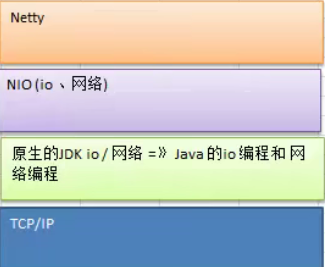
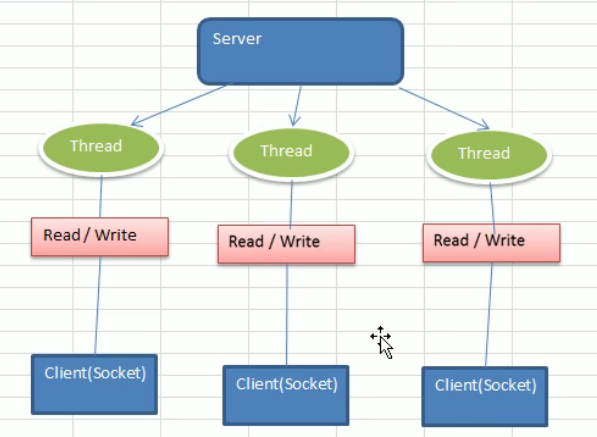
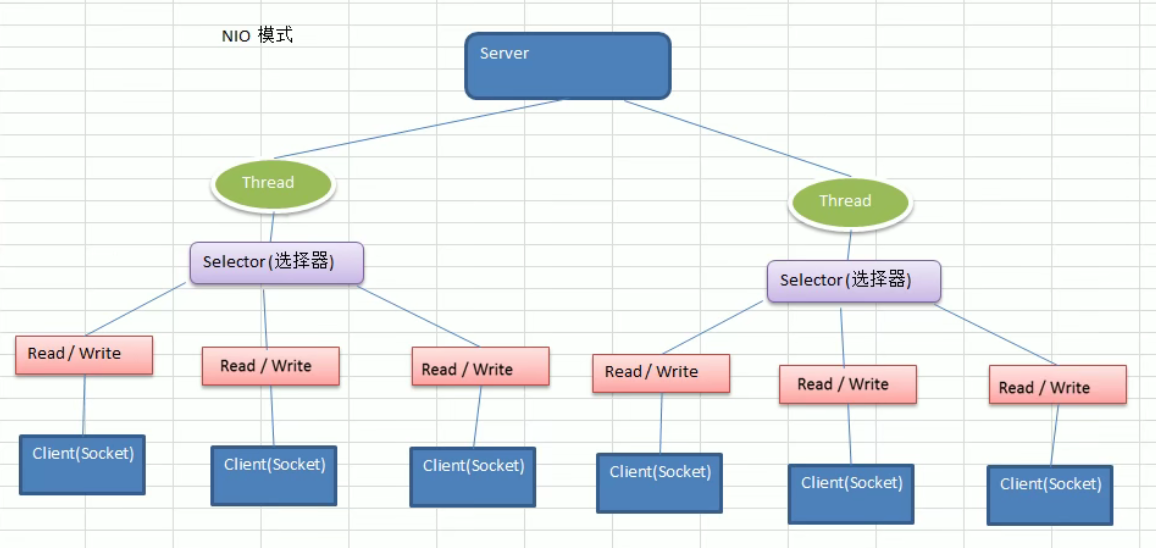
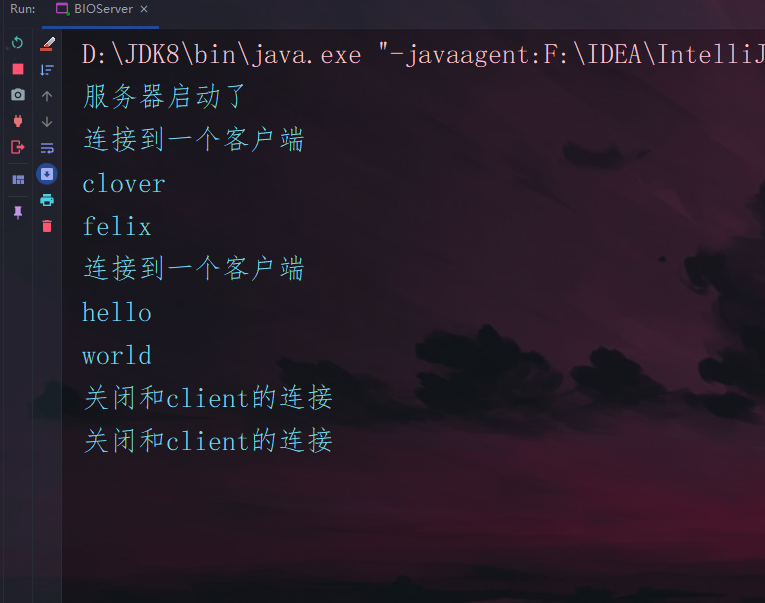
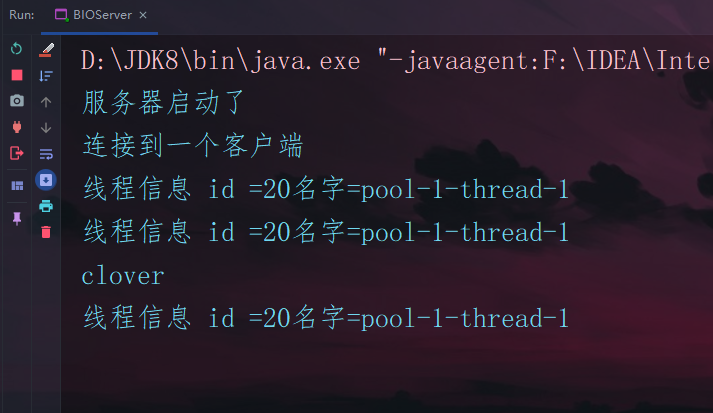
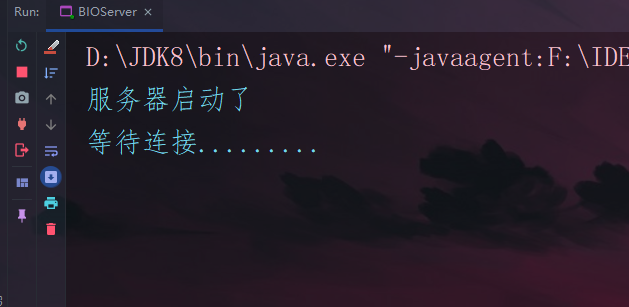
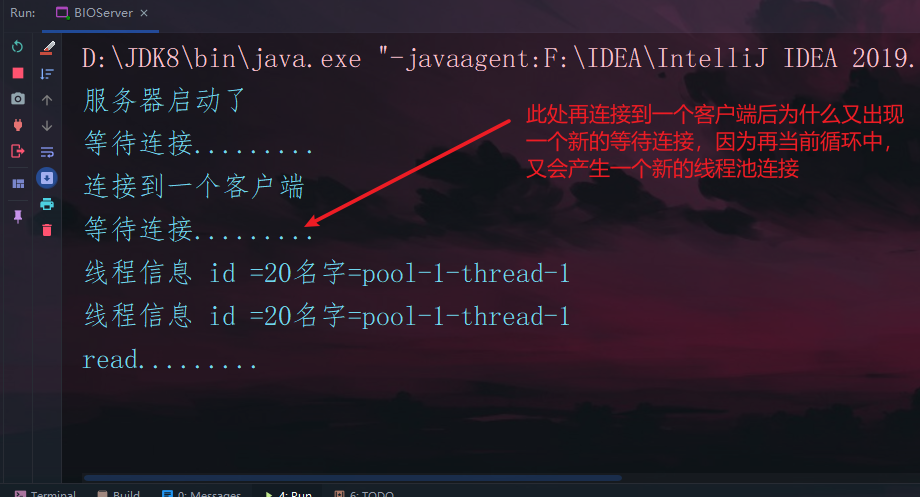
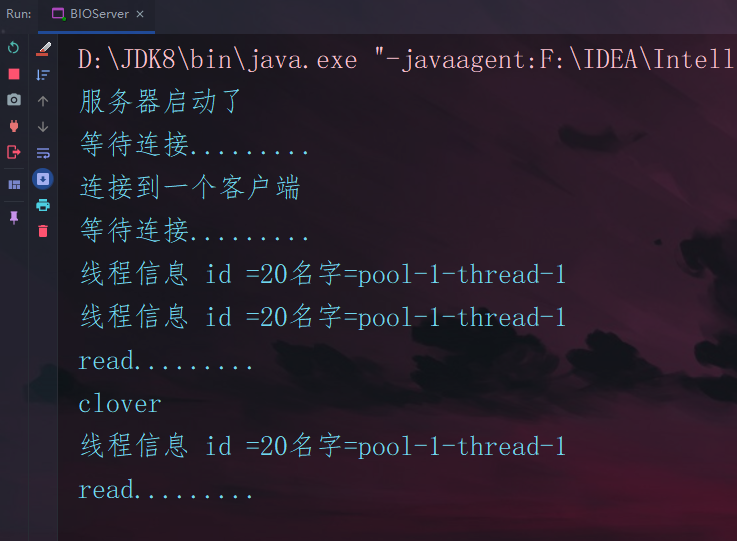
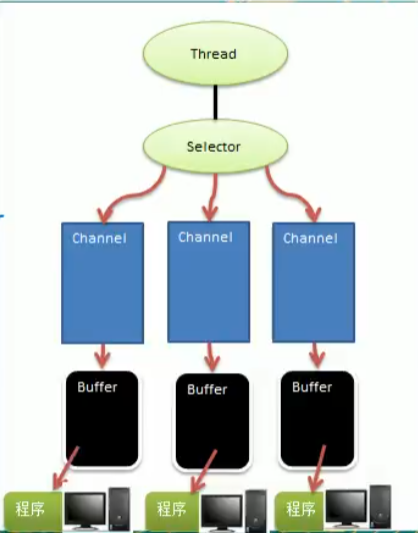

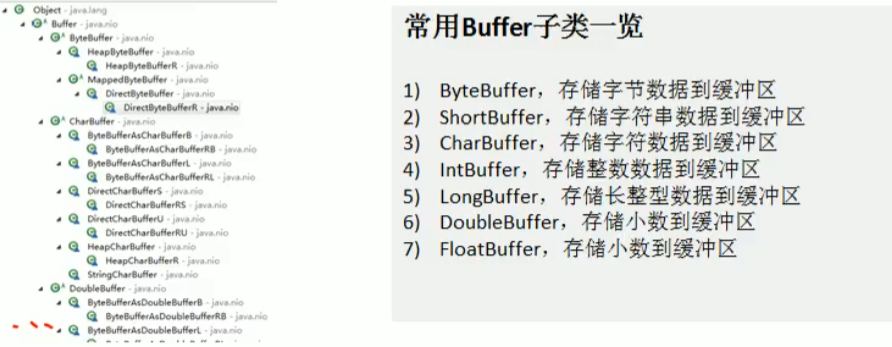
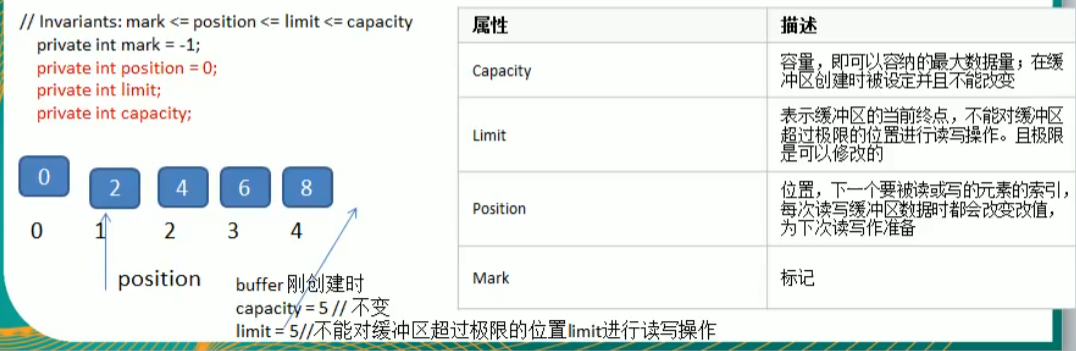
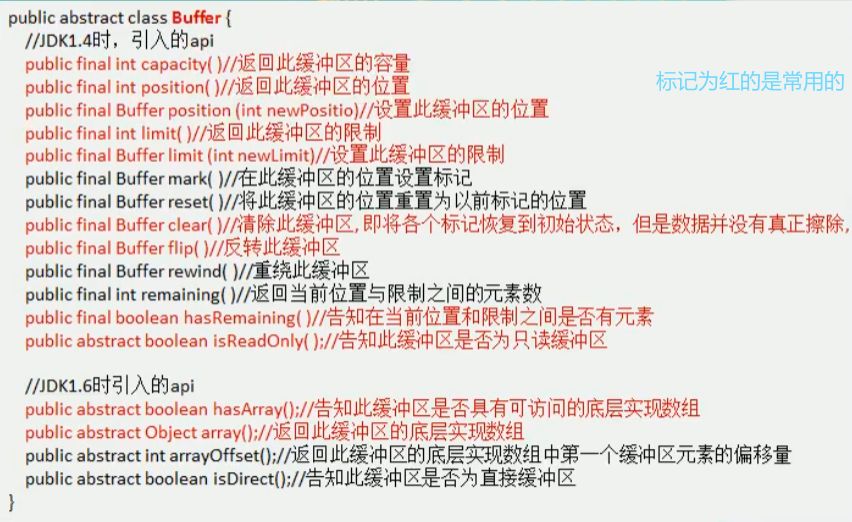
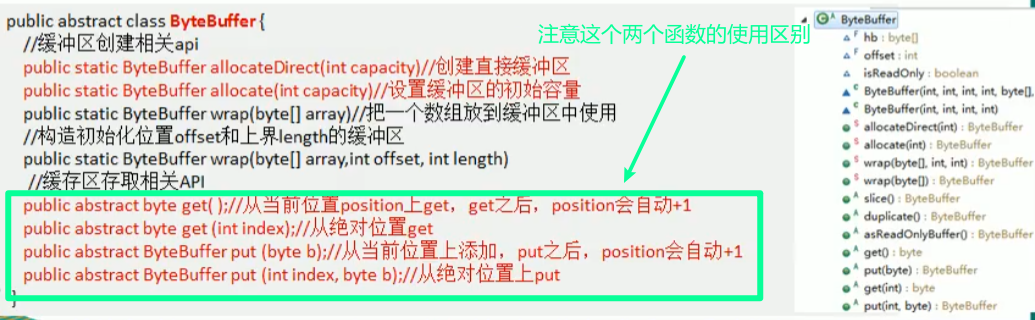
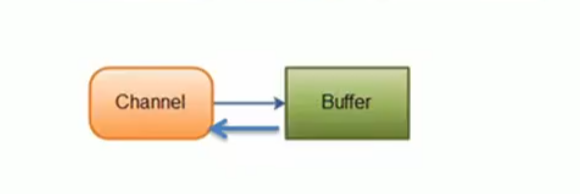
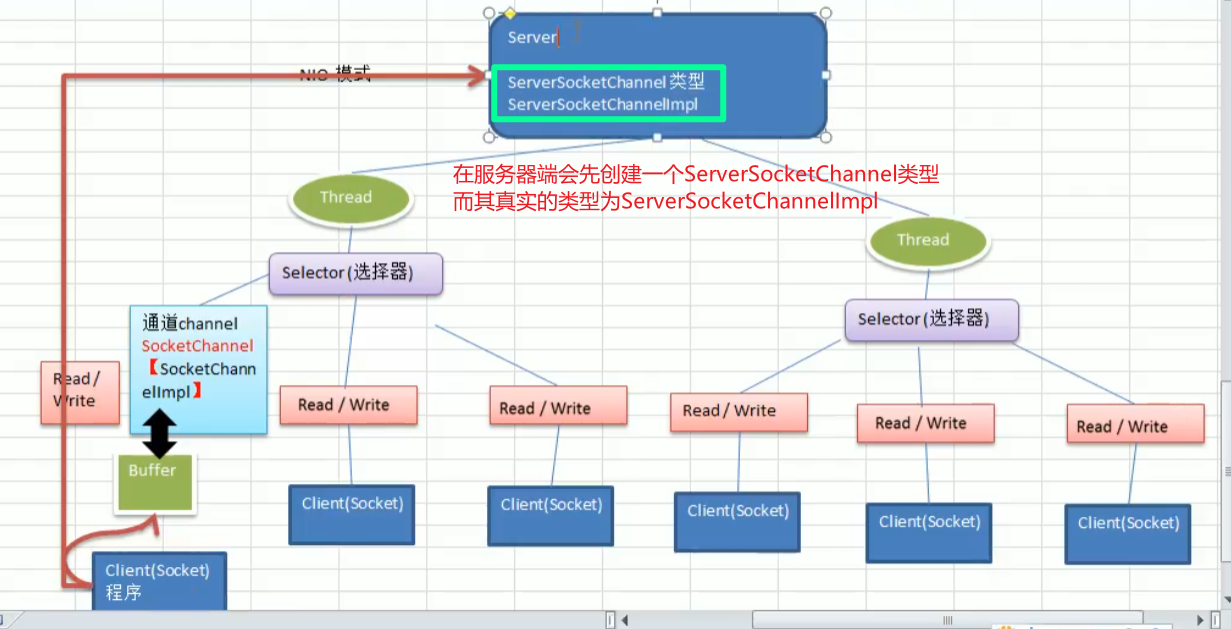
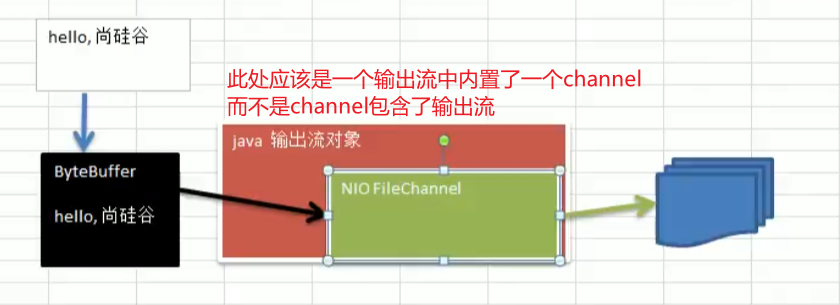
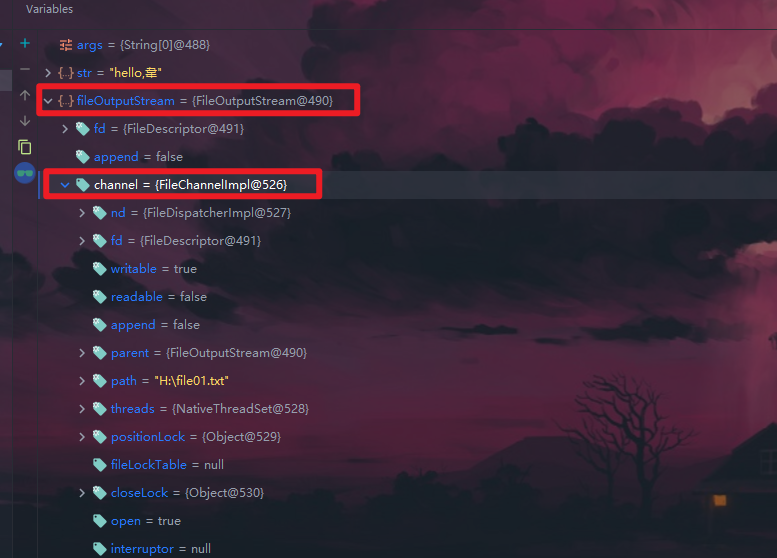
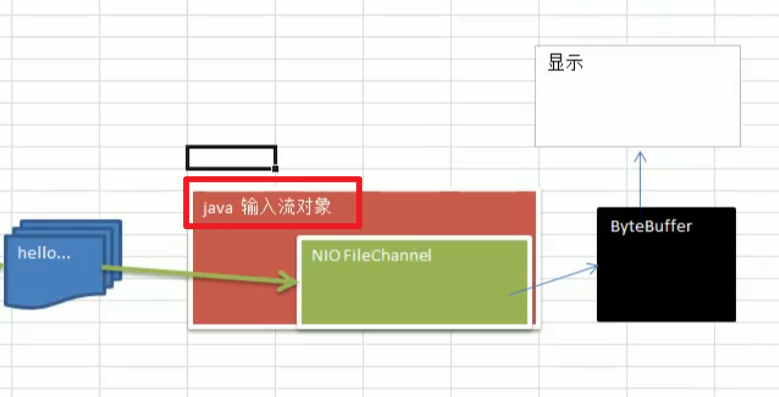

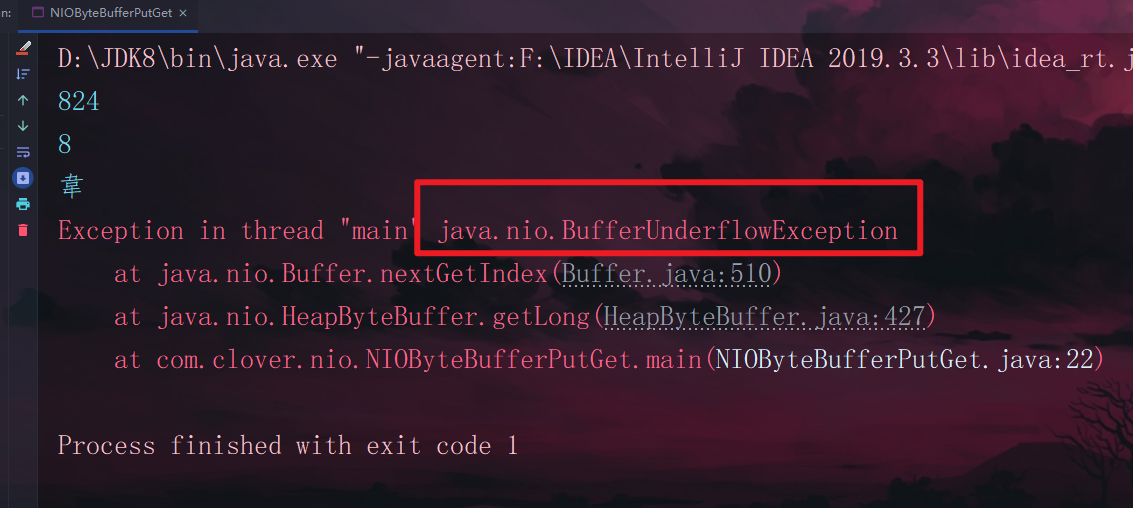
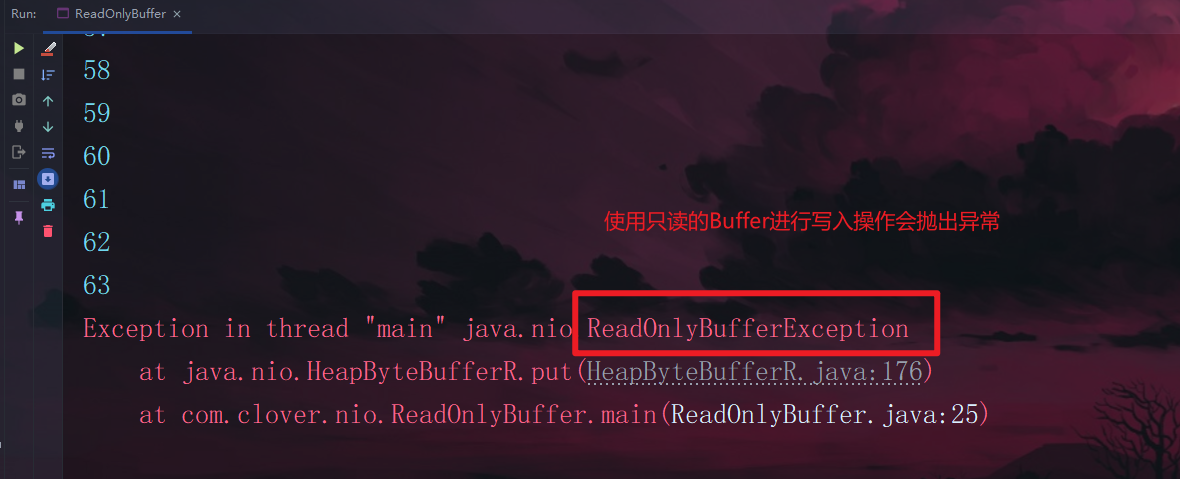
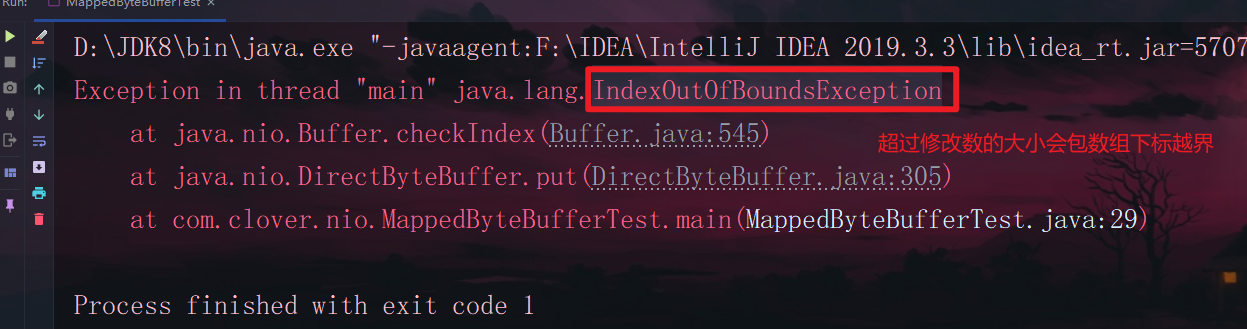
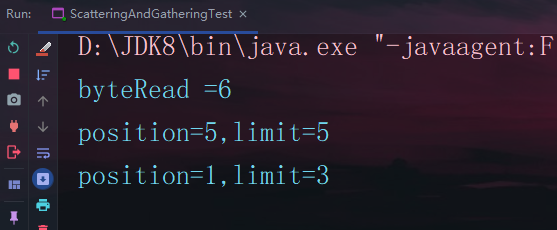
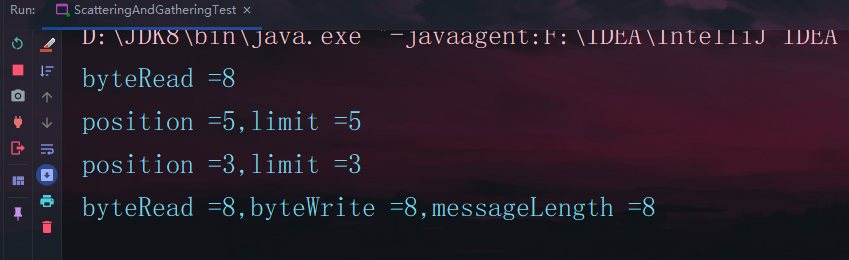
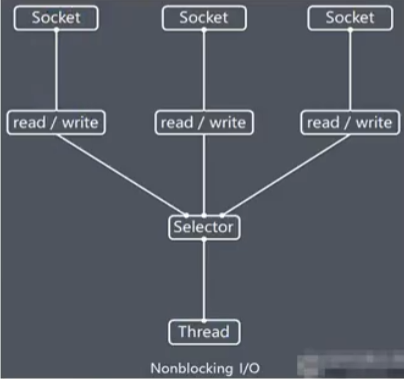
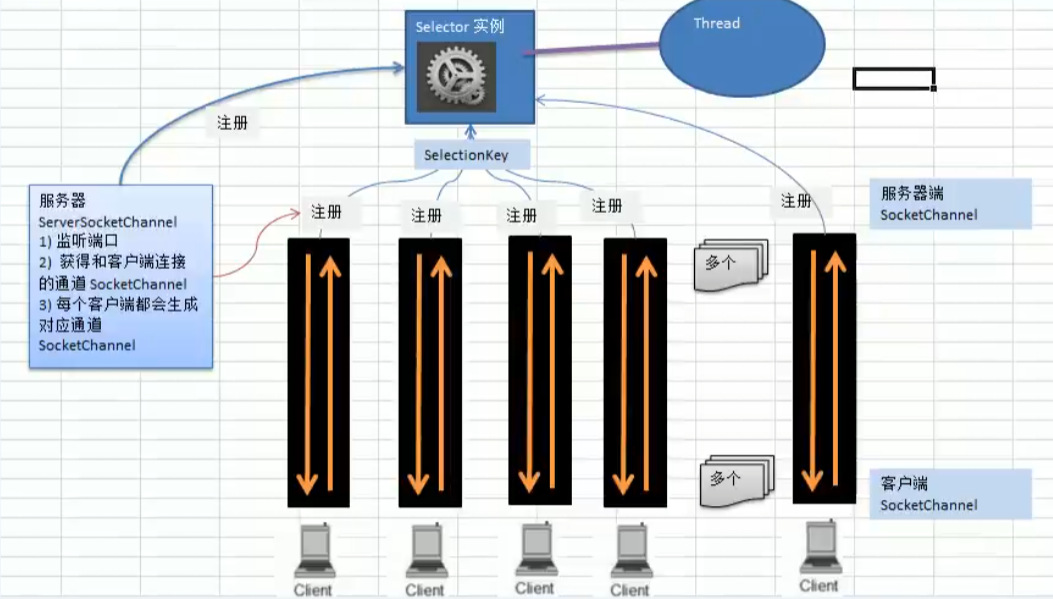

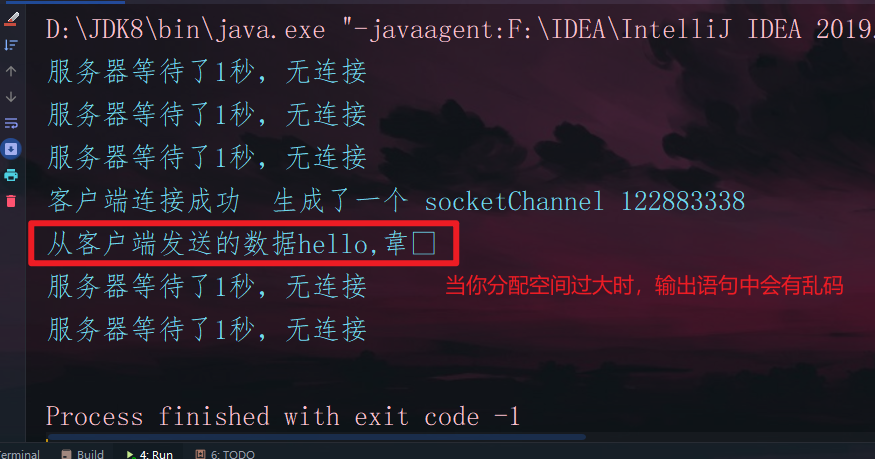
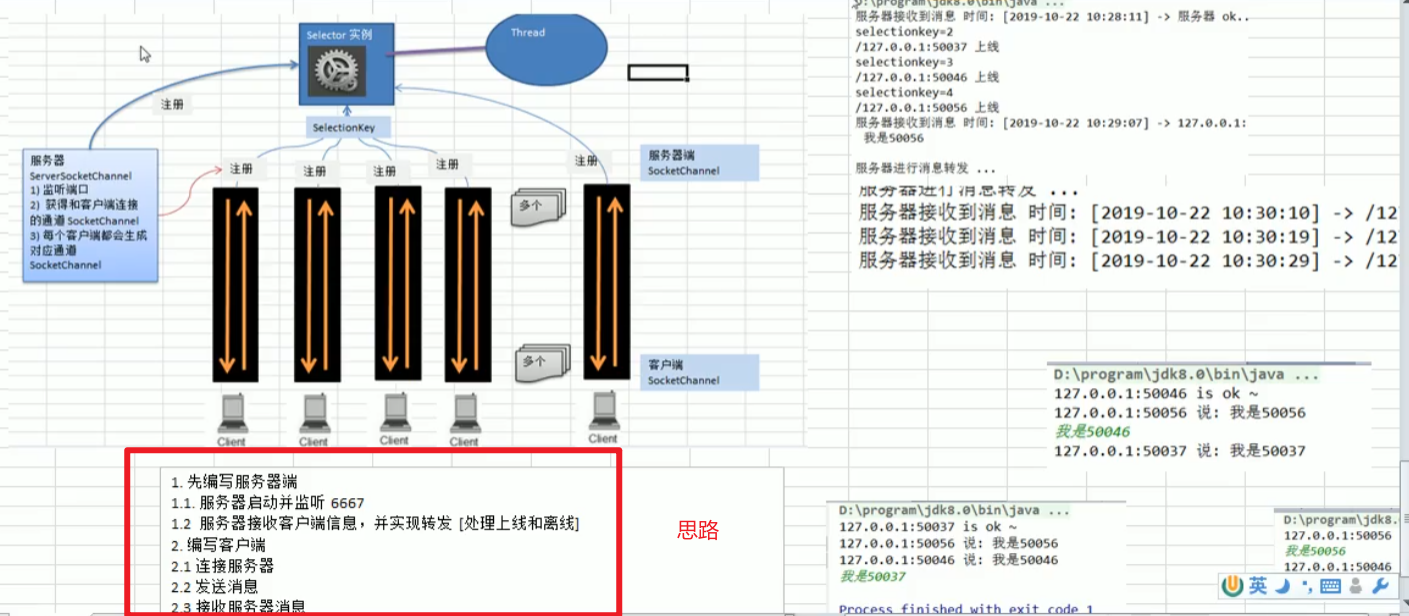

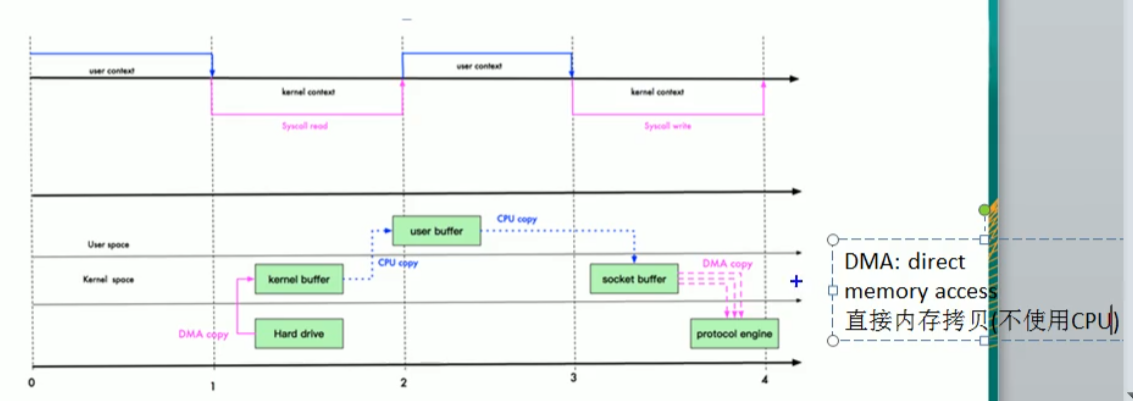
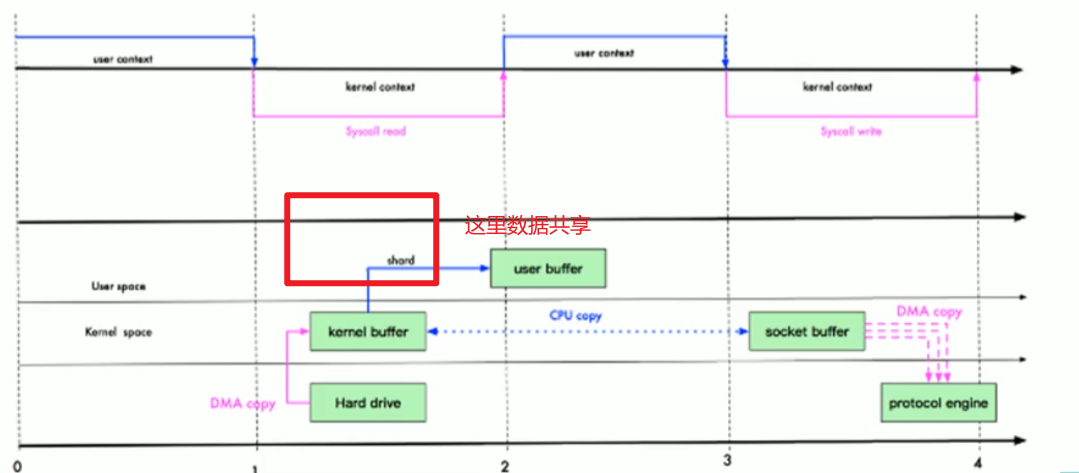
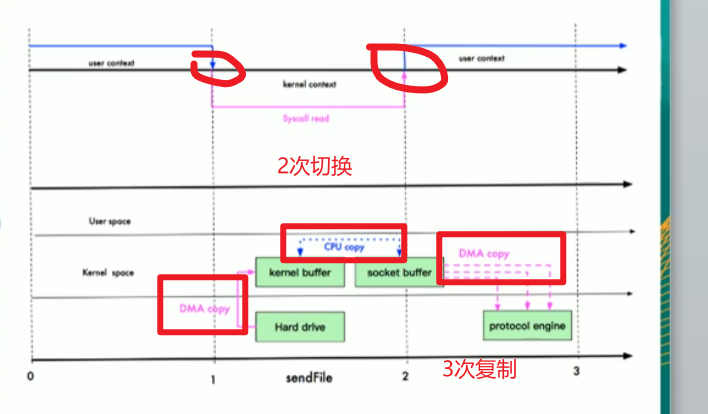
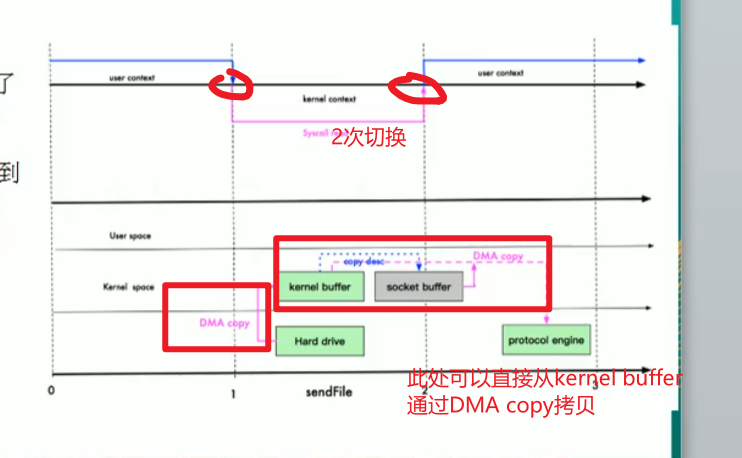
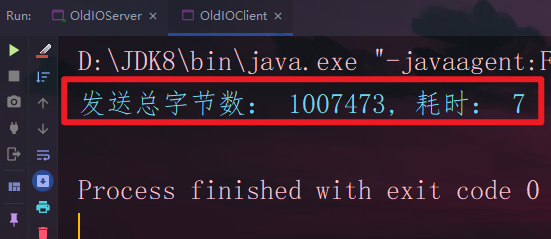
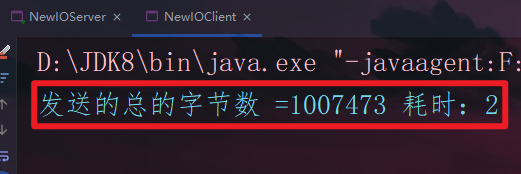
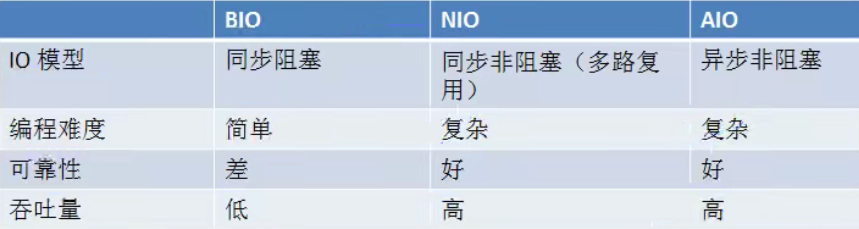
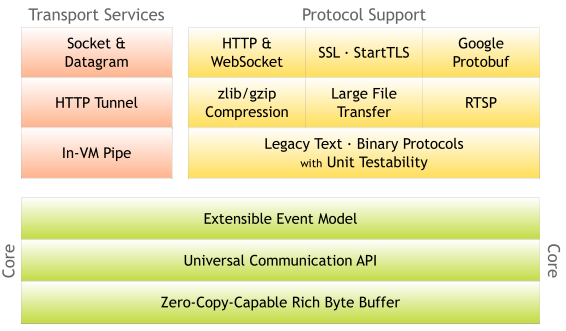
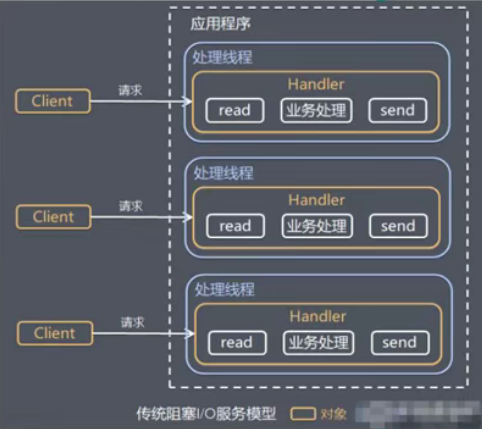
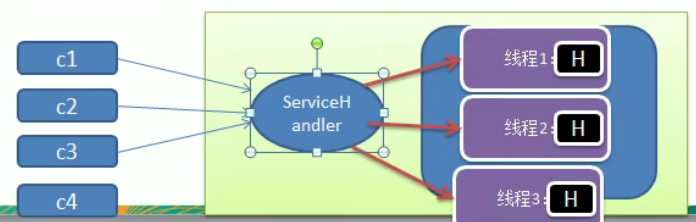
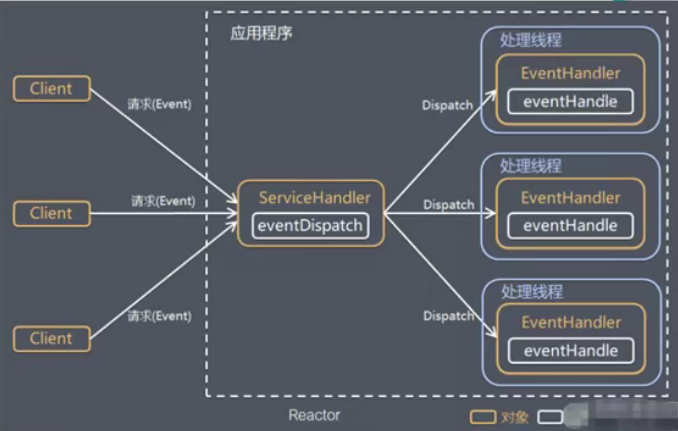
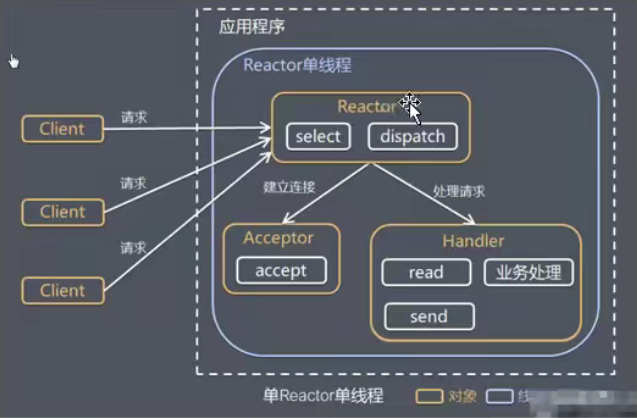
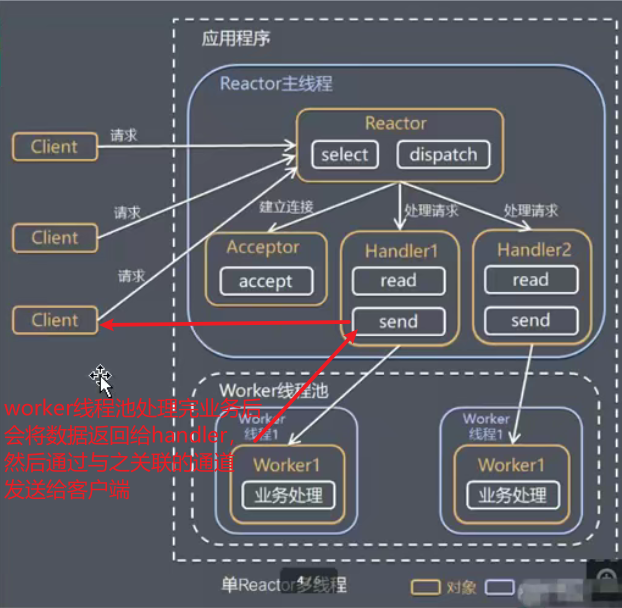
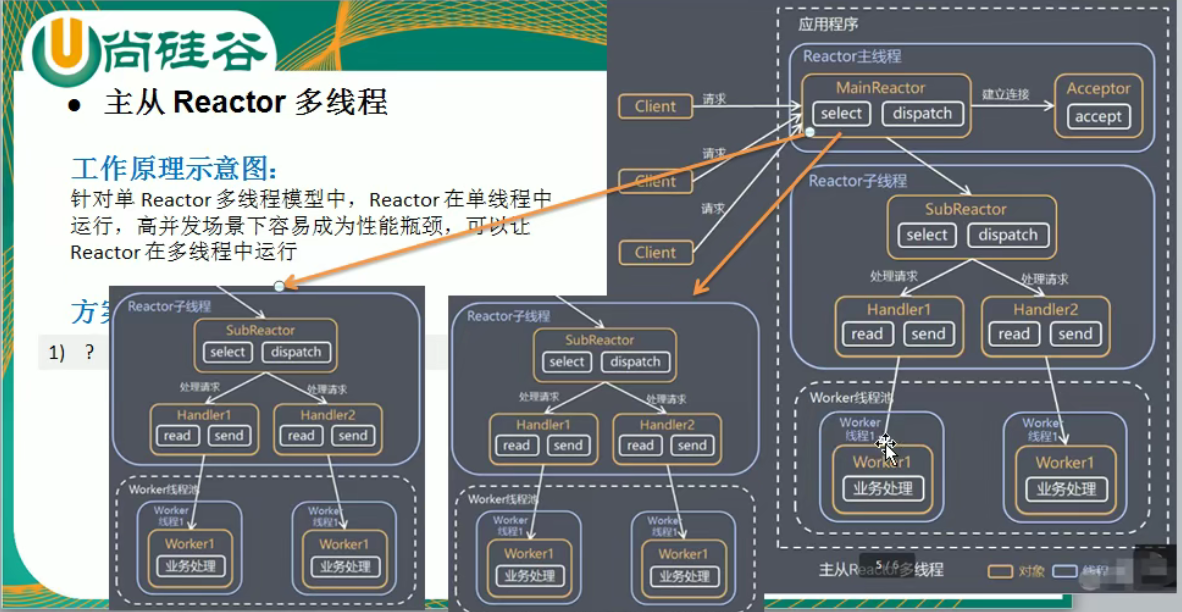
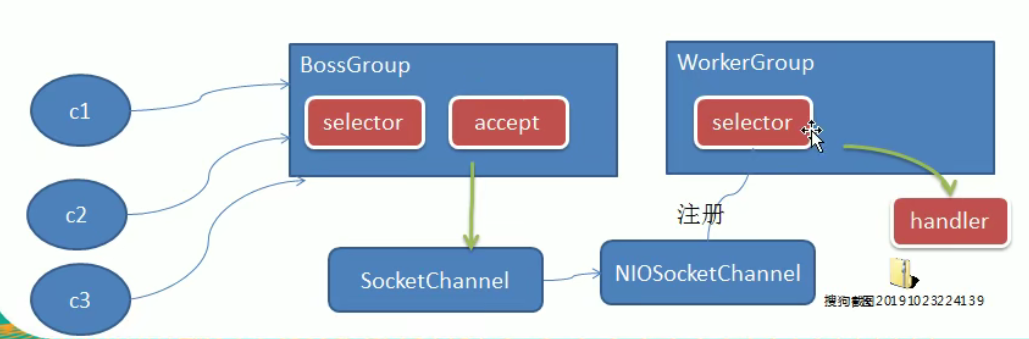
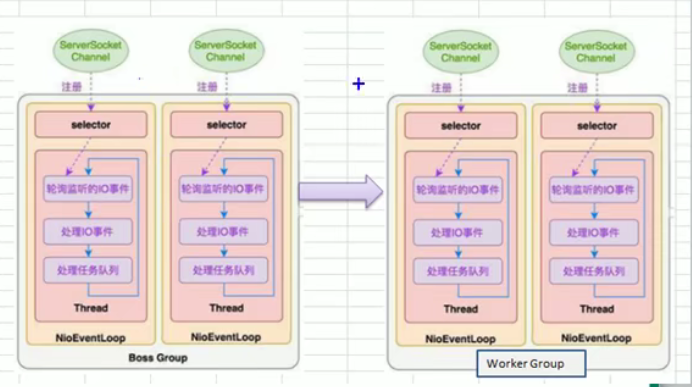
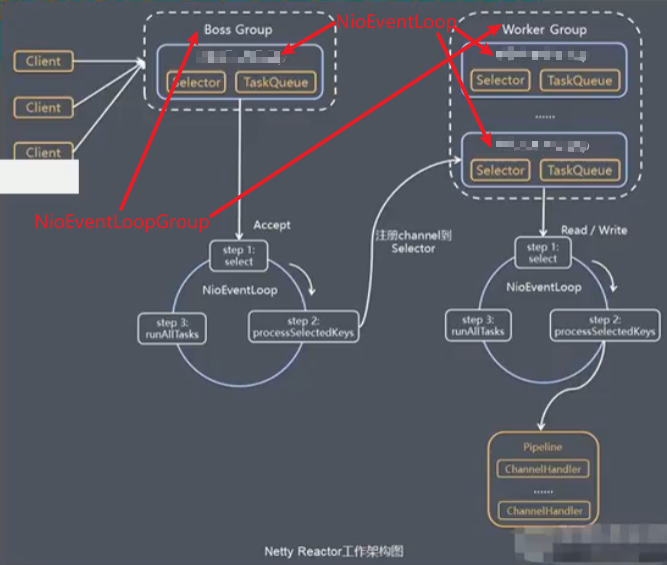
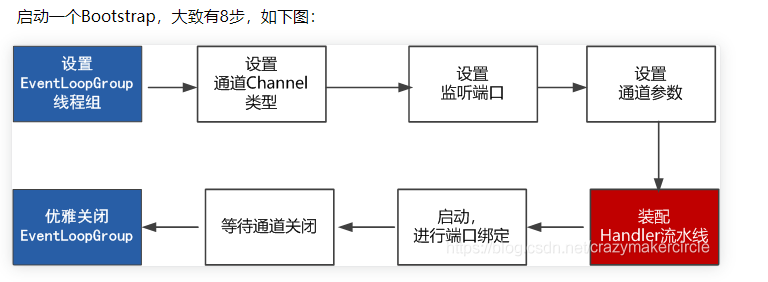


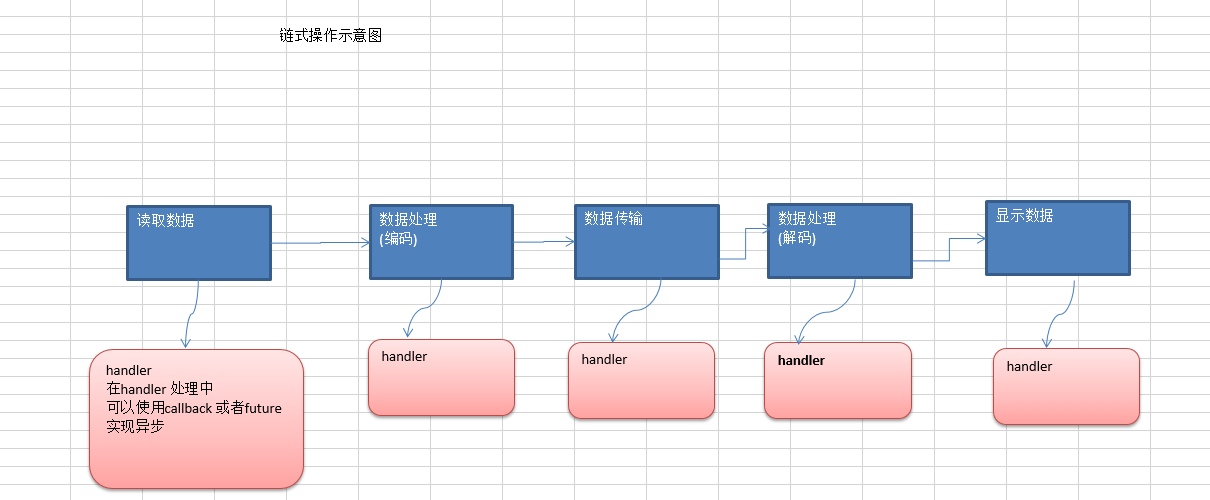 说明:
说明: